1. Pengenalan
Thank you for choosing the Proscenic P11 Ultra Cordless Vacuum Cleaner. This manual provides essential information for the safe and efficient use, maintenance, and troubleshooting of your new appliance. Please read it thoroughly before first use and retain it for future reference.
The Proscenic P11 Ultra is designed for versatile cleaning across various surfaces, offering powerful suction and convenient features for a cleaner home environment.
2. Arahan Keselamatan Penting
Sentiasa ikuti langkah berjaga-jaga keselamatan asas apabila menggunakan peralatan elektrik untuk mengurangkan risiko kebakaran, renjatan elektrik atau kecederaan.
- Baca semua arahan sebelum menggunakan perkakas.
- Jangan gunakan di luar atau di permukaan basah.
- Jangan biarkan digunakan sebagai mainan. Perhatian yang rapi diperlukan apabila digunakan oleh atau berhampiran kanak-kanak.
- Gunakan hanya seperti yang diterangkan dalam manual ini. Gunakan hanya lampiran yang disyorkan pengilang.
- Jangan gunakan dengan kord atau palam yang rosak. Jika perkakas tidak berfungsi sebagaimana mestinya, telah terjatuh, rosak, ditinggalkan di luar rumah, atau terjatuh ke dalam air, kembalikannya ke pusat servis.
- Jangan tarik atau bawa dengan kord, gunakan kord sebagai pemegang, tutup pintu pada kord, atau tarik kord di sekeliling tepi atau sudut yang tajam. Jangan jalankan perkakas di atas kord. Jauhkan kord dari permukaan yang dipanaskan.
- Jangan cabut plag dengan menarik kord. Untuk mencabut palam, pegang palam, bukan kordnya.
- Jangan pegang palam atau perkakas dengan tangan yang basah.
- Jangan letakkan sebarang objek ke dalam bukaan. Jangan gunakan dengan mana-mana bukaan yang disekat; jauhkan daripada habuk, serabut, rambut dan apa sahaja yang boleh mengurangkan aliran udara.
- Jauhkan rambut, pakaian longgar, jari dan semua bahagian badan daripada bukaan dan bahagian yang bergerak.
- Jangan ambil apa-apa yang terbakar atau berasap, seperti rokok, mancis, atau abu panas.
- Gunakan lebih berhati-hati semasa membersihkan di tangga.
- Jangan gunakan untuk mengambil cecair mudah terbakar atau mudah terbakar, seperti petrol, atau gunakan di kawasan yang mungkin terdapat.
- Jangan ambil bahan toksik (cth, peluntur klorin, pembersih ammonia, pembersih longkang).
- Jangan gunakan di ruang tertutup yang terdapat wap daripada cat asas minyak, pencair cat, beberapa bahan kalis rama-rama, habuk mudah terbakar atau wap letupan atau toksik yang lain.
- Do not vacuum hard or sharp objects such as glass, nails, screws, or coins.
- Sentiasa matikan perkakas ini sebelum menyambung atau memutuskan sambungan muncung bermotor.
- Simpan perkakas di dalam rumah. Simpan selepas digunakan untuk mengelakkan kemalangan.
- Gunakan hanya pengecas yang dibekalkan oleh pengilang untuk mengecas semula.
- Jangan bakar perkakas walaupun ia rosak teruk. Bateri boleh meletup dalam api.
- The battery should be fully charged and stored separately if the device is not used for a long time.
3. Kandungan Pakej
Carefully unpack your Proscenic P11 Ultra and check that all items are present and in good condition. If any items are missing or damaged, please contact customer support.
- Unit Vakum Utama
- Adjustable Telescopic Rod
- Motorized Floor Brush (Anti-Tangle with Green Light)
- Bateri boleh tanggal
- Accessory Kit (includes Crevice Tool, Dusting Brush)
- Penyesuai (Pengecas)
- Charging Dock / Wall Mount
- Manual Pengguna (dokumen ini)
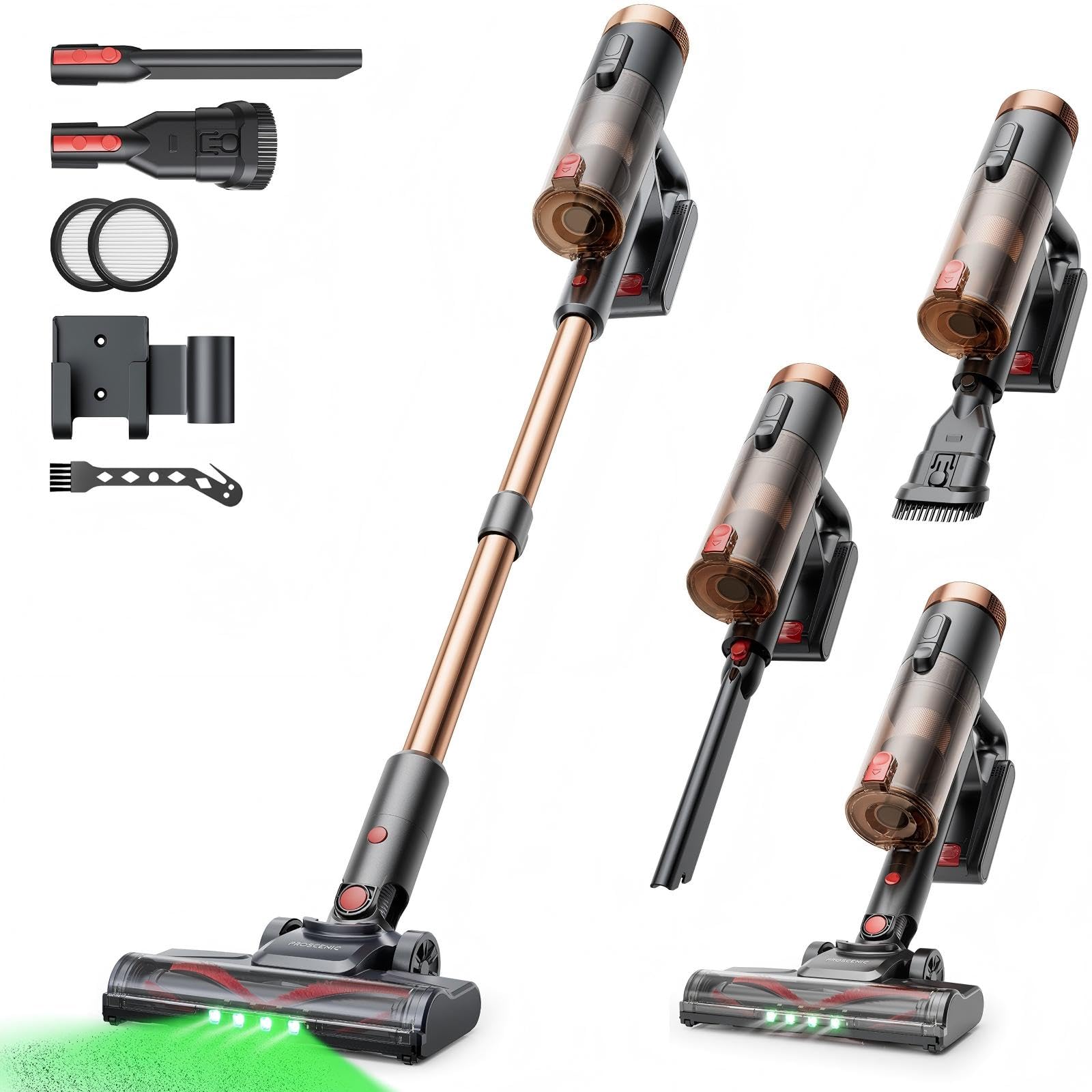
Image 1: Proscenic P11 Ultra main unit and included accessories. This image displays the vacuum cleaner's primary components, including the handheld unit, extension wand, floor brush, and various attachments.
4. Produk Lebihview
Familiarize yourself with the key components and features of your Proscenic P11 Ultra.
Ciri-ciri Utama:
- Reka Bentuk Berdiri Bebas: Allows the vacuum to stand upright independently for convenient storage and breaks during cleaning.
- 180° Rotating Floor Brush: Enhances maneuverability, allowing easy access to tight corners and under furniture.
- Adjustable Telescopic Rod: Customize the height for comfortable use by various users.
- Anti-Tangle Brush with Green Detection Light: Prevents hair tangles and illuminates hidden dust particles for thorough cleaning.
- 50 kPa Super Strong Suction Power: Provides powerful cleaning performance for stubborn dirt and debris.
- Intelligent Touchscreen: Displays real-time information on battery life, maintenance status, and suction modes.
- Two Suction Power Modes: Offers versatile cleaning options for different floor types and cleaning needs.
- Bateri boleh tanggal: Allows for extended cleaning time with an optional spare battery and convenient charging.
Image 2: Close-up of the Proscenic P11 Ultra's intelligent touchscreen. The screen provides visual feedback on the vacuum's status.
5. Persediaan & Pemasangan
Follow these steps to assemble your Proscenic P11 Ultra and prepare it for first use.
5.1 Memasang Unit Utama
- Insert the adjustable telescopic rod into the main handheld vacuum unit until it clicks securely into place.
- Attach the motorized floor brush to the bottom end of the telescopic rod, ensuring it locks firmly.
- Insert the removable battery into the designated slot on the main unit until it clicks.
Image 3: Illustration of assembling the main vacuum unit, showing the connection points for the telescopic rod and floor brush.
5.2 Mengecas Bateri
Before first use, fully charge the battery. The battery can be charged while attached to the main unit or separately.
- Connect the adapter to the charging port on the battery or the charging dock.
- Palamkan penyesuai ke salur keluar kuasa.
- The touchscreen display will indicate charging status. A full charge typically takes approximately 4-5 hours.
Image 4: The vacuum cleaner connected to its charger, illustrating the charging process. The battery can be charged while installed or removed.
5.3 Memasang Aksesori
To use the crevice tool or dusting brush, detach the telescopic rod and floor brush from the main unit. Insert the desired accessory directly into the main unit's nozzle until it clicks.
6. Operasi
Learn how to effectively use your Proscenic P11 Ultra for various cleaning tasks.
6.1 Menghidupkan/Mematikan dan Mod Sedutan
- Press the power button on the main unit to turn the vacuum cleaner on. It will start in the default suction mode.
- Use the mode selection button on the touchscreen to switch between the two available suction power modes: Standard and Max.
- Tekan butang kuasa sekali lagi untuk mematikan pembersih vakum.
6.2 Membersihkan Permukaan
- Hard Floors & Carpets: Use the motorized floor brush for general cleaning. The green detection light will help identify fine dust.
- Tight Spaces & Corners: Utilize the crevice tool for narrow gaps, edges, and hard-to-reach areas.
- Upholstery & Delicate Surfaces: Attach the dusting brush for cleaning sofas, curtains, and other sensitive items.
- Rambut Haiwan Kesayangan: The anti-tangle brush is specifically designed to effectively pick up pet hair without tangling.
Image 5: The Proscenic P11 Ultra in use, demonstrating its maneuverability on a hard floor surface. The green light on the brush head is visible.
6.3 Freestanding Function
The P11 Ultra features a freestanding design. When you need to pause cleaning or store the vacuum temporarily, simply ensure it is balanced and stands upright on its own. This allows for convenient breaks without needing to lean the vacuum against a wall or lay it down.
7. Penyelenggaraan
Penyelenggaraan tetap memastikan prestasi optimum dan memanjangkan jangka hayat pembersih vakum anda.
7.1 Mengosongkan Tong Sampah
Empty the dustbin after each use or when the MAX fill line is reached.
- Pastikan vakum dimatikan.
- Locate the dustbin release button, usually near the handle.
- Press the button to open the dustbin flap and empty contents into a waste bin.
- Tutup penutup tong sampah dengan kemas sehingga ia berbunyi klik.
Image 6: A user demonstrating how to empty the transparent dustbin of the Proscenic P11 Ultra into a trash receptacle.
7.2 Membersihkan Penapis HEPA
Clean the HEPA filter regularly (e.g., monthly, depending on usage) to maintain suction power.
- Keluarkan tong sampah dari unit utama.
- Twist and pull out the HEPA filter assembly.
- Ketik penapis perlahan-lahan di atas tong sampah untuk mengeluarkan habuk yang longgar.
- If necessary, rinse the filter under cold running water. Ensure it is completely dry (for at least 24 hours) before reinserting. Do not use detergents.
- Reassemble the filter and dustbin.
7.3 Membersihkan Gulungan Berus
Periksa gulungan berus secara berkala untuk mengesan rambut kusut atau serpihan.
- Turn off the vacuum and detach the motorized floor brush.
- Locate the brush roll release mechanism (refer to the floor brush diagram).
- Remove the brush roll. Use scissors or a cleaning tool to cut and remove any tangled hair or fibers.
- Reinsert the brush roll and secure the release mechanism.
8. Penyelesaian masalah
If you encounter issues with your Proscenic P11 Ultra, refer to the following common problems and solutions.
| Masalah | Kemungkinan Punca | Penyelesaian |
|---|---|---|
| Vakum tidak dihidupkan | Bateri tidak dicas atau tidak dipasang dengan betul. | Pastikan bateri dicas sepenuhnya dan dimasukkan dengan selamat. |
| Kuasa sedutan rendah | Dustbin is full; Filter is clogged; Brush roll is blocked. | Empty dustbin. Clean or replace HEPA filter. Remove blockages from brush roll. |
| Gulungan berus tidak berputar | Brush roll is tangled with hair/debris; Floor brush is not properly attached. | Clean brush roll. Reattach floor brush securely. |
| Hayat bateri pendek | Battery not fully charged; Using Max suction mode frequently; Battery degradation. | Ensure full charge. Use Standard mode for longer runtime. Consider replacing battery if significantly degraded. |
| Bunyi yang tidak biasa | Blockage in nozzle or hose; Damaged brush roll. | Check for and remove any blockages. Inspect brush roll for damage. |
If the problem persists after attempting these solutions, please contact Proscenic customer support.
9. Spesifikasi
Technical specifications for the Proscenic P11 Ultra Cordless Vacuum Cleaner.
- model: P11 Ultra
- Sumber Kuasa: Dikuasakan Bateri
- Voltage: 22.5 Volt
- Kuasa sedutan: Sehingga 50 kPa
- Berat Barang: 2.68 Kilogram
- Kapasiti tong sampah: Approximately 1.0 Liter (1000 Microliters as per data, interpreted as 1.0L)
- Jenis Penapis: Penapis HEPA
- Faktor Bentuk: Upright (Stick Vacuum)
- Tanpa wayar: ya
- Permukaan Disyorkan: Carpet, Solid Wood, Upholstery
- Ciri Khas: Freestanding Design, Touchscreen, Green Detection Light, Anti-Tangle Brush, Adjustable Telescopic Rod, Removable Battery
10. Waranti & Sokongan Pelanggan
Proscenic provides a Waranti 2 tahun for the P11 Ultra Cordless Vacuum Cleaner, covering manufacturing defects from the date of purchase.
Untuk sebarang pertanyaan, bantuan teknikal atau tuntutan jaminan, sila hubungi pasukan sokongan pelanggan kami. Kami menawarkan 7x24 hours customer support untuk membantu anda.
e-mel: service-de@proscenic.com
Please have your model number (P11 Ultra) and purchase information ready when contacting support.


