1. Pengenalan
Thank you for choosing the Proscenic F10 Ultra Wet Dry Vacuum Cleaner. This appliance is designed to provide efficient and versatile cleaning for various hard floor surfaces, combining vacuuming and wiping functions. Please read this manual thoroughly before initial use to ensure proper operation, maintenance, and safety. Keep this manual for future reference.
2. Arahan Keselamatan Penting
Apabila menggunakan perkakas elektrik, langkah berjaga-jaga asas hendaklah sentiasa dipatuhi, termasuk yang berikut:
- Baca semua arahan sebelum menggunakan perkakas ini.
- Jangan gunakan di luar atau di permukaan basah.
- Jangan biarkan digunakan sebagai mainan. Perhatian yang rapi diperlukan apabila digunakan oleh atau berhampiran kanak-kanak.
- Gunakan hanya seperti yang diterangkan dalam manual ini. Gunakan hanya lampiran yang disyorkan pengilang.
- Jangan gunakan dengan kord atau palam yang rosak. Jika perkakas tidak berfungsi sebagaimana mestinya, telah terjatuh, rosak, ditinggalkan di luar rumah, atau terjatuh ke dalam air, kembalikannya ke pusat servis.
- Jangan tarik atau bawa dengan kord, gunakan kord sebagai pemegang, tutup pintu pada kord, atau tarik kord di sekeliling tepi atau sudut yang tajam. Jangan jalankan perkakas di atas kord. Jauhkan kord dari permukaan yang dipanaskan.
- Jangan cabut plag dengan menarik kord. Untuk mencabut palam, pegang palam, bukan kordnya.
- Jangan pegang palam atau perkakas dengan tangan yang basah.
- Jangan letakkan sebarang objek ke dalam bukaan. Jangan gunakan dengan mana-mana bukaan yang disekat; jauhkan daripada habuk, serabut, rambut dan apa sahaja yang boleh mengurangkan aliran udara.
- Jauhkan rambut, pakaian longgar, jari dan semua bahagian badan daripada bukaan dan bahagian yang bergerak.
- Jangan ambil apa-apa yang terbakar atau berasap, seperti rokok, mancis, atau abu panas.
- Jangan gunakan untuk mengambil cecair mudah terbakar atau mudah terbakar, seperti petrol, atau gunakan di kawasan yang mungkin terdapat.
- Jangan ambil bahan toksik, seperti peluntur klorin, ammonia atau pembersih longkang.
- Jangan gunakan tanpa tangki dan penapis di tempatnya.
- Matikan semua kawalan sebelum mencabut plag.
- Gunakan lebih berhati-hati semasa membersihkan di tangga.
- Jangan gunakan untuk mengutip objek keras atau tajam seperti kaca, paku, skru, syiling, dll.
- Elakkan permulaan yang tidak disengajakan. Pastikan suis berada dalam kedudukan mati sebelum menyambung ke pek bateri, mengambil atau membawa perkakas.
- Isi semula hanya dengan pengecas yang ditentukan oleh pengilang.
3. Komponen Produk
Familiarize yourself with the parts of your Proscenic F10 Ultra Wet Dry Vacuum Cleaner.
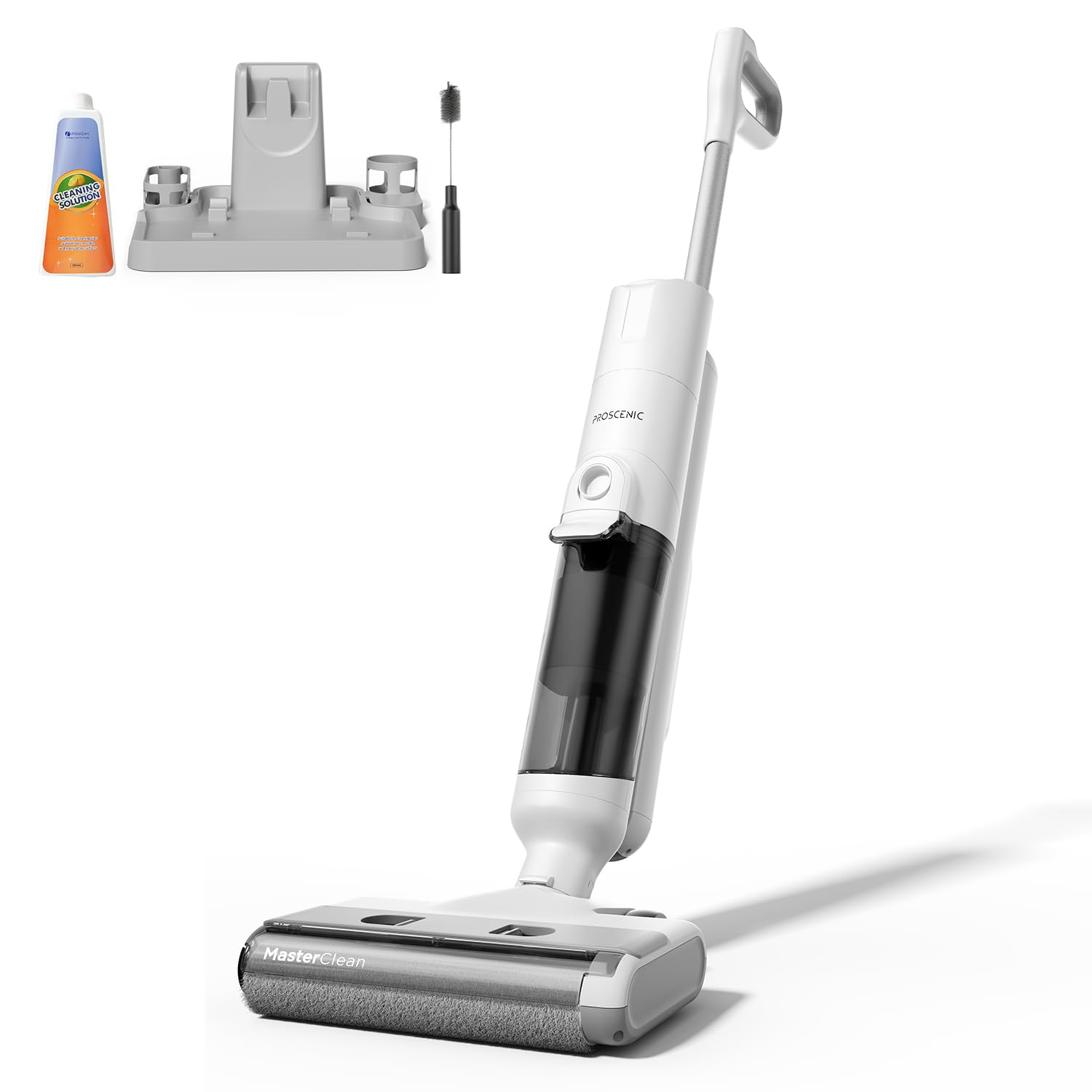
Image 1: Proscenic F10 Ultra Wet Dry Vacuum Cleaner. This image displays the main body of the vacuum cleaner, showcasing its sleek design and primary components such as the handle, main unit, and floor head.
Kandungan Pakej:
- Unit Vakum Utama
- Mengendalikan Pemasangan
- Tangki Air Bersih
- Tangki Air Kotor
- Pangkalan Pengecasan
- Penyesuai Kuasa
- Alat Berus Pembersih
- Penapis HEPA (prapasang atau ganti)
- Manual Pengguna (dokumen ini)
Komponen Utama:
- Paparan led: Provides real-time information on battery status, cleaning mode, and alerts.
- Gesaan Suara: Guides users through operation and maintenance tasks.
- Tangki Air Bersih: Holds fresh water and cleaning solution.
- Tangki Air Kotor: Mengumpul air kotor dan serpihan.
- Gulungan Berus: Actively scrubs and cleans floors.
- Penderia Inframerah: Detects dirt levels in Smart Mode.
- Self-Cleaning Button: Initiates the automatic brush cleaning cycle.
4. Persediaan dan Penggunaan Awal
4.1 Perhimpunan
- Insert the handle assembly into the main unit until it clicks securely into place.
- Pastikan tangki air bersih dan tangki air kotor diletakkan dengan betul pada kedudukan masing-masing.
4.2 Mengecas Bateri
- Letakkan pembersih vakum di atas tapak pengecasnya.
- Connect the power adapter to the charging base and then to a power outlet.
- Paparan LED akan menunjukkan status pengecasan. Pengecasan penuh mengambil masa kira-kira 4 jam.
- Ensure the appliance is fully charged before its first use to maximize battery life.
4.3 Mengisi Tangki Air Bersih
- Keluarkan tangki air bersih dari unit utama.
- Open the tank cap and fill with clean tap water. You may add a small amount of non-foaming cleaning solution suitable for wet/dry vacuums, following the solution's instructions. Do not overfill.
- Close the cap securely and reinsert the tank into the vacuum cleaner.
5. Arahan Operasi
5.1 Menghidupkan/Mematikan
Press the Power button on the handle to turn the vacuum cleaner on or off. The LED display will illuminate, and voice prompts will guide you.
5.2 Memilih Mod Pembersihan
The Proscenic F10 Ultra offers three cleaning modes:
- Mod Pintar: Infrared sensors automatically detect the level of dirt and adjust suction power and water flow accordingly. Ideal for general cleaning and varying dirt levels.
- Mod Vac: Provides economical cleaning with reduced water output, suitable for wooden floors or light dry debris.
- Mod Maks: Delivers intensive stain removal with maximum suction and water flow, recommended for heavily soiled areas like kitchens and terraces.
Tekan butang Mod pada pemegang untuk melihat mod pembersihan yang tersedia. Mod yang dipilih akan dipaparkan pada skrin LED.
5.3 Proses Pembersihan
- Pastikan tangki air bersih diisi dan tangki air kotor kosong.
- Turn on the appliance and select your desired cleaning mode.
- Tilt the vacuum cleaner back to engage the brush roll and begin cleaning. The self-propelled design assists in effortless movement.
- Move the vacuum cleaner slowly over the floor surface, allowing it to vacuum and wipe simultaneously.
- For edge cleaning, guide the vacuum cleaner along walls and baseboards.
- Monitor the LED display for battery status and any alerts. Voice prompts will also provide guidance.
- When finished, turn off the appliance and return it to the charging base.
6. Penyelenggaraan dan Penjagaan
Regular maintenance ensures optimal performance and extends the lifespan of your Proscenic F10 Ultra.
6.1 Fungsi Pembersihan Kendiri
- Selepas setiap penggunaan, letakkan pembersih vakum pada tapak pengecasannya.
- Pastikan terdapat air bersih yang mencukupi di dalam tangki air bersih.
- Press the Self-Cleaning button (usually indicated by a water drop icon).
- The appliance will automatically clean the brush roll and internal pathways. This process typically takes about 1 minute.
- Once the self-cleaning cycle is complete, empty the dirty water tank.
6.2 Mengosongkan dan Membersihkan Tangki Air Kotor
- Keluarkan tangki air kotor dari unit utama.
- Carefully open the tank and dispose of the dirty water and debris.
- Bilas tangki dengan teliti dengan air bersih.
- Clean the filter assembly within the dirty water tank.
- Benarkan semua bahagian kering sepenuhnya sebelum dipasang semula.
6.3 Membersihkan Gulungan Berus
- Even with the self-cleaning function, periodic manual cleaning of the brush roll is recommended.
- Matikan dan cabut plag perkakas.
- Remove the brush roll cover and then the brush roll itself.
- Use the provided cleaning brush tool to remove any tangled hair or debris from the brush roll.
- Bilas gulungan berus di bawah air yang mengalir.
- Allow the brush roll to air dry completely before reinstalling.
6.4 Membersihkan Penapis HEPA
The HEPA filter should be cleaned regularly and replaced every 3-6 months, depending on usage.
- Locate and remove the HEPA filter, typically found within the dirty water tank assembly.
- Tap the filter gently to dislodge dust and debris. You may rinse it under cool running water.
- Ensure the filter is completely dry before reinstallation to prevent mold growth and maintain suction performance.
7. Penyelesaian masalah
Rujuk bahagian ini untuk isu biasa dan penyelesaiannya.
| Masalah | Kemungkinan Punca | Penyelesaian |
|---|---|---|
| Perkakas tidak dihidupkan. | Bateri habis. | Cas perkakas sepenuhnya. |
| Butang kuasa tidak ditekan dengan betul. | Pastikan butang kuasa ditekan dengan kuat. | |
| Prestasi sedutan atau pembersihan yang lemah. | Tangki air kotor penuh. | Kosongkan dan bersihkan tangki air yang kotor. |
| Gulungan berus kusut atau kotor. | Clean the brush roll, remove any hair or debris. | |
| Penapis HEPA tersumbat. | Bersihkan atau gantikan penapis HEPA. | |
| Tangki air bersih kosong. | Isi semula tangki air bersih. | |
| Kebocoran air. | Tanks not properly installed. | Ensure both clean and dirty water tanks are securely in place. |
| Tank caps are not sealed. | Check that all tank caps are tightly closed. | |
| Fungsi pembersihan kendiri tidak berfungsi. | Insufficient water in clean water tank. | Ensure the clean water tank is filled above the minimum level. |
| Tangki air kotor penuh. | Empty the dirty water tank before initiating self-cleaning. |
8. Spesifikasi
| Jenama | Proscenic |
| Model | F10 Ultra |
| Berat Barang | 8.8 paun |
| Faktor Bentuk | Handheld (referring to the main unit's design for maneuverability) |
| Jenis Bateri | Litium-Ion |
| Jenis Penapis | Penapis HEPA |
| Sumber Kuasa | Dikuasakan Bateri |
| Voltage | 28.8 Volt |
| Capacity (Water Tanks) | 1.3 Liter |
| Wattage | 350 watt |
| Masa Mengecas | 4 Jam |
| Masa Berjalan | Sehingga 60 minit (bergantung pada mod) |
| warna | putih |
9. Waranti dan Sokongan Pelanggan
Proscenic products are manufactured to high-quality standards. For specific warranty information, please refer to the warranty card included with your purchase or visit the official Proscenic website. If you encounter any issues or have questions regarding your Proscenic F10 Ultra Wet Dry Vacuum Cleaner, please contact Proscenic customer support for assistance.
Pengeluar: Proscenic
Untuk sokongan lanjut, sila layari Proscenic Store on Amazon.


