pengenalan
This manual provides essential information for the safe and efficient use of your Itel A50 Dual SIM smartphone. Please read this manual carefully before using the device to ensure optimal performance and to prevent damage.

Figure 1: Itel A50 Dual SIM Smartphone (Cyan Blue)
The image displays the Itel A50 smartphone in cyan blue, showcasing both its front screen and the textured back panel with the triple camera module and flash. The phone has a sleek design with rounded corners.
Persediaan
1. Memasukkan Kad SIM dan Kad Memori
The Itel A50 supports dual SIM cards and an external memory card (up to 2TB). Ensure the device is powered off before inserting or removing cards.
- Cari dulang kad SIM di sisi peranti.
- Gunakan alat ejektor SIM yang disediakan untuk membuka dulang.
- Carefully place your Nano-SIM cards and microSD card into the designated slots on the tray. Ensure the gold contacts face downwards.
- Tolak dulang perlahan-lahan ke dalam peranti sehingga ia berbunyi pada tempatnya.
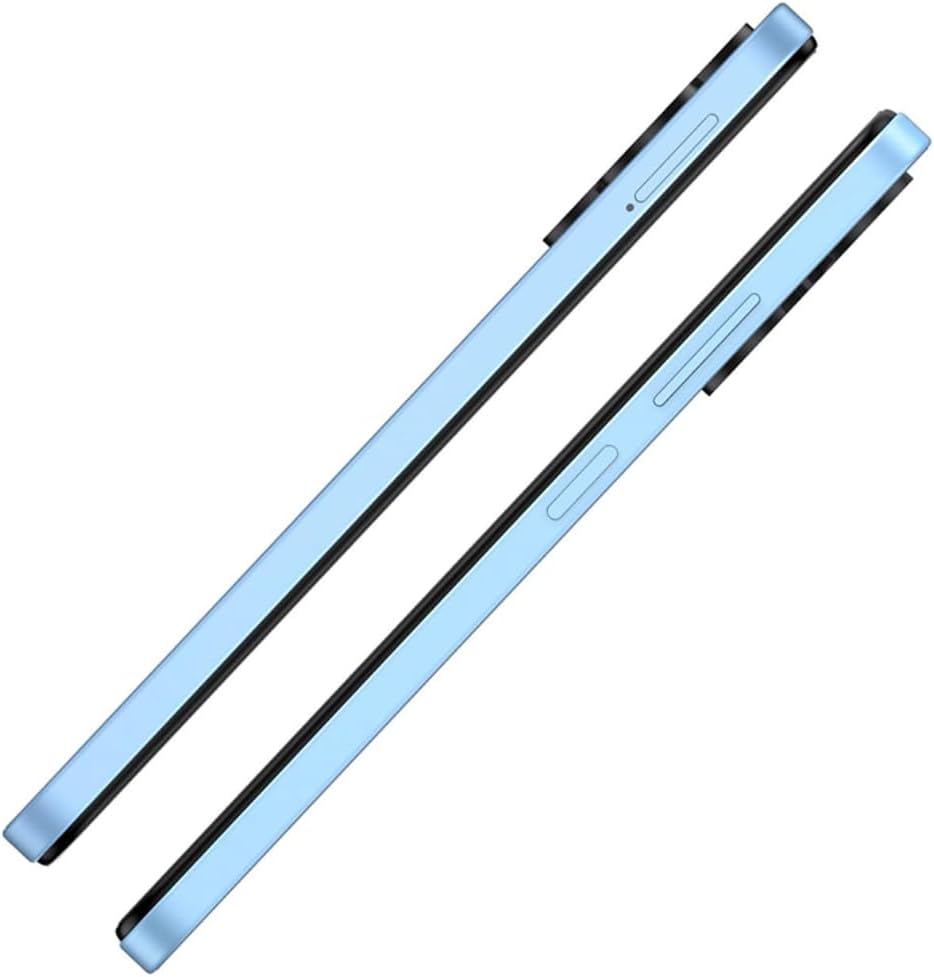
Rajah 2: Sisi View dengan Dulang SIM
This image shows the right side of the Itel A50 smartphone, highlighting the elongated volume rocker and the power button below it. The SIM card tray slot is visible above the volume buttons.
2. Mengecas Bateri
Before first use, fully charge the device battery. The Itel A50 comes with a 5000mAh battery.
- Sambungkan kabel USB Jenis-C ke port pengecasan di bahagian bawah telefon.
- Sambungkan hujung kabel yang satu lagi ke penyesuai kuasa dan pasangkannya ke salur keluar dinding.
- Penunjuk pengecasan akan muncul pada skrin.

Rajah 3: Port Pengecasan
The image shows the bottom edge of the Itel A50 smartphone with a white USB-C charging cable plugged into the central port. To the left of the charging port, a 3.5mm headphone jack is visible, and to the right, a speaker grille.
Arahan Operasi
1. Hidupkan/Mati Kuasa
- Untuk Menghidupkan: Press and hold the Power button (located on the right side) until the Itel logo appears.
- Untuk Mematikan: Tekan dan tahan butang Kuasa sehingga menu pilihan kuasa muncul, kemudian pilih "Matikan".
- Untuk Mulakan Semula: Tekan dan tahan butang Kuasa sehingga menu pilihan kuasa muncul, kemudian pilih "Mulakan Semula".

Figure 4: Front Display
This image displays the front of the Itel A50 smartphone, showing its large screen with a waterdrop notch at the top for the front camera. The display shows a vibrant, abstract wallpaper.
2. Navigasi Asas
- Skrin Sentuh: Tap, swipe, pinch-to-zoom to interact with the interface.
- Skrin Utama: Skrin utama di mana anda boleh mengakses apl dan widget.
- Pemberitahuan: Leret ke bawah dari bahagian atas skrin ke view notifications and quick settings. The integrated Dynamic Bar provides essential notifications more seamlessly.
3. Penggunaan Kamera
The Itel A50 features a rear camera system for capturing photos and videos.
- Buka apl Kamera daripada skrin utama atau laci apl anda.
- Pilih mod yang anda inginkan (Foto, Video, Potret, dll.).
- Ketik butang pengatup untuk mengambil foto atau mula/hentikan rakaman video.

Figure 5: Rear Camera Module
This image shows the back of the Itel A50 smartphone, highlighting the prominent camera island in the upper left corner. The island contains three circular lenses and a flash, with "AI CAMERA" text visible. The back panel has a subtle textured pattern.
Penyelenggaraan dan Penjagaan
- Pembersihan: Gunakan kain lembut dan tidak berbulu untuk membersihkan skrin dan badan. Elakkan pembersih atau pelarut yang kasar.
- Suhu: Jangan dedahkan peranti kepada suhu yang melampau (panas atau sejuk).
- Tahan Air: The Itel A50 is not water-resistant. Avoid contact with liquids.
- Hayat Bateri: To prolong battery life, avoid fully discharging the battery frequently. Optimize power consumption using the built-in power-saving solutions.
- Kemas Kini Perisian: Keep your device's software updated to ensure optimal performance and security.
Menyelesaikan masalah
| Masalah | Penyelesaian yang Mungkin |
|---|---|
| Peranti tidak dihidupkan. | Pastikan bateri dicas. Sambungkan ke pengecas dan tunggu beberapa minit sebelum cuba menghidupkan semula. |
| Skrin tidak bertindak balas. | Perform a forced restart by pressing and holding the Power button for about 10-15 seconds. |
| Isyarat rangkaian yang lemah. | Periksa pemasukan kad SIM. Beralih ke kawasan dengan liputan rangkaian yang lebih baik. Mulakan semula peranti. |
| Aplikasi perlahan atau ranap. | Close background apps. Clear app cache. Ensure sufficient storage space. Restart the device. The device is designed for smooth and efficient operations, optimizing performance for specific scenarios. |
| Bateri cepat habis. | Reduce screen brightness. Disable unnecessary features (Wi-Fi, Bluetooth, GPS) when not in use. Use power-saving modes. |
Spesifikasi
| Ciri | Perincian |
|---|---|
| Nama Model | T603 (Item model number: A667LP) |
| Jenama | Itel |
| Sistem Operasi | OS 14 |
| Saiz Memori RAM yang Dipasang | 8 GB (3+5GB RAM) |
| Kapasiti Penyimpanan Memori | 128 GB (Supports up to 2TB external memory) |
| Model CPU | Pemproses Cortex A8 1.2GHz |
| Kelajuan CPU | 2 GHz |
| Saiz Skrin | 6.6 Inci (Pepenjuru skrin yang boleh dilihat: 7" / 17 cm) |
| Pembawa Tanpa Wayar | Dibuka kunci |
| Teknologi Selular | 4G |
| Bateri | 1 Lithium Ion battery required (included), 5000mAh |
| Dimensi Pakej | 18 x 9 x 4.5cm; 187g |
| Tarikh Mula-mula Tersedia | 25 September 2024 |
| Pengeluar | itel |
Waranti dan Sokongan
For warranty information and technical support, please refer to the warranty card included in your product packaging or visit the official Itel webtapak. Simpan bukti pembelian anda untuk tuntutan waranti.
For further assistance, you may contact Itel customer service through their official channels.


