1. Pengenalan
This user manual provides important information regarding the installation, operation, and maintenance of your AEGISLINK SC240 Smoke and Carbon Monoxide Detector. Please read this manual thoroughly before installation and keep it for future reference. This device is designed to detect both smoke and carbon monoxide, providing early warning of potential hazards in your home.

Image: The AEGISLINK SC240 detector provides peace of mind for your family.
2. Maklumat Keselamatan Penting
Always adhere to all local and national building and installation codes. This device is not intended to replace proper ventilation and maintenance of fuel-burning appliances. It will not protect against the immediate effects of carbon monoxide exposure or smoke inhalation if the device is not properly installed, maintained, and tested.
- Jangan cat pengesan. Paint can clog the openings and interfere with the sensor's ability to detect smoke or carbon monoxide.
- Do not install in areas with high humidity such as bathrooms or near dishwashers.
- Avoid installing near vents, fans, or doors where air currents might prevent smoke or CO from reaching the sensor.
- Test the alarm weekly untuk memastikan operasi yang betul.
3. Ciri-ciri Produk
- 10-Year Lifespan: Equipped with reliable and long-lasting sensors for a decade of stable performance.
- Built-in LCD Display: Shows real-time carbon monoxide levels (in PPM) and battery status. Activates upon test or when CO levels reach a certain threshold.
- Dual Sensor Technology: Utilizes both photoelectric (for smoke) and electrochemical (for CO) sensors for comprehensive protection.
- Penggera Kuat: Siren exceeds 85 dB at 10 ft (3 m) to ensure audibility throughout the home.
- Reka bentuk padat: Measures approximately 5 × 1.4 inches (128 × 34.7 mm) for discreet installation.
- Pemasangan Mudah: Designed for simple screw-in installation without the need for an electrician.

Image: The AEGISLINK SC240 features a 10-year sensor life and replaceable battery.

Image: The integrated LCD provides real-time carbon monoxide level readings.
4. Kandungan Pakej
The following items are included in your AEGISLINK SC240 package:
- 3 x AEGISLINK Smoke and Carbon Monoxide Detector SC240
- 3 x Kurungan Pemasangan
- 3 x CR123A Replaceable Battery
- 1 x Parts Kit (screws and anchors)
- 1 x Manual Pengguna (dokumen ini)

Image: A typical 3-pack of AEGISLINK SC240 detectors.
5. Pemasangan
5.1 Memilih Lokasi
For optimal protection, install smoke and carbon monoxide detectors on every level of your home, including basements, and in or near all sleeping areas. Consider the following:
- Install on the ceiling or high on a wall (at least 4 inches from the ceiling).
- Keep detectors at least 20 feet away from fuel-burning appliances (furnaces, water heaters, space heaters) to avoid nuisance alarms.
- Avoid dead air spaces, such as the peak of a vaulted ceiling or corners where walls and ceilings meet.
5.2 Arahan Pemasangan
- Sediakan Lokasi Pemasangan: Choose a clean, dry, and stable surface on the ceiling or wall.
- Pasang Pendakap Pelekap: Use the included screws and anchors to securely fasten the mounting bracket to the chosen location. Ensure the bracket is flush with the surface.
- Pasang Bateri: Open the battery compartment on the back of the detector. Insert the CR123A battery, ensuring correct polarity (+/-). The detector will emit a short beep to indicate it has powered on.
- Attach the Detector: Align the detector with the mounting bracket and twist clockwise until it clicks securely into place.
- Test the Detector: Press and hold the Test/Silence button on the front of the detector for a few seconds. The alarm should sound, and the LCD display should activate, indicating proper function.

Image: Insert the CR123A battery into the designated compartment.
6. Operasi
6.1 Operasi Biasa
During normal operation, the green LED indicator will flash approximately once every 60 seconds, indicating that the detector is functioning correctly. The LCD display will typically be off to conserve battery power.
6.2 Keadaan Penggera
- Penggera asap: When smoke is detected, the red LED will flash rapidly, and the alarm will sound with a loud, continuous siren.
- Penggera Karbon Monoksida (CO): When dangerous levels of CO are detected, the red LED will flash, the alarm will sound with a distinct pattern (e.g., four quick beeps followed by a pause), and the LCD will display the detected CO concentration in PPM.
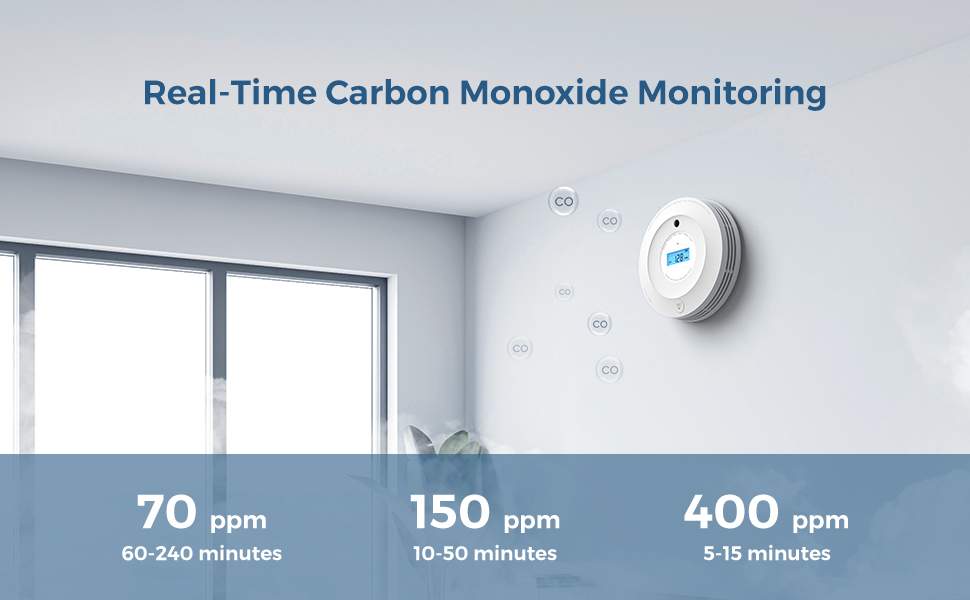
Image: Carbon Monoxide alarm thresholds and response times.

Image: Indicator lights provide visual status of the detector.
6.3 Butang Ujian/Senyap
The large button on the front of the detector serves two functions:
- Fungsi Ujian: Press and hold the button to test the alarm's functionality. The alarm will sound, and the LCD will activate.
- Fungsi Senyap: In the event of a nuisance alarm (e.g., from cooking smoke), press the button to temporarily silence the alarm. The alarm will reset after a few minutes if the smoke or CO clears. If the hazard persists, the alarm will reactivate.

Image: Regularly test your detector by pressing the Test/Silence button.
7. Penyelenggaraan
7.1 Ujian Mingguan
Test your detector weekly by pressing and holding the Test/Silence button until the alarm sounds. This confirms the unit's electronics, battery, and alarm are working.
7.2 Membersihkan Pengesan Anda
Dust and debris can accumulate on the detector and affect its performance. Clean your detector at least once a month:
- Use a soft brush attachment on your vacuum cleaner to remove dust from the vents.
- Lap bahagian luar dengan sedikit damp cloth. Do not use cleaning solvents or sprays directly on the detector.
7.3 Penggantian Bateri
The detector uses a replaceable CR123A lithium battery. When the battery is low, the yellow LED will flash, and the detector will chirp periodically. Replace the battery immediately to ensure continuous protection.
- Putar pengesan lawan arah jam untuk menanggalkannya dari pendakap pelekap.
- Buka petak bateri.
- Keluarkan bateri lama dan buang mengikut peraturan tempatan.
- Masukkan bateri CR123A baharu, dengan memerhatikan kekutuban yang betul.
- Close the battery compartment and reattach the detector to the mounting bracket.
- Test the detector after battery replacement.
8. Penyelesaian masalah
| Masalah | Kemungkinan Punca | Penyelesaian |
|---|---|---|
| Alarm chirps periodically (e.g., every 30-60 seconds). | Bateri lemah. | Replace the CR123A battery immediately. |
| Bunyi penggera tanpa asap atau CO2 yang jelas. | Nuisance alarm (steam, cooking fumes, dust). | Press the Test/Silence button. Ventilate the area. Clean the detector. |
| Detector does not respond to test button. | Dead battery, incorrect battery installation, or unit malfunction. | Check battery polarity, replace battery. If problem persists, contact customer support. |
| Paparan LCD kosong. | Normal power-saving mode, or dead battery. | The LCD activates when CO is detected or during a test. If it remains blank during a test, replace the battery. |
| Yellow LED flashes continuously. | Fault condition or end-of-life warning. | If the unit is chirping with the yellow LED, replace the battery. If it's a continuous yellow flash without chirping, the unit may be faulty or at its end of life (10 years). Replace the detector. |
9. Spesifikasi
| Ciri | Perincian |
|---|---|
| Nombor Model | SC240 |
| Jenis Sensor | Fotoelektrik (Asap), Elektrokimia (CO) |
| Sumber Kuasa | Battery Powered (3V CR123A Lithium Battery) |
| Keras Penggera | ≥ 85 dB at 10 ft (3 m) |
| Dimensi Produk | 5.1" (Diameter) × 1.4" (Depth) / 128 mm × 34.7 mm |
| Berat Barang | 6.88 auns (lebih kurang 195 g) |
| Suhu Operasi | 40°F - 100°F (4.4°C - 37.8°C) |
| Kelembapan Operasi | 10% - 95% RH (tanpa pemeluwapan) |
| bahan | ABS kalis api |
| Kawasan Liputan | 215-430 kaki persegi |

Image: Compact dimensions of the AEGISLINK SC240 detector.
10. Waranti dan Sokongan
AEGISLINK provides the following warranty and support for the SC240 Smoke and Carbon Monoxide Detector:
- Jaminan wang dikembalikan 60 hari
- Waranti kualiti 5 tahun
- Sokongan teknikal seumur hidup
For technical assistance or warranty claims, please contact AEGISLINK customer support through their official channels or visit their website. Refer to the contact information provided with your purchase or on the product packaging.


