1. Produk Lebihview
The Compex Mini Wireless Electric Muscle Stimulator is a compact and portable device designed to assist active individuals with muscle stimulation for workouts, training, and recovery. It utilizes EMS (Electrical Muscle Stimulation) and TENS (Transcutaneous Electrical Nerve Stimulation) technologies to help manage muscle soreness, increase blood circulation, loosen stiff muscles, and temporarily reduce pain. The device connects wirelessly to your smartphone via a dedicated mobile application for easy control and program selection.

Image 1.1: Compex Mini Wireless pods alongside a smartphone, illustrating the device's compact design and app connectivity.
2. Kandungan Pakej
Verify that all the following items are included in your Compex Mini Wireless package:
- Two (2) Compex Mini Wireless Pods
- Electrode Pads (various sizes)
- Kabel Pengecasan (USB)
- Manual Pengguna (dokumen ini)

Image 2.1: Contents of the Compex Mini Wireless package, showing the pods, electrode pads, and charging cable.
3. Panduan Persediaan
- Charge the Pods: Connect the charging cable to the Compex Mini Wireless pods and a USB power source. The indicator lights on the pods will show charging status. A full charge provides up to seven hours of use.
- Muat turun Apl: Cari untuk the "Compex Mini" app on your smartphone's app store (Apple App Store for iOS or Google Play Store for Android) and install it.
- Pasangkan dengan Telefon Pintar: Open the Compex Mini app. Ensure Bluetooth is enabled on your smartphone. Turn on the Compex Mini pods by pressing the power button. Follow the in-app instructions to pair the pods with your smartphone.
- Attach Electrode Pads: Securely attach the electrode pads to the designated connectors on the pods. Ensure the pads are clean and have good adhesive quality for optimal performance.
4. Arahan Operasi
The Compex Mini Wireless offers six unique programs to help you achieve your fitness goals. All operations are controlled via the smartphone application.
- Pilih Program: From the main screen of the Compex Mini app, navigate to the "Programs" section. Choose the desired program based on your activity or recovery needs (e.g., Warm-up, Endurance, Resistance, Recovery, Pain Relief, Massage).
- Sapukan Pad: Place the electrode pads on the target muscle group according to the pad placement guidelines provided within the app or in the included quick start guide. Ensure good skin contact.
- Mulakan Sesi: Once the program is selected and pads are applied, press the "Start" button in the app.
- Laraskan Intensiti: Gradually increase the intensity using the "+" button in the app until you feel a strong, comfortable muscle contraction. Decrease intensity with the "-" button if the sensation becomes uncomfortable. The intensity can also be adjusted directly on the pods using the physical buttons.
- Pantau Kemajuan: The app displays the remaining time for your session and the current intensity level. You can pause or stop the session at any time.
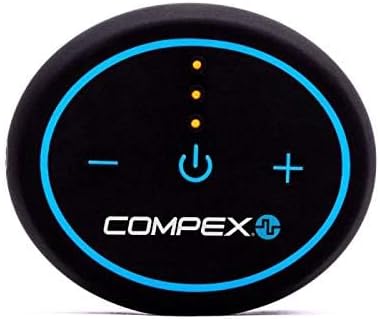
Image 4.1: Detail of the Compex Mini Wireless pod, highlighting the power and intensity adjustment buttons.
5. Kawasan Permohonan
The Compex Mini Wireless can be applied to various muscle groups for different purposes:
- kaki: Quadriceps, Hamstrings, Calves for strength, endurance, and recovery.
- lengan: Biceps, Triceps for muscle activation and recovery.
- Teras: Abdominals, Lower Back for strengthening and pain relief.
- Bahu: Deltoids, Trapezius for recovery and pain management.

Imej 5.1: Cthample of Compex Mini Wireless application on arm and abdominal muscles.

Imej 5.2: Cthample of Compex Mini Wireless application on the thigh.
6. Penyelenggaraan
- Cleaning the Pods: Wipe the pods with a soft, damp kain. Jangan gunakan pembersih yang melelas atau rendamkannya di dalam air.
- Electrode Pad Care: After each use, place the electrode pads back on their protective plastic film. Store them in a cool, dry place. Replace pads when they lose their adhesiveness or if they become dirty.
- Hayat Bateri: Recharge the pods regularly to maintain optimal battery performance. Avoid fully discharging the battery for extended periods.
7. Penyelesaian masalah
| Masalah | Kemungkinan Punca | Penyelesaian |
|---|---|---|
| Peranti tidak dihidupkan | Bateri lemah | Charge the pods fully. |
| Tidak dapat menyambung ke apl | Bluetooth off, pods not in pairing mode, app issue | Ensure Bluetooth is on. Restart pods and app. Try re-pairing. |
| Tiada sensasi atau sensasi lemah | Pads not adhering, intensity too low, pads worn out | Ensure pads are firmly attached to clean skin. Increase intensity gradually. Replace old pads. |
| Pads losing stickiness | Pads are dirty or old | Clean skin before application. Replace pads as needed. |
8. Spesifikasi
- Nombor Model: CX192WI04
- Sumber Kuasa: 1 bateri Polimer Litium (termasuk)
- Hayat Bateri: Hingga 7 jam setiap caj
- Ketersambungan: Bluetooth (Smartphone Compatible)
- Dimensi: Lebih kurang 7.05 x 6.18 x 1.93 inci (Pakej)
- Berat: Kira-kira 0.4 auns
- Pengeluar: DonJoy Global
- Tarikh Mula-mula Tersedia: 1 April 2019
9. Maklumat Waranti dan Sokongan
For warranty information and customer support, please refer to the official Compex website or contact your retailer. Keep your proof of purchase for any warranty claims. Specific warranty terms and conditions may vary by region.