
pengenalan
The QFX R-58 is a portable retro-style radio designed for versatile audio entertainment. It features AM, FM, and Shortwave (SW) radio bands, Bluetooth connectivity for wireless audio streaming, and a built-in MP3 player supporting USB and TF card media. Power options include a rechargeable internal battery, USB charging, and supplemental solar charging for extended use. This manual provides essential information for operating and maintaining your device.
Ciri-ciri Utama:
- Radio Berbilang Band: Access AM, FM, and Shortwave frequencies.
- Kesambungan Bluetooth: Stream audio wirelessly from compatible devices.
- Main balik MP3: Play music directly from USB drives or TF (MicroSD) cards.
- Bateri boleh dicas semula: Integrated battery for portable use.
- Pengecasan Suria: Supplemental solar panel for charging in well-lit conditions.
- Antena Boleh Ditarik Balik: Improves radio reception.
- Jack fon kepala: Untuk mendengar secara peribadi.
Persediaan
1. Pemasangan Bateri
The QFX R-58 uses a replaceable 18650 lithium-ion battery. Ensure the battery is correctly inserted before first use.
- Cari petak bateri di belakang radio.
- Slide the 'OPEN' latch to open the battery cover.
- Insert the 18650 battery, ensuring correct polarity (+/-).
- Tutup penutup bateri dengan selamat.
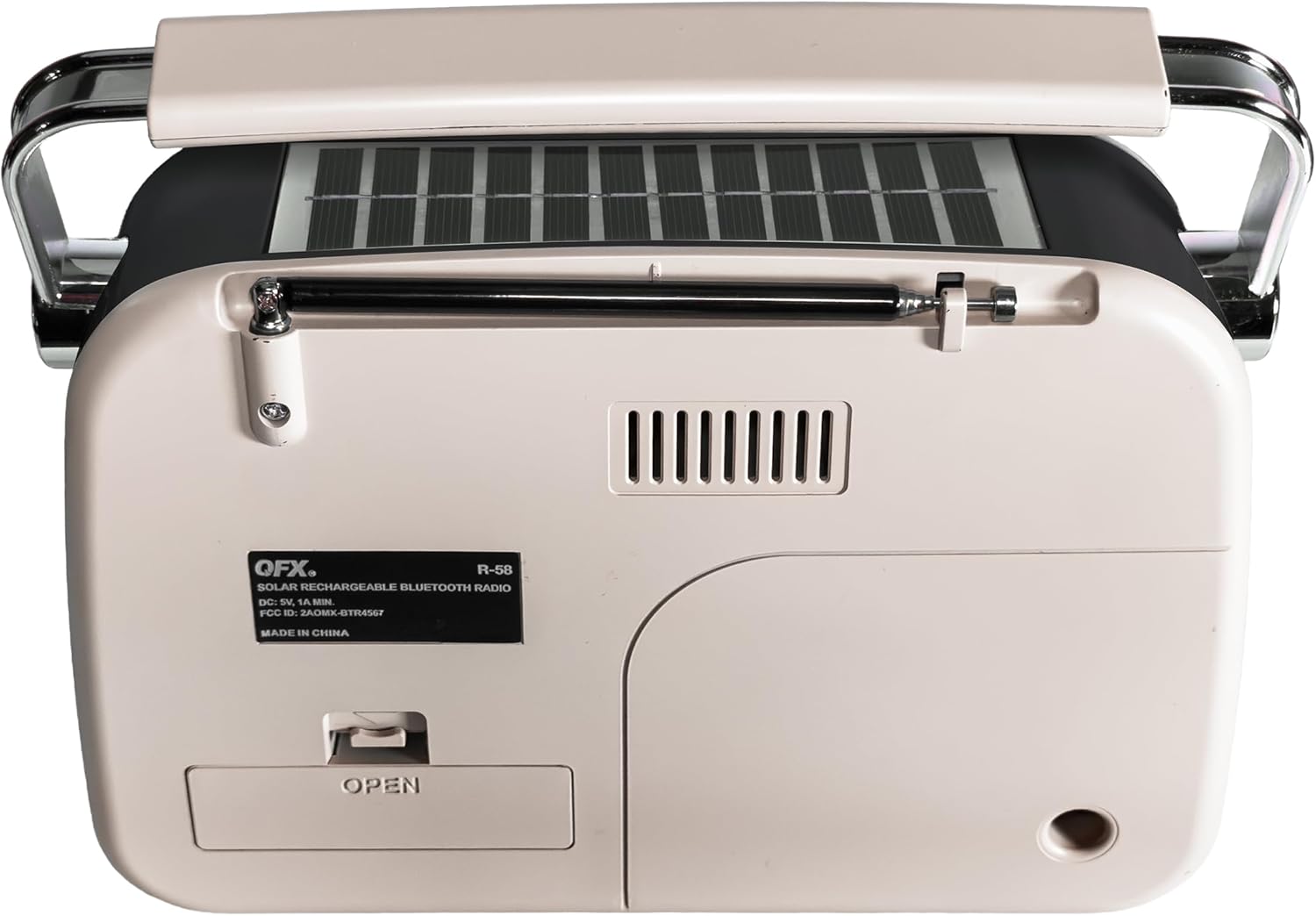
Rajah 1: Belakang view of the QFX R-58 radio, highlighting the battery compartment.
2. Mengecas Bateri
The radio can be charged via USB-C or its integrated solar panel.
- Pengecasan USB-C: Connect a USB-C cable to the DC-5V input port on the side of the radio and to a compatible USB power source (e.g., wall adapter, computer). The 'CHARGE' indicator light will illuminate.
- Pengecasan Suria: Place the radio with the solar panel facing direct sunlight. This provides supplemental charging and is most effective in bright conditions. The 'CHARGE' indicator light may glow dimly or brightly depending on light intensity.

Figure 2: Side panel with USB-C charging port and charge indicator.
3. Sambungan Antena
For optimal radio reception, extend the retractable antenna.
- Gently pull the antenna upwards from its housing until fully extended.
- Adjust the angle and direction of the antenna for the best signal reception.
Arahan Operasi
1. Hidupkan/Mati Kuasa dan Kawalan Kelantangan
- Untuk menghidupkan radio ON, rotate the ON/OFF Volume Wheel upwards.
- Untuk menghidupkan radio DIMATIKAN, rotate the ON/OFF Volume Wheel downwards until it clicks.
- Adjust the volume by rotating the ON/OFF Volume Wheel.
2. Selecting Modes (Radio/Music/Bluetooth)
Use the toggle switch on the side panel to select your desired mode:
- MUZIK: For USB/TF card MP3 playback.
- FM: Untuk penerimaan radio FM.
- AM: For AM radio reception.
- SW: For Shortwave radio reception.
To activate Bluetooth mode, press the 'M' (Mode) button until you hear the Bluetooth pairing prompt.
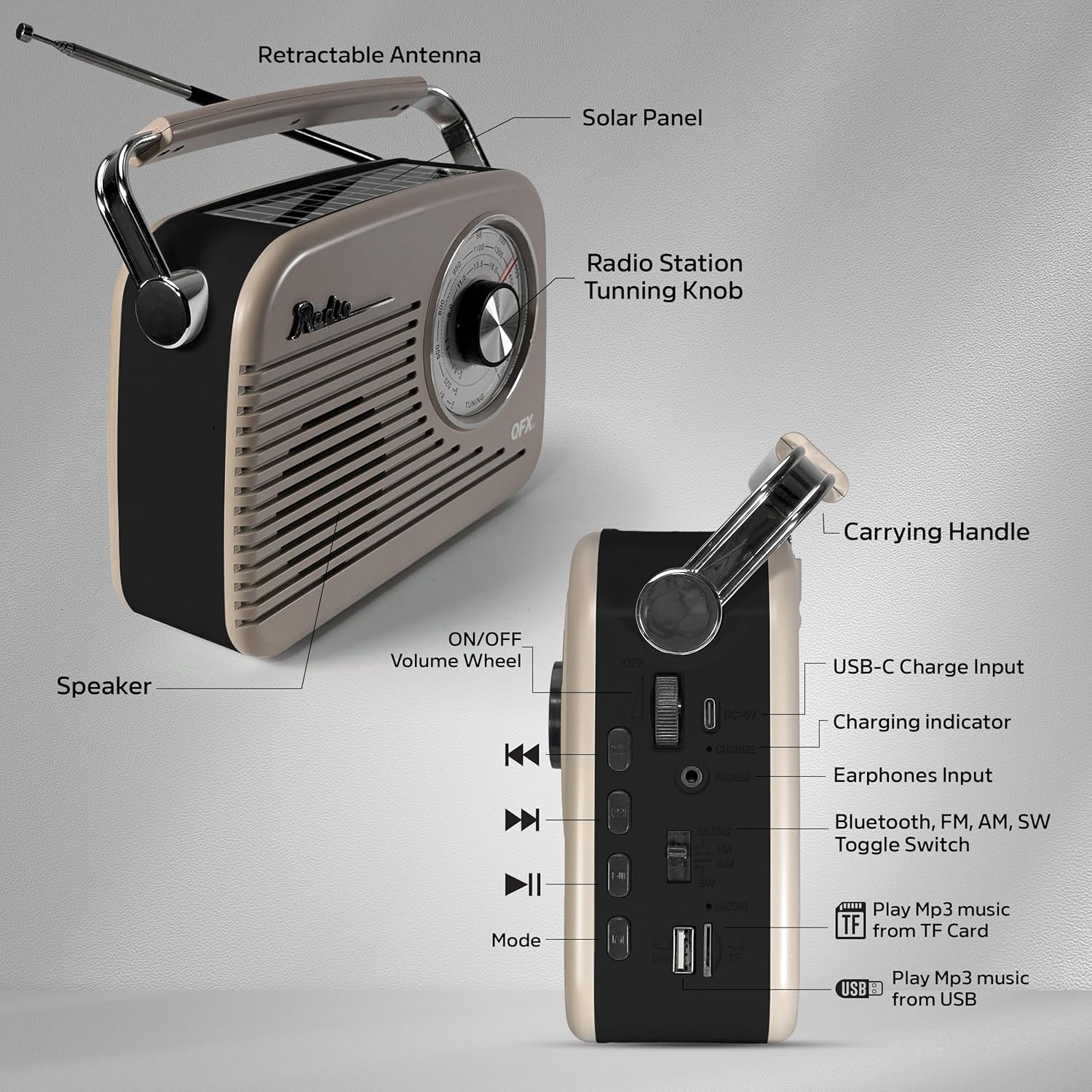
Figure 3: Labeled diagram of the QFX R-58 controls.
3. Operasi Radio (AM/FM/SW)
- Select the desired band (FM, AM, or SW) using the toggle switch.
- Putar Tombol Penalaan on the front panel to scan for radio stations.
- Extend and adjust the retractable antenna for optimal signal clarity.

Figure 4: Adjusting the radio tuning knob.
4. Berpasangan Bluetooth
- Press the 'M' (Mode) button until the radio announces "Bluetooth". The Bluetooth indicator light will flash.
- Pada peranti mudah alih anda, dayakan Bluetooth dan cari peranti yang tersedia.
- Select "QFX R-58" from the list of devices to pair.
- Once paired, the radio will confirm with an audible prompt, and the Bluetooth indicator light will remain solid.

Figure 5: Bluetooth pairing with a mobile device.
5. USB/TF Card MP3 Playback
- Masukkan pemacu kilat USB ke dalam port USB atau kad TF (MicroSD) ke dalam slot kad TF.
- Switch the mode toggle to 'MUSIC'. The radio will automatically detect and begin playing MP3 files.
- Gunakan butang kawalan main balik (Sebelumnya, Main/Jeda, Seterusnya) untuk mengurus muzik anda.
6. Penggunaan Fon Kepala
- Plug 3.5mm headphones into the 'PHONES' jack on the side panel for private listening.
- Pembesar suara dalaman akan disenyapkan secara automatik apabila fon kepala disambungkan.
Penyelenggaraan
- Pembersihan: Gunakan kain lembut dan kering untuk membersihkan bahagian luar radio. Elakkan pembersih atau pelarut yang kasar.
- Penjagaan Bateri: If the radio will not be used for an extended period, remove the 18650 battery to prevent leakage. Store the battery in a cool, dry place.
- Panel Suria: Keep the solar panel clean and free of dust or debris to ensure efficient supplemental charging.
- Storan: Store the radio in a dry environment, away from extreme temperatures and direct sunlight when not in use.
Menyelesaikan masalah
| Masalah | Kemungkinan Punca | Penyelesaian |
|---|---|---|
| No power/Radio does not turn on | Bateri habis atau tidak dipasang dengan betul. | Charge the battery via USB-C. Ensure the 18650 battery is correctly inserted with proper polarity. |
| Penerimaan radio yang lemah | Antena tidak dilanjutkan atau kawasan isyarat lemah. | Fully extend the antenna and adjust its position. Try moving the radio to a different location. |
| Bluetooth tidak berpasangan | Radio tidak berada dalam mod Bluetooth atau peranti terlalu jauh. | Ensure the radio is in Bluetooth mode (indicated by flashing light). Keep your device within 10 meters (33 feet) of the radio. |
| Kad USB/TF tidak dimainkan | Incorrect mode selected or unsupported file format. | Switch to 'MUSIC' mode. Ensure files are in MP3 format. Check if the USB drive or TF card is properly inserted. |
| Solar charging indicator is dim | Cahaya matahari tidak mencukupi. | Move the radio to an area with direct, strong sunlight. Note that solar charging is supplemental. |
Spesifikasi
| Ciri | Perincian |
|---|---|
| Jenama | Qfx |
| Nama Model | R-58-IVY |
| Teknologi Ketersambungan | Bluetooth |
| Jenis Pembesar Suara | Penceramah Tunggal |
| Ciri-ciri Tambahan | USB Port, TF Card Slot, Solar Panel |
| Dimensi Item (D x W x H) | 9.06"D x 2.95"W x 7.87"H |
| Berat Barang | 2.31 paun |
| UPC | 606540005392 |
Waranti dan Sokongan
For warranty information and customer support, please refer to the documentation included with your purchase or visit the official QFX webtapak. Simpan bukti pembelian anda untuk sebarang tuntutan waranti.