pengenalan
This manual provides detailed instructions for the assembly, operation, and maintenance of your HOMCOM 3-Drawer Mobile Filing Cabinet. Please read this manual thoroughly before assembly and use to ensure safe and correct operation. Keep this manual for future reference.

Image: The HOMCOM 3-Drawer Mobile Filing Cabinet, black, with a printer on top, positioned next to a desk in an office environment. This image illustrates the product's intended use and appearance.
Maklumat Keselamatan
- Pastikan semua bahagian ada dan tidak rosak sebelum pemasangan. Jangan gunakan jika mana-mana bahagian hilang atau rosak.
- Pasang unit pada permukaan yang lembut dan bersih untuk mengelakkan calar.
- Jangan ketatkan skru semasa pemasangan untuk mengelakkan bahan daripada rosak.
- Distribute weight evenly in drawers and on the top surface to maintain stability.
- Jauhkan kanak-kanak dan haiwan peliharaan dari kawasan perhimpunan.
- Always lock the wheels when the cabinet is in a stationary position to prevent accidental movement.
- Jangan panjat atau berdiri di atas kabinet.
Kandungan Pakej
Sebelum memulakan pemasangan, sahkan bahawa semua komponen yang disenaraikan di bawah disertakan dalam pakej anda. Jika mana-mana bahagian hilang atau rosak, sila hubungi khidmat pelanggan.
- Panel kabinet (sisi, atas, bawah, belakang)
- 3 Drawer components (fronts, sides, backs, bottoms)
- Full extension drawer slides (6 pairs)
- 4 Swivel casters (2 with brakes, 2 without)
- Locking mechanism with 2 keys
- Pek perkakasan (skru, dowel, kunci sesondol, dsb.)
- Arahan pemasangan (manual ini)

Image: An illustrative diagram showing various components of the cabinet, such as panels and hardware, indicating parts included in the package.
Persediaan dan Perhimpunan
Assembly is required for this product. Follow the steps below carefully. It is recommended to have two people for assembly.
- Sediakan Kawasan: Clear a spacious, clean, and soft area for assembly to prevent damage to the cabinet parts and your floor.
- Kenal pasti Bahagian: Lay out all parts and hardware. Refer to the parts list to ensure everything is present.
- Pasang Rangka Kabinet: Attach the side panels to the bottom panel using the provided hardware. Ensure all connections are secure.
- Pasang Slaid Laci: Secure the drawer slides to the inner sides of the cabinet frame. Pay attention to the orientation of the slides.
- Pasang Laci: Construct each of the three drawers by attaching the front, back, and side panels to the drawer bottom. Install the corresponding drawer slides onto the drawers.
- Sisipkan Laci: Carefully slide the assembled drawers into the cabinet frame, aligning the drawer slides.
- Lampirkan Panel Atas: Secure the top panel to the assembled cabinet frame.
- Pasang Kastor: Attach the four swivel casters to the bottom of the cabinet. Ensure the two casters with brakes are positioned at the front for easy access.
- Pasang Mekanisme Penguncian: Integrate the centralized locking mechanism as per the specific instructions provided with the hardware. Test the lock with the provided keys.

Image: A diagram illustrating the sequence of assembly steps for the HOMCOM filing cabinet, showing how different parts connect.
Arahan Operasi
Menggunakan Laci
The cabinet features three spacious drawers with full extension rails for easy access to contents. To open a drawer, gently pull the handle. To close, push the drawer firmly until it is fully seated.
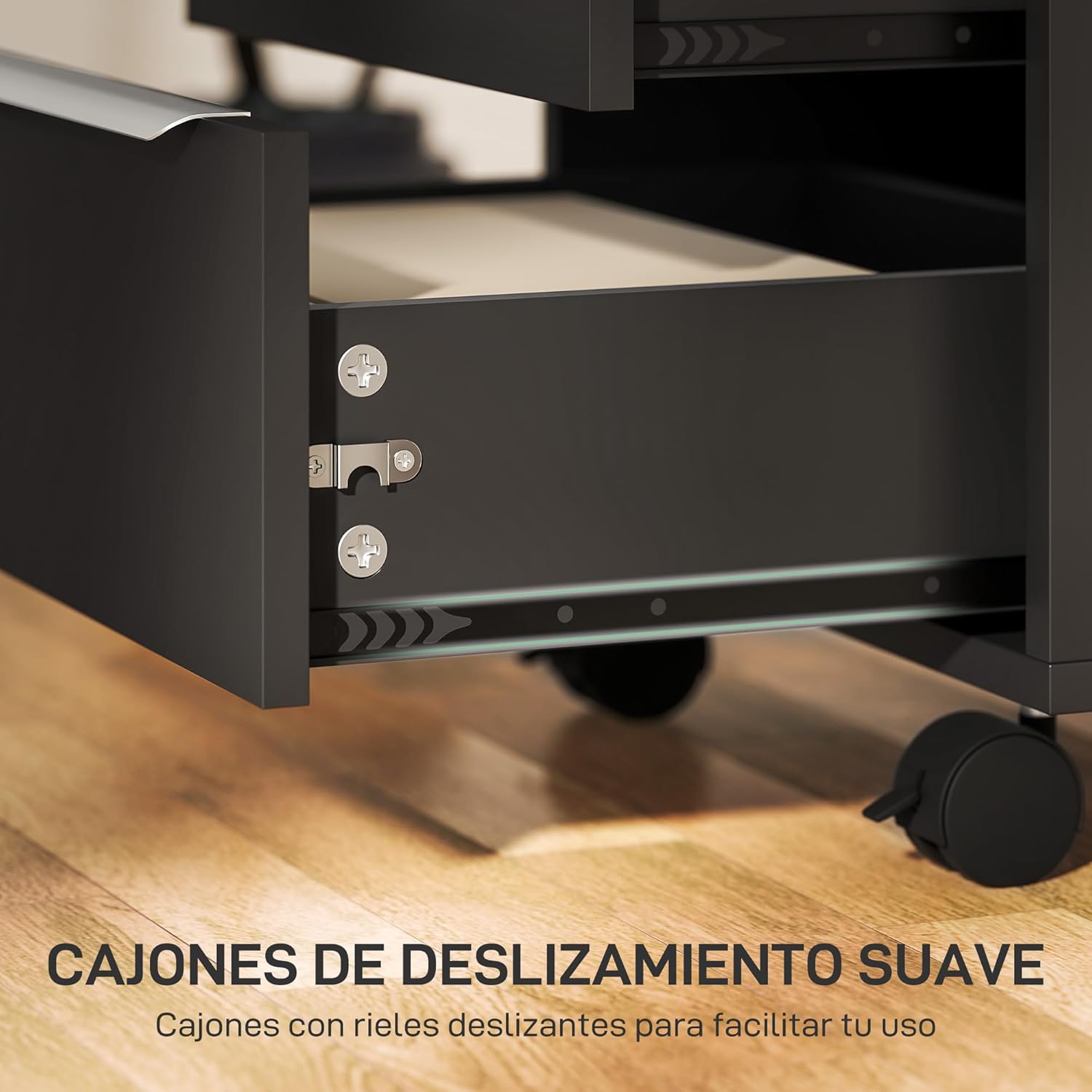
Imej: Dari dekat view of an open drawer, highlighting the smooth-gliding full extension rails for easy operation.
Nota Penting: This cabinet is designed for storing files and documents flat. It is not equipped for hanging files.

Image: An open drawer containing documents stored flat, illustrating the recommended method of storage within the cabinet.
Centralized Locking System
The cabinet is equipped with a centralized locking system. Inserting and turning the key in the top lock will secure all three drawers simultaneously, ensuring the privacy and security of your belongings.
- To lock: Ensure all drawers are fully closed. Insert the key into the lock on the top drawer and turn it clockwise until the drawers are secured. Remove the key.
- To unlock: Insert the key into the lock and turn it counter-clockwise. The drawers will now be accessible.

Image: A hand inserting a key into the centralized lock located on the top drawer of the filing cabinet, demonstrating the locking mechanism.
Using the Casters
The cabinet features four 360° swivel casters for easy mobility. Two of these casters are equipped with brakes for stability.
- To move the cabinet: Ensure the brakes on the casters are disengaged. Gently push or pull the cabinet to its desired location.
- To secure the cabinet: Once in position, engage the brakes on the two front casters by pressing down on the lever. This will prevent the cabinet from rolling.

Imej: A terperinci view of the cabinet's four swivel casters, showing two standard casters and two casters equipped with locking brakes for stability and mobility.
Penyelenggaraan
- Pembersihan: Lap permukaan kabinet dengan kain lembut,amp cloth. Avoid using harsh chemicals or abrasive cleaners, as these can damage the melamine finish.
- Pemeriksaan perkakasan: Periksa semua skru dan pengikat secara berkala untuk memastikan ia ketat. Ketatkan semula jika perlu untuk mengekalkan integriti struktur.
- Rel Laci: If drawers become stiff, a small amount of silicone-based lubricant can be applied to the drawer slides.
- Kastor: Pastikan roda bebas daripada serpihan (rambut, habuk) bagi memastikan pergerakan yang lancar.
- Perlindungan Kelembapan: The cabinet is moisture-resistant, but prolonged exposure to excessive moisture should be avoided. Wipe up spills immediately.
Menyelesaikan masalah
- Laci kaku atau sukar dibuka/ditutup:
- Periksa sama ada slaid laci sejajar dengan betul dan bebas daripada halangan.
- Pastikan kabinet berada di atas permukaan yang rata.
- Apply a small amount of silicone lubricant to the drawer slides.
- Sahkan bahawa kandungan laci tidak terlebih muatan atau diagihkan secara tidak sekata.
- Lock is not engaging all drawers:
- Ensure all drawers are fully closed before attempting to lock.
- Check if the locking mechanism is properly installed and aligned.
- Avoid forcing the key; if it's stiff, check for obstructions or misalignment.
- Cabinet is unstable or wobbles:
- Sahkan bahawa semua skru pemasangan diketatkan dengan kukuh.
- Pastikan kabinet diletakkan di atas permukaan yang rata dan rata.
- Engage the brakes on the casters if the cabinet is meant to be stationary.
Spesifikasi
| Jenama | HOMCOM |
| Nombor Model | ES836-301V00BK0731 |
| warna | Hitam |
| Dimensi Keseluruhan (L x W x H) | 40 x 40 x 63.5 cm (15.7 x 15.7 x 25 inci) |
| Berat Produk | 15.3 kg (33.7 lbs) |
| bahan | Engineered Wood, Melamine |
| Kapasiti Beban Maksimum (Permukaan Atas) | 10 kg (22 lbs) |
| Max. Load Capacity (Per Drawer) | 5 kg (11 lbs) |
| Ciri Khas | Lockable, With Wheels, Moisture Resistant |
| Penggunaan yang Disyorkan | Files and folders, Keys |
| Jenis Pemasangan | Lantai Lantai |
| Jenis Bilik | Bilik Tidur, Pejabat Rumah, Ruang Tamu |

Image: A diagram illustrating the overall dimensions (40x40x63.5 cm) and weight capacities (10kg for top, 5kg per drawer) of the HOMCOM filing cabinet.
Waranti dan Sokongan
For warranty information or technical support, please refer to the contact details provided at the point of purchase or visit the official HOMCOM webtapak. Simpan resit pembelian anda sebagai bukti pembelian.
Pengeluar: HOMCOM
model: ES836-301V00BK0731


