pengenalan
Thank you for choosing the FiiO EH11 Retro On-Ear Bluetooth Headphones. These headphones combine classic design with modern wireless technology, offering high-resolution audio and versatile connectivity. This manual provides essential information for the proper use, setup, and maintenance of your EH11 headphones.
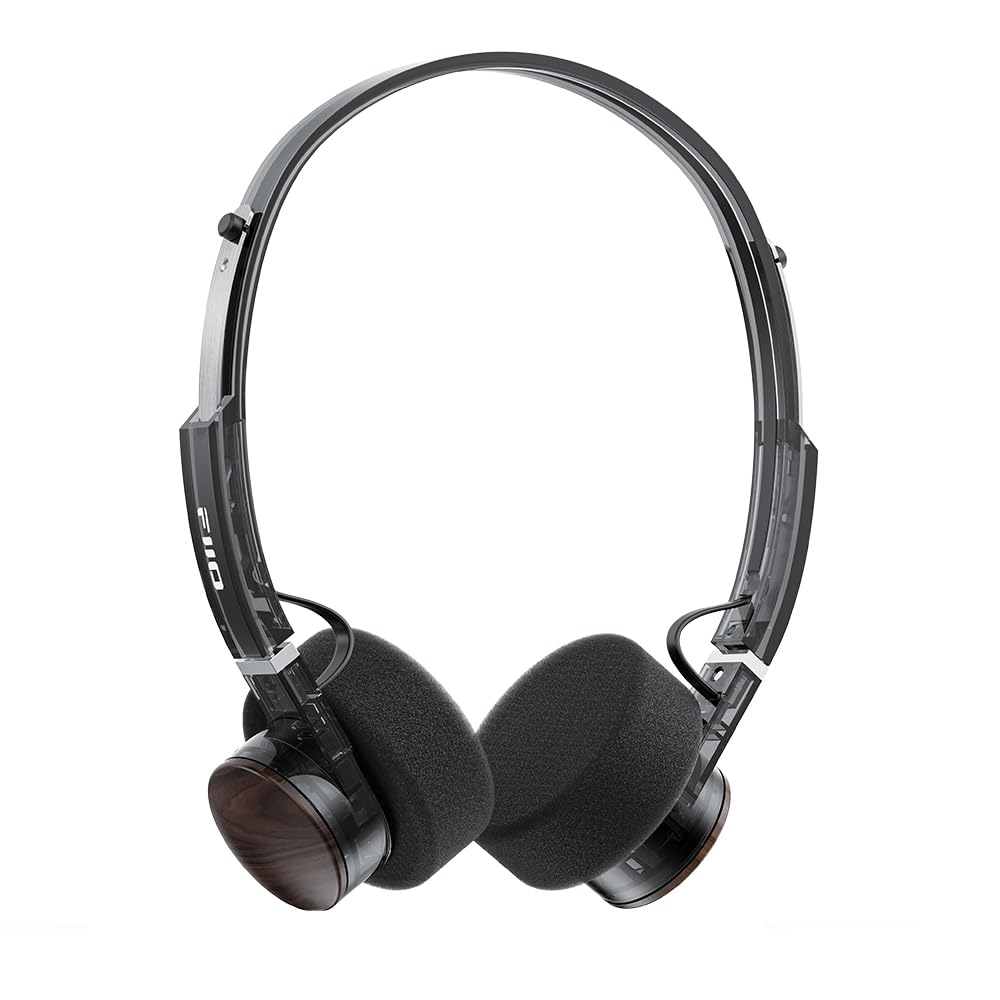
Image: FiiO EH11 Retro On-Ear Bluetooth Headphones, Transparent Black variant. This image displays the overall design of the headphones, highlighting the on-ear form factor and retro aesthetic.
Maklumat Keselamatan
- Jangan dedahkan fon kepala kepada suhu yang melampau, kelembapan atau persekitaran yang menghakis.
- Elakkan mendengar pada tahap kelantangan tinggi untuk tempoh yang lama untuk mengelakkan kerosakan pendengaran.
- Jangan buka, baiki atau ubah suai peranti ini sendiri. Hubungi kakitangan servis yang sah untuk mendapatkan bantuan.
- Jauhkan peranti daripada kanak-kanak dan haiwan peliharaan.
- Buang produk dan baterinya secara bertanggungjawab mengikut peraturan tempatan.
Kandungan Pakej
Sila pastikan semua item ada dalam pakej anda:
- FiiO EH11 Retro On-Ear Bluetooth Headphones
- Foam earpads (2 pairs)
- USB A to Type-C charging cable (1)
- Quick guide (1)
Produk Selesaiview
Familiarize yourself with the main components and controls of your FiiO EH11 headphones.
Kawalan dan Pelabuhan
- Butang Kuasa/Pelbagai Fungsi: Used for power on/off, play/pause, answering/ending calls.
- Tombol Kelantangan: Rotatable knob for volume adjustment and track control.
- Port USB Jenis-C: Untuk mengecas fon kepala.
- mikrofon: Built-in for calls and voice commands.
- Penunjuk LED: Memaparkan kuasa, pengecasan dan status Bluetooth.
Note: Specific button functions and LED indicator behaviors are detailed in the 'Operating' section.
Persediaan
1. Mengecas Fon Kepala
- Sambungkan kabel pengecas USB Jenis-C ke port pengecasan pada fon kepala.
- Sambungkan hujung kabel yang satu lagi ke penyesuai kuasa USB (tidak disertakan) atau port USB komputer.
- Penunjuk LED akan menunjukkan status pengecasan (contohnya, merah semasa mengecas, mati apabila dicas penuh).
- Cas penuh mengambil masa kira-kira 1.5 jam dan menyediakan sehingga 30 jam main balik.
Description: Connect the provided USB-C cable to the headphone's charging port and a power source to charge the internal battery.
2. Menghidupkan/Mematikan
- Hidupkan kuasa: Press and hold the Power/Multi-function button for approximately 3 seconds until the LED indicator lights up and you hear a power-on prompt.
- Matikan: Press and hold the Power/Multi-function button for approximately 5 seconds until the LED indicator turns off and you hear a power-off prompt.
3. Berpasangan Bluetooth
- Pastikan fon kepala dimatikan.
- Press and hold the Power/Multi-function button for approximately 5-7 seconds until the LED indicator flashes red and blue alternately, indicating pairing mode.
- Pada peranti anda (telefon pintar, tablet, komputer), dayakan Bluetooth dan cari peranti yang tersedia.
- Select "FiiO EH11" from the list of found devices.
- Once connected, the LED indicator will flash blue periodically, and you will hear a connection prompt.
4. Sambungan Dwi Peranti
The EH11 supports simultaneous connection to two Bluetooth devices.
- Pasangkan fon kepala dengan peranti pertama seperti yang diterangkan di atas.
- Lumpuhkan Bluetooth pada peranti pertama. Fon kepala akan memasuki semula mod berpasangan.
- Pasangkan fon kepala dengan peranti kedua.
- Dayakan semula Bluetooth pada peranti pertama. Fon kepala harus bersambung secara automatik ke kedua-dua peranti.
- You can now seamlessly switch between audio sources from the two connected devices.
5. FiiO Control App
Download the FiiO Control App from your device's app store to unlock additional features and customization options, including EQ presets and gaming mode settings.
- Cari untuk "FiiO Control" in the App Store (iOS) or Google Play Store (Android).
- Install the app and ensure your EH11 headphones are connected via Bluetooth.
- Open the app to access settings such as EQ, gaming mode, and firmware updates.
Arahan Operasi
Main balik Muzik
- Main/Jeda: Tekan sebentar butang Kuasa/Berbilang fungsi.
- Kelantangan: Rotate the Volume knob clockwise.
- Perlahankan suara: Rotate the Volume knob counter-clockwise.
- Lagu Seterusnya: Double-click the Volume knob.
- Trek Sebelumnya: Triple-click the Volume knob.
Pengurusan Panggilan
- Jawab/Tamatkan Panggilan: Tekan sebentar butang Kuasa/Berbilang fungsi.
- Tolak Panggilan: Tekan dan tahan butang Kuasa/Berbilang fungsi selama 2 saat.
Mod Permainan
Activate Gaming Mode via the FiiO Control App to enhance in-game audio cues like footsteps and gunshots for a more immersive experience. This mode also optimizes latency.
LDAC High-Resolution Audio
The FiiO EH11 supports LDAC codec for high-resolution wireless audio. Ensure your source device also supports LDAC and that it is enabled in your device's Bluetooth settings for the best audio quality.
Penyelenggaraan
Pembersihan
- Lap fon kepala dengan kain lembut, kering dan tidak berbulu.
- Jangan gunakan bahan kimia yang keras, pelarut pembersih atau detergen yang kuat.
- Elakkan mendapatkan kelembapan ke dalam mana-mana bukaan.
Penggantian Pad Telinga
The foam ear pads are detachable for easy cleaning and replacement. Gently pull the ear pads off the earcups to remove them. Align the new ear pads with the earcups and press them firmly into place until they are securely attached.
Two pairs of different-colored official ear pads are included in the package for customization.
Penyimpanan
When not in use, store the headphones in a cool, dry place, away from direct sunlight and extreme temperatures. Avoid placing heavy objects on the headphones.
Menyelesaikan masalah
- Tiada Kuasa:
- Pastikan fon kepala dicas sepenuhnya.
- Try connecting to a different charging cable or power source.
- Tidak Boleh Berpasangan dengan Peranti:
- Ensure the headphones are in pairing mode (LED flashing red and blue).
- Pastikan Bluetooth didayakan pada peranti anda.
- Gerakkan fon kepala lebih dekat dengan peranti anda.
- Cuba mulakan semula kedua-dua fon kepala dan peranti anda.
- Kosongkan sambungan Bluetooth sebelumnya pada peranti anda.
- Tiada Bunyi atau Kelantangan Rendah:
- Semak tahap kelantangan pada kedua-dua fon kepala dan peranti anda yang disambungkan.
- Pastikan fon kepala disambungkan dengan betul ke peranti anda.
- Cuba mainkan audio daripada aplikasi atau sumber lain.
- Kualiti Audio Lemah:
- Pastikan tiada halangan antara fon kepala dan peranti anda.
- Beralih daripada sumber gangguan (cth, penghala Wi-Fi, peranti Bluetooth lain).
- If using LDAC, ensure your source device supports it and it is enabled.
Spesifikasi
| Ciri | Spesifikasi |
|---|---|
| Nama Model | EH11 |
| Teknologi Ketersambungan | Bluetooth |
| Teknologi Komunikasi Tanpa Wayar | Bluetooth |
| Jenis Pemacu Audio | Pemacu Dinamik (40mm) |
| Bentuk alat dengar | Di Telinga |
| Hayat Bateri | Sehingga 30 Jam |
| Masa Mengecas | lebih kurang 1.5 Jam |
| Berat badan | lebih kurang 92g (3.25 oz) |
| Ciri Khas | LDAC High-Resolution Bluetooth Audio, Dual Device Connection, FiiO Control App Support, Gaming Mode |
| Komponen yang Disertakan | Foam earpads*2, Quick guide*1, USB A to Type-C charging cable*1 |
Waranti dan Sokongan
FiiO products come with a limited warranty. For detailed warranty information, technical support, or service inquiries, please refer to the official FiiO webtapak atau hubungi pengedar tempatan anda.
Anda boleh mendapatkan maklumat lanjut dan butiran hubungan di FiiO Official Store.


