1. Pengenalan
The BLUETTI Elite 400 is a high-capacity portable power station designed to provide reliable power for various applications, including home backup, RV life, camping, and off-grid scenarios. It features a robust 3840Wh LiFePO4 battery and delivers a continuous 2600W AC output, with a surge capability of up to 3900W. Its integrated wheels and telescopic handle enhance portability, making it easy to transport wherever power is needed.

Image: The BLUETTI Elite 400 providing power to a refrigerator, demonstrating its home backup capability.
2. Arahan Keselamatan
Sila baca dan fahami semua arahan keselamatan sebelum mengendalikan BLUETTI Elite 400. Kegagalan mematuhi arahan ini boleh mengakibatkan renjatan elektrik, kebakaran atau kecederaan serius.
- Keselamatan Umum: Keep the device away from water, fire, and extreme temperatures. Do not disassemble, repair, or modify the unit. Ensure proper ventilation during use and charging.
- LFP Battery: The Elite 400 utilizes a LiFePO4 battery, known for its safety and longevity. It undergoes extensive testing to ensure zero fire or explosion risk.
- Smart Battery Management System (BMS): The integrated BMS protects against overcharge, overcurrent, and overheating, ensuring safe operation.
- Multi-Protection Shell: The unit features a durable, shockproof, short-circuit, and leak-resistant shell for enhanced protection.

Image: Visual representation of the safe LiFePO4 battery cells.
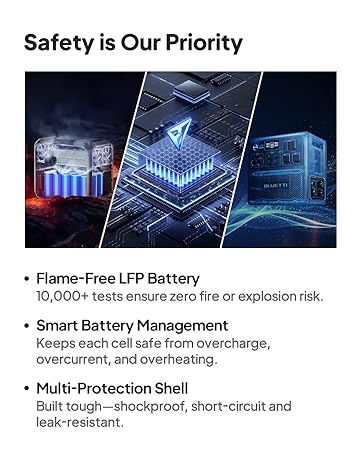
Image: Diagram illustrating the Smart Battery Management System.

Image: Representation of the multi-protection shell design.
3. Kandungan Pakej
Upon receiving your BLUETTI Elite 400, please verify that all the following items are included in the package:
- Stesen Janakuasa Mudah Alih BLUETTI Elite 400
- Kabel Pengecasan AC
- Skru Pembumian
- Manual Pengguna

Image: All items included in the BLUETTI Elite 400 package.
4. Produk Lebihview
4.1 Design & Portability
The Elite 400 is designed for ease of movement, featuring a luggage-style trolley system. This includes a robust telescopic handle and durable caster wheels, allowing for effortless transport between indoor and outdoor environments, even with its substantial capacity.

Image: A woman easily moving the power station using its telescopic handle and wheels.
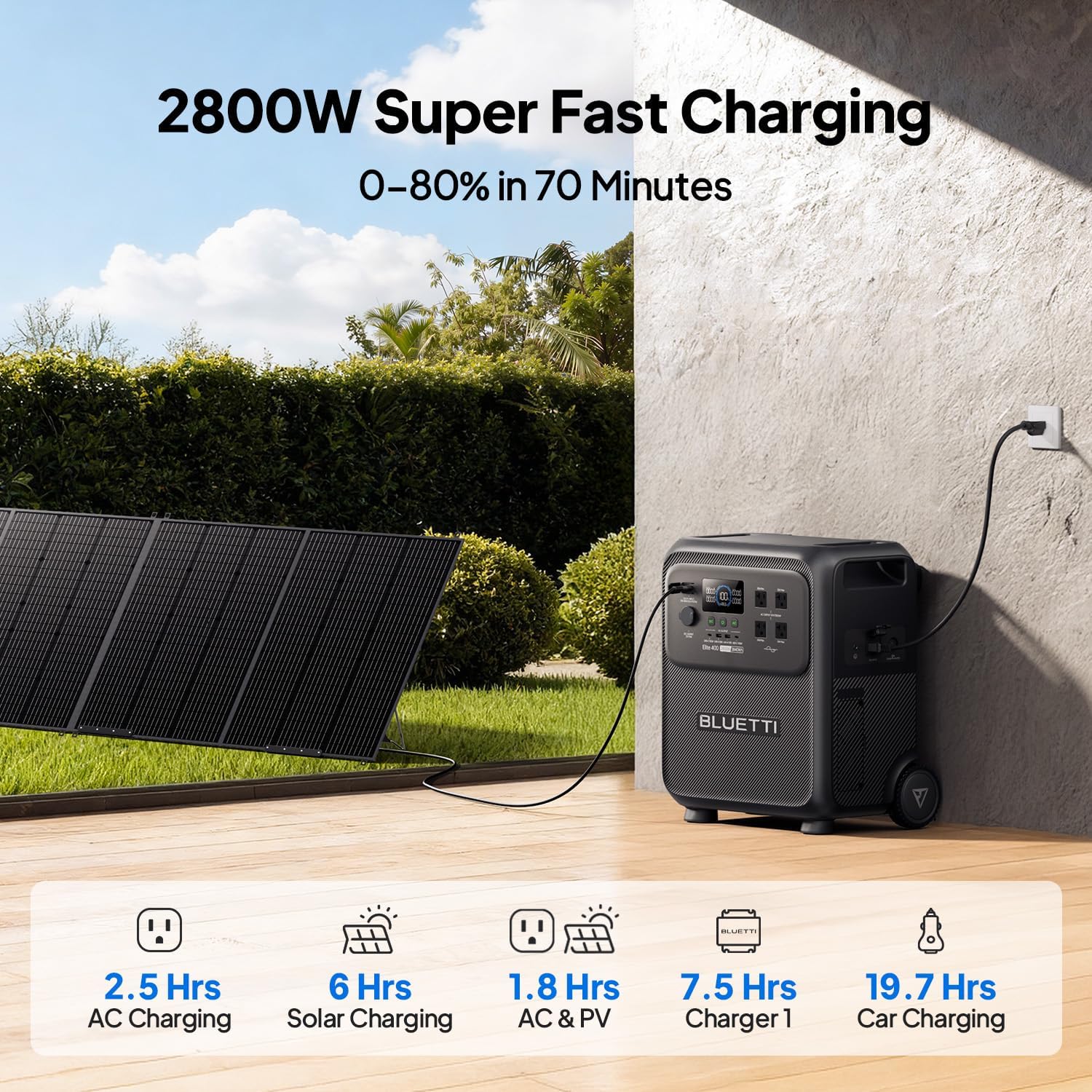
Image: The power station being pulled across a smooth surface, highlighting its mobility.
4.2 Port Output
The Elite 400 offers a comprehensive array of 9 output ports to accommodate a wide range of devices and appliances:
- 4 x Soket Penghawa Dingin: 2600W Max (120V)
- 2 x Port USB-A: Maksimum 15W
- 2 x Port USB-C: Maksimum 100W
- 1 x Car Port: 120W Max (12V/10A)

Imej: Terperinci view of the Elite 400's output ports, including AC, USB-A, USB-C, and car port.
4.3 Paparan
The unit features a clear LCD display that provides real-time information on battery status, input/output wattage, and operational modes. This allows for easy monitoring of power consumption and remaining battery life.
5. Persediaan
Follow these steps for initial setup of your BLUETTI Elite 400:
- Membongkar: Carefully remove the power station and all accessories from its packaging. Inspect for any damage.
- penempatan: Place the unit on a flat, stable, and well-ventilated surface. Ensure adequate space around the unit for heat dissipation.
- Caj Permulaan: For optimal battery health, it is recommended to fully charge the Elite 400 before its first use. Connect the AC charging cable to a wall outlet and to the AC input port on the power station.
6. Arahan Operasi
6.1 Menghidupkan/Mematikan
Press and hold the main power button for a few seconds to turn the unit ON or OFF. The LCD display will illuminate upon activation.
6.2 Menyambung Peranti
To use the output ports:
- Keluaran AC: Press the 'AC' button to activate the AC outlets. Plug your devices into the desired AC ports.
- Output DC: Press the 'DC' button to activate the DC and USB ports. Plug your devices into the appropriate USB-A, USB-C, or car ports.
6.3 Mod Angkat Kuasa
The Elite 400 supports a Power Lifting mode, allowing it to handle resistive loads up to 3900W, exceeding its continuous 2600W rating. This feature is useful for appliances with high startup power requirements. Refer to the user manual for activation and usage details.
6.4 Fungsi UPS
For seamless power backup, the Elite 400 features an Uninterruptible Power Supply (UPS) function with a rapid 15ms switchover time. This ensures that essential devices remain powered during outages without interruption.
6.5 Mod Eko
Activate Eco Mode to conserve battery power. In this mode, the power station will automatically shut down if the output power remains below a certain threshold for an extended period.
7. Mod Pengecasan
The BLUETTI Elite 400 offers multiple charging options:
- Pengecasan AC: Connect the AC charging cable to a standard wall outlet. The unit supports up to 1800W AC input for a full charge in approximately 2.5 hours.
- Pengecasan Suria: Connect compatible solar panels (up to 1000W Max) to the DC/PV input port. A full charge can be achieved in approximately 6 hours with optimal sunlight.
- AC + Solar Charging (Turbo Mode): Combine AC and solar input for the fastest charging. With a maximum combined input of 2800W, the unit can reach 80% charge in just 70 minutes.
- Pengecasan Kereta: Charge the unit from your vehicle's 12V/24V car port.
- DC-DC Alternator Charging: Supported for charging from a vehicle's alternator.

Image: The power station being charged via solar panels, demonstrating solar input capability.
7.1 AC Charging Mode Overview
The Elite 400 offers three AC charging modes: Standard (default), Turbo, and Silent. The table below outlines the input capabilities and estimated charging times for the US version:
8. Penyelenggaraan
Proper maintenance ensures the longevity and optimal performance of your Elite 400.
- Storan: Store the power station in a cool, dry place, away from direct sunlight and corrosive materials. Maintain a charge level of 50-80% for long-term storage.
- Kekerapan cas semula: Recharge the unit at least once every 3-6 months to prevent battery degradation, even if not in use.
- Pembersihan: Use a dry, soft cloth to clean the exterior of the unit. Do not use harsh chemicals or abrasive materials. Ensure all ports are free from dust and debris.
- Pengudaraan: Always ensure the ventilation vents are clear and unobstructed during operation to prevent overheating.
9. Penyelesaian masalah
If you encounter issues with your Elite 400, refer to the following common problems and solutions:
- Unit Tidak Dihidupkan: Ensure the battery is charged. If the unit has been stored for a long time, try connecting it to an AC outlet for a few minutes.
- Tiada Output AC: Check if the 'AC' button is activated. Verify that the connected device's power consumption does not exceed the 2600W continuous output or 3900W surge limit. The unit may have entered overload protection mode.
- Pengecasan perlahan: Ensure all charging cables are securely connected. For solar charging, verify panel placement and sunlight intensity. In Turbo mode, ensure both AC and solar inputs are active.
- Terlalu panas: The Elite 400 features advanced thermal management. If the unit feels warm, ensure vents are clear. The internal fan will activate to dissipate heat. If an overheat warning appears on the display, disconnect loads and allow the unit to cool down.
For more complex issues, please contact BLUETTI customer support.
10. Spesifikasi
11. Waranti & Sokongan
BLUETTI products typically come with a manufacturer's warranty. Please refer to the warranty card included in your package or visit the official BLUETTI webtapak untuk terma dan syarat jaminan terperinci.
For technical support, troubleshooting assistance, or any inquiries regarding your BLUETTI Elite 400, please contact BLUETTI customer service through their official webtapak atau maklumat hubungan yang diberikan dalam dokumentasi produk anda.
You can visit the BLUETTI Store for more information: Kedai BLUETTI di Amazon