1. Pengenalan
This manual provides essential information for setting up, operating, and maintaining your Hisense 55 Inch Class QD6 Series 4K QLED Smart Fire TV. Please read these instructions carefully before using your television to ensure proper function and safety. Keep this manual for future reference.

Rajah 1.1: Depan view of the Hisense 55 Inch Class QD6 Series 4K QLED Smart Fire TV. This image shows the television with its stand, displaying the screen and the Hisense logo.
2. Persediaan
2.1 Membongkar
- Keluarkan TV dari pembungkusannya dengan berhati-hati.
- Ensure all accessories are present: Remote Control, power cord, stand components, and screws.
- Kekalkan bahan pembungkusan untuk pengangkutan atau perkhidmatan yang berpotensi pada masa hadapan.
2.2 Pemasangan Stand
Untuk memasang pendirian TV:
- Letakkan skrin TV ke bawah pada permukaan yang lembut dan rata untuk mengelakkan kerosakan.
- Align the stand legs with the corresponding screw holes on the bottom of the TV.
- Secure each leg using the provided screws. Ensure they are tightened firmly.
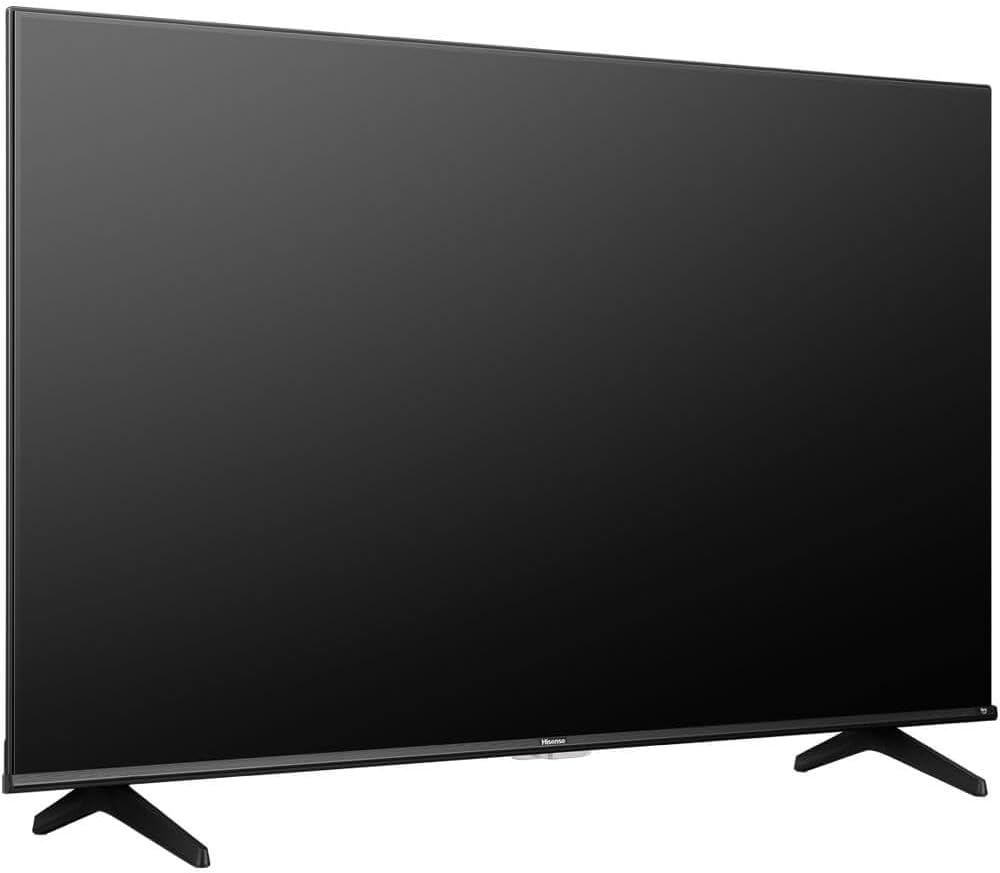
Rajah 2.1: Bersudut view of the Hisense TV with its stand attached. This illustrates the TV's profile and the installed stand legs.
2.3 Sambungan
Connect external devices to your TV using the appropriate ports on the back panel.
- HDMI Ports (3 total): For connecting Blu-ray players, game consoles, cable/satellite boxes, and other HDMI-enabled devices.
- Port USB: Untuk menyambungkan peranti storan USB untuk memainkan media files.
- Port Ethernet (LAN): Untuk sambungan internet berwayar.
- Input Antena/Kabel: Untuk menyambungkan antena atau isyarat TV kabel.
- Audio Keluar Digital (Optik): Untuk menyambung ke bar bunyi atau penerima audio.
- AV Dalam: Untuk menyambungkan peranti lama menggunakan video komposit dan kabel audio stereo.

Rajah 2.2: Terperinci view of the TV's rear connection panel. This image highlights the various input and output ports, including HDMI, USB, Ethernet, and audio connections.
3. Arahan Operasi
3.1 Hidupkan/Mati Kuasa
- Hidupkan kuasa: Connect the power cord to the TV and a power outlet. Press the Power button on the remote control or on the TV.
- Matikan: Press the Power button on the remote control to put the TV into standby mode. Unplug the power cord from the outlet for complete power disconnection.
3.2 Alat Kawalan Jauh
The included Alexa Voice Remote allows for easy navigation and voice commands. Insert two AAA batteries (not included) into the remote control, observing polarity.
- Kawalan Suara: Press and hold the microphone button and speak your command to search for content, launch apps, or control TV functions.
- Navigasi: Gunakan pad arah dan butang OK untuk menavigasi menu dan memilih item.
- Kelantangan/Saluran: Butang khusus untuk melaraskan kelantangan dan menukar saluran.
3.3 Smart TV Features (Fire TV OS)
Your TV is powered by Fire TV OS, providing access to a wide range of streaming services and applications.
- Skrin Utama: Access your favorite apps, live TV, and recommended content from the customizable home screen.
- App Store: Download additional apps like Netflix, Prime Video, YouTube, and Disney+ from the integrated app store.
- tetapan: Adjust picture, sound, network, and system settings through the Fire TV menu.
3.4 Pemilihan Input
To switch between connected devices or TV sources:
- Tekan ke Input butang pada alat kawalan jauh anda.
- Select the desired input source (e.g., HDMI 1, USB, TV) from the on-screen menu.
4. Penyelenggaraan
4.1 Pembersihan
- Skrin: Lap skrin perlahan-lahan dengan kain lembut yang tidak berbulu. Untuk kesan degil, gunakan pembersih skrin yang direka khusus untuk TV, digunakan pada kain, bukan terus ke skrin.
- Badan: Lap bingkai TV dan berdiri dengan kain lembut dan kering. Elakkan menggunakan pembersih atau pelarut yang kasar.
- Sentiasa cabut plag TV sebelum membersihkan.
4.2 Kemas Kini Perisian
Your TV may receive software updates to improve performance and add new features.
- Ensure your TV is connected to the internet.
- Navigasi ke tetapan menu on your Fire TV.
- Pilih Peranti & Perisian, kemudian Tentang, dan akhirnya Check for System Update.
- Follow the on-screen prompts to install any available updates. Do not power off the TV during an update.
5. Penyelesaian masalah
Jika anda menghadapi masalah dengan TV anda, rujuk kepada penyelesaian biasa berikut:
| Masalah | Penyelesaian yang Mungkin |
|---|---|
| Tiada Kuasa | Periksa sama ada kord kuasa dipasang dengan selamat ke dalam TV dan alur keluar dinding. Cuba kedai lain. |
| Tiada Gambar, tetapi Bunyi Hadir | Pastikan sumber input yang betul dipilih. Semak sambungan kabel ke peranti luaran. |
| Tiada Bunyi, tetapi Gambar Hadir | Check the volume level and mute status. Verify audio cable connections. Check TV audio output settings. |
| Alat Kawalan Jauh Tidak Berfungsi | Replace batteries. Ensure there are no obstructions between the remote and the TV. Re-pair the remote if necessary (refer to Fire TV remote pairing instructions). |
| Isu Sambungan Rangkaian | Mulakan semula penghala dan modem anda. Semak kata laluan Wi-Fi. Untuk sambungan berwayar, pastikan kabel Ethernet disambungkan dengan betul. |
| Isu Kualiti Gambar (cth, kabur, herot) | Check the source resolution. Adjust picture settings (brightness, contrast, sharpness) in the TV menu. Ensure cables are not damaged. |
6. Spesifikasi
Key technical specifications for the Hisense 55 Inch Class QD6 Series 4K QLED Smart Fire TV (Model: 55QD65QFKIT1):
- Saiz Skrin: 55 Inci
- Teknologi Paparan: QLED
- Resolusi: 4K (3840 x 2160)
- Kadar Segar Semula: 60Hz
- Sistem pengendalian: Sistem Operasi TV Kebakaran
- Ketersambungan: 3 x HDMI, USB, Ethernet, Wi-Fi, Bluetooth
- Audio: Built-In Speaker, Digital Audio Out (Optical)
- Sokongan HDR: Dolby Vision, HDR10
- Dimensi (D x W x H): 2.9" x 48.5" x 30.7" (dengan dirian)
- Standard Gunung VESA: 200 x 200 mm
- Penggunaan Kuasa: 150W

Figure 6.1: Visual representation of QLED color technology. This image shows a television displaying vibrant, rich colors, emphasizing the 'Billion+ shades of vivid colour' feature.
7. Waranti dan Sokongan
7.1 Maklumat Waranti
This Hisense television comes with a Waranti pengilang 12 bulan dari tarikh pembelian. Waranti ini meliputi kecacatan pembuatan dan mutu kerja di bawah penggunaan biasa. Sila simpan bukti pembelian anda untuk tuntutan waranti.
7.2 Sokongan Pelanggan
For technical assistance, troubleshooting beyond this manual, or warranty service, please contact Hisense customer support. Refer to the official Hisense webtapak atau kad pendaftaran produk anda untuk butiran hubungan khusus untuk wilayah anda.


