1. Maklumat Keselamatan
Sila baca semua arahan keselamatan dengan teliti sebelum menggunakan produk ini. Simpan manual ini untuk rujukan masa hadapan.
- Keselamatan Elektrik: Do not expose this appliance to rain or moisture to reduce the risk of fire or electric shock. Ensure the power adapter is connected to a suitable power source.
- Pengudaraan: Jangan sekat sebarang bukaan pengudaraan. Pasang mengikut arahan pengilang.
- haba: Jangan pasang berhampiran mana-mana sumber haba seperti radiator, daftar haba, dapur, atau radas lain (termasuk amppenghidup) yang menghasilkan haba.
- Pembersihan: Bersihkan hanya dengan kain kering.
- Servis: Jangan cuba servis produk ini sendiri. Rujuk semua perkhidmatan kepada pegawai perkhidmatan yang berkelayakan.
2. Kandungan Pakej
Sahkan bahawa semua item yang disenaraikan di bawah disertakan dalam pakej anda:
- 1 x ULTIMEA Poseidon M20 Pro Soundbar
- 1 x Penyesuai Kuasa untuk Bar Bunyi
- 1 x Alat Kawalan Jauh (Tidak Termasuk Bateri)
- 1 x Manual Pengguna
- 1 x Kabel Audio 3.5mm hingga 3.5mm Stereo (Kabel AUX 1.5m)
- 1 x Kabel Optik Digital (1.5m)
- 4 x Kit Pemasangan Dinding
- 2 x Pendakap Dinding
- 2 x Skru Pemasangan pada Pembesar Suara

Rajah 2.1: Aksesori dan kabel yang disertakan.
3. Produk Lebihview
The ULTIMEA Poseidon M20 Pro is a 2.1ch surround sound bar designed to enhance your audio experience with powerful sound and versatile features.
3.1 All-In-One Design
This soundbar features built-in dual speakers, a 3-inch subwoofer, and side-firing bass ports to deliver deeper lows and expanded surround effects. It offers a 2.1 channel sound experience with 132W peak power.

Figure 3.1: All-in-one soundbar design.
3.2 BassMX Technology
Ultimea's exclusive BassMX technology enhances low frequencies with adjustable bass, providing a powerful sound experience from a compact size.
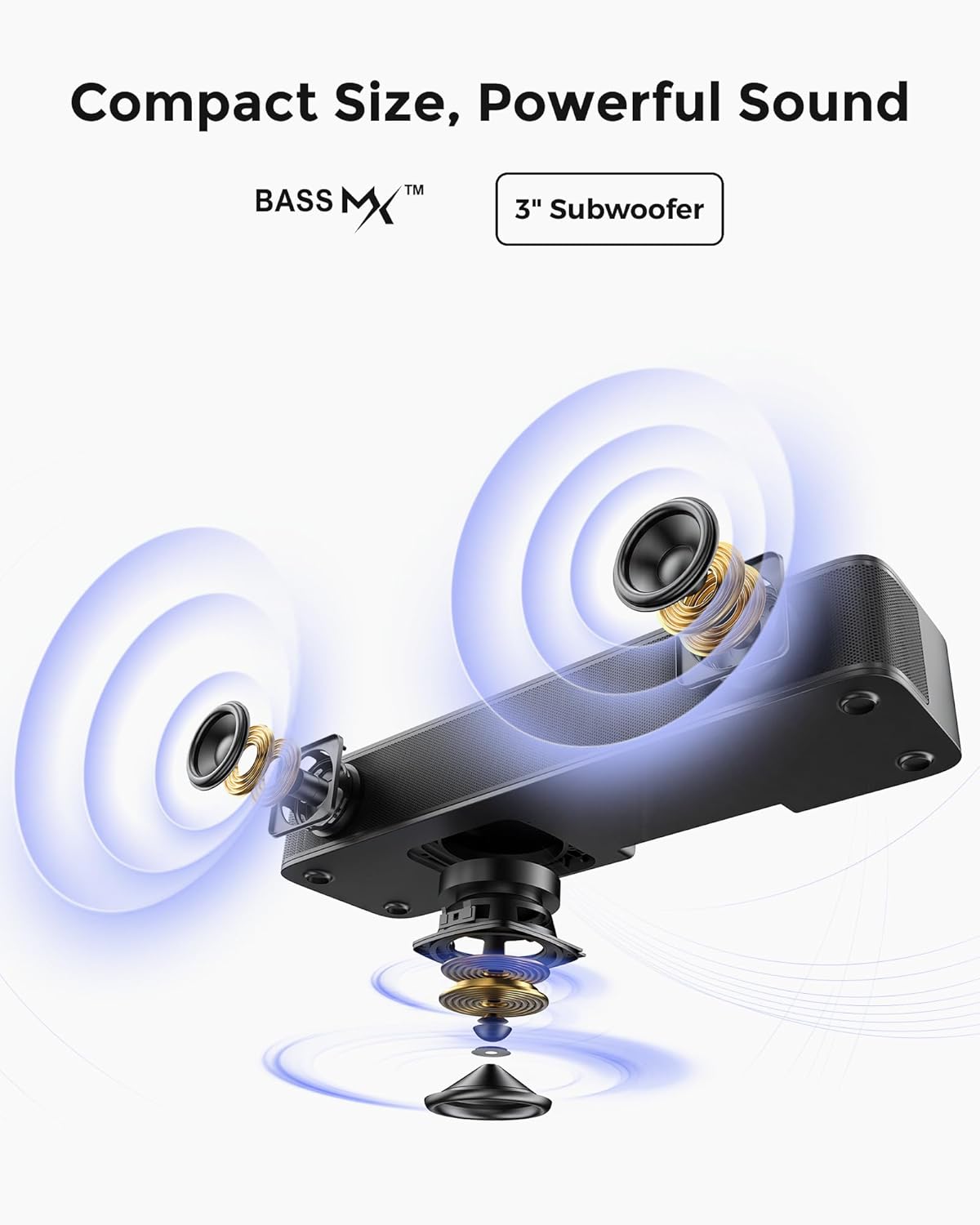
Figure 3.2: BassMX technology for enhanced bass.
3.3 VoiceMX for Crystal-Clear Dialogue
VoiceMX technology dynamically optimizes speech frequencies in real-time, ensuring crystal-clear dialogue in all content.

Figure 3.3: VoiceMX for enhanced vocal clarity.
3.4 Compact Size & Flexible Placement
The compact design allows for versatile placement options, including on a stand, cabinet, under the TV, or wall-mounted.

Figure 3.4: Flexible placement options for the soundbar.
3.5 Pilihan Kesambungan
The soundbar supports multiple input options including Optical, AUX, Bluetooth 5.4, and USB. An additional "SUB OUT" port is available for connecting an external active subwoofer (not included).

Rajah 3.5: Port sambungan panel belakang.
4. Persediaan
4.1 Penempatan
Position the soundbar centrally in front of your TV or mount it on the wall using the provided wall mount kit. Ensure there is adequate space for ventilation.
4.2 Sambungan Kuasa
- Connect the power adapter to the 'DC IN' port on the back of the soundbar.
- Palamkan hujung satu lagi penyesuai kuasa ke dalam salur keluar dinding.
4.3 Menyambung ke TV Anda
Pilih salah satu daripada kaedah sambungan berikut:
4.3.1 Sambungan Optik (Disyorkan)
- Tanggalkan penutup pelindung dari kedua-dua hujung Kabel Optik Digital.
- Insert one end of the optical cable into the 'OPTICAL' port on your TV.
- Insert the other end into the 'OPTICAL' port on the soundbar.
- On the soundbar remote, press the 'OPT' button to select the Optical input.

Figure 4.1: Optical connection diagram.
4.3.2 Sambungan AUX
- Connect one end of the 3.5mm AUX cable to the 'AUX' output port on your TV.
- Connect the other end to the 'AUX' input port on the soundbar.
- On the soundbar remote, press the 'AUX' button to select the AUX input.

Figure 4.2: AUX connection diagram.
4.3.3 Sambungan Bluetooth
- On the soundbar remote, press the 'BT' button to enter Bluetooth pairing mode. The indicator light will blink blue.
- Enable Bluetooth on your TV or mobile device and search for 'Poseidon M20 Pro'.
- Select 'Poseidon M20 Pro' to pair. The indicator light will turn solid blue once connected.

Figure 4.3: Bluetooth connection diagram.
4.4 Instructional Video
Video 4.1: Detailed instructional video for setting up the Poseidon M20 Pro soundbar, including unboxing and connection steps.
5. Arahan Operasi
5.1 Soundbar Controls
The soundbar can be controlled using the touch buttons on its top panel or the included remote control.
- Butang Kuasa: Menghidupkan/mematikan bar bunyi.
- Butang Input: Cycles through input sources (Optical, AUX, Bluetooth, USB).
- Butang Kelantangan (+/-): Melaraskan tahap kelantangan.
- Butang Bluetooth: Memasuki mod pasangan Bluetooth.
5.2 Using the ULTIMEA Smart App
Download the ULTIMEA Smart App to access advanced control features and customization options for your soundbar.

Figure 5.1: ULTIMEA Smart App interface.
5.2.1 Tetapan Penyama 10-Jalur
The app allows you to fine-tune your audio with a 10-band equalizer. Adjust frequencies to match your personal taste and environment.

Figure 5.2: Detailed 10-band equalizer settings in the app.
5.2.2 Preset EQ Matrices & Modes
Access 121 preset equalizer matrices tailored for distinct sonic preferences (Bass, Pop, Classical, Rock) and 6 tailored EQ modes (Movie, Music, Voice, Sport, Game, Night) for quick sound optimization.
6. Penyelenggaraan
Untuk memastikan jangka hayat dan prestasi optimum bar bunyi anda, ikut garis panduan penyelenggaraan ini:
- Pembersihan: Gunakan kain lembut dan kering untuk membersihkan permukaan soundbar. Jangan gunakan pembersih cecair atau semburan aerosol.
- Pengudaraan: Pastikan bukaan pengudaraan bersih daripada habuk dan serpihan.
- Storan: If storing the soundbar for an extended period, unplug it from the power source and store it in a cool, dry place.
7. Penyelesaian masalah
Jika anda menghadapi masalah dengan bar bunyi anda, rujuk langkah penyelesaian masalah biasa berikut:
7.1 No Sound After Connection
- Semak Sumber Input: Ensure the correct input source (Optical, AUX, Bluetooth) is selected on the soundbar using the remote control or the soundbar's input button.
- Semak Sambungan Kabel: Verify that all audio cables are securely connected to both the soundbar and your TV.
- TV Audio Output Settings: Access your TV's audio settings and ensure the audio output is set to the correct external device (e.g., Optical Out, AUX Out, or Bluetooth Speaker). Many TVs require setting the Digital Audio Output Format to 'PCM' for optical connections.
- Tahap Kelantangan: Tingkatkan kelantangan pada kedua-dua bar bunyi dan TV anda.
- Kitaran Kuasa: Turn off both the TV and the soundbar, unplug them from the power outlet, wait a few minutes, then plug them back in and power them on.
7.2 Isu Penggandingan Bluetooth
- Soundbar in Pairing Mode: Ensure the soundbar is in Bluetooth pairing mode (blinking blue indicator light).
- Device Bluetooth On: Confirm Bluetooth is enabled on your TV or mobile device.
- Lupakan Peranti: If previously paired, try 'forgetting' or 'unpairing' the soundbar from your device's Bluetooth list and then re-pair.
- Jarak: Pastikan peranti anda berada dalam jarak 10 meter (33 kaki) dari bar bunyi.
8. Spesifikasi
| Ciri | Penerangan |
|---|---|
| Nama Model | Poseidon M20 Pro |
| Nombor Model Item | U2203 |
| Jenis Pembesar Suara | Soundbar (2.1ch with built-in subwoofer) |
| Kuasa Output Maksimum Pembesar Suara | 132 Watt (Puncak) |
| Teknologi Ketersambungan | Bluetooth 5.4, Optical, AUX, USB (does not support HDMI) |
| Kaedah Kawalan | Apl, Jauh |
| Dimensi Produk | 15.75"D x 2.76"W x 4.25"H |
| Berat Barang | 4.41 paun |
| Jenis Pemasangan | Pelekap Atas Meja, Pemasangan Dinding |

Figure 8.1: Soundbar dimensions.
9. Waranti dan Sokongan
For warranty information or technical support, please contact ULTIMEA customer service through the retailer where the product was purchased or visit the official ULTIMEA website. Please have your model number (U2203) and purchase details ready.