pengenalan
This manual provides essential information for the safe and efficient operation of your VEVOR 130W CO2 Laser Engraver. Please read all instructions carefully before setup, operation, and maintenance to ensure proper use and to prevent damage or injury. This machine is designed for engraving and cutting various non-metal materials such as wood, acrylic, and glass, and also for engraving coated metals.
Arahan Keselamatan
Operating a laser engraver requires adherence to strict safety protocols. Failure to follow these instructions can result in serious injury or equipment damage.
- Perlindungan Mata: Always wear appropriate laser safety glasses when the machine is in operation. The laser beam is invisible and can cause permanent eye damage.
- Pengudaraan: Ensure adequate ventilation to remove smoke and fumes generated during engraving and cutting. Use the built-in air-assist system and an external exhaust system.
- Keserasian Bahan: Only engrave or cut materials specified as safe for CO2 lasers. Avoid materials that produce toxic fumes or are highly flammable. Do not engrave or cut PVC, vinyl, or materials containing chlorine.
- Keselamatan Kebakaran: Keep a fire extinguisher nearby. Never leave the machine unattended during operation. Flammable materials can ignite.
- Keselamatan Elektrik: Pastikan mesin dibumikan dengan betul. Jangan kendalikan dengan tangan basah atau di dalamamp conditions. Disconnect power before performing any maintenance or adjustments.
- Hentian kecemasan: Biasakan diri anda dengan lokasi dan operasi butang berhenti kecemasan.
- Enclosure Safety: The machine features an auto power-off function when the lid is open. Do not bypass this safety mechanism.
Produk Selesaiview
The VEVOR 130W CO2 Laser Engraver is a high-performance machine designed for precision engraving and cutting. Key features include a 130W CO2 laser tube, a large 55 x 35 inch work area, autofocus capability, and a 2-way pass-through design for processing larger materials.
Komponen Utama:
- Kepala Laser: Delivers the laser beam to the material. Equipped with autofocus.
- Work Beds: Includes both a honeycomb bed (for general cutting and engraving) and an aluminum blade bed (suitable for hard material cutting).
- Panel Kawalan: For machine operation, settings adjustment, and job management.
- Tiub Laser: 130W CO2 laser tube with an expected lifespan of 8,000+ hours.
- Water Chiller System: Essential for cooling the laser tube during operation to maintain performance and extend lifespan.
- Sistem Bantuan Udara: Clears smoke and debris from the cutting path, improving cut quality and reducing flare-ups.
- Sistem ekzos: Removes fumes and smoke from the work area.
- Butang Berhenti Kecemasan: Immediately halts all machine operations.
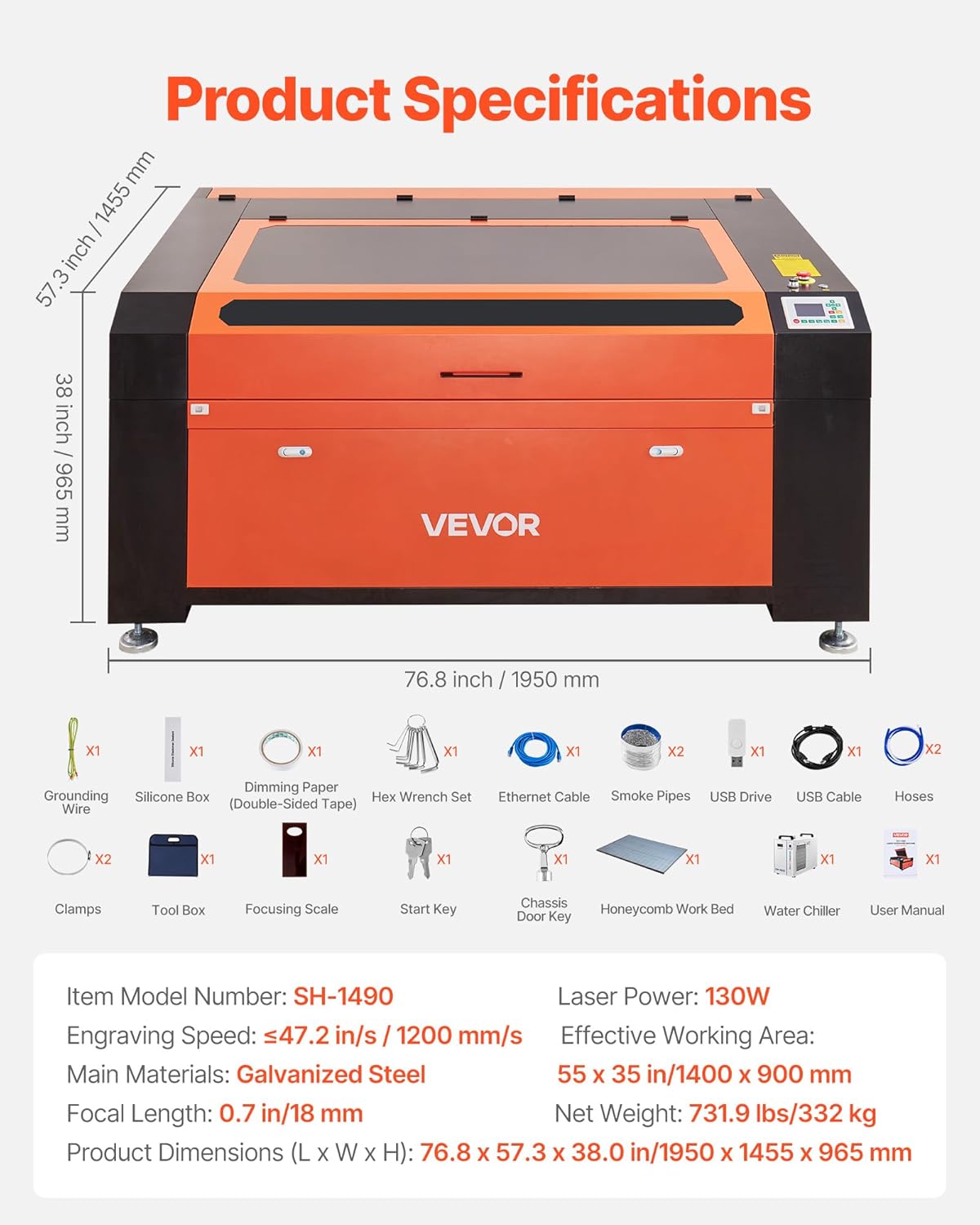
Imej: Selesaiview of the VEVOR 130W CO2 Laser Engraver, showing its main dimensions and included accessories.
Persediaan
Before operating the laser engraver, ensure it is properly set up and all connections are secure.
- Membongkar dan Meletakkan: Carefully unpack the machine. Place it on a stable, level surface capable of supporting its weight (736 lbs / 332 kg). Ensure sufficient space around the machine for ventilation and access.
- Sambungan Elektrik: Connect the machine to a grounded power outlet. Verify the voltage sepadan dengan keperluan mesin.
- Water Chiller Setup: Connect the water chiller to the laser tube according to the chiller's instructions. Fill the chiller with distilled water or recommended coolant. Ensure the chiller is operating correctly to provide continuous cooling to the laser tube.
- Air Assist and Exhaust System: Connect the air assist pump to the laser head and the exhaust fan/system to the machine's exhaust port. Ensure proper ducting to vent fumes safely outdoors or to a filtration system.
- Pemasangan Perisian: Install the necessary software (e.g., LightBurn, RDWorks) on your computer. The machine is compatible with Windows, macOS, and Linux systems.
- Sambungan ke Komputer: Connect the laser engraver to your computer via USB or Ethernet cable.
- Hidupkan Kuasa Awal: Power on the water chiller first, then the laser engraver. Observe for any unusual noises or error messages.
Arahan Operasi
Follow these steps for safe and effective engraving and cutting operations.
- Peletakan Bahan: Place your material on the appropriate work bed (honeycomb for general use, blade for hard materials). Ensure the material is flat and secure.
- Fokus automatik: Utilize the autofocus function. Input the material thickness via the control panel or software, and the laser head will automatically adjust to the optimal focal length (0.7 in / 18 mm). This ensures precise engraving and cutting.
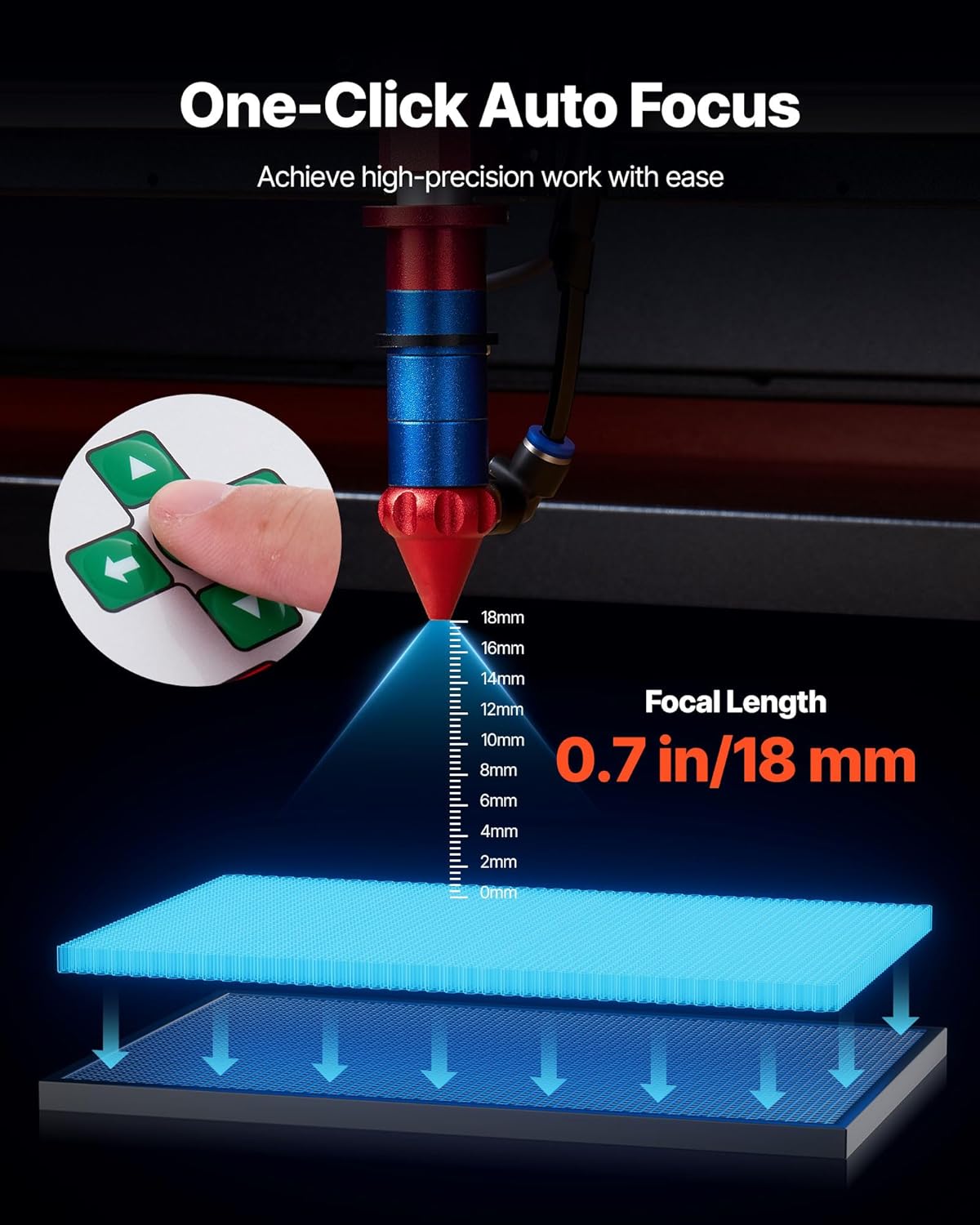
Image: The autofocus system automatically adjusts the laser head to the correct focal length for precise work.
- Persediaan Reka Bentuk: Create or import your design in the compatible software (LightBurn, RDWorks, CorelDraw, AutoCAD, Photoshop). Set appropriate power and speed settings for your material. Recommended maximum cutting thickness is 0.4 in / 10 mm.
- Pemindahan Kerja: Transfer your design to the laser engraver via USB, Ethernet, or USB drive.
- Praview dan Penentuan Kedudukan: Use the control panel to preview the job area and ensure correct material positioning.
- Mulakan Operasi: Close the lid, ensure all safety measures are in place, and press the start button on the control panel or software. Monitor the process closely.
- Two-Way Pass-Through: For materials longer than the work area, utilize the front and rear pass-through doors. Manually feed the material through the machine as needed, ensuring continuous alignment.

Image: The 2-way pass-through design allows for processing oversized materials by feeding them through the machine.
- penyiapan: Once the job is complete, wait for the exhaust system to clear any remaining fumes before opening the lid and removing the material.
Penyelenggaraan
Regular maintenance is crucial for the longevity and optimal performance of your laser engraver.
- Optik Bersih: Regularly clean the laser lens and mirrors with specialized optical cleaning solutions and wipes. Dust and debris can degrade laser performance.
- Work Bed Cleaning: Clean the honeycomb and blade beds frequently to remove debris and residue, which can affect material flatness and cut quality.
- Water Chiller Maintenance: Check the water level in the chiller regularly and refill with distilled water or coolant as needed. Periodically flush and replace the coolant to prevent algae growth and maintain cooling efficiency.
- Sistem ekzos: Inspect and clean the exhaust fan and ducts to ensure proper airflow and efficient fume extraction.
- Pelinciran: Lubricate the guide rails and moving parts of the laser head assembly as recommended by the manufacturer to ensure smooth operation.
- Laser Tube Inspection: Periodically inspect the laser tube for any signs of damage or degradation. A well-maintained tube can last 8,000+ hours.

Imej: A terperinci view of the long-lasting CO2 laser tube, designed for high-intensity workloads.
Menyelesaikan masalah
Bahagian ini menangani isu biasa yang mungkin anda hadapi semasa operasi.
| Masalah | Kemungkinan Punca | Penyelesaian |
|---|---|---|
| Laser tidak menyala atau output lemah |
|
|
| Poor cut quality or uneven engraving |
|
|
| Mesin tidak bersambung ke komputer |
|
|
| Asap atau wasap yang berlebihan |
|
|
Spesifikasi
Technical specifications for the VEVOR 130W CO2 Laser Engraver.
| Ciri | Perincian |
|---|---|
| Nombor Model | 130W- Autofocus- 2 Way Pass Through |
| Kuasa Laser | 130W CO2 Laser |
| Kawasan Kerja yang Berkesan | 55 x 35 inci (1400 x 900 mm) |
| Kelajuan Ukiran | Up to 1200 mm/s (47.2 in/s) |
| Panjang Fokus | 0.7 inci (18 mm) |
| Recommended Max Cutting Thickness | 0.4 inches (10 mm) for most materials |
| Laser Tube Lifespan | 8,000+ jam |
| Autofokus | ya |
| Pass-Through Design | 2-Way (front and rear) |
| Work Beds Included | Honeycomb bed, Aluminum blade bed |
| Bahan Utama | Keluli tergalvani |
| Dimensi Produk (L x W x H) | 76.8 x 57.3 x 38.0 inci (1950 x 1455 x 965 mm) |
| Berat Bersih | 736 paun (332 kg) |
| Keserasian | LightBurn, RDWorks, CorelDraw, AutoCAD, Photoshop |
| Sistem Operasi | Windows, macOS, Linux |
Waranti dan Sokongan
Untuk maklumat jaminan dan sokongan teknikal, sila rujuk VEVOR rasmi website or contact VEVOR customer service directly. Keep your purchase receipt and model number handy for faster service.
Sokongan dalam talian: melawat www.vevor.com untuk Soalan Lazim, panduan penyelesaian masalah dan maklumat hubungan.
Perkhidmatan Pelanggan: Contact details are typically provided in the packaging or on the official product page.