pengenalan
This manual provides detailed instructions for the use and maintenance of your GOBOULT Raven True Wireless Stereo (TWS) Earbuds. Please read this manual thoroughly before using the product to ensure proper operation and to maximize your listening experience.

Imej: Selesaiview of GOBOULT Raven TWS Earbuds showcasing main features like 70 hours playtime, app support, dual device pairing, 10mm drivers, quad mic environmental noise cancellation, and available color options.
Apa yang ada dalam Kotak
Your GOBOULT Raven TWS Earbuds package includes the following items:
- GOBOULT Raven TWS Earbuds (Left and Right)
- Kes Pengecasan
- Kabel Pengecas USB
- Pelbagai Saiz Telinga
- Manual Pengguna (dokumen ini)
- Kad Waranti
Produk Selesaiview
The GOBOULT Raven TWS Earbuds are designed for comfort and high-quality audio. Familiarize yourself with the components:
- Earbud: Fon telinga kiri (Kiri) dan Kanan (Kanan) dengan kawasan kawalan sentuh dan mikrofon.
- Sarung Pengecasan: Stores and charges the earbuds. Features a USB Type-C charging port.
- Penunjuk LED: On both earbuds and the charging case, indicating battery status, charging, and pairing mode.
- Mikrofon: Quad microphones for Environmental Noise Cancellation (ENC) during calls.

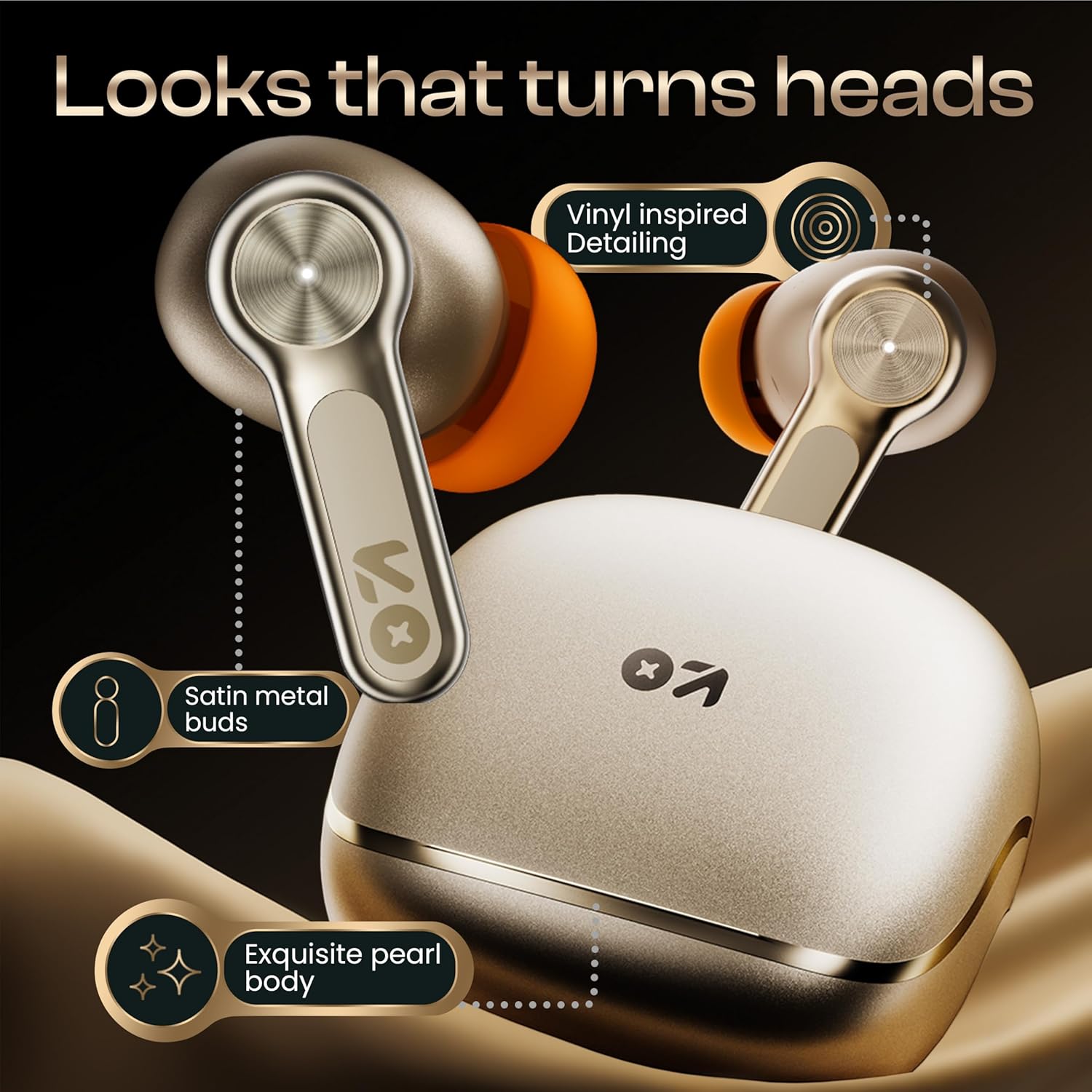
Imej: Terperinci view of the GOBOULT Raven earbuds and their charging case, showcasing the satin metal finish and exquisite pearl body design.
Persediaan
1. Pengecasan Awal
Sebelum penggunaan pertama, cas sepenuhnya fon telinga dan bekas pengecas.
- Letakkan kedua earbud ke dalam cas pengecasan.
- Sambungkan kabel pengecas USB Jenis-C ke port pengecasan pada bekas dan ke sumber kuasa.
- Penunjuk LED pada bekas akan menunjukkan status pengecasan. Setelah dicas sepenuhnya, penunjuk akan berubah atau padam.
A 10-minute charge provides approximately 120 minutes of playtime.

Image: The GOBOULT Raven earbuds being charged in their case, highlighting the impressive 70-hour total battery life and the quick charge capability (10 mins charge for 120 mins playtime).
2. Berpasangan dengan Peranti
The earbuds use Bluetooth 5.4 for stable and quick connections.
- Open the charging case. The earbuds will automatically enter pairing mode (LED indicators will flash).
- Pada peranti anda (telefon pintar, tablet, komputer riba), dayakan Bluetooth.
- Cari untuk "GOBOULT Raven" in the list of available Bluetooth devices and select it to connect.
- Once connected, the LED indicators on the earbuds will stop flashing.
The earbuds feature Blink&Pair™ technology for instant pairing after the initial setup.

Image: The GOBOULT Raven earbuds and case, emphasizing the upgraded Bluetooth v5.4 for instant pairing and reliable connection, along with support for SBC and AAC audio codecs.
3. GOBOULT App Installation
For enhanced customization and control, download the GOBOULT App from your device's app store.
- Cari untuk "GOBOULT" in the App Store (iOS) or Google Play Store (Android).
- Install the app and follow the on-screen instructions to connect your Raven earbuds.
- The app allows you to customize sound profiles (EQ modes), control features, and manage touch controls.

Image: A smartphone screen displaying the GOBOULT Amp APP, illustrating features like equalizer customization, custom touch controls, gaming mode activation, and widget support for a personalized audio experience.
Arahan Operasi
Kawalan Sentuh
The GOBOULT Raven earbuds feature intuitive touch controls on each earbud. The specific functions can often be customized via the GOBOULT App.
| Tindakan | Fungsi |
|---|---|
| Ketik Tunggal (L/R) | Main/Jeda Muzik, Jawab/Tamatkan Panggilan |
| Ketik Dua Kali (L) | Trek Sebelumnya |
| Ketik Dua Kali (R) | Trek Seterusnya |
| Ketik Tiga Kali (L/R) | Aktifkan Pembantu Suara |
| Tekan Lama (L/R) | Reject Call, Toggle Gaming Mode (customizable) |
Note: These are typical touch control functions. Refer to the GOBOULT App for exact and customizable controls.
Imej: A terperinci view of the GOBOULT Raven earbud's touch-sensitive surface, indicating areas for music playback control and call management.
Berpasangan Dwi Peranti
The earbuds can connect to two devices simultaneously, allowing seamless switching between them.
- Pair the earbuds with your first device (e.g., smartphone) as described in the "Pairing with a Device" section.
- Disconnect Bluetooth on the first device or put the earbuds back in the case and close it, then open it again to re-enter pairing mode.
- Pair the earbuds with your second device (e.g., laptop).
- Reconnect the earbuds to the first device via its Bluetooth settings. The earbuds should now be connected to both.
Audio akan bertukar secara automatik kepada peranti yang memainkan kandungan atau menerima panggilan.

Image: The GOBOULT Raven earbuds and their case positioned between a smartphone and a laptop, demonstrating the dual device pairing feature for seamless switching between audio sources.
Gaming Mode (Ultra-Low Latency)
Activate Gaming Mode for a 50ms ultra-low latency experience, ideal for gaming and video playback.
- Gaming Mode can typically be activated via a specific touch control gesture (refer to your GOBOULT App settings or the table above).
- You can also enable/disable Gaming Mode through the GOBOULT App.

Image: The GOBOULT Raven earbuds and their charging case next to a gaming controller, emphasizing the Combat™ Gaming Mode with 50ms ultra-low latency for an optimized gaming experience.
Pembantu Suara
Access your device's voice assistant (Google Assistant, Siri) directly from the earbuds.
- Perform the designated touch control gesture (e.g., triple tap) to activate the voice assistant.
- Sebutkan arahan anda selepas gesaan.

Image: A composite image illustrating the Smart AI Voice Assistance feature, showing integration with "Ok Google" and "Hey Siri", alongside the IPX5 water-resistant rating of the earbuds.
Penyelenggaraan
Pembersihan
- Bersihkan fon telinga dan bekas pengecas dengan kerap menggunakan kain yang lembut, kering dan tidak berbulu.
- Tanggalkan hujung telinga dan bersihkan sebarang tahi telinga atau serpihan daripada muncung fon telinga menggunakan berus kecil atau kapas.
- Pastikan sesentuh pengecasan pada kedua-dua fon telinga dan bekas bersih dan kering.
Rintangan Air (IPX5)
The GOBOULT Raven earbuds are IPX5 water-resistant, meaning they can withstand sweat and light rain. They are not designed for submersion in water.
- Do not expose the earbuds to running water or submerge them.
- If they get wet, wipe them dry thoroughly before placing them back in the charging case.
Penyimpanan
Simpan fon telinga dalam bekas pengecasnya apabila tidak digunakan untuk melindunginya dan memastikan ia dicas.
- Elakkan menyimpan dalam suhu yang melampau atau kelembapan yang tinggi.
Menyelesaikan masalah
| Masalah | Penyelesaian yang Mungkin |
|---|---|
| Fon telinga tidak berpasangan |
|
| Hanya satu fon telinga berfungsi |
|
| Kualiti bunyi yang lemah |
|
| Isu pengecasan |
|
Spesifikasi
| Ciri | Perincian |
|---|---|
| Nama Model | Raven (Airbass Earbuds) |
| Ketersambungan | Bluetooth v5.4 |
| Julat Tanpa Wayar | Sehingga 10 meter |
| Pemacu Audio | Pemacu Dinamik 10mm |
| Masa bermain | Hingga 70 jam (dengan cas pengecasan) |
| Masa Mengecas | Approx. 20 minutes (for quick charge) |
| Latensi Audio | 50ms (Gaming Mode) / 45ms (as per spec) |
| Mikrofon | Quad Mic dengan Pembatalan Bunyi Persekitaran (ENC) |
| Tahan Air | IPX5 |
| Kaedah Kawalan | Sentuh, Suara |
| Ciri Khas | Dual Device Pairing, GOBOULT App Support, Smart AI Voice Assistance |
| Respons Kekerapan | 20 Hz (lower bound) |
| Sensitiviti | 115 dB |
| Antara Muka Perkakasan | USB Jenis C |
| Dimensi Produk | 5 x 4.5 x 5.4 cm |
| Berat Barang | 600 g (berat bungkusan) |
Nota: Spesifikasi tertakluk kepada perubahan tanpa notis terlebih dahulu.
Waranti dan Sokongan
Maklumat Waranti
Your GOBOULT Raven TWS Earbuds come with a Waranti Pengeluar 1 Tahun from the date of purchase. This warranty covers manufacturing defects and ensures trusted performance and premium build quality.
- Please retain your purchase receipt and the warranty card for warranty claims.
- Waranti tidak melindungi kerosakan yang disebabkan oleh penyalahgunaan, kemalangan, pengubahsuaian yang tidak dibenarkan atau haus dan lusuh biasa.
Sokongan Pelanggan
For any queries, technical assistance, or warranty claims, please contact GOBOULT customer support. Refer to the contact information provided on your warranty card or visit the official GOBOULT webtapak untuk butiran sokongan.
Pengeluar: GOBOULT, B-67 Wazirpur Industrial Area, New Delhi 110052, India


