1. Pengenalan
The KONNWEI MAXOBD OBD2 Scanner is a professional diagnostic tool designed to read and clear diagnostic trouble codes (DTCs) from your vehicle's engine control unit (ECU). It provides access to various vehicle systems, allowing users to monitor live data, perform I/M readiness tests, and retrieve vehicle information. This manual provides detailed instructions for the proper use and maintenance of your MAXOBD scanner.
2. Maklumat Keselamatan
Before operating the MAXOBD OBD2 Scanner, please read and understand all safety messages and instructions in this manual. Failure to do so may result in personal injury or damage to the vehicle or the scanner.
- Sentiasa lakukan ujian automotif dalam persekitaran yang selamat.
- Pakai pelindung mata yang memenuhi piawaian ANSI.
- Jauhkan pakaian, rambut, tangan, alatan, peralatan ujian, dsb., dari semua bahagian enjin yang bergerak atau panas.
- Kendalikan kenderaan di kawasan kerja yang mempunyai pengudaraan yang baik; gas ekzos adalah beracun.
- Letakkan transmisi di PARK (untuk transmisi automatik) atau NEUTRAL (untuk transmisi manual) dan pastikan brek letak kereta dihidupkan.
- Keep a fire extinguisher suitable for gasoline/electrical fires nearby.
- Jangan sambungkan atau cabut sebarang peralatan ujian semasa penyalaan dihidupkan atau enjin hidup.
3. Produk Lebihview
The MAXOBD scanner features a clear display and intuitive button layout for easy navigation and operation. It connects directly to your vehicle's OBD-II port to retrieve diagnostic information.
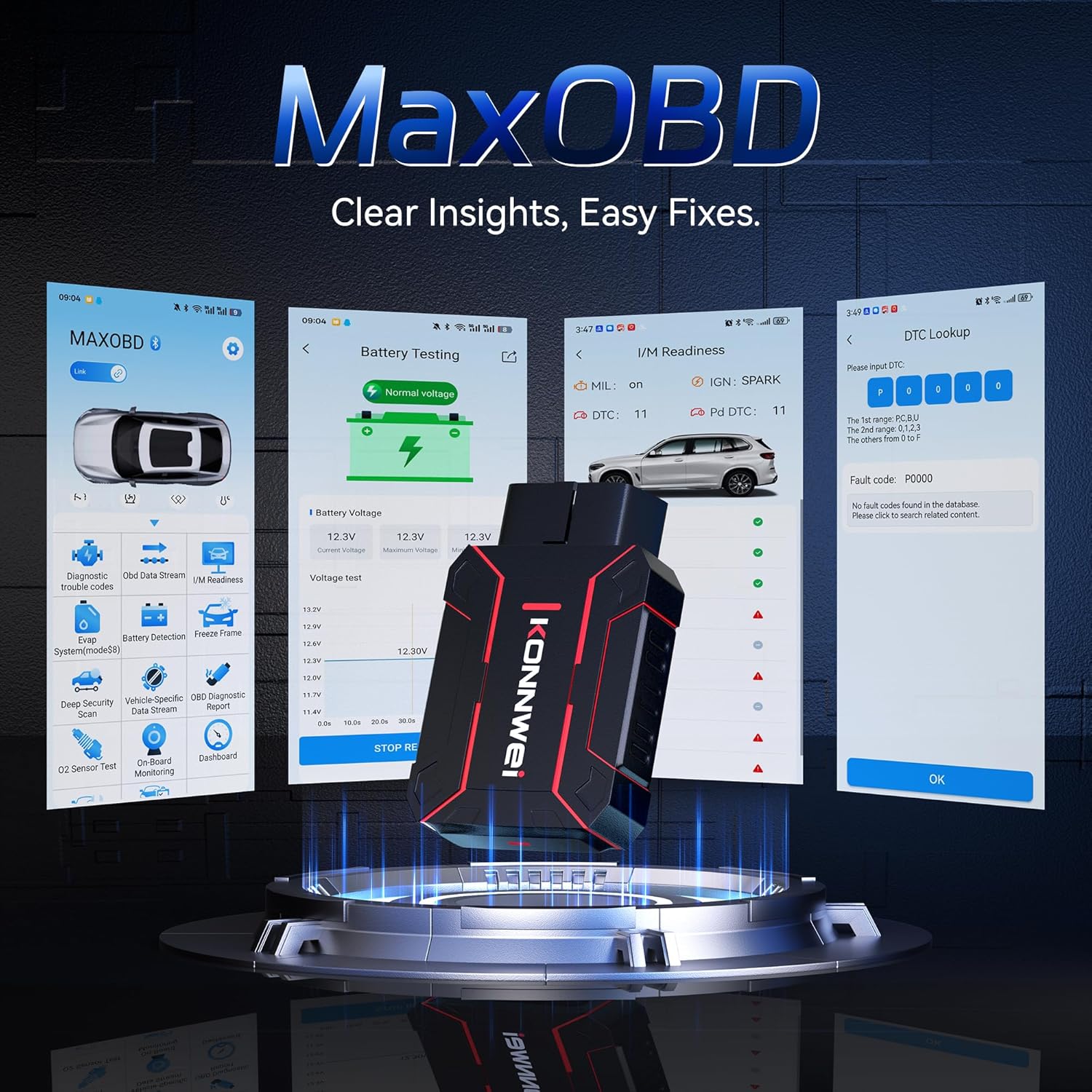
Image: The KONNWEI MAXOBD OBD2 Scanner device, illustrating its physical form and various diagnostic screen interfaces such as battery testing, I/M readiness, and DTC lookup.
Komponen Utama:
- OBD-II Connector: Connects to the vehicle's Data Link Connector (DLC).
- Paparan LCD: Menunjukkan keputusan ujian dan pilihan menu.
- Butang Navigasi: Digunakan untuk menatal menu dan memilih pilihan.
- Enter/Exit Buttons: Confirm selections or return to previous screens.
4. Persediaan
Follow these steps to set up your MAXOBD OBD2 Scanner:
- Locate the Vehicle's OBD-II Port: The 16-pin Data Link Connector (DLC) is usually located under the dashboard on the driver's side of the vehicle. Refer to your vehicle's service manual for the exact location if you cannot find it.
- Sambungkan Pengimbas: Plug the MAXOBD scanner's OBD-II connector firmly into the vehicle's DLC. Ensure a secure connection.
- Hidupkan kuasa: Once connected, the scanner will automatically power on. If it does not, turn the vehicle's ignition to the 'ON' position (engine off).
5. Arahan Operasi
The MAXOBD scanner offers various diagnostic functions. Use the navigation buttons to move through menus and the Enter button to select options.

Image: A visual representation of a vehicle highlighting various systems (Engine, ABS, SAS, SRS, DPF, TPMS) that the MAXOBD scanner can perform a full system scan on.
Fungsi Menu Utama:
- Baca Kod: Retrieves Diagnostic Trouble Codes (DTCs) from the vehicle's ECU. These codes indicate specific issues detected by the vehicle's onboard diagnostic system.
- Padamkan Kod: Clears all DTCs from the vehicle's ECU and turns off the Malfunction Indicator Lamp (MIL). Ensure the underlying issue is resolved before clearing codes.
- Kesediaan Saya / M: Memeriksa status sistem pemantauan berkaitan pelepasan untuk menentukan sama ada ia bersedia untuk ujian pelepasan.
- Aliran Data: Displays real-time operational parameters from the vehicle's sensors and components. This can include engine RPM, vehicle speed, oxygen sensor readings, and more.
- Bingkai pegun: Captures a snapshot of sensor data at the moment a DTC was set. This data can help identify the conditions under which a fault occurred.
- Ujian Sensor O2: Retrieves O2 sensor monitoring test results for the most recently completed tests from the vehicle's onboard computer.
- Ujian Monitor On-Board: Mendapatkan keputusan untuk komponen dan sistem rangkaian kuasa berkaitan emisi yang tidak dipantau secara berterusan.
- Ujian Sistem EVAP: Memulakan ujian kebocoran untuk Sistem Kawalan Pelepasan Sejatan Kenderaan.
- Maklumat Kenderaan: Memaparkan nombor pengenalan kenderaan (VIN), ID penentukuran (CALID) dan nombor pengesahan penentukuran (CVN).
Melakukan Imbasan Diagnostik:
- Connect the scanner to the vehicle's DLC and turn the ignition to 'ON'.
- From the main menu, select 'Read Codes' and press Enter.
- The scanner will communicate with the vehicle and display any detected DTCs.
- Use the navigation buttons to scroll through the codes and their descriptions.
- To clear codes, return to the main menu, select 'Erase Codes', and confirm.
6. Penyelenggaraan
Proper maintenance ensures the longevity and reliable operation of your MAXOBD scanner.
- Pembersihan: Gunakan yang lembut, damp cloth to clean the scanner's exterior. Do not use abrasive cleaners or solvents.
- Storan: Store the scanner in a dry, clean environment away from extreme temperatures and direct sunlight. Keep it in its original packaging or a protective case when not in use.
- Kemas Kini Perisian: Semak pegawai KONNWEI secara berkala website for available software updates to ensure your scanner has the latest vehicle compatibility and features. Follow the instructions provided on the website for updating the device.
7. Penyelesaian masalah
If you encounter issues with your MAXOBD scanner, refer to the following common problems and solutions:
| Masalah | Kemungkinan Punca | Penyelesaian |
|---|---|---|
| Pengimbas tidak dihidupkan. | Loose connection; vehicle ignition off; faulty OBD-II port. | Ensure the scanner is securely plugged into the DLC. Turn vehicle ignition to 'ON'. Test on another vehicle if possible. |
| Mesej "Ralat Pautan" atau "Ralat Komunikasi". | Loose connection; vehicle not OBD-II compliant; ignition off; communication protocol issue. | Verify connection. Ensure vehicle is OBD-II compliant (most vehicles 1996 and newer). Turn ignition to 'ON'. Try a different vehicle if available. |
| Skrin kosong atau beku. | Gangguan perisian; gangguan bekalan elektrik. | Disconnect and reconnect the scanner. If the issue persists, contact customer support. |
If the problem persists after attempting these solutions, please contact KONNWEI customer support for further assistance.
8. Spesifikasi
- Jenama: KONNWEI
- model: maxobdTM
- Sumber Kuasa: Battery Powered (via OBD-II port)
- Sistem pengendalian: Linux
- Saiz Skrin: 2.8 Inci
- Jenis Kesesuaian Automotif: Universal Fit (for OBD-II compliant vehicles)
- Dimensi Pakej: 10.04 x 7.28 x 2.76 inci
9. Waranti dan Sokongan
KONNWEI products are designed for reliability and performance. For warranty information, please refer to the documentation included with your purchase or visit the official KONNWEI website. For technical support, troubleshooting assistance, or any other inquiries, please contact KONNWEI customer service through their official channels.
KONNWEI Official Webtapak: Lawati Kedai KONNWEI di Amazon


