1. Pengenalan
The ATTACK SHARK G800 is a versatile wireless RGB gaming headset designed for an immersive audio experience across multiple platforms. It features tri-mode connectivity (2.4Ghz wireless, Bluetooth, and wired), 7.1 virtual surround sound, 50mm drivers, and a detachable AI noise-canceling microphone. This manual provides instructions for setup, operation, and maintenance to ensure optimal performance.
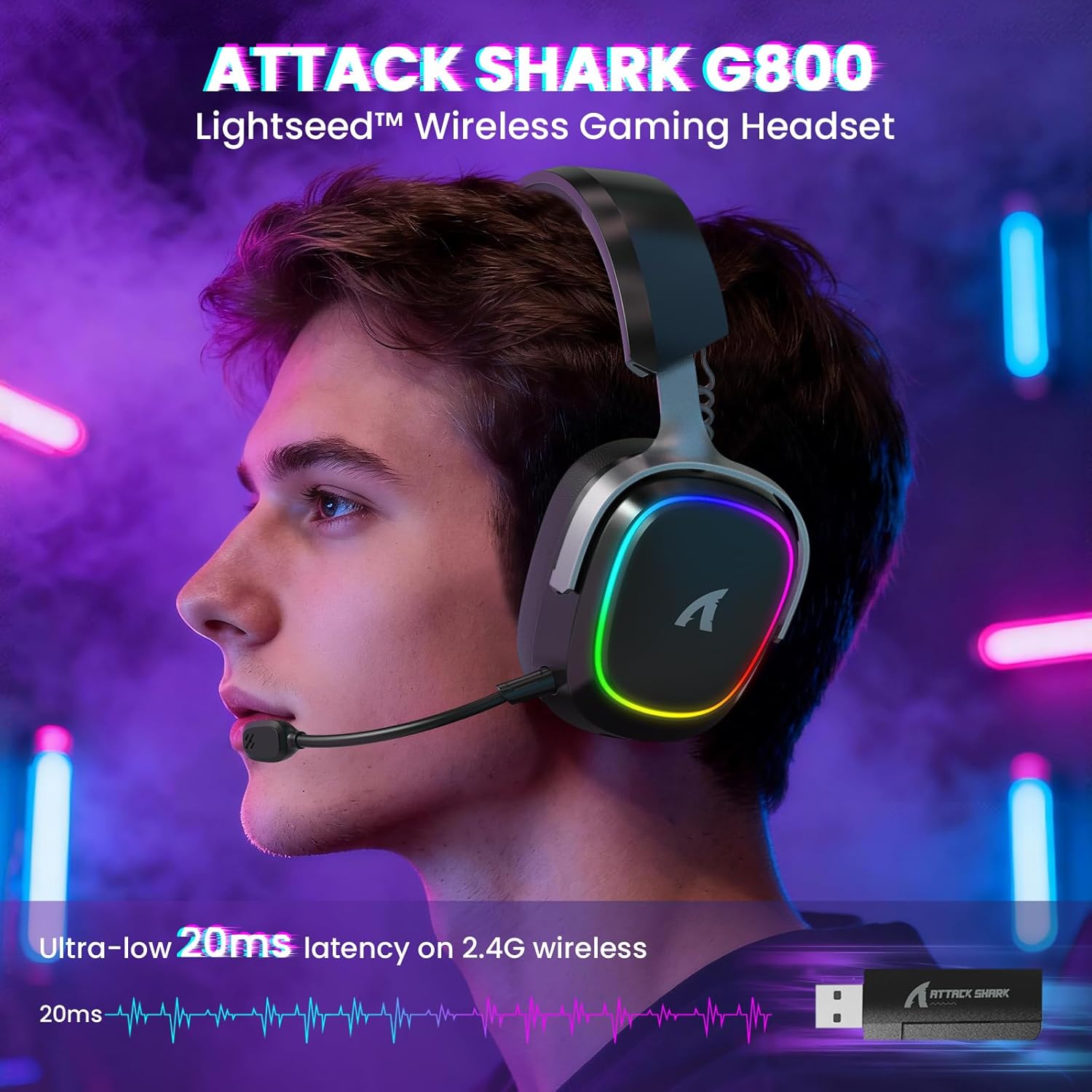
Image: The G800 headset in use, highlighting its RGB lighting and comfortable fit.
2. Apa yang ada di dalam Kotak
- ATTACK SHARK G800 Wireless RGB Gaming Headset
- Detachable AI Noise-Canceling Microphone
- 2.4Ghz Wireless USB-A + Type-C Dual-Head Receiver
- Kabel Pengecas USB-A ke USB-C
- Kabel Audio USB-C ke USB-C
- Manual Pengguna (dokumen ini)
3. Produk LebihviewKawalan dan Port
Familiarize yourself with the various controls and ports on your G800 headset for seamless operation.
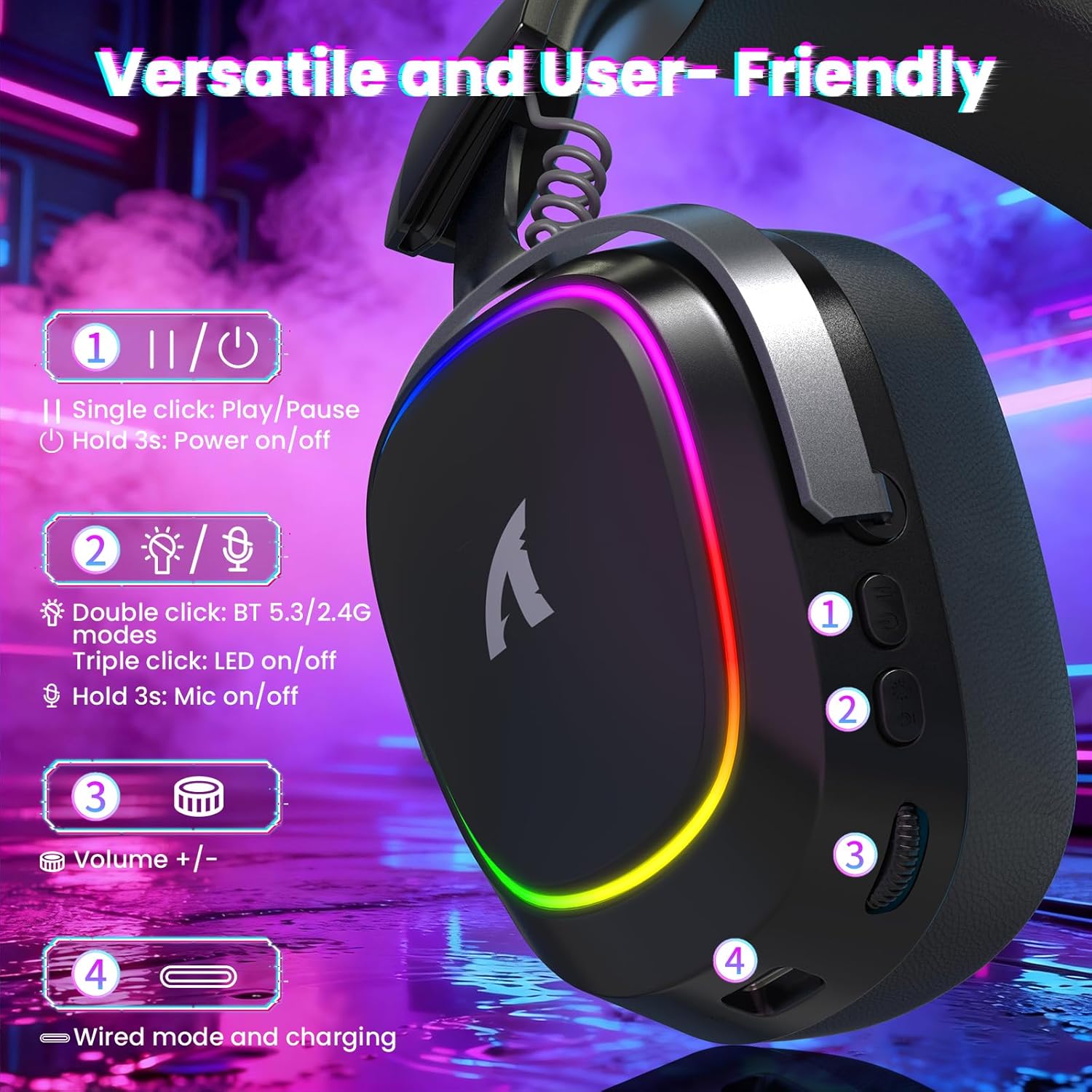
Imej: Terperinci view of the headset's left earcup with numbered controls and their functions.
- Play/Pause & Power Button: Single click for play/pause. Hold for 3 seconds to power on/off.
- Mode Switch & LED/Mic Control: Double click to switch between Bluetooth (BT 5.3) and 2.4Ghz wireless modes. Triple click to toggle RGB LED on/off. Hold for 3 seconds to toggle microphone on/off.
- Roda Kelantangan: Rotate to adjust audio volume up or down.
- Wired Mode & Charging Port: USB-C port for wired connection and charging.
- Jack Mikrofon: Port untuk menyambungkan mikrofon yang boleh ditanggalkan.
4. Persediaan dan Sambungan
The G800 headset offers three connection methods: 2.4Ghz wireless, Bluetooth, and wired.
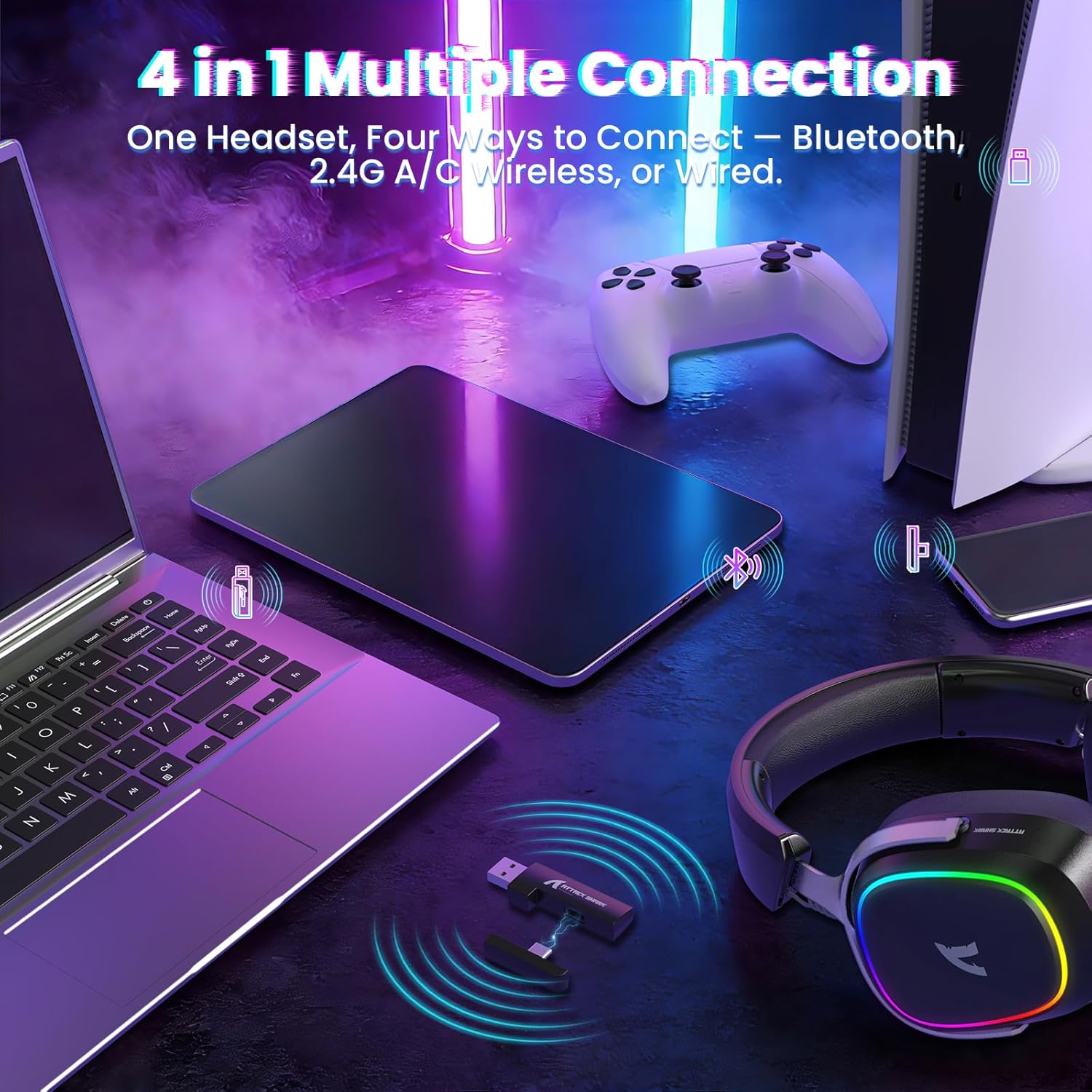
Image: The headset demonstrating its multi-platform connectivity options.
4.1. Sambungan Wayarles 2.4Ghz
- Insert the 2.4Ghz USB-A or Type-C dual-head receiver into an available USB port on your PC, laptop, or PS5.
- Power on the G800 headset by holding the Power Button (1) for 3 seconds.
- Double click the Mode Switch (2) until the headset indicates 2.4Ghz mode (usually via an LED indicator or voice prompt).
- The headset should automatically connect to the receiver. If not, ensure the receiver is properly inserted and the headset is in 2.4Ghz mode.
4.2. Sambungan Bluetooth
- Power on the G800 headset by holding the Power Button (1) for 3 seconds.
- Double click the Mode Switch (2) until the headset indicates Bluetooth mode (usually via an LED indicator or voice prompt). The headset will enter pairing mode.
- On your device (e.g., mobile phone, tablet, PC), go to Bluetooth settings and search for available devices.
- Select "ATTACK SHARK G800" from the list to pair.
4.3. Sambungan Berwayar
- Connect one end of the USB-C audio cable to the Wired Mode & Charging Port (4) on the headset.
- Connect the other end of the USB-C audio cable to your device's compatible port.
- Alat dengar akan bertukar secara automatik kepada mod berwayar.
4.4. Mengecas Alat Dengar
The G800 headset is equipped with a 1000mAh battery for extended use.

Image: Visual representation of the headset's 1000mAh battery capacity.
- Connect the USB-A to USB-C charging cable to the Wired Mode & Charging Port (4) on the headset and to a USB power source (e.g., computer USB port, wall adapter).
- Penunjuk LED pada set kepala akan menunjukkan status pengecasan.
- The headset includes charging over-voltage perlindungan untuk keselamatan.
- An auto-shutdown function activates after 5 minutes of inactivity to conserve power.
5. Arahan Operasi
5.1. Pengalaman Audio
The G800 features 50mm large-aperture biological diaphragm drivers and virtual 7.1 surround sound for an immersive audio experience.

Image: The 50mm audio drivers, responsible for high-fidelity sound.

Image: Demonstrating the 7.1 surround sound capability for precise audio positioning.
5.2. Penggunaan Mikrofon
The detachable 360° AI Noise-Canceling Microphone ensures clear voice communication by filtering out background noise.
- Insert the detachable microphone into the dedicated microphone jack on the headset.
- Hold the Mode Switch (2) for 3 seconds to toggle the microphone on or off.
5.3. Kawalan Pencahayaan RGB
The headset features customizable RGB lighting.
- Triple click the Mode Switch (2) to toggle the RGB LED lighting on or off.
5.4. Software Customization
Enhance your audio experience with the dedicated driver software.
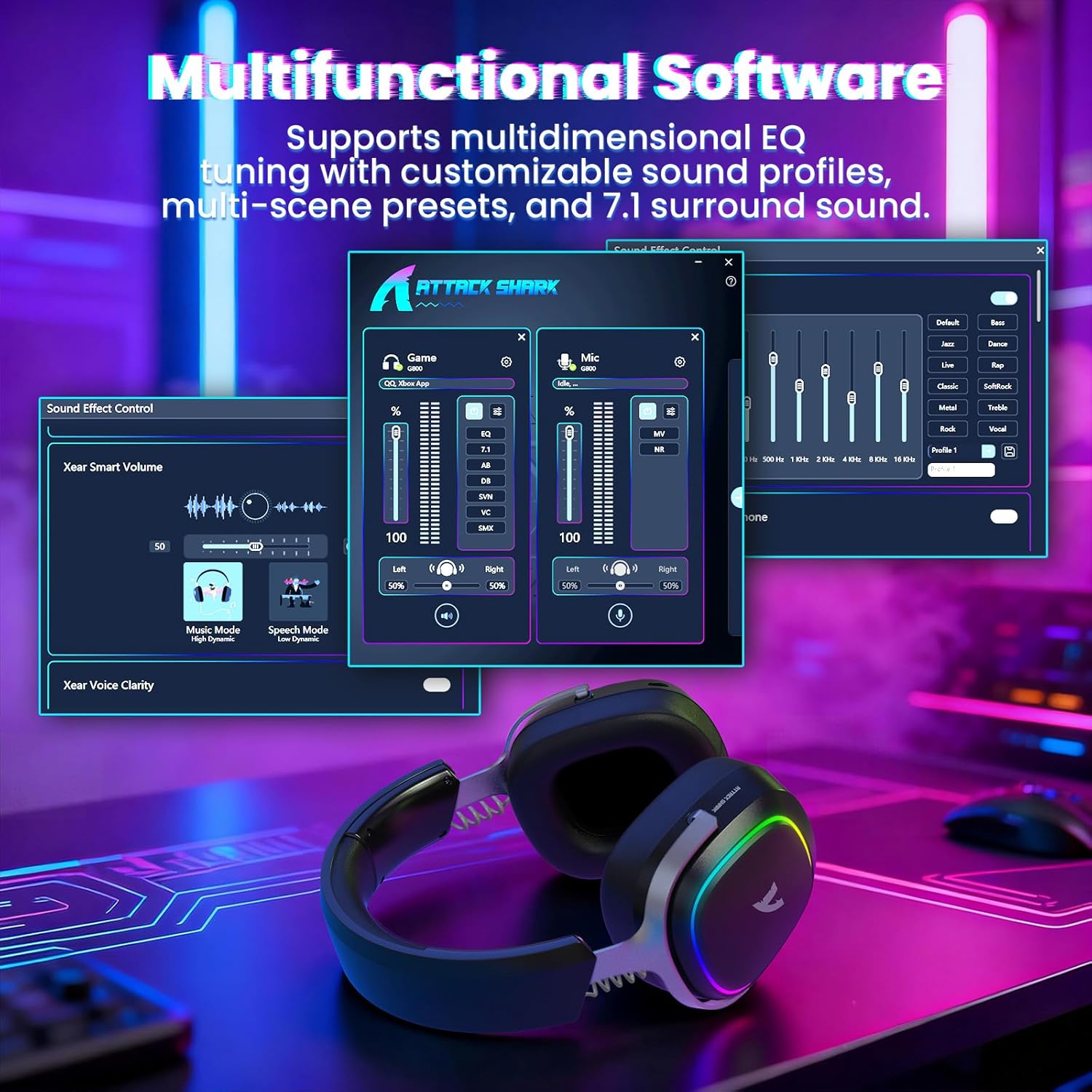
Image: The software interface for customizing audio settings.
- Download the official ATTACK SHARK G800 driver software from the manufacturer's webtapak.
- The software allows you to create custom EQ sound profiles and fine-tune 7.1 surround sound settings to match your preferences and game types.
6. Penyelenggaraan
Proper maintenance ensures the longevity and performance of your G800 headset.
- Pembersihan: Gunakan kain lembut dan kering untuk membersihkan alat dengar. Elakkan pembersih cecair atau bahan kasar.
- Storan: Simpan alat dengar di tempat yang sejuk dan kering jauh dari cahaya matahari langsung dan suhu yang melampau.
- Alas Telinga: The ear cushions are replaceable. Refer to the manufacturer's website for replacement parts and instructions.

Image: Components of the headset, including replaceable ear cushions.
7. Penyelesaian masalah
- Tiada Bunyi:
- Semak tahap kelantangan pada kedua-dua set kepala dan peranti anda yang disambungkan.
- Ensure the correct audio output device is selected in your device's sound settings.
- Verify the headset is properly connected (2.4Ghz receiver, Bluetooth paired, or wired cable).
- Reboot the headset and your device.
- Mikrofon Tidak Berfungsi:
- Pastikan mikrofon dipasang dengan kukuh pada alat dengar.
- Check if the microphone is muted (hold Mode Switch (2) for 3 seconds to toggle).
- Sahkan bahawa peranti input mikrofon yang betul telah dipilih dalam tetapan bunyi peranti anda.
- Uji mikrofon pada peranti lain jika boleh.
- Isu Sambungan:
- For 2.4Ghz, ensure the receiver is fully inserted and the headset is in 2.4Ghz mode.
- For Bluetooth, ensure the headset is in pairing mode and within range of your device. Try unpairing and re-pairing.
- For wired, ensure the cable is securely connected to both the headset and your device.
- Avoid sources of interference (e.g., other wireless devices, microwaves).
- Lampu RGB Tidak Berfungsi:
- Triple click the Mode Switch (2) to toggle the RGB LED on/off.
- Ensure the headset has sufficient battery charge.
8. Spesifikasi
| Ciri | Spesifikasi |
|---|---|
| Nama Model | G800 |
| Teknologi Ketersambungan | Wired, Bluetooth (BT 5.3), 2.4Ghz Wireless |
| Jenis Pemacu Audio | Pemacu Dinamik (50mm) |
| Bunyi Sekeliling | Virtual 7.1 Spatial Audio |
| Mikrofon | Detachable 360° AI Noise-Canceling |
| Wireless Latency (2.4Ghz) | 20ms (Lightseed Wireless Technology) |
| Wireless Range (2.4Ghz) | Sehingga 10m / 32.8kaki |
| Julat Bluetooth | Sehingga 30m / 98.4kaki |
| Kapasiti Bateri | 1000mAh |
| Penempatan Telinga | Atas Telinga |
| bahan | Aluminum Alloy, Protein Leather, Memory Foam |
| Berat badan | 1.1 paun (lebih kurang) |
| Peranti Serasi | PC, Laptops, PS5, Mobile Devices |
9. Maklumat Keselamatan
- Elakkan mendengar berpanjangan pada kelantangan tinggi untuk mengelakkan kerosakan pendengaran.
- Do not expose the headset to extreme temperatures, humidity, or liquids.
- Jauhkan daripada kanak-kanak.
- Jangan cuba membuka atau mengubah suai alat dengar. Ini akan membatalkan jaminan.
- Buang produk secara bertanggungjawab mengikut peraturan tempatan.
10. Video Produk Rasmi
Video: Tayangan video produk rasmicasing the ATTACK SHARK G800 Wireless Tri Mode RGB Gaming Headset's features and design. This video is provided by the seller, UrWorthLtd US.
11. Waranti dan Sokongan
For warranty information, technical support, or customer service, please refer to the documentation included with your purchase or visit the official ATTACK SHARK webtapak. Simpan bukti pembelian anda untuk tuntutan waranti.


