1. Pengenalan
This manual provides detailed instructions for the assembly, operation, and maintenance of your FLEXISPOT CyberX 71-Inch RGB LED Electric Gaming Standing Desk. Please read this manual thoroughly before use to ensure proper function and safety. Keep this manual for future reference.
2. Maklumat Keselamatan
- Pastikan semua komponen diikat dengan selamat sebelum digunakan.
- Jangan melebihi kapasiti beban maksimum 352 lbs (160 kg).
- Jauhkan kanak-kanak dan haiwan peliharaan daripada meja semasa melaraskan ketinggian.
- Avoid placing liquids directly on the desk surface without a cup holder to prevent spills and potential damage to electronics.
- Do not disassemble or modify the desk's electrical components. Contact customer support for service.
- Ensure power cables are properly managed to prevent tripping hazards or damage.
3. Kandungan Pakej
Sahkan bahawa semua bahagian telah tersedia sebelum memulakan pemasangan. Jika mana-mana bahagian hilang atau rosak, sila hubungi khidmat pelanggan.
- Desktop (1)
- Desk Legs with Dual Motors (2)
- Crossbar/Frame Components
- Gamepad-Style Joystick Controller (1)
- Penyesuai Kuasa dan Kabel
- Pengatur Kabel (1)
- Pemegang Piala (1)
- Rotating Headphone Stand (1)
- Perkakasan Pemasangan (skru, alatan)

4. Persediaan dan Pemasangan
Assembly is straightforward and typically takes approximately 45 minutes. It is recommended to have assistance due to the weight of the components.
4.1 Pemasangan Bingkai
- Buka bungkusan semua komponen dan letakkannya di atas permukaan yang bersih dan rata.
- Attach the crossbar components to the desk legs using the provided hardware. Ensure all screws are tightened securely.
- Connect the motor cables to the main control hub.
4.2 Desktop Attachment
- Carefully place the desktop upside down on a soft, protective surface.
- Position the assembled frame onto the desktop, aligning the pre-drilled holes.
- Secure the desktop to the frame using the provided screws. Ensure the cable management tray and control box are properly positioned before fully tightening the desktop.
4.3 Pemasangan Aksesori
- Attach the cup holder and rotating headphone stand to the desired locations on the desktop edges.
- Install the cable organizer and cable management tray underneath the desktop.
- Connect the RGB LED strips to the designated ports on the control hub.

4.4 Assembly Video Reference
For a visual guide on the assembly process, refer to the following video:
5. Arahan Operasi
5.1 Pelarasan Ketinggian
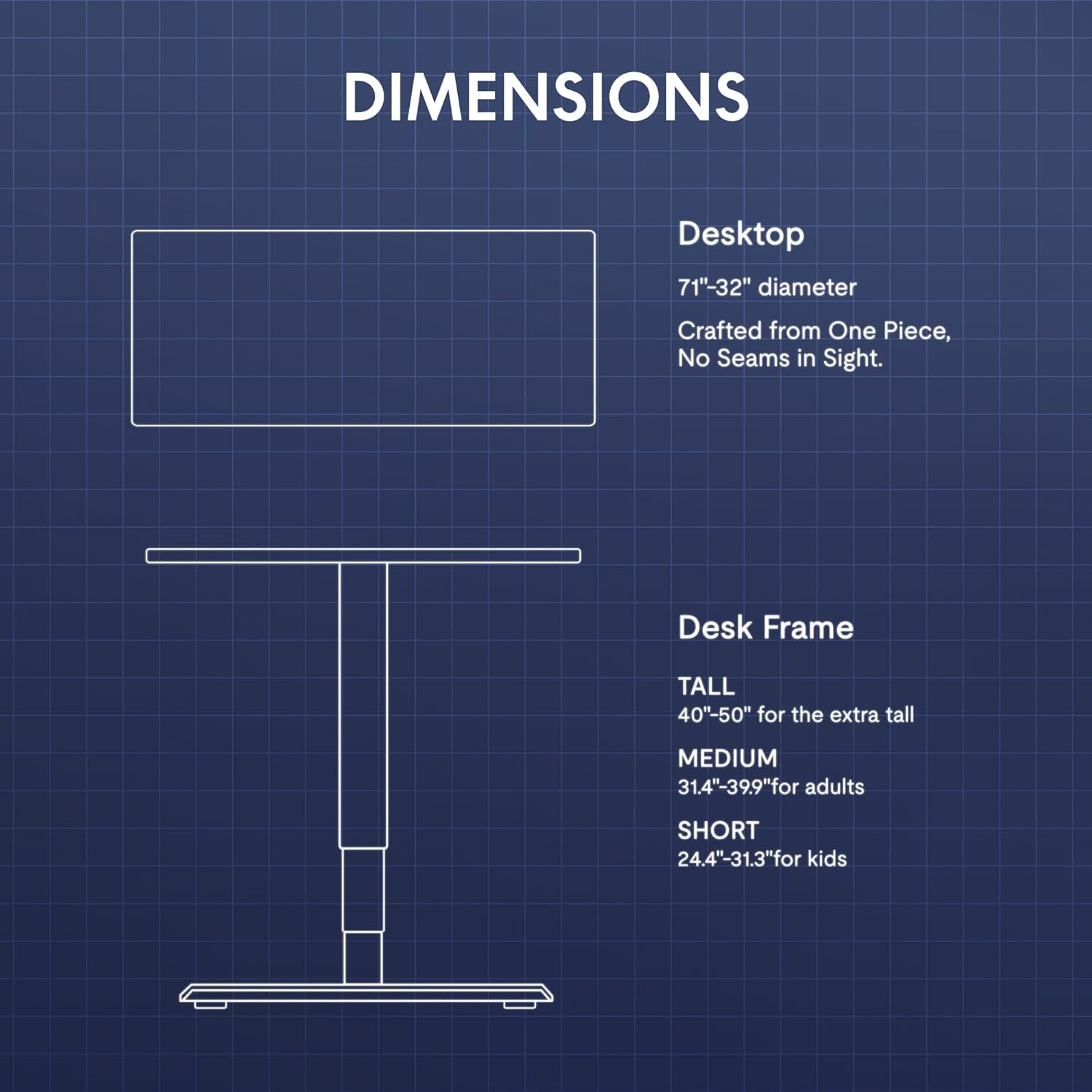
The desk features a gamepad-style joystick controller for intuitive height adjustment. The 3-stage legs allow for a lifting range from 24.4 inches to 50 inches.
- Menyelaraskan Tinggi: Use the joystick to move the desk up or down. The LED display will show the current height.
- Pratetap Memori: The controller includes three memory presets (1, 2, 3). To save a height, adjust the desk to the desired level, press the 'M' button, then press the desired preset number (1, 2, or 3). To recall a saved height, simply press the corresponding preset number.

Pencahayaan LED 5.2 RGB
The desk features integrated 3-sided RGB LED strips to enhance your workspace ambiance.
- Menukar Warna: Use the left/right controls on the joystick to cycle through various RGB lighting colors and effects.

5.3 Video Demonstrating Operation
Observe the desk's operation, including height adjustment and RGB lighting, in the following video:
6. Ciri Berakhirview
- Immersive RGB LED Lighting: Integrated 3-sided RGB LED strips provide dynamic lighting.
- Gamepad-Style Joystick Controller: Features an LED display with multi-color RGB lighting and 3 memory presets for height adjustment.
- Dual Motor Powerful Lift: Crafted with aerospace-grade steel and dual motors, supporting up to 352 lbs with smooth, quiet height adjustments.
- Extended 3-Stage Height Range: 24.4"–50" lifting range for superior stability and accommodation of various user heights.
- Carbon Fiber Texture Desktop: Kelengkapan yang tahan lama dan estetikasing surface.
- Pengurusan Kabel Bersepadu: Includes a cable organizer and a cable management tray to keep wires tidy.
- Aksesori yang Mudah: Features a removable cup holder and a rotating headphone stand.

7. Penyelenggaraan
- Pembersihan: Lap permukaan desktop dengan kain lembut,amp kain. Elakkan pembersih yang melelas atau bahan kimia yang keras.
- Pemeriksaan: Periksa semua skru dan sambungan secara berkala untuk memastikan ia ketat.
- Pengurusan Kabel: Regularly inspect cables for wear or damage and ensure they are neatly organized to prevent interference with desk movement.
8. Penyelesaian masalah
| Masalah | Kemungkinan Punca | Penyelesaian |
|---|---|---|
| Meja tidak bergerak | Power cable disconnected; Overload; Motor error | Check power connections; Reduce weight on desk; Unplug for 10 seconds and replug. |
| Pelarasan ketinggian tidak sekata | Obstruction; Sensor issue | Clear any obstructions; Perform a reset (refer to controller instructions). |
| Lampu RGB tidak berfungsi | RGB cable disconnected; Controller issue | Check RGB cable connections to the control hub; Ensure controller is powered. |
Jika masalah berterusan, sila hubungi khidmat pelanggan.
9. Spesifikasi
| Ciri | Perincian |
|---|---|
| Jenama | FLEXISPOT |
| Model | CyberX |
| Dimensi Desktop | 71"L x 32"D |
| Julat Ketinggian | 24.4" - 50" |
| Kapasiti Muatan | Sehingga 352 lbs |
| Jenis Motor | Dual Motor, 3-Stage Kaki |
| Ciri Khas | RGB LED Lighting, Gamepad-Style Joystick Controller, Memory Presets, Cable Management, Cup Holder, Headphone Stand |
| bahan | Wood (Top), Metal (Base) |
| warna | Bingkai Putih + Atasan Putih |
| Perhimpunan Diperlukan | ya |
10. Waranti dan Sokongan
The FLEXISPOT CyberX desk comes with a 5-year coverage on the frame and motors, and a 3-year protection on electronics and the controller. This warranty covers manufacturing defects and ensures reliable operation under normal use.
For technical support, warranty claims, or any inquiries, please contact FLEXISPOT customer service through their official webtapak atau peruncit tempat produk itu dibeli.


