pengenalan
Welcome to the user manual for your new Lenovo LOQ 15IRX10 Gaming Laptop. This guide provides essential information for setting up, operating, maintaining, and troubleshooting your device. The Lenovo LOQ 15IRX10 is a high-performance gaming laptop featuring a 15.6" FHD IPS 144Hz display, a 13th Generation Intel Core i7-13650HX processor, NVIDIA GeForce RTX 5050 graphics, 24GB DDR5 RAM, and a 1TB NVMe M.2 SSD, running on Windows 11 Home.
Please read this manual thoroughly to ensure proper use and to maximize the lifespan and performance of your laptop.
Apa yang ada dalam Kotak
Upon unboxing your Lenovo LOQ 15IRX10 Gaming Laptop, please verify that all the following items are included:
- Lenovo LOQ 15IRX10 Gaming Laptop
- Penyesuai AC 245W
- Pemacu USB MST 32GB
- Quick Start Guide (if applicable, not explicitly listed but common)
Jika terdapat sebarang barang yang hilang atau rosak, sila hubungi peruncit anda atau sokongan Lenovo dengan segera.
Persediaan
1. Hidupkan dan Pengecasan Awal
Before first use, it is recommended to fully charge your laptop's battery.
- Sambungkan penyesuai AC 245W ke port input kuasa pada komputer riba anda.
- Palamkan penyesuai AC ke salur keluar kuasa.
- Tekan butang kuasa untuk menghidupkan komputer riba.

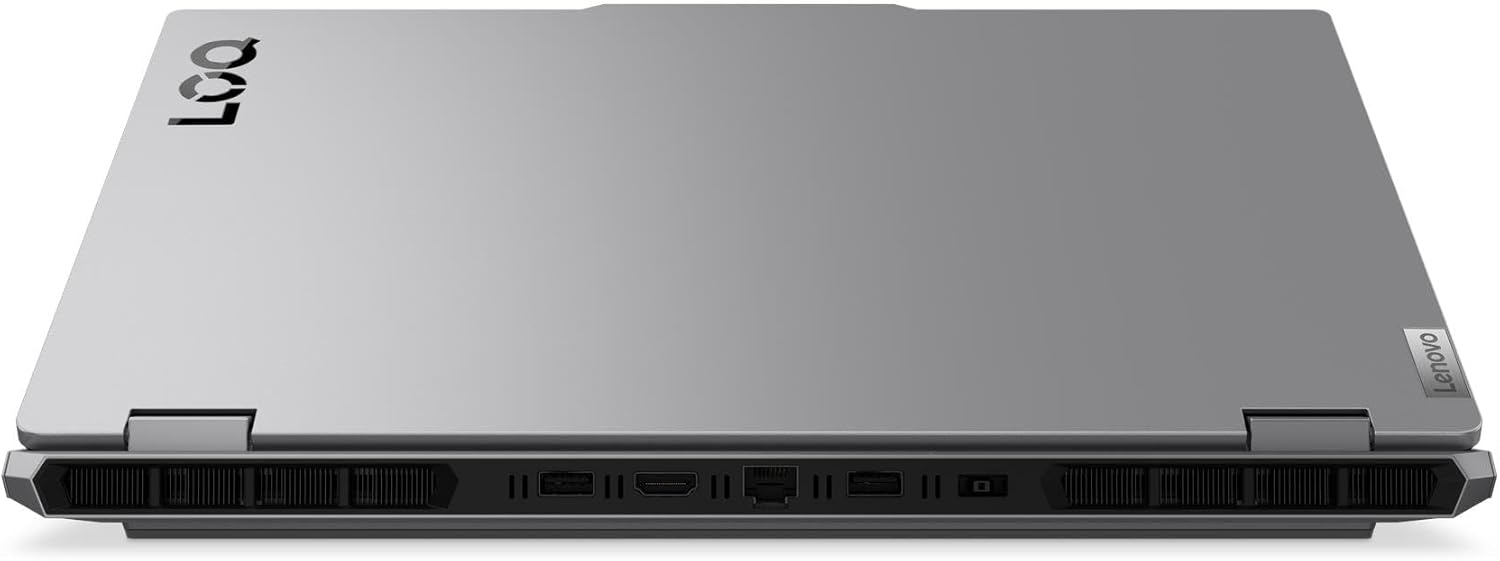
Imej: Belakang view of the Lenovo LOQ 15IRX10 laptop showing the power input and other ports.
2. Windows 11 Home Setup
Follow the on-screen instructions to complete the initial setup of Windows 11 Home. This includes selecting your region, language, connecting to a network, and creating a user account.
3. Menyambung ke Rangkaian
Your laptop supports Wi-Fi 6 and Gigabit Ethernet.
- Wi-Fi: During Windows setup or later, click the Wi-Fi icon in the taskbar, select your network, and enter the password.
- Ethernet: Sambungkan kabel Ethernet dari penghala atau modem anda ke port RJ-45 pada komputer riba.
Imej: Belakang view of the laptop highlighting the RJ-45 Ethernet port.
4. Menyambung Peranti
Connect external devices such as a mouse, keyboard, or external display.
- Peranti USB: Use the USB 3.2 Gen 1 Type-A ports or the USB 3.2 Gen 2 Type-C port.
- Paparan luaran: Connect an external monitor using the HDMI v2.1 port or the USB 3.2 Gen 2 Type-C port (which supports DisplayPort).
- Peranti Audio: Use the Headphone/Microphone Combo Jack for headsets.
Imej: Sebelah kiri view of the laptop showing USB-C, USB-A, and audio jack ports.
Imej: Belakang view of the laptop highlighting the HDMI port.
Mengendalikan Komputer Riba
Papan Kekunci dan Pad Sentuh
Your Lenovo LOQ 15IRX10 features a full-size keyboard with a numeric keypad and white backlighting for comfortable typing in various lighting conditions. The touchpad supports multi-touch gestures for intuitive navigation.

Imej: Atas ke bawah view of the laptop showing the keyboard and touchpad.
Paparan
The 15.6-inch Full HD (1920 x 1080) IPS Anti-Glare display offers a 144Hz refresh rate for smooth visuals, especially during gaming. Adjust brightness using the function keys (Fn + F5/F6) or through Windows display settings.
Audio
The laptop is equipped with stereo speakers (2W x2) optimized with Nahimic Audio for an immersive sound experience. Adjust volume using the function keys (Fn + F1/F2/F3) or Windows sound settings.
Pengurusan Bateri
The 4-cell, 60 Wh battery provides up to 6 hours of average usage. For optimal battery life:
- Keep the AC adapter connected during intensive tasks like gaming.
- Utilize Windows power saving modes when not gaming.
- Elakkan suhu yang melampau.
The laptop supports Super Rapid Charge, allowing it to charge from 0% to 30% in approximately 10 minutes.
Penyelenggaraan
Membersihkan Komputer Riba Anda
- Skrin: Gunakan kain lembut yang tidak berbulu dampdiisi dengan air atau pembersih skrin. Jangan sembur cecair terus ke skrin.
- Papan Kekunci dan Casis: Gunakan kain lembut dan kering. Untuk kotoran degil, sedikit damp kain dengan larutan sabun lembut boleh digunakan, memastikan tiada cecair memasuki bukaan.
- Pengudaraan: Bersihkan habuk dari lubang penyejuk secara berkala menggunakan udara termampat untuk memastikan aliran udara yang betul dan mencegah terlalu panas.
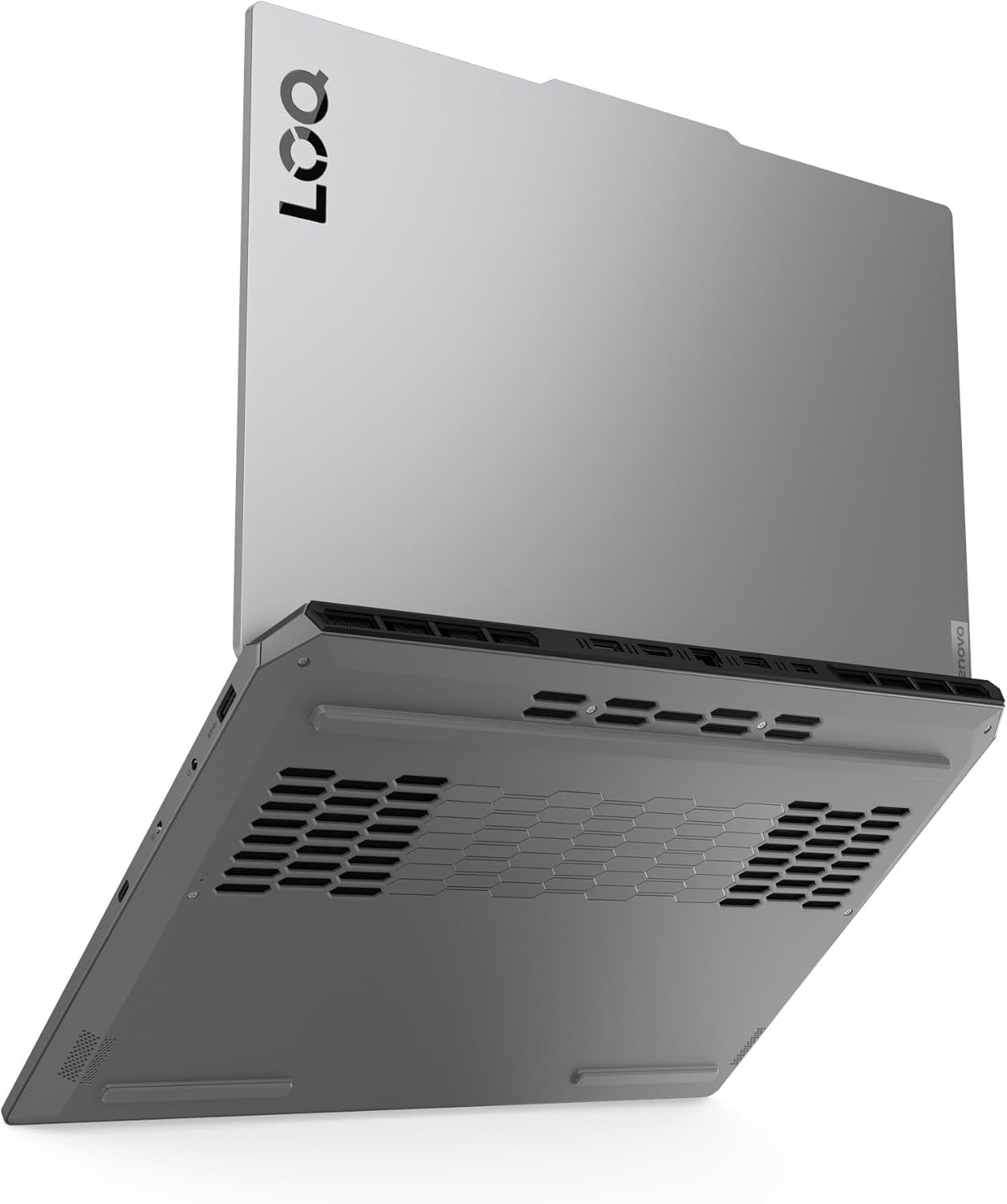
Imej: Bawah view of the laptop, illustrating the ventilation grilles for cooling.
Kemas Kini Perisian
Regularly update your operating system, drivers, and applications to ensure optimal performance, security, and compatibility.
- Kemas Kini Windows: Pergi ke Tetapan > Kemas Kini Windows.
- Kemas Kini Pemandu: Check the official Lenovo support website for the latest drivers for your model. NVIDIA graphics drivers should be updated regularly through GeForce Experience or NVIDIA's webtapak.
Pengurusan Storan
Periodically manage your 1TB NVMe M.2 SSD to maintain performance.
- Padam yang tidak perlu files dan aplikasi.
- Use Windows Disk Cleanup or Storage Sense to free up space.
- Consider backing up important data to an external drive or cloud storage.
Menyelesaikan masalah
Bahagian ini membincangkan isu biasa yang mungkin anda hadapi. Untuk masalah yang lebih kompleks, rujuk sokongan Lenovo webtapak atau hubungi sokongan teknikal.
Tiada Kuasa / Komputer Riba Tidak Boleh Dihidupkan
- Pastikan penyesuai AC disambungkan dengan selamat pada kedua-dua komputer riba dan salur keluar kuasa yang berfungsi.
- Sahkan alur keluar kuasa berfungsi dengan memasang peranti lain.
- Jika bateri habis sepenuhnya, biarkan ia mengecas sekurang-kurangnya 30 minit sebelum cuba menghidupkan.
Isu Paparan
- Skrin Kosong: Ensure the laptop is powered on. Try connecting an external monitor to check if the issue is with the laptop's display or the graphics output.
- Resolusi/Kadar Segar Semula Salah: Adjust display settings in Windows (Settings > System > Display). Ensure graphics drivers are up to date.
Network Connectivity Problems
- Wi-Fi: Check if Wi-Fi is enabled in Windows settings. Restart your router/modem. Ensure you are connecting to the correct network with the right password.
- Ethernet: Verify the Ethernet cable is properly connected. Check network adapter settings in Windows.
Lampu latar keyboard
The Lenovo LOQ 15IRX10 features a white backlit keyboard. If the backlight is not working, ensure it is enabled using the dedicated function key (often Fn + Spacebar or a specific F-key, refer to your keyboard's icons). This model does not support multi-color (RGB) backlighting.
Spesifikasi
Detailed technical specifications for the Lenovo LOQ 15IRX10 Gaming Laptop:
| Ciri | Spesifikasi |
|---|---|
| Nama Model | LOQ 15IRX10 |
| Pemproses | 13th Gen Intel Core i7-13650HX (14-Core, up to 4.9 GHz) |
| Grafik | NVIDIA GeForce RTX 5050 8GB GDDR6 |
| Paparan | 15.6" FHD (1920 x 1080) IPS Anti-Glare, 144Hz, 300 nits, 100% sRGB, G-SYNC |
| RAM | 24GB DDR5 4800 MHz |
| Penyimpanan | 1TB NVMe M.2 SSD |
| Sistem Operasi | Windows 11 Home |
| papan kekunci | Fullsize Backlit Keyboard with Numpad (White Backlight) |
| Webcam | 5.0MP with E Shutter |
| Audio | Stereo speakers, 2W x2, optimized with Nahimic Audio |
| Kesambungan Wayarles | Realtek RTL8852BE Wi-Fi 6 (2x2), Bluetooth 5.2 |
| Pelabuhan |
|
| Bateri | 4 Cell 60 Wh (Up to 6 hours average usage) |
| Penyesuai Kuasa | Penyesuai AC 245W |
| Dimensi (L x W x H) | 14.17" x 10.19" x 0.94" (360mm x 259mm x 23.9mm) |
| Berat badan | 5.29 paun (2.4 kg) |
| warna | Luna Grey |
Waranti dan Sokongan
Your Lenovo LOQ 15IRX10 Gaming Laptop comes with a standard manufacturer's warranty. For specific warranty terms and conditions, please refer to the warranty documentation included with your product or visit the official Lenovo support webtapak.
Sokongan Teknikal
Untuk bantuan teknikal, muat turun pemandu atau maklumat lanjut, sila lawati Sokongan Lenovo rasmi webtapak: sokongan.lenovo.com. You will need your laptop's serial number, which can usually be found on a sticker on the bottom of the device or within the system information in Windows.
Pelan Perlindungan
Extended protection plans may be available for purchase to cover your device beyond the standard warranty period. These plans often include accidental damage protection and extended service. Please check with your retailer or Lenovo for available options.
- Pelan Perlindungan 2 Tahun
- Pelan Perlindungan 4 Tahun
- Complete Protect (pilihan pengebilan bulanan)


