1. Pengenalan
This manual provides instructions for the safe and effective operation of the OWON ADS824A Digital Oscilloscope. The ADS824A is a 200MHz, 4-channel, 12-bit digital oscilloscope designed for high-precision testing. It features a 1.25GSa/s real-time sampling rate and a 50M storage depth, making it suitable for signal integrity verification, circuit fault identification, digital circuit design, debugging, and automotive electronics testing. This device integrates an oscilloscope, frequency counter, voltmeter, and FFT spectrum analyzer into a single unit.
2. Produk Lebihview
2.1 Ciri-ciri Utama
- 200MHz bandwidth with four analog channels.
- 1.25GSa/s masa nyataampling rate and 50M storage depth.
- Up to 700,000wfms/s waveform refresh rate.
- 12-bit vertical resolution (4096 levels) for capturing microvolt-level signal fluctuations.
- Integrated functions: oscilloscope, frequency counter, voltmeter, and FFT spectrum analyzer.
- Supports 43 automatic measurements with advanced math functions and a built-in glossary.
- 7-inch multi-touch TFT-LCD display.
- Communication interfaces: HDMI, USB device, USB Host, Trig Out(P/F), LAN.
- Supports various triggering modes including edge, video, pulse width, slope, Nth edge, and logic.
- Includes 2-channel hardware decoding for RS-232/UART, I2C, SPI, CAN, and LIN protocols.
2.2 Apa yang ada di dalam Kotak
The OWON ADS824A package typically includes:
- OWON ADS824A Digital Oscilloscope Unit
- Penyesuai Kuasa
- Manual Pengguna
- Kabel USB
2.3 Fizikal Overview

Rajah 2.3.1: Depan view of the OWON ADS824A Digital Oscilloscope, showing the display and control panel.

Figure 2.3.2: Front panel highlighting key specifications such as 4 channels, 1.25GSa/s, 200MHz bandwidth, and 700,000 wfms/s refresh rate.

Rajah 2.3.3: Jarak dekat view of the control knobs for horizontal and vertical adjustments.
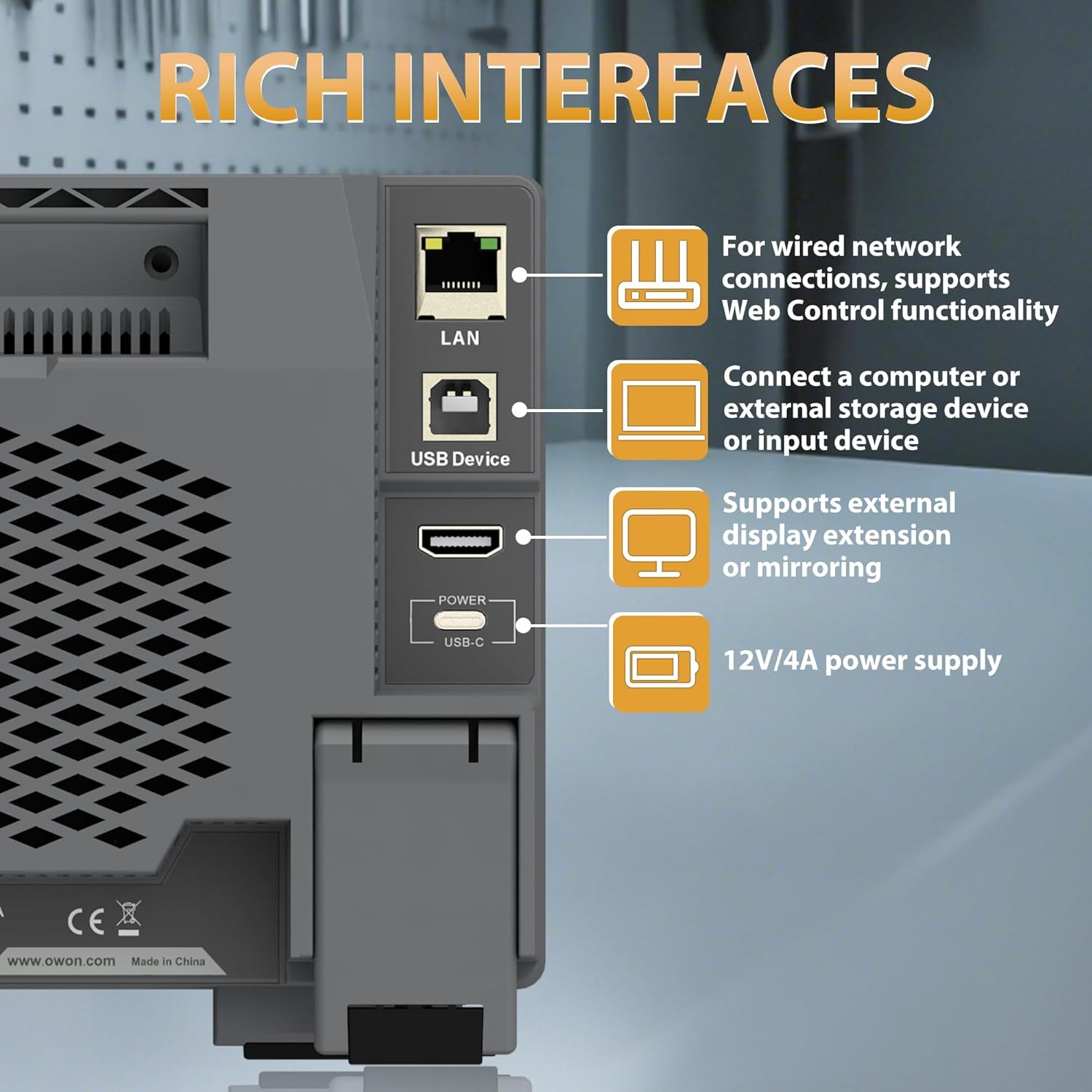
Figure 2.3.4: Rear panel showing the LAN, USB Device, HDMI, and USB-C Power interfaces.

Rajah 2.3.5: Bahagian atas dan belakang view illustrating the overall dimensions and port layout.
3. Persediaan
3.1 Sambungan Kuasa
- Connect the provided power adapter to the USB-C Power interface on the rear panel of the oscilloscope.
- Pasangkan penyesuai kuasa ke dalam soket kuasa AC yang sesuai.
- Tekan butang kuasa yang terletak pada panel hadapan untuk menghidupkan peranti.
3.2 Sambungan Probe
- Connect the BNC connector of the oscilloscope probe to one of the four input channels (CH1-CH4) on the front panel.
- Ensure the probe's ground clip is securely connected to the ground reference of the circuit under test.
- Attach the probe tip to the test point on the circuit.
4. Arahan Operasi
4.1 Operasi Asas
The ADS824A features a 7-inch multi-touch display for intuitive control.

Figure 4.1.1: The 7-inch multi-touch TFT-LCD display allows for direct interaction with the waveform and menu settings.
- Hidupkan/Mati Kuasa: Tekan butang kuasa pada panel hadapan.
- Navigasi: Use the multi-touch screen or the physical control knobs to navigate menus and adjust settings.
- Tetapkan Automatik: Press the 'Autoset' button to automatically adjust horizontal and vertical settings for optimal waveform display.
4.2 Waveform Display and Control
- Kawalan Mendatar: Adjust the time base (s/div) and horizontal position using the dedicated knobs.
- Kawalan Menegak: Laraskan voltage scale (V/div) and vertical position for each channel using their respective knobs.
- Zum: The device supports zoom windows for detailed waveform analysis.

Figure 4.2.1: Illustration of the waveform capture rate, showing the ability to display complex signals effectively.
4.3 Fungsi Pengukuran
The ADS824A offers extensive measurement capabilities:
- Auto Measurements: Access 43 automatic measurement functions. A built-in glossary assists in understanding technical terms for quick setup.
- Parametric Statistics: Supports measurement indicators and cursor gating for detailed analysis.
- Cursor Gating: Utilize visual indicators and zoom windows for precise cursor measurements in FFT and XY modes.

Figure 4.3.1: Display showing the interface for 43 auto measurements and the technical terms glossary.

Rajah 4.3.2: Skrin views demonstrating parametric statistics and cursor gating with visual indicators.
4.4 Pencetusan
The oscilloscope supports various triggering options to capture specific events:
- Trigger Types: Edge, Video, Pulse Width, Slope, Nth Edge, Logic, Under-amplitude, Over-amplitude, and Timeout.
- Persediaan: Access trigger settings via the dedicated 'Trigger' button or on-screen menu.

Figure 4.4.1: Interface showing advanced triggering options and hardware decoding capabilities.
4.5 Fungsi Lanjutan
- Penganalisis Spektrum FFT: Perform 1M-point FFT analysis for accurate frequency component display.
- Digital Voltmeter (DVM): Integrated 4-digit voltmeter for ACrms, DC, and AC+DCrms measurements.
- Kaunter Kekerapan: Integrated 6-digit digital frequency counter.
- Protocol Decoding: Supports 2-channel hardware decoding for common serial protocols including RS-232/UART, I2C, SPI, CAN, and LIN.
- Resolusi Tinggi: The 12-bit vertical resolution (4096 levels) allows for capturing minute signal fluctuations, crucial for power ripple and noise analysis.

Figure 4.5.1: Display illustrating the FFT spectrum analysis and 256-level grayscale display features.

Rajah 4.5.2: Skrin views demonstrating 50Mpts storage depth settings, 4-digit voltmeter, and 6-digit frequency counter.

Figure 4.5.3: Comparison illustrating the enhanced detail provided by the 12-bit high-resolution display compared to a standard oscilloscope.
4.6 Kesambungan Peranti Luaran
The ADS824A supports various external devices:
- Host USB: Connect a mouse or keyboard for enhanced control and efficiency.
- Peranti USB: Connect to a computer for data transfer or remote control.
- LAN: For wired network connections and Web Kawalan fungsi.
- HDMI: Connect to an external display for extended or mirrored viewing.
5. Penyelenggaraan
5.1 Pembersihan
Untuk mengekalkan prestasi dan penampilan peranti:
- Lap bahagian luar dengan lembut, damp kain.
- Avoid using abrasive cleaners or solvents that may damage the casing atau skrin.
- Ensure no liquids enter the device openings.
5.2 Penyimpanan
When not in use, store the oscilloscope in a clean, dry environment away from direct sunlight and extreme temperatures.
5.3 Penjagaan Bateri
The ADS824A includes a built-in lithium battery for portability. Proper battery care ensures longevity:
- Cas bateri sepenuhnya sebelum penggunaan pertama.
- Elakkan menyahcas bateri sepenuhnya dengan kerap.
- If storing for extended periods, charge the battery to approximately 50% and recharge every few months.
- The built-in battery helps avoid issues caused by ground loops, providing a safe floating ground for measurements.

Figure 5.3.1: Information regarding the built-in lithium battery, emphasizing portability and ground loop avoidance.
6. Penyelesaian masalah
This section addresses common issues you might encounter with the OWON ADS824A oscilloscope.
| Masalah | Kemungkinan Punca | Penyelesaian |
|---|---|---|
| Tiada kuasa | Power adapter not connected or faulty; battery discharged. | Check power connections. Ensure adapter is working. Charge the battery. |
| Tiada bentuk gelombang dipaparkan | Probe not connected; signal too small/large; incorrect trigger settings. | Verify probe connection. Adjust vertical scale (V/div). Press 'Autoset'. Check trigger level and mode. |
| Bentuk gelombang yang tidak stabil | Incorrect trigger level or mode; noisy signal. | Adjust trigger level. Change trigger mode. Use averaging acquisition mode. |
| Skrin tidak bertindak balas | Gangguan perisian sementara. | Restart the device. If issue persists, contact support. |
7. Spesifikasi
Detailed technical specifications for the OWON ADS824A Digital Oscilloscope.

Figure 7.1.1: Table detailing key oscilloscope specifications including bandwidth, sampling rate, and vertical resolution.
| Parameter | Nilai |
|---|---|
| Lebar jalur | 200 MHz |
| Saluran | 4 |
| SampKadar ling | 1.25 GSa/s (Masa Nyata) |
| Max. Waveform Capture Rate | 700,000 wfms/s |
| Max Memory Depth | 50 Mpts |
| Resolusi menegak | 12 bit |
| Vertical Sensitivity Range | 500 uV/div - 10 V/div |
| Impedans Input | 1 MΩ±2%, parallel with 20 pF±5 pF |
| Julat Asas Masa | 1 ns/div - 1000 s/div |
| Ketepatan Asas Masa | ±(0.01% + 0.1tdv) |
| Penyahkodan Bas | RS232/UART, I2C, SPI, CAN, LIN |
| Gandingan Input | DC, AC, Tanah |
| Dimensi Produk | 10.25 x 3.07 x 6.3 inci |
| Berat Barang | 3.3 paun |
8. Waranti dan Sokongan
For warranty information and technical support, please refer to the documentation provided with your purchase or visit the official OWON weblaman web. Butiran hubungan untuk khidmat pelanggan biasanya tersedia di halaman sokongan pengilang.


