1. Pengenalan dan Lebihview
The Zoom PodTrak P4next is a portable podcast recorder designed for high-quality audio capture and production. This device offers a comprehensive solution for podcasters, featuring multiple inputs, advanced audio processing, and flexible recording options. Its compact design and battery power capability make it suitable for both studio and on-the-go recording environments.
Ciri-ciri Utama:
- Kualiti Audio Unggul: 4 XLR inputs with -125 dBu EIN for professional-grade recordings.
- Mudah Alih Dipertingkat: Lightweight (10.58 oz / 300g) and compact (4.95 x 4.72 x 1.57 inches) for mobile use.
- Jangka Hayat Bateri: Up to 8.5 hours of continuous recording with lithium batteries.
- Ketahanan Teguh: Sturdy construction for demanding environments.
- Intuitive Ease of Use: Clear 128 x 64 OLED display and user-friendly controls.
- Kesan Terbina dalam: AI Noise Reduction, Tone, and Compression.
- Ketersambungan Serbaguna: Phone input for call-in guests, USB audio interface mode.
- Pad Bunyi: Customizable sound pads for instant playback.
2. Persediaan
2.1 Menguasakan Peranti
The PodTrak P4next can be powered in multiple ways:
- Bateri AA: Insert 2 AA batteries into the battery compartment located on the underside of the device.
- Kuasa USB-C: Connect a USB-C cable to the DC 5V port on the side of the unit and to a compatible USB power adapter or power bank.

Rajah 2.1: Belakang view of the PodTrak P4next, illustrating the battery compartment for 2 AA batteries.

Rajah 2.2: Sisi view of the PodTrak P4next, highlighting the microSD card slot and USB-C power input.
2.2 Menyambung Mikrofon
The PodTrak P4next features 4 XLR inputs for connecting microphones. These inputs provide phantom power for condenser microphones.
- Connect your XLR microphones to the corresponding input jacks (1-4) on the top of the device.
- Ensure phantom power is enabled for condenser microphones via the dedicated switches if required.

Rajah 2.3: Depan view of the PodTrak P4next, displaying the four XLR microphone inputs at the top.
2.3 Menyambung Fon Kepala
Four independent headphone outputs are available for monitoring.
- Plug your headphones into the 3.5mm jacks (1-4) located on the front edge of the device.
- Each output has an individual volume control knob.

Rajah 2.4: Sisi view of the PodTrak P4next, illustrating the four headphone output jacks and their respective volume controls.
2.4 Inserting SD Card
The PodTrak P4next records directly to an SD card.
- Open the microSD card slot cover on the side of the device.
- Insert a microSD card (up to 1TB supported) until it clicks into place.
Rajah 2.5: Sisi view of the PodTrak P4next, indicating the microSD card slot for recording media.
2.5 Connecting to Phone/Computer
The device supports external connections for various recording scenarios.
- Input Telefon: Use a TRRS cable to connect your smartphone to the dedicated phone input for recording call-in guests.
- Antaramuka Audio USB: Connect the PodTrak P4next to a computer via USB-C to use it as an audio interface for recording directly to your digital audio workstation (DAW).

Figure 2.6: The PodTrak P4next connected to a smartphone, demonstrating its capability to integrate phone calls into your podcast.
3. Operating the PodTrak P4next
3.1 Rakaman Asas
Untuk memulakan rakaman:
- Ensure microphones and headphones are connected and powered.
- Adjust the gain knobs for each microphone input to achieve optimal levels, avoiding clipping.
- Tekan merah REKOD button to start recording. The button will illuminate.
- Tekan ke REKOD butang sekali lagi untuk menghentikan rakaman.
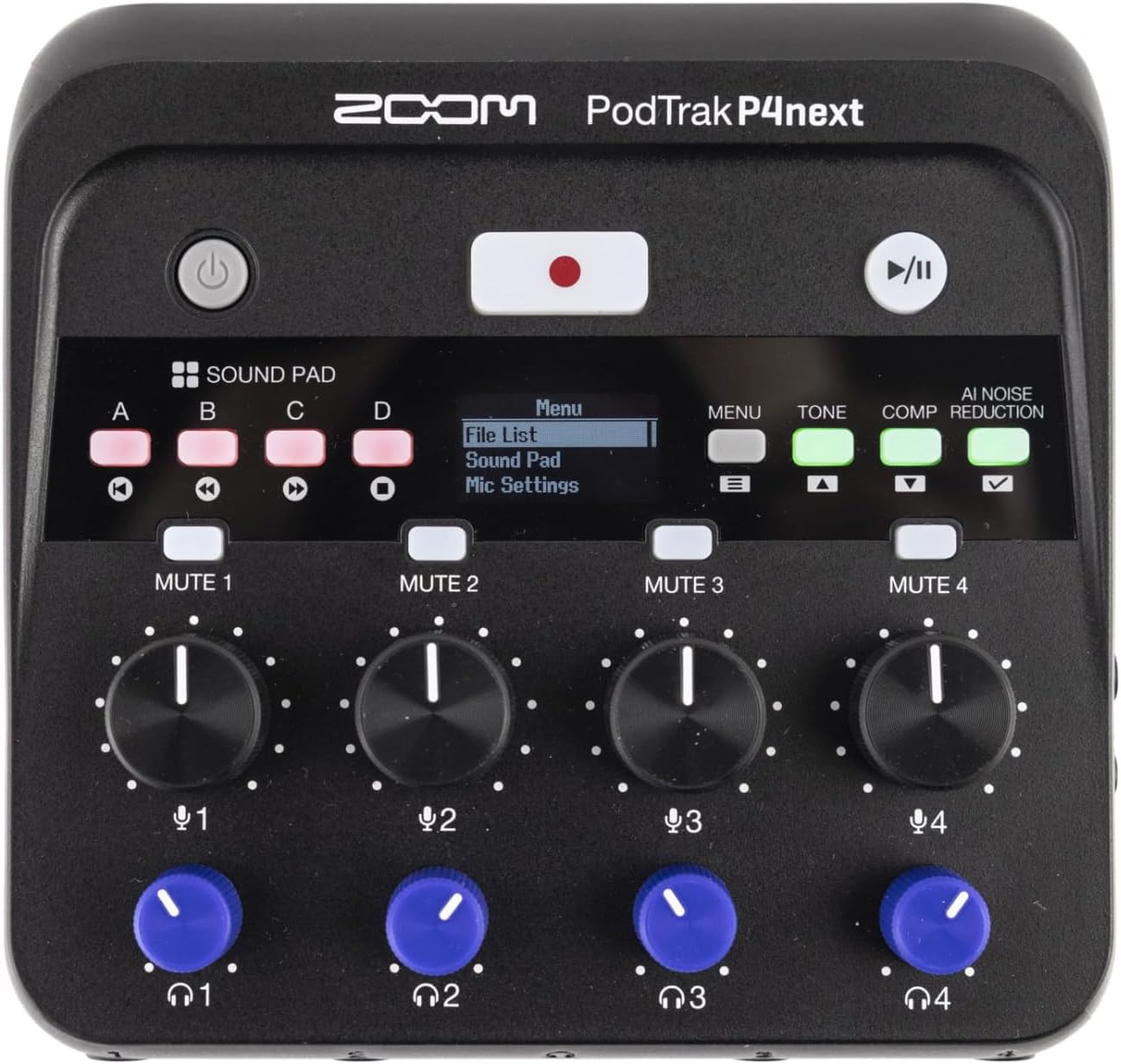
Rajah 3.1: Atas-bawah view of the PodTrak P4next, highlighting the main controls including the record button and input gain knobs.
3.2 Sound Pads
The four sound pads (A, B, C, D) can be used to trigger pre-recorded audio clips or sound effects during your podcast.
- Press a sound pad button (A, B, C, or D) to play the assigned sound.
- Adjust the volume of the sound pads using the dedicated knob.
3.3 Butang Bisu
Each microphone input has a dedicated mute button (MUTE 1-4) to quickly silence a participant.
- Tekan ke HILANGKAN button for the desired channel to mute it. The button will illuminate to indicate it is muted.
- Tekan sekali lagi untuk menyahredam.
3.4 Audio Effects (AI Noise Reduction, Tone, Comp)
Enhance your audio with built-in effects:
- Pengurangan Bunyi AI: Activates intelligent noise cancellation to minimize background distractions.
- Nada: Adjusts the tonal characteristics of the audio.
- Comp (Compression): Applies compression to even out audio levels.
- Press the respective buttons (AI NOISE REDUCTION, TONE, COMP) to toggle these effects on or off.

Rajah 3.2: Jarak dekat view of the PodTrak P4next's control panel, highlighting the AI Noise Reduction, Tone, and Compression effect buttons.
3.5 Recording Phone Calls and USB Audio
The PodTrak P4next allows seamless integration of phone calls and USB audio.
- Connect your phone to the dedicated input using a TRRS cable. The device automatically creates a mix-minus feed to prevent echo for the caller.
- When connected as a USB audio interface, audio from your computer can be routed through the P4next and recorded alongside your microphones.
4. Penyelenggaraan
Proper maintenance ensures the longevity and optimal performance of your PodTrak P4next.
- Pembersihan: Gunakan kain lembut dan kering untuk membersihkan bahagian luar peranti. Elakkan pembersih atau pelarut yang kasar.
- Storan: Simpan unit ini di tempat yang sejuk dan kering, jauh daripada cahaya matahari langsung dan suhu yang melampau. Tanggalkan bateri jika disimpan untuk tempoh yang lama bagi mengelakkan kebocoran.
- Kemas kini Firmware: Semak Zoom rasmi secara berkala weblaman web untuk kemas kini perisian tegar bagi memastikan peranti anda mempunyai ciri terkini dan pembetulan pepijat.
5. Penyelesaian masalah
If you encounter issues with your PodTrak P4next, refer to the following common solutions:
- Tiada Kuasa: Ensure batteries are correctly inserted and charged, or that the USB-C power source is functioning.
- Tiada Input Audio: Check microphone connections, ensure phantom power is on for condenser mics, and verify gain levels are appropriately set.
- Tiada Audio Fon Kepala: Confirm headphones are plugged in correctly and individual headphone volume knobs are turned up.
- Isu Rakaman: Check if the SD card is properly inserted and has sufficient free space. Ensure the card is formatted correctly (FAT32).
- Echo on Phone Calls: The P4next features automatic mix-minus. Ensure your phone is connected via a TRRS cable to the dedicated phone input.
6. Spesifikasi
| Ciri | Spesifikasi |
|---|---|
| Berat Barang | 12 auns (340g) |
| Dimensi Produk | 4.95 x 4.72 x 1.57 inci (12.57 x 11.99 x 3.99 cm) |
| Nombor Model Item | P4next/230EU |
| Input Mikrofon | 4 x XLR (with -125 dBu EIN) |
| Output Fon Kepala | 4 x 3.5mm stereo mini jack (with individual volume control) |
| Media Rakaman | microSD/microSDHC/microSDXC card (up to 1TB) |
| Hayat Bateri | Up to 8.5 hours (with lithium batteries) |
| Audio Interface Mode | Disokong melalui USB-C |
7. Video Produk Rasmi
Video 7.1: An official introduction to the Zoom PodTrak P4next, showcasinreka bentuk dan ciri-ciri utamanya.
8. Waranti dan Sokongan
For warranty information, technical support, and additional resources, please visit the official Zoom webtapak atau hubungi bahagian perkhidmatan pelanggan mereka. Simpan bukti pembelian anda untuk tuntutan waranti.
- Sokongan dalam talian: Visit the Zoom Store on Amazon
- Pendaftaran Produk: Daftar produk anda dalam talian untuk menerima kemas kini dan sokongan.


