1. Pengenalan
Welcome to the NIMO N179 17-inch Laptop user manual. This guide provides essential information for setting up, operating, maintaining, and troubleshooting your new laptop. The NIMO N179 is designed for versatile use, offering a large display, powerful AMD Ryzen 7 7735HS processor with Radeon 680M graphics, 16GB DDR5 RAM, and a 512GB NVMe SSD for efficient performance in business, study, and light gaming applications.
2. Apa yang ada di dalam Kotak
Sila semak kandungan pakej anda untuk memastikan semua item ada:
- 1 x NIMO N179 Laptop
- 1 x Type-C 100W PD Fast Charger
- 1 x Manual Pengguna (dokumen ini)
- Windows 11 Home (pre-installed)
- Warranty Information (2 Years Warranty, 90 Days Return)
3. Panduan Persediaan
Follow these steps to set up your NIMO N179 laptop for the first time.
3.1 Pengecasan Awal
Before first use, it is recommended to fully charge your laptop. Connect the provided 100W Type-C PD Fast Charger to the laptop's Type-C port and a power outlet. The charging indicator light will illuminate.
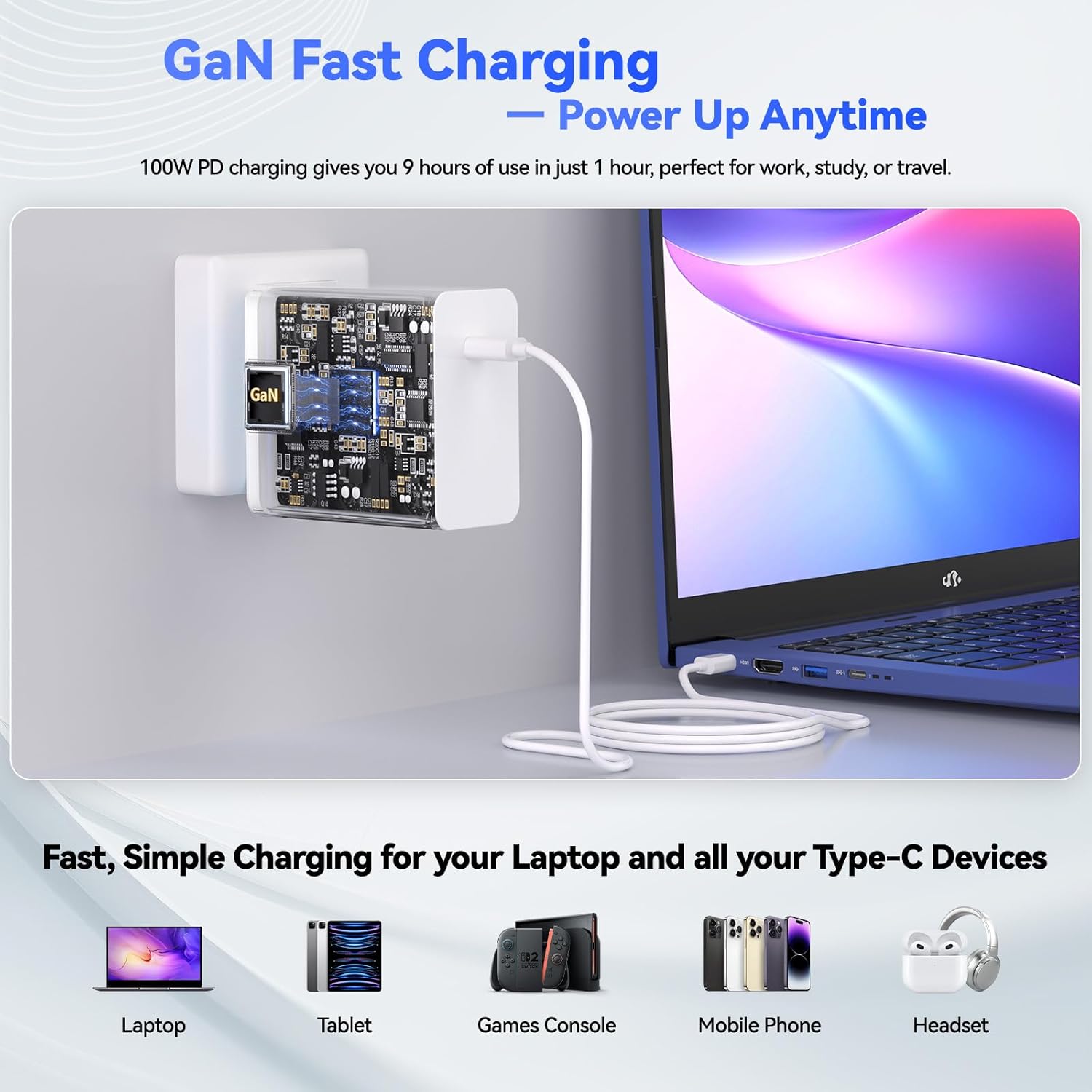
Figure 3.1: Connecting the 100W Type-C PD Fast Charger to the NIMO N179 laptop.
3.2 Menghidupkan
Open the laptop lid and press the power button, usually located on the top right of the keyboard or side panel. The laptop will boot up, and you will be guided through the Windows 11 initial setup process.
3.3 Persediaan Windows 11
Follow the on-screen instructions to configure Windows 11. This includes selecting your region, keyboard layout, connecting to a Wi-Fi network, and creating a user account. Ensure you have your Wi-Fi password ready.
4. Arahan Operasi
This section details the primary functions and features of your NIMO N179 laptop.
4.1 Paparan dan Visual
The NIMO N179 features an immersive 17.3-inch Full HD (1920 x 1080 pixels) display. This large screen provides ample workspace for multitasking and an enhanced viewpengalaman untuk pelbagai aplikasi.

Figure 4.1: The 17.3-inch Full HD display offers a broad visual experience for productivity.
4.2 Pemproses dan Prestasi
Your laptop is equipped with an AMD Ryzen 7 7735HS processor (8 cores, 16 threads) and integrated AMD Radeon 680M graphics. This combination delivers responsive performance for demanding applications, creative tasks, and light gaming.

Figure 4.2: The AMD Ryzen 7 7735HS processor provides robust performance.

Figure 4.3: AMD Radeon 680M graphics for gaming and creative work.
4.3 Memori dan Penyimpanan
The laptop includes 16GB of DDR5 RAM for efficient multitasking and a 512GB NVMe SSD for fast boot times and quick application loading. The storage is designed for rapid data access.
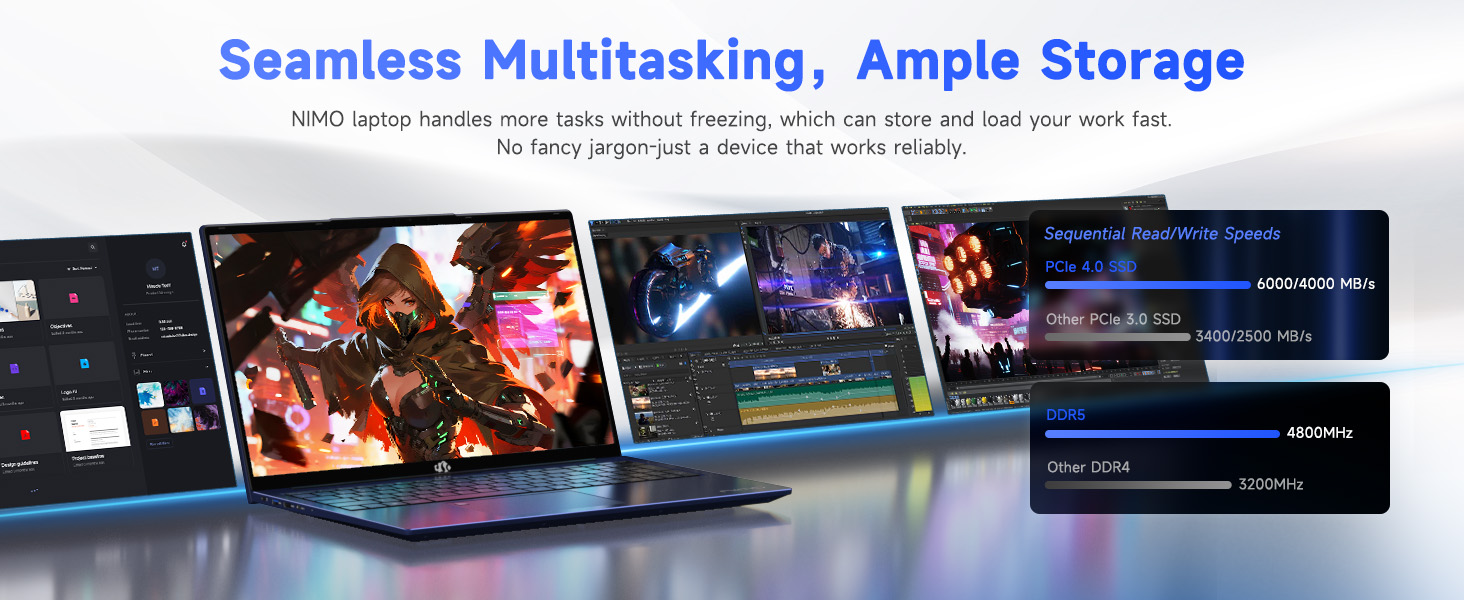
Figure 4.4: High-speed DDR5 memory and NVMe SSD for seamless operation.
4.4 Ketersambungan
The NIMO N179 supports Wi-Fi 6E for faster and more stable wireless connections, and Bluetooth 5.2 for connecting wireless peripherals. It also features multiple ports for external devices:
- USB 3.2 Gen1 ports
- Port USB 2.0
- Type-C Gen2 (multifunction) ports
- HDMI 2.0 port
- Bicu Audio
- Pembaca Kad SD
- Slot Kunci Kensington

Gambar 4.5: Lebihview of laptop ports for various connections.

Figure 4.6: Wi-Fi 6E provides advanced wireless connectivity.
4.5 Security and Comfort Features
The laptop integrates several features for security and user comfort:
- WebPengatup Privasi cam: A physical slider to cover the webcam when not in use, ensuring privacy.
- Pengecaman Cap Jari: Untuk log masuk yang selamat dan pantas.
- Papan Kekunci Bercahaya Belakang: Allows for comfortable typing in low-light conditions. Press F9 to cycle through backlight settings (temporary light, constant light, off).
- Papan kekunci angka: A dedicated numeric keypad for enhanced data entry efficiency.

Figure 4.7: Fingerprint unlock and backlit keyboard for security and comfort.

Rajah 4.8: Terperinci view of security and comfort features.
5. Penyelenggaraan
Proper maintenance ensures the longevity and optimal performance of your NIMO N179 laptop.
5.1 Pembersihan
- Gunakan kain lembut dan tidak berbulu untuk membersihkan skrin dan permukaan luar.
- Untuk tanda degil, sedikit dampen kain dengan air atau pembersih selamat skrin. Elakkan bahan kimia yang keras.
- Regularly clean the keyboard with compressed air to remove dust and debris.
5.2 Penjagaan Bateri
The laptop is equipped with a 58Wh battery. To maximize battery life:
- Elakkan suhu yang melampau.
- Jangan biarkan komputer riba dicas sepenuhnya atau dinyahcas sepenuhnya untuk tempoh yang lama.
- Untuk penyimpanan jangka panjang, cas bateri kepada kira-kira 50-60%.

Figure 5.1: Battery features and charging efficiency.
5.3 Kemas Kini Perisian
Regularly update your Windows operating system and drivers to ensure optimal performance, security, and compatibility. You can check for updates via Windows Settings.
5.4 Sistem Penyejukan
The NIMO N179 features an efficient cooling system to maintain performance. Ensure the vents are not obstructed to allow proper airflow.

Figure 5.2: Internal cooling system for sustained performance.
6. Penyelesaian masalah
This section addresses common issues you might encounter with your NIMO N179 laptop.
6.1 Tiada Kuasa / Komputer Riba Tidak Dihidupkan
- Pastikan penyesuai kuasa disambungkan dengan selamat pada kedua-dua komputer riba dan salur keluar kuasa yang berfungsi.
- Sahkan alur keluar kuasa berfungsi dengan memasang peranti lain.
- Jika bateri telah habis sepenuhnya, ia mungkin mengambil masa beberapa minit untuk mengecas sebelum komputer riba boleh dihidupkan.
6.2 Isu Ketersambungan Wi-Fi
- Semak sama ada Wi-Fi didayakan dalam tetapan Windows.
- Mulakan semula penghala dan modem anda.
- Pastikan anda berada dalam julat rangkaian Wi-Fi anda dan telah memasukkan kata laluan yang betul.
- Update your Wi-Fi drivers through Device Manager.
- If issues persist, try restarting the network adapter via Windows Network Settings.
6.3 Keyboard Backlight Not Working
- Tekan ke F9 key to cycle through the backlight settings (off, temporary, constant).
- Ensure your laptop's power settings are not configured to disable the backlight to save power.
6.4 Fingerprint Reader Issues
- Ensure your finger is clean and dry when using the sensor.
- Re-register your fingerprint in Windows Settings if you experience consistent issues.
- Update fingerprint reader drivers.
6.5 System Slowdown or Freezing
- Tutup aplikasi yang tidak perlu berjalan di latar belakang.
- Semak Pengurus Tugas untuk proses yang menggunakan CPU atau RAM yang tinggi.
- Ensure your system has sufficient free storage space on the SSD.
- Jalankan imbasan virus.
- Ensure the laptop's cooling vents are clear and not obstructed.
7. Spesifikasi
Detailed technical specifications for the NIMO N179 laptop:
| Ciri | Perincian |
|---|---|
| Nama Model | NIMO N179 |
| Saiz Skrin | 17.3 Inci |
| Resolusi Skrin | 1920 x 1080 piksel (HD Penuh) |
| Pemproses | AMD Ryzen 7 7735HS (8 Teras, 16 Benang, sehingga 4.75 GHz) |
| Pemproses bersama Grafik | AMD Radeon 680M (Bersepadu) |
| RAM | 16 GB DDR5 (4800 MHz) |
| Pemacu Keras | 512 GB SSD (NVMe, Solid State) |
| Sistem Operasi | Windows 11 Home |
| Jenis Wayarles | Wi-Fi 6E (802.11a/b/g/n/ac), Bluetooth 5.2 |
| Pelabuhan | 1x USB 2.0, 4x USB 3.0 (Gen1), 2x Type-C Gen2 (Multifunction), 1x HDMI 2.0, 1x Audio Jack, 1x SD Card Reader, 1x Kensington Lock |
| Bateri | 58Wh Lithium Metal (up to 9.9 hours average battery life) |
| Pengecas | 100W Type-C PD Fast Charger (GaN Technology) |
| Berat Barang | 4.6 paun |
| Dimensi Produk | 15.66 x 9.99 x 0.74 inci |
| Ciri Khas | Backlit Keyboard, Fingerprint Reader, HD Audio, Numeric Keypad, Webkamera Pengatup Privasi |
8. Waranti dan Sokongan
NIMO provides comprehensive support for your N179 laptop.
8.1 Maklumat Waranti
Your NIMO N179 laptop comes with a Waranti 2 tahunSelain itu, seorang Polisi pemulangan 90 hari is offered from the date of purchase. Please retain your proof of purchase for warranty claims.
8.2 Sokongan Pelanggan
For technical assistance or any inquiries, NIMO offers 24/7 online technical support. Refer to the contact information provided with your product packaging or visit the official NIMO support weblaman web untuk maklumat lanjut.


