1. Pengenalan
This manual provides detailed instructions for the installation, operation, and maintenance of your Leadfan 9-inch Car Radio Stereo. This unit is designed to enhance your driving experience with features such as wireless Apple CarPlay, Android Auto, GPS navigation, Bluetooth connectivity, and more. Please read this manual thoroughly before installation and use to ensure proper function and safety.
2. Keserasian Kenderaan
This car radio stereo is compatible with the following vehicle models:
- Subaru Forester: 2008, 2009, 2010, 2011, 2012
- Subaru Impreza WRX: 2007, 2008, 2009, 2010, 2011
Nota Penting:
This unit is designed for vehicles without a factory large screen or amplebih hidup. Please verify your vehicle's dashboard configuration before installation. Refer to the image below for visual guidance on compatible and incompatible dashboard types.
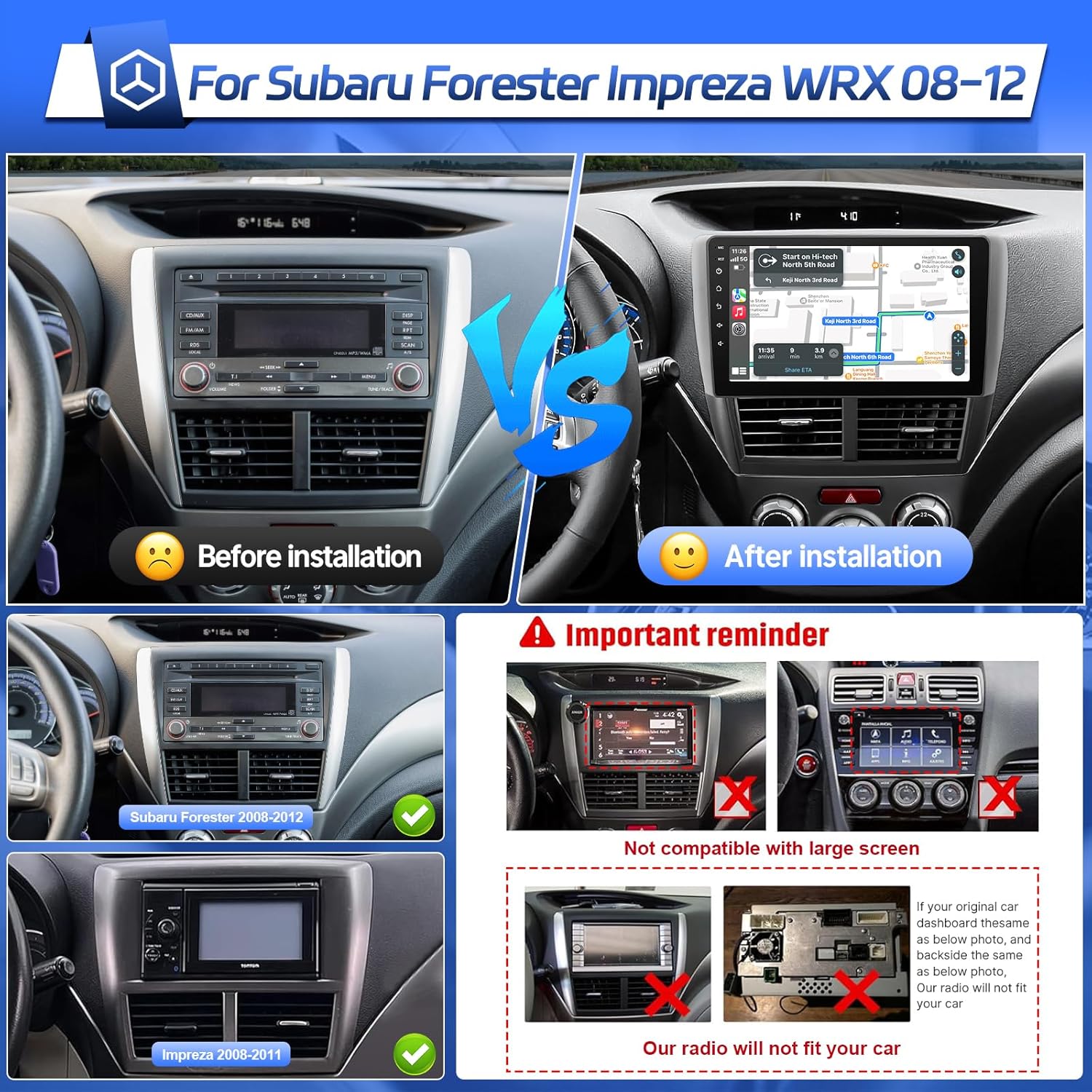
Image: Comparison of a Subaru Forester dashboard before and after the Leadfan car radio installation. It also illustrates compatible dashboards for Subaru Forester (2008-2012) and Impreza (2008-2011), and highlights incompatible dashboards with existing large screens or specific factory radio designs.
3. Kandungan Pakej
Sila semak pakej untuk item berikut:
- Leadfan 9-inch Car Radio Stereo Unit
- Kabel Kuasa
- Kabel RCA
- Kabel USB (x2)
- Antena GPS
- Kamera Sandaran
- Mikrofon (MIC)
- Pemasangan Kenderaan
- Manual Pengguna
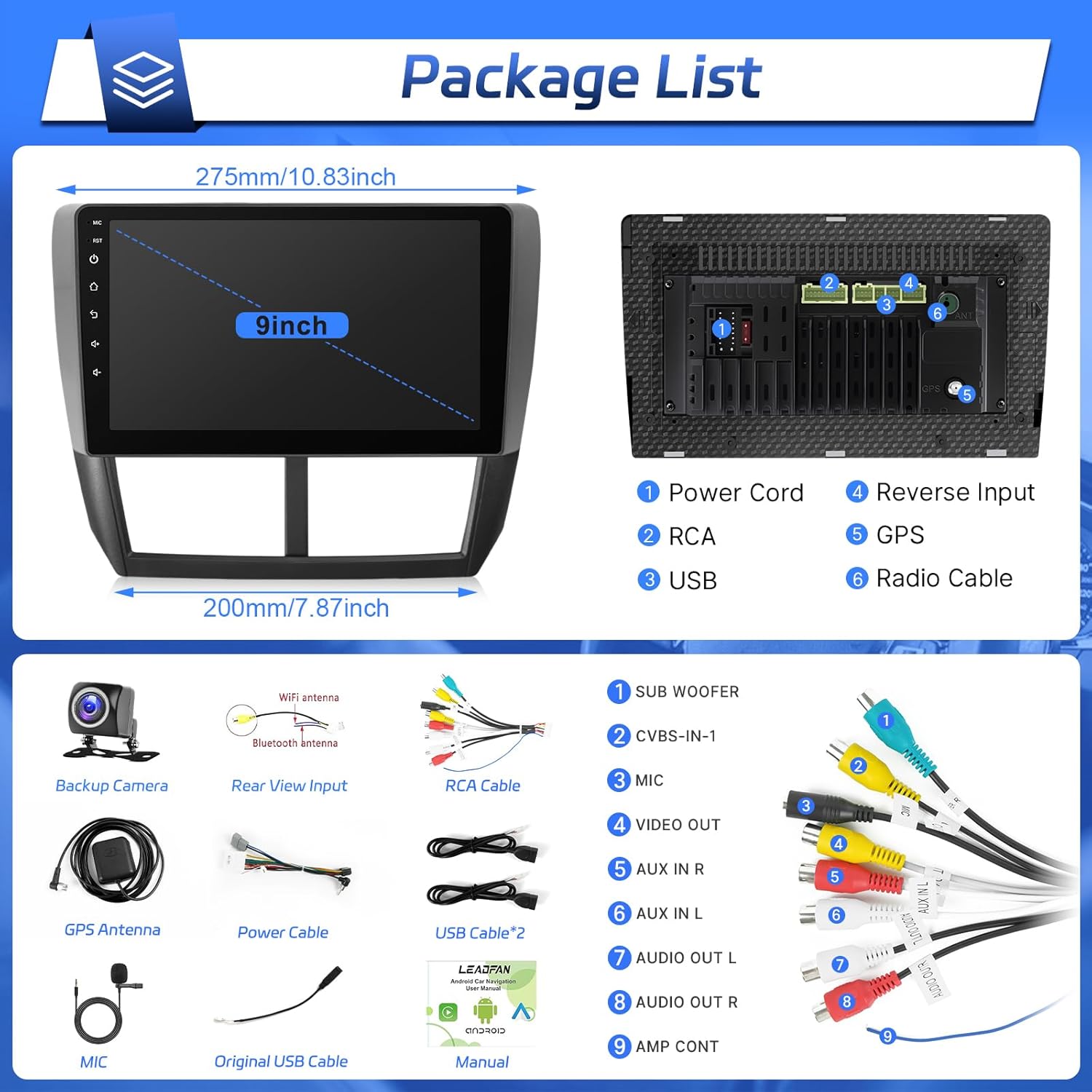
Image: A visual representation of the car radio unit's dimensions and its rear connection ports, alongside all accessories included in the package, such as various cables, antennas, and the backup camera.
4. Persediaan dan Pemasangan
Installation of this unit is designed to be plug-and-play for compatible Subaru models. However, professional installation is recommended if you are unfamiliar with car audio wiring.
4.1 Senarai Semak Pra-Pemasangan
- Pastikan penyalaan kenderaan dimatikan dan terminal negatif bateri diputuskan sambungannya.
- Confirm all package contents are present.
- Review your vehicle's existing dashboard and wiring to ensure compatibility.
4.2 Langkah Pemasangan
- Alih Keluar Radio Kilang: Carefully remove the trim panels and screws securing your existing factory radio.
- Sambungkan Wiring Harness: Connect the provided power cable and RCA cables to the corresponding ports on the new Leadfan unit and your vehicle's wiring harness. Ensure all connections are secure. Refer to the wiring diagram in the 'Package Contents' section for port identification.
- Pasang Antena GPS: Mount the GPS antenna on the dashboard or another location with a clear view of the sky. Route the cable to the unit and connect it to the 'GPS' port.
- Pasang Antena WiFi: Connect the WiFi antenna to the designated port on the unit.
- Sambungkan Kabel USB: Halakan kabel USB ke lokasi yang mudah (cth., ruang sarung tangan) dan sambungkannya ke unit.
- Sambungkan Mikrofon: Plug in the external microphone for improved call quality and voice commands. Position it near the driver for optimal performance.
- Pasang Kamera Sandaran (Pilihan): If installing the included backup camera, route the video cable from the rear of the vehicle to the unit and connect it to the 'Reverse Input' port. Connect the camera's power to the vehicle's reverse light circuit.
- Lekapkan Unit: Secure the Leadfan unit into the dashboard opening using the provided vehicle mount and screws.
- Sambung semula Bateri: Sambung semula terminal bateri negatif kenderaan.
- Kefungsian Ujian: Turn on the ignition and test all functions of the new car radio stereo.
5. Arahan Operasi
This section details the primary functions and how to operate your Leadfan car radio stereo.
5.1 Tanpa Wayar Apple CarPlay & Android Auto
Connect your smartphone wirelessly to access navigation, music, calls, and messages directly on the car's display.
- Pastikan Bluetooth dan Wi-Fi didayakan pada telefon pintar anda.
- On the car stereo, navigate to the CarPlay or Android Auto application.
- Follow the on-screen prompts to pair your phone. For Apple CarPlay, select your device from the list. For Android Auto, ensure the Android Auto app is installed on your phone.
- Once connected, your phone's compatible apps will appear on the stereo screen.

Image: The user interface of the car radio displaying both Apple CarPlay and Android Auto. CarPlay shows a grid of applications including Phone, Music, Waze, and Messages. Android Auto shows a similar layout with navigation and media controls.
5.2 Kesambungan Bluetooth
Pair your phone via Bluetooth for hands-free calling and wireless audio streaming.
- On the car stereo, go to the Bluetooth settings.
- Dayakan Bluetooth pada telefon pintar anda dan cari peranti yang tersedia.
- Select the car stereo's Bluetooth name (e.g., "Leadfan Car BT") from your phone's list and confirm pairing.
- Once connected, you can make/receive calls and play music through the car's speakers.

Image: A driver interacting with the car radio's Bluetooth interface for hands-free calling. The screen displays a dial pad and call options, while a smartphone shows an active call, demonstrating the integrated Bluetooth functionality.
5.3 GPS Navigation & Wi-Fi Function
Utilize built-in GPS for navigation and connect to Wi-Fi for online features.
- Navigasi GPS: The unit comes with a built-in GPS module. You can use pre-installed offline maps or download online navigation apps via the Play Store.
- Sambungan Wi-Fi: Go to Settings > Wi-Fi. Turn on Wi-Fi and connect to an available hotspot (e.g., from your smartphone) to access online features, download apps, and get live traffic updates.

Image: The car radio screen showing a GPS navigation map with route information and various application shortcuts. Another inset image demonstrates the unit connected to Wi-Fi, displaying a web browser with YouTube content.
5.4 Radio FM
Akses stesen radio kegemaran anda dengan penala FM bersepadu.
- Select the 'FM Radio' application from the main menu.
- Use the scan function to automatically find and save available stations, or manually tune to a specific frequency.
- Save your preferred stations as presets for quick access.
5.5 Kawalan Roda Stereng (SWC)
Configure your vehicle's steering wheel buttons to control the car stereo.
- Go to 'Settings' and find the 'Steering Wheel Control' or 'SWC' option.
- Follow the on-screen instructions to map each physical button on your steering wheel to a corresponding function on the stereo (e.g., volume up/down, track skip, mode).
5.6 Belakang View Kamera
Unit ini menyokong bahagian belakang view camera for safer parking and reversing.
- Apabila kenderaan dialihkan ke gear undur, skrin akan memaparkan bahagian belakang secara automatik view suapan kamera.
- The camera provides a 170° viewing angle to assist in detecting obstacles.
5.7 Tetapan EQ
Sesuaikan pengalaman audio anda dengan tetapan penyama.
- Access the 'EQ' or 'Sound Settings' application.
- Adjust bass, treble, balance, and fader. Choose from preset sound modes (Rock, Pop, Jazz, Classical, etc.) or create a custom profile.
5.8 Pautan Cermin
Cerminkan skrin telefon pintar anda terus pada paparan stereo kereta.
- Open the 'Mirror Link' application on the stereo.
- Follow the instructions to connect your Android or iOS device. This typically involves connecting via USB or Wi-Fi and enabling screen mirroring on your phone.

Image: A multi-panel image illustrating several features: the audio equalizer (EQ) settings, a smartphone screen mirrored onto the car radio display, the interface for configuring steering wheel controls, and the view from the backup camera with parking guidelines.
5.9 Fungsi Skrin Pisah
Lakukan pelbagai tugas dengan menjalankan dua aplikasi secara serentak pada skrin.
- Buka aplikasi pertama yang ingin anda gunakan.
- Press and hold the recent apps button or swipe from the side (depending on the interface) to activate split-screen mode.
- Select the second application to display it alongside the first.

Image: The car radio screen demonstrating the split-screen feature, with the YouTube application running on the left side and a local music player interface on the right side, allowing for simultaneous use of two apps.
6. Penyelenggaraan
Proper care will ensure the longevity and optimal performance of your car radio stereo.
- Pembersihan: Gunakan kain lembut dan kering untuk membersihkan skrin dan unit. Untuk kotoran degil, sedikitampen kain dengan air atau pembersih selamat skrin. Elakkan bahan yang melelas atau bahan kimia yang keras.
- Kemas Kini Perisian: Periodically check for software updates via the system settings. Connecting to Wi-Fi will allow you to download and install updates that may improve performance or add new features.
- Suhu: Elakkan daripada mendedahkan unit kepada suhu yang melampau untuk tempoh yang lama.
7. Penyelesaian masalah
Jika anda menghadapi masalah, rujuk kepada masalah dan penyelesaian biasa berikut:
| Masalah | Kemungkinan Punca | Penyelesaian |
|---|---|---|
| Unit tidak dihidupkan. | Sambungan kuasa longgar, fius putus, pendawaian tidak betul. | Check power cable connections. Inspect vehicle's fuse box and the unit's fuse. Verify wiring against the diagram. |
| Tiada bunyi dari pembesar suara. | Volume too low, incorrect audio source, speaker wiring issues. | Tingkatkan kelantangan. Pilih sumber audio yang betul. Semak sambungan pembesar suara. |
| Bluetooth tidak bersambung. | Bluetooth off on phone/unit, incorrect pairing process. | Ensure Bluetooth is enabled on both devices. Delete previous pairings and re-pair. Restart both devices. |
| Isyarat GPS lemah atau tidak tepat. | Antena GPS terhalang atau tidak diletakkan dengan betul. | Pastikan antena GPS mempunyai jernih view dari langit. Periksa sambungan antena. |
| Kamera sandaran tidak dipaparkan. | Pendawaian salah, kerosakan kamera, picu undur tidak disambungkan. | Check camera video and power connections. Ensure reverse trigger wire is correctly connected to the vehicle's reverse light. |
| Skrin sentuh tidak bertindak balas. | Gangguan perisian sementara. | Perform a soft reset (refer to unit's specific reset procedure, usually a small reset button). If issue persists, contact support. |
If the problem persists after attempting these solutions, please contact Leadfan customer support.
8. Spesifikasi
| Ciri | Perincian |
|---|---|
| Model | US02-QYY-SW340-1 |
| Saiz Paparan | 9 Inci |
| Sistem Operasi | Android 12 |
| Pemproses | 4 Teras |
| RAM | 2GB |
| Storan Dalaman | 32GB |
| Ketersambungan | Bluetooth, USB, Wi-Fi |
| Ciri Khas | Wireless CarPlay, Android Auto, Touchscreen, GPS Navigation, FM Radio, Steering Wheel Control, Backup Camera Support, Mirror Link, Split Screen |
| Mod Keluaran Audio | Stereo |
| Komponen yang Disertakan | Power Cable, RCA Cables, USB Cables, GPS Antenna, Backup Camera, Microphone, Vehicle Mount |
| Dimensi Produk | 5.08 x 5.08 x 5.08 cm; 1.3 kg |
9. Waranti dan Sokongan
For warranty information and technical support, please refer to the warranty card included in your package or visit the official Leadfan webtapak. Simpan resit pembelian anda sebagai bukti pembelian untuk sebarang tuntutan waranti.
If you require assistance with installation, troubleshooting, or have any questions about your product, please contact Leadfan customer service through the contact information provided with your purchase or on the manufacturer's webtapak.


