1. Pengenalan
The Fender Mustang LTX100 is a 100-watt modeling combo amplifier designed for guitarists seeking versatile tone and performance. This ampciri yang lebih hidup 25 amp models, 25 studio-quality effects, and 100 preset slots for extensive sound customization. It is equipped with a 12-inch Celestion G12FSD-100 speaker, an integrated color display with a chromatic tuner, Bluetooth audio streaming, and USB-C connectivity for recording and app control. This manual provides essential information for the proper setup, operation, and maintenance of your Mustang LTX100 amplebih hidup.

Figure 1.1: Fender Mustang LTX100 Amplifier with included accessories.
2. Maklumat Keselamatan
Please read and understand all safety instructions before operating your Fender Mustang LTX100 amppenyaring. Simpan manual ini untuk rujukan pada masa hadapan.
- AMARAN: To reduce the risk of fire or electric shock, do not expose this appliance to rain or moisture. Do not remove the cover. Refer servicing to qualified personnel only.
- PERHATIAN: Untuk mengelakkan kejutan elektrik, jangan gunakan palam (berpolarisasi) ini dengan kord sambungan, bekas atau alur keluar lain melainkan bilah boleh dimasukkan sepenuhnya untuk mengelakkan pendedahan bilah.
- AMARAN: Produk ini mengandungi bahan kimia yang diketahui oleh Negeri California untuk menyebabkan kanser dan kecacatan kelahiran atau bahaya pembiakan lain.
- Memastikan ampPemanas elektrik disambungkan ke soket kuasa yang dibumikan.
- Do not block ventilation openings. Maintain adequate space around the amppenguat untuk aliran udara yang betul.
- Elakkan daripada meletakkan amplifier near heat sources such as radiators, heat registers, stoves, or other apparatus (including amppenghidup) yang menghasilkan haba.
- Lindungi kord kuasa daripada berjalan atau tersepit, terutamanya pada palam, bekas kemudahan dan tempat keluar dari radas.
- Cabut plag radas ini semasa ribut petir atau apabila tidak digunakan untuk jangka masa yang lama.
3. Persediaan
3.1 Membongkar dan Meletakkan
Buang dengan berhati-hati amplifier and all accessories from the packaging. Inspect the unit for any signs of damage. Place the amplifier on a stable, level surface, ensuring adequate space for ventilation.
3.2 Sambungan Kuasa
- Memastikan ampSuis kuasa lifier berada dalam kedudukan MATI.
- Connect the provided power cord to the INPUT POWER receptacle on the rear panel of the amplebih hidup.
- Plug the other end of the power cord into a suitable grounded AC power outlet.
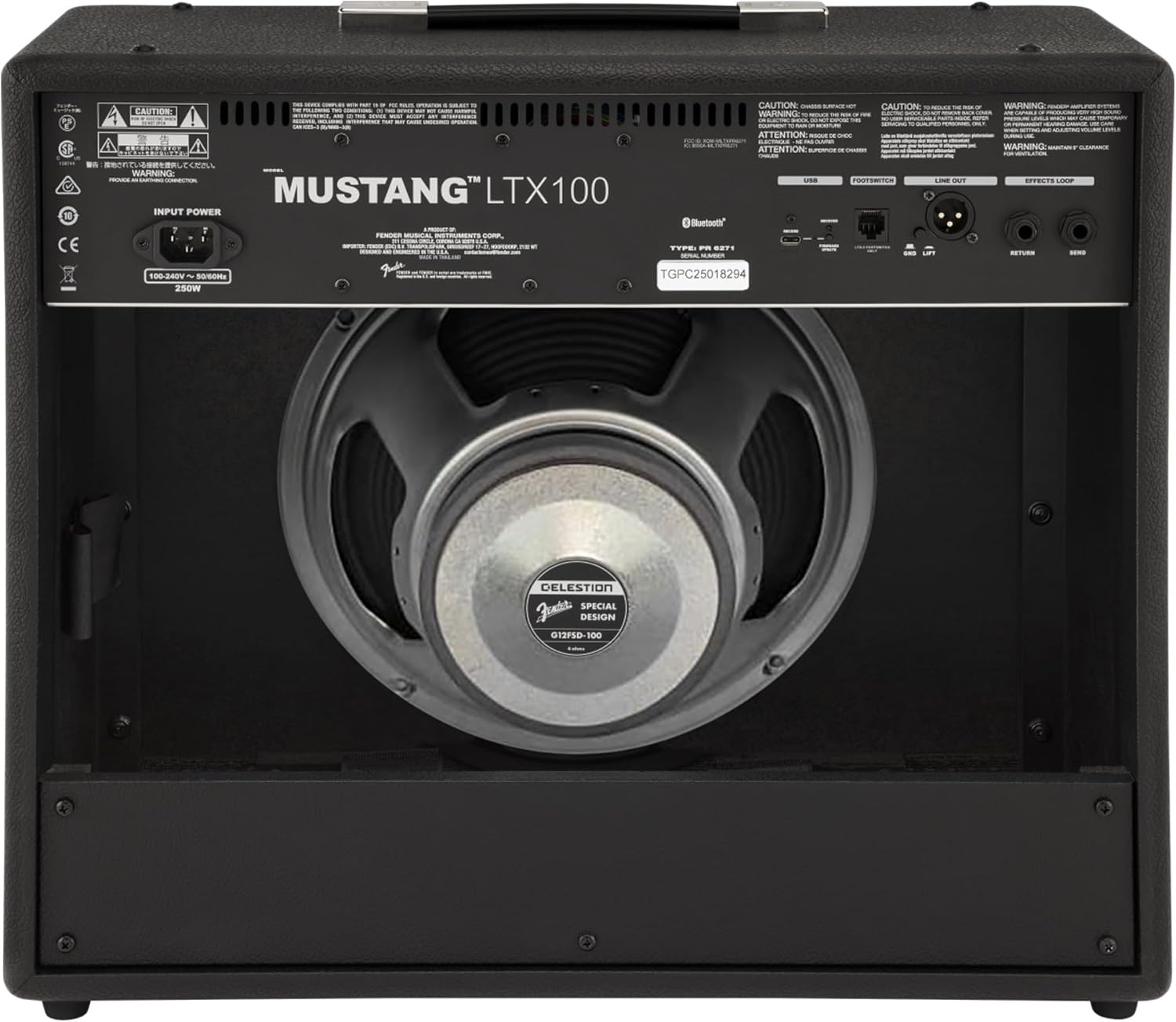
Rajah 3.1: Sambungan Panel Belakang
3.3 Sambungan Instrumen dan Aksesori
- Input Instrumen: Connect your guitar using a standard 1/4-inch instrument cable to the INPUT jack on the front panel.
- Input Bantu: For connecting external audio devices (e.g., MP3 player, phone), use a 3.5mm stereo cable to the AUX input on the front panel.
- Output Fon Kepala: For silent practice, connect headphones to the HEADPHONE OUT jack on the rear panel.
- Talian XLR Keluar: For connecting to a PA system or recording interface, use XLR cables to the LINE OUT jacks on the rear panel. A ground lift switch is provided to eliminate hum.
- Gelung Kesan: External effects pedals can be connected via the SEND and RETURN jacks on the rear panel.
- USB-C: Connect to a computer for recording, firmware updates, and Fender Tone 3.0 app control.
4. Arahan Operasi
4.1 Kawalan Panel Hadapan Lebihview

Rajah 4.1: Kawalan Panel Hadapan
- MASUKKAN: Bicu 1/4 inci untuk menyambungkan gitar anda.
- AUX: Input stereo 3.5mm untuk peranti audio luaran.
- DAPATKAN: Controls the input level and amount of overdrive/distortion for the selected amp model.
- JILID: Adjusts the output level of the selected amp model.
- Treble: Melaraskan tindak balas frekuensi tinggi.
- TENGAH: Melaraskan tindak balas frekuensi pertengahan.
- ASAS: Melaraskan tindak balas frekuensi rendah.
- MASTER: Mengawal volum keluaran keseluruhan amplebih hidup.
- DISPLAY: Color LCD screen for navigating menus, selecting amp models, effects, and viewing tuner.
- ENCODER KNOB: Used to scroll through menus and adjust parameters on the display. Press to select.
- KEMBALI: Kembali ke menu atau skrin sebelumnya.
- JIMAT: Stores current settings as a preset.
- MENU: Accesses the main menu for system settings, global parameters, and more.
- KETIK: Used for setting delay and modulation effect tempos. Hold to activate the chromatic tuner.
- HIDUP/MATI: Suis kuasa untuk amplebih hidup.
4.2 Menghidupkan dan Operasi Asas
- Ensure all connections are secure and the MASTER volume is set to a low level.
- Press the ON/OFF switch to power on the amplifier. The display will illuminate.
- Pilih satu amp model and effect using the encoder knob and display.
- Adjust the GAIN, VOLUME, TREBLE, MIDDLE, and BASS knobs to shape your desired tone.
- Gradually increase the MASTER volume to achieve the desired listening level.
4.3 Menggunakan Amp Model dan Kesan
The Mustang LTX100 offers 25 distinct amp models and 25 studio-quality effects. Use the encoder knob to browse through the available options on the display. Once an amp model or effect is selected, its parameters can be adjusted using the encoder knob or the dedicated tone knobs (Treble, Middle, Bass) if applicable.
4.4 Pratetap
The amplifier comes with 70 factory presets and allows for 100 user-defined presets. To save your custom settings:
- Dial in your desired amp model, effects, and tone settings.
- Tekan butang SIMPAN.
- Use the encoder knob to select a user preset slot.
- Press the encoder knob to confirm and save your preset.
4.5 Penstriman Audio Bluetooth
To stream audio from a mobile device:
- Aktifkan Bluetooth pada peranti mudah alih anda.
- pada amplifier, navigate to the Bluetooth menu via the display.
- Select "Pair New Device" and choose "Mustang LTX100" from your device's Bluetooth list.
- Once paired, you can play audio through the amplebih hidup.
4.6 Fender Tone 3.0 App
The Fender Tone 3.0 app (available for iOS and Android) provides wireless control over your amplifier. It allows you to edit, save, and share presets, as well as access additional features. Connect your amplifier to your mobile device via Bluetooth to use the app.
5. Penyelenggaraan
5.1 Pembersihan
- Sentiasa memutuskan sambungan ampkipas dari soket kuasa sebelum membersihkan.
- Gunakan kain lembut dan kering untuk membersihkan permukaan luar.
- Jangan gunakan pembersih, pelarut atau lilin yang kasar, kerana ini boleh merosakkan kemasan.
- Avoid spraying liquids directly onto the amplebih hidup.
5.2 Penyimpanan
- Simpan amplifier in a dry, cool environment, away from direct sunlight and extreme temperatures.
- If storing for an extended period, cover the amplifier to protect it from dust.
6. Penyelesaian masalah
| Masalah | Kemungkinan Punca | Penyelesaian |
|---|---|---|
| Tiada kuasa | Power cord not connected; Power outlet not active; Amplifier power switch off | Check power cord connection; Test outlet with another device; Ensure power switch is ON |
| Tiada bunyi | Instrument cable faulty/disconnected; Guitar volume off; Amplifier volume/master low; Headphones connected | Check/replace instrument cable; Turn up guitar volume; Increase amplifier volume/master; Disconnect headphones |
| Bunyi herot | Gain too high; Master volume too high; Faulty cable/instrument | Reduce GAIN; Reduce MASTER volume; Test with different cable/instrument |
| Isu sambungan Bluetooth | Peranti tidak dalam mod berpasangan; Amplifier not discoverable; Interference | Ensure device is in pairing mode; Re-initiate pairing on amplifier; Move closer to amplifier; Mulakan semula kedua-dua peranti |
7. Spesifikasi
| Ciri | Perincian |
|---|---|
| Nama Model | Mustang LTX100 |
| Nombor Model | 2311800000 |
| Output Kuasa | 100 Watt |
| Penceramah | 1 x 12″ Celestion G12FSD-100 |
| Amp model | 25 |
| Kesan | 25 (distortion, overdrive, compression, modulation, delay, reverb, octave, etc.) |
| Pratetap | 70 factory presets + 100 user slots |
| Paparan | Color LCD with onboard chromatic tuner |
| Ketersambungan | Bluetooth audio, USB-C bidirectional audio |
| Keluaran | XLR line out (with ground lift), headphone out |
| Input | 1/4″ instrument input, 3.5 mm aux input |
| Sokongan Apl | Fender Tone 3.0 app (iOS/Android) |
| Pembinaan | Kombo amplifier, rugged build |
| Berat Barang | 26.4 paun |
| Dimensi Produk | 22.3 x 19.9 x 12.3 inci |
| bahan | logam |
| Sumber Kuasa | Elektrik Bertali |
8. Waranti dan Sokongan
For detailed warranty information, product registration, and technical support, please visit the official Fender website. You can also find FAQs, software updates, and additional resources there.
Official Fender Store: Kedai Fender di Amazon


