1. Pengenalan
This manual provides detailed instructions for the safe and effective use of your PRIXTON Snap Pocket DC600 compact camera. The Snap Pocket DC600 is a high-performance compact camera designed to capture moments with exceptional quality, offering 5K video recording and photos up to 50 megapixels. Its features include a 270° rotating screen, a waterproof casing for depths up to 30 meters, and integrated WiFi and USB-C connectivity. This device is suitable for various environments, including aquatic and outdoor adventures.
2. Produk Lebihview
2.1 Ciri-ciri Utama
- High-Definition Video and Photography: Records videos up to 5K at 30 frames per second and captures photos up to 50 megapixels, with multiple resolutions available.
- Multi-Angle Design with Touch Screen: Features a 1.3-inch IPS touch screen with 270° rotation for flexible framing, ideal for selfies and creative shots.
- Kalis air Casing up to 30 Meters: Protected by a waterproof case, making it suitable for water sports, diving, and extreme activities without compromising image quality.
- Kesambungan Pintar: Includes integrated WiFi for remote control and fast content transfer. Connects via USB-C and allows content management through the SupCam Pro application, compatible with iOS and Android.
- Battery Life and Storage: Equipped with a 1000 mAh battery, providing up to 90 minutes of continuous recording. Supports microSD cards up to 256 GB.
2.2 Komponen Kamera
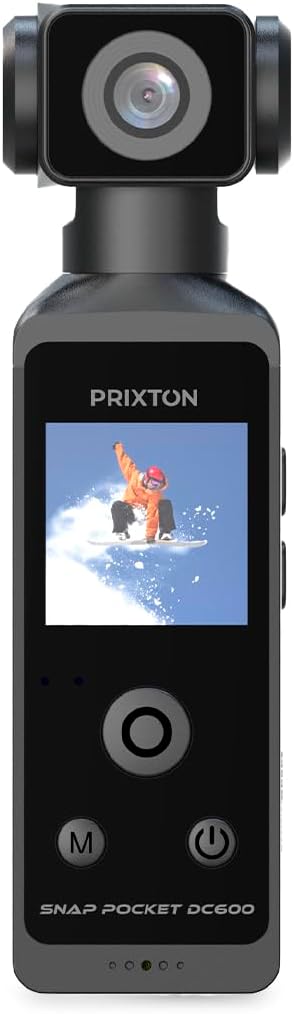


3. Persediaan
3.1 Mengecas Bateri
Before first use, fully charge the camera's internal 1000 mAh battery. Connect the included USB-C cable to the camera's USB-C port (refer to Image 3) and the other end to a standard USB power adapter (not included) or a computer's USB port. The charging indicator light will show the charging status.
3.2 Memasukkan Kad MicroSD
The camera requires a microSD card (up to 256 GB, not included) for storing photos and videos. Locate the microSD card slot on the side of the camera (refer to Image 3). Gently insert the microSD card with the contacts facing down until it clicks into place. To remove, press the card in again until it springs out.
3.3 Kuasa Awal Hidup
Press and hold the Power button (usually marked with a ⑂ symbol) for a few seconds until the screen illuminates. Follow any on-screen prompts for initial setup, such as language and date/time settings.
3.4 Connecting to the Mobile Application
Download the 'SupCam Pro' application from your device's app store (iOS or Android). Enable WiFi on your camera and connect your smartphone to the camera's WiFi network. Open the SupCam Pro app to control the camera remotely and transfer media files.
4. Arahan Operasi
4.1 Kawalan Asas
- Butang Kuasa: Press and hold to turn on/off. Short press to switch between modes or confirm selections.
- Butang Mod (M): Short press to cycle through different shooting modes (e.g., video, photo, playback).
- Butang Navigasi (Atas/Bawah): Used to navigate menus or zoom in/out in certain modes.
- Butang Rana / Rakam: Press to start/stop video recording or take a photo.
4.2 Rakaman Video
In video mode, press the Shutter/Record button to begin recording. Press it again to stop. The camera supports resolutions up to 5K at 30fps. Adjust video settings (resolution, frame rate) via the on-screen menu.
4.3 Tangkapan Foto
In photo mode, press the Shutter/Record button to take a picture. The camera can capture photos up to 50 megapixels. Adjust photo settings (resolution, timer) via the on-screen menu.
4.4 Using the 270° Rotating Screen
The camera's 1.3-inch IPS touch screen can rotate 270 degrees. This allows for flexible viewing angles, making it easy to frame shots from various perspectives, including selfies. Simply adjust the screen to your desired position.


4.5 Penggunaan Kalis Air
When using the camera in or near water, ensure it is properly enclosed within its waterproof casing (refer to Image 4). Verify that all seals are clean and securely closed before submersion. The camera is waterproof up to 30 meters with the casing.

5. Penyelenggaraan
5.1 Pembersihan
- Badan Kamera: Lap dengan kain lembut dan kering. Untuk kotoran degil, gunakan sedikit damp kain dan kemudian keringkan dengan teliti.
- Kanta: Use a lens cleaning cloth or brush to gently remove dust. Avoid touching the lens with fingers.
- Kalis air Casing: After use in saltwater, rinse the casing with fresh water and allow it to air dry. Ensure no sand or debris is trapped in the seals.
5.2 Penjagaan Bateri
To prolong battery life, avoid exposing the camera to extreme temperatures. Charge the battery regularly, even if not in use, to prevent deep discharge. If storing for extended periods, charge the battery to about 50%.
5.3 Penyimpanan
Store the camera in a cool, dry place away from direct sunlight and excessive humidity. When transporting, use a protective case to prevent scratches and damage.

6. Penyelesaian masalah
- Kamera tidak dihidupkan: Ensure the battery is charged. If the issue persists, try resetting the camera using the small reset button (refer to Image 3) with a thin pin.
- Cannot record or take photos: Check if a microSD card is inserted and has sufficient free space. Ensure the card is formatted correctly (FAT32 or exFAT).
- Isu sambungan WiFi: Ensure WiFi is enabled on the camera and your mobile device. Restart both devices and try connecting again. Verify the 'SupCam Pro' app is up to date.
- Kualiti imej/video yang lemah: Check the lens for smudges or dirt. Ensure settings like resolution and exposure are appropriate for the lighting conditions.
- Water leakage in waterproof case: Immediately remove the camera from water. Inspect the waterproof casing for cracks or damage. Ensure the seals are clean and properly seated before next use.
7. Spesifikasi
| Ciri | Spesifikasi |
|---|---|
| Jenama | PRIXTON |
| Nama Model | DC600 |
| Nombor Model Item | 10006216 |
| Saiz Skrin | 1.3 inches IPS Touch Screen (270° rotating) |
| Resolusi Pegun Berkesan | 50 Megapiksel |
| Resolusi Video | Up to 5K @ 30fps |
| Penstabilan Imej | ya |
| Panjang Fokus | 2mm - 10mm |
| Apertur Maksimum | f/22 |
| Kedalaman Kalis Air | Up to 30 meters (with waterproof casing) |
| Ketersambungan | WiFi, USB-C |
| Bateri | 1000 mAh (up to 90 minutes continuous recording) |
| Penyimpanan | Kad MicroSD sehingga 256 GB |
| Komponen yang Disertakan | 1 kabel pengecasan |
8. Waranti dan Sokongan
8.1 Maklumat Waranti
Specific warranty details are not provided in this manual. Please refer to the product packaging or the official PRIXTON webtapak untuk terma dan syarat jaminan.
8.2 Sokongan Pelanggan
For technical assistance, troubleshooting beyond this manual, or inquiries regarding spare parts, please contact PRIXTON customer support through their official website or the contact information provided with your purchase. Spare parts availability information is currently unavailable.


