pengenalan
This manual provides comprehensive instructions for the safe and efficient operation of your Crosley CR3505A-LN Cruiser Portable CD Player. Please read this manual thoroughly before using the device and retain it for future reference. This portable audio player combines classic design with modern functionality, offering CD playback, Bluetooth connectivity, FM radio, and auxiliary input.
Apa yang ada dalam Kotak
Sahkan bahawa semua item ada semasa membongkar:
- Crosley CR3505A-LN Portable CD Player
- Kabel USB-C
Ciri-ciri Produk
- Pemain Muzik Mudah Alih: Equipped with a rechargeable lithium battery, providing up to 4 hours of playback at 50% volume after a 3.5-hour charge.
- Versatile Audio Options: Features built-in stereo speakers and a headphone jack. Supports CD playback, Bluetooth streaming to wireless headphones/speakers, and auxiliary input for other devices.
- Retro Style, Modern Function: Blends nostalgic aesthetics with contemporary features, including a tonearm-inspired power switch and a built-in FM radio.
- Designed for Portability: Lightweight construction with a magnetic lid closure for easy transport.
Pengenalan Komponen
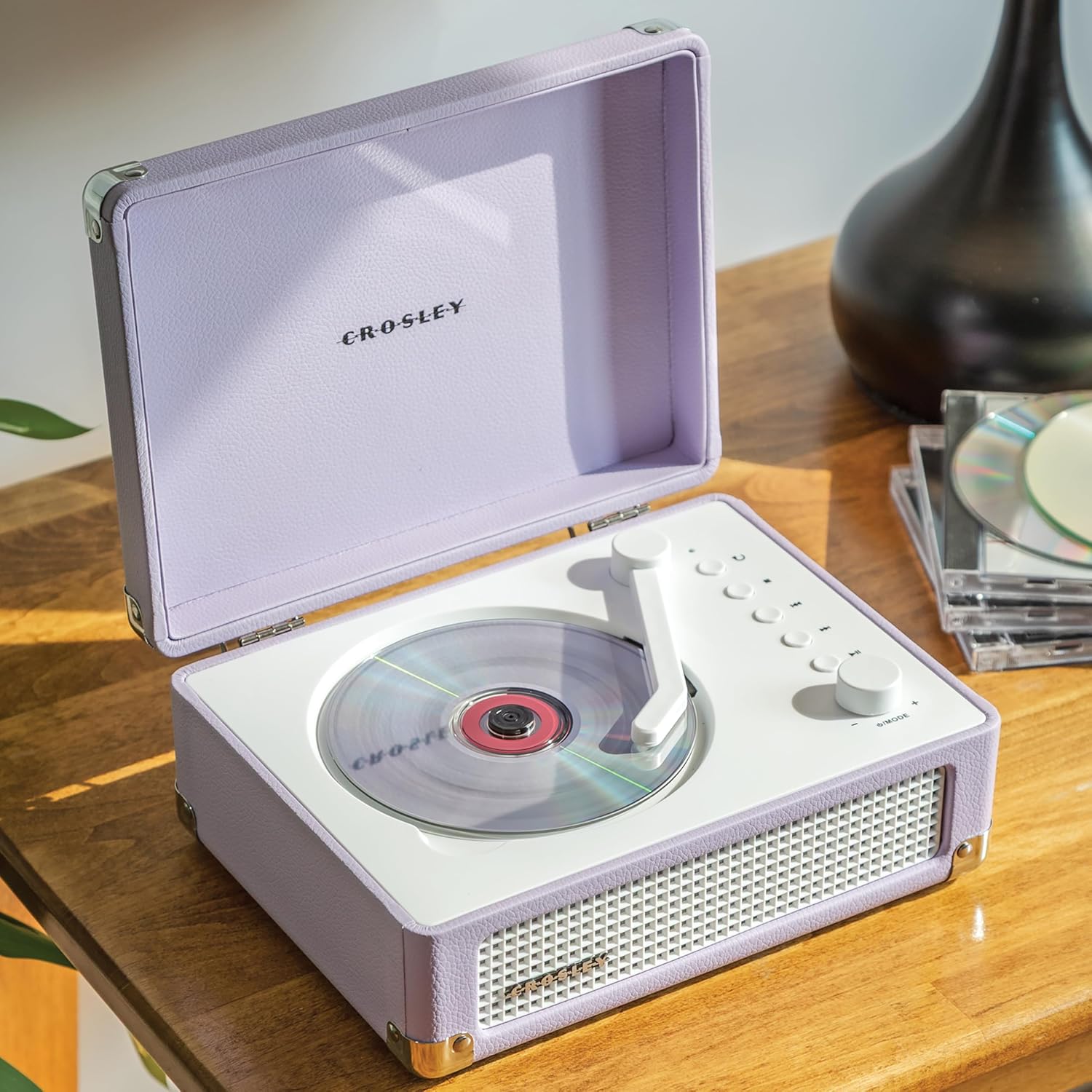
Rajah 1: Atas view of the Crosley CR3505A-LN with lid open, highlighting the CD compartment and control panel.

Rajah 2: Belakang view of the unit, displaying the headphone jack, AUX In port, and USB-C charging port.
Panel Kawalan Terlaluview
- Tonearm-inspired Power Switch: Activates/deactivates the unit and initiates CD playback.
- Mode/Power Dial: Rotates to adjust volume. Press to cycle through modes (CD, Bluetooth, FM, AUX).
- Butang Ulang: Repeats current track or album.
- Butang Berhenti: Menghentikan main balik CD.
- Butang Trek/Undur Sebelumnya: Skips to the previous track or rewinds during playback.
- Butang Trek Seterusnya/Maju Pantas: Skips to the next track or fast forwards during playback.
- Butang Main/Jeda: Controls playback for CD and Bluetooth.
- Bluetooth/FM Indicator Light: Indicates current mode and pairing status.
Persediaan
Mengecas Bateri
- Connect the supplied USB-C cable to the DC 5V port on the rear of the unit (Figure 2).
- Sambungkan hujung kabel USB-C yang satu lagi kepada penyesuai kuasa USB yang serasi (tidak disertakan).
- The indicator light will show charging status. A full charge takes approximately 3.5 hours.
Menghidupkan/Mematikan
To power on the unit, move the tonearm-inspired switch over the CD spindle. To power off, move the switch back to its resting position.
Arahan Operasi
Main semula CD
- Open the lid of the CD player.
- Carefully place a CD onto the spindle in the CD compartment, label side up.
- Tutup penutup.
- Move the tonearm-inspired switch over the CD spindle to power on and initiate playback.
- Use the Play/Pause, Stop, Previous Track/Rewind, and Next Track/Fast Forward buttons to control playback.
- Press the Repeat button to cycle through repeat modes (repeat one track, repeat all tracks, random play).
Berpasangan Bluetooth
- Hidupkan unit.
- Press the Mode/Power dial repeatedly until the Bluetooth indicator light flashes blue, indicating pairing mode.
- On your Bluetooth-enabled device (e.g., smartphone, tablet), search for "Crosley CR3505A-LN" in the Bluetooth settings.
- Select the device to pair. Once connected, the Bluetooth indicator light will turn solid blue.
- You can now stream audio from your device to the CD player.
Radio FM
- Hidupkan unit.
- Press the Mode/Power dial repeatedly until the FM indicator light illuminates.
- Use the Previous Track/Rewind and Next Track/Fast Forward buttons to tune to desired FM stations.
Input Bantu
- Hidupkan unit.
- Press the Mode/Power dial repeatedly until the AUX indicator light illuminates.
- Connect an external audio device (e.g., MP3 player) to the AUX In port on the rear of the unit (Figure 2) using a 3.5mm audio cable (not included).
- Audio from the external device will now play through the CD player's speakers.
Kawalan Kelantangan
Rotate the Mode/Power dial clockwise to increase volume and counter-clockwise to decrease volume.
Penyelenggaraan
Pembersihan
- Sentiasa cabut plag unit daripada sumber kuasa sebelum membersihkan.
- Gunakan kain lembut dan kering untuk mengelap permukaan luar. Jangan gunakan pembersih yang melelas, lilin atau pelarut.
- For the CD lens, use a specialized CD lens cleaner. Avoid touching the lens directly.
Penjagaan Bateri
- Untuk memanjangkan hayat bateri, elakkan daripada menyahcas sepenuhnya bateri dengan kerap.
- If storing the unit for an extended period, charge the battery to approximately 50% every few months.
Menyelesaikan masalah
| Masalah | Kemungkinan Punca | Penyelesaian |
|---|---|---|
| Tiada kuasa | Battery is discharged; Unit is not powered on. | Charge the battery using the USB-C cable; Ensure the tonearm-inspired switch is moved to the ON position. |
| CD tidak dimainkan | CD inserted incorrectly; CD is dirty or scratched; Unit is not in CD mode. | Reinsert CD label side up; Clean or replace CD; Press Mode/Power dial to select CD mode. |
| Bluetooth tidak bersambung | Unit tidak dalam mod berpasangan; Peranti terlalu jauh; Peranti yang telah dipasangkan sebelum ini telah disambungkan. | Press Mode/Power dial until Bluetooth light flashes; Move device closer; Disconnect from other Bluetooth devices. |
| Penerimaan radio FM yang lemah | Isyarat lemah; Gangguan. | Adjust the unit's position; Try tuning to a stronger station. |
| Tiada bunyi | Kelantangan terlalu rendah; Mod salah dipilih; Fon kepala disambungkan. | Increase volume; Ensure correct mode (CD, BT, FM, AUX) is selected; Disconnect headphones if using speakers. |
Spesifikasi
- Dimensi Produk: 6.75 x 8.75 x 3.75 inci
- Berat Barang: 2.54 paun
- Nombor Model Item: CR3505A-LN
- Jenama: Crosley
- warna: Lavender
- Teknologi Ketersambungan: Bluetooth
- Bilangan Cakera: 1
Maklumat Keselamatan
- Jangan dedahkan unit kepada suhu yang melampau, kelembapan atau cahaya matahari langsung.
- Avoid placing the unit near heat sources or in areas with poor ventilation.
- Jangan buka atau cuba membaiki unit sendiri. Rujuk semua servis kepada kakitangan yang berkelayakan.
- Jauhkan unit daripada air atau cecair lain.
- Gunakan hanya kabel pengecas yang dinyatakan.
Waranti dan Sokongan
Crosley products are designed in the USA and come with USA-based customer support. For warranty information or technical assistance, please refer to the official Crosley webtapak atau hubungi perkhidmatan pelanggan mereka secara langsung. Simpan resit pembelian anda sebagai bukti pembelian untuk tuntutan waranti.


