pengenalan
Welcome to the EMPIRE GAMING K243 Mechanical Gaming Keyboard user manual. This guide provides comprehensive instructions for setting up, operating, and maintaining your new keyboard. The K243 is designed for gamers and typists seeking a responsive and durable input device with customizable RGB lighting.
Featuring 111 AZERTY layout keys, MX Red mechanical switches, N-Key Rollover (NKRO) anti-ghosting, and a detachable USB-C cable, the K243 offers a premium experience across multiple platforms, including PC and gaming consoles.

Figure 1: EMPIRE GAMING K243 Mechanical Gaming Keyboard
Persediaan
Kandungan Pakej
- EMPIRE GAMING K243 Mechanical Gaming Keyboard
- Kabel USB-C boleh tanggal
Menyambung Papan Kekunci
- Locate the USB-C port on the back of your K243 keyboard.
- Sambungkan satu hujung kabel USB-C yang disediakan ke port USB-C papan kekunci.
- Connect the other end of the USB-C cable to an available USB-A port on your computer or gaming console.
- The keyboard is plug-and-play; no additional drivers are required for basic functionality.
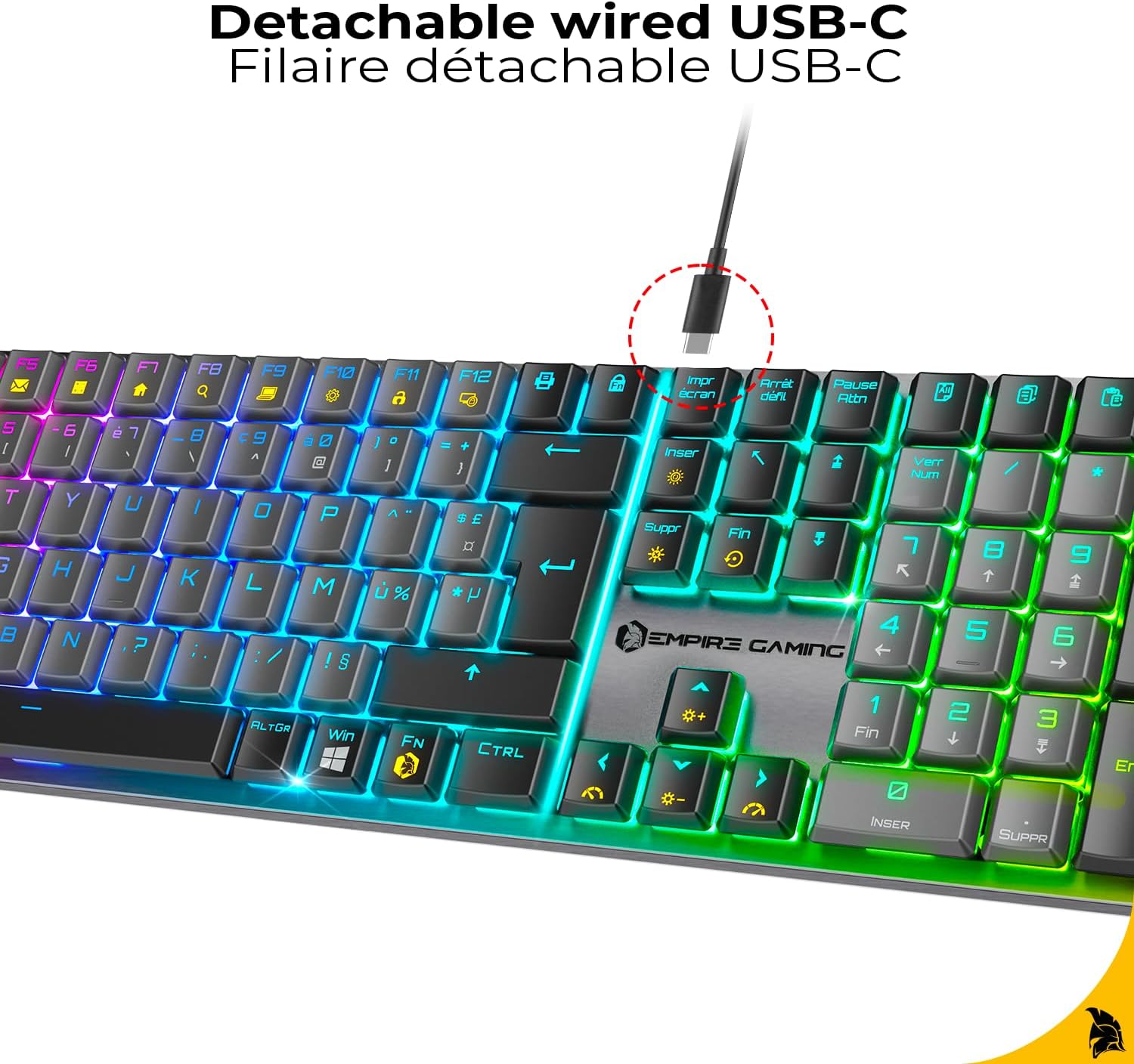
Figure 2: Detachable USB-C Cable Connection
Keserasian
The EMPIRE GAMING K243 keyboard is compatible with:
- PC (Windows operating systems)
- PlayStation 5 (PS5)
- PlayStation 4 (PS4)
- Konsol Xbox
The keyboard features an AZERTY layout, optimized for French-speaking users.

Figure 3: AZERTY Keyboard Layout
Arahan Operasi
Mechanical MX Red Switches
The K243 is equipped with MX Red mechanical switches, known for their linear travel and low actuation force. This provides a smooth, precise, and responsive typing experience, ideal for both competitive gaming and extended typing sessions. The switches are designed for durability and consistent performance.

Figure 4: MX Red Mechanical Switches
N-Key Rollover (NKRO) Anti-Ghosting
The keyboard features N-Key Rollover (NKRO) technology, ensuring that every keystroke is registered accurately, even when multiple keys are pressed simultaneously. This anti-ghosting feature is crucial for fast-paced gaming, preventing missed inputs and ensuring maximum precision.

Figure 5: NKRO Anti-Ghosting
Kawalan Pencahayaan RGB
The K243 keyboard offers dynamic RGB backlighting with 24 predefined effects. All lighting adjustments are made directly on the keyboard using function key combinations, without the need for additional software.
- Tukar Mod Pencahayaan: Tekan Fn + Ins to cycle through the 24 predefined RGB effects.
- Change Lighting Color: Tekan Fn + Del to change the color within certain lighting modes.
- Laraskan Kecerahan: Tekan Fn + ↑ (Up Arrow) untuk meningkatkan kecerahan, dan Fn + ↓ (Down Arrow) untuk mengurangkan kecerahan.
- Adjust Effect Speed: Tekan Fn + ← (Left Arrow) to decrease effect speed, and Fn + → (Right Arrow) to increase effect speed.
- Kunci Windows Key: Tekan Fn + Menang to disable the Windows key, preventing accidental presses during gaming.

Figure 6: Customizable RGB Effects
Penyelenggaraan
Membersihkan Papan Kekunci Anda
To ensure the longevity and optimal performance of your EMPIRE GAMING K243 keyboard, regular cleaning is recommended:
- Putuskan sambungan: Always disconnect the keyboard from your device before cleaning.
- Penyingkiran habuk: Use a can of compressed air to blow away dust and debris from between the keycaps. Hold the can upright to prevent propellant discharge.
- Pembersihan Permukaan: Lap penutup kekunci dan permukaan papan kekunci dengan lembut menggunakan kain lembut dan bebas bulu.ampdisapu dengan air atau larutan pembersih yang lembut dan tidak melelas. Elakkan kelembapan berlebihan.
- Noda degil: For stubborn stains, a cotton swab lightly dampened with isopropyl alcohol can be used on individual keycaps.
- Pengeringan: Ensure the keyboard is completely dry before reconnecting it to your device.
Do not immerse the keyboard in water or use harsh chemicals, as this can damage the electronic components.
Menyelesaikan masalah
If you encounter issues with your EMPIRE GAMING K243 keyboard, please refer to the following common troubleshooting steps:
| Masalah | Penyelesaian yang Mungkin |
|---|---|
| Papan kekunci tidak bertindak balas. |
|
| Pencahayaan RGB tidak berfungsi atau tersekat. |
|
| Keys are not registering correctly (ghosting). |
|
| Windows key is not working. |
|
Spesifikasi
| Ciri | Perincian |
|---|---|
| Jenama | EMPIRE GAMING |
| Model | K243 |
| Ketersambungan | Wired USB-C (Detachable) |
| Jenis Papan Kekunci | mekanikal |
| Jenis Suis | MX Red |
| Reka Letak Kekunci | AZERTY (FR) |
| Bilangan Kunci | 111 |
| Anti-Ghosting | N-Key Rollover (NKRO) |
| Pencahayaan latar | RGB with 24 Predefined Effects |
| Peranti Serasi | PC, PS5, PS4, Xbox |
| Dimensi (L x W x H) | 42.8 x 11.9 x 2.4 cm (16.85 x 4.69 x 0.94 inci) |
| Berat badan | 665 g (1.47 paun) |
| Sumber Kuasa | Kuasa USB |
| Komponen yang Disertakan | Keyboard, USB-C Cable |

Rajah 7: Dimensi Papan Kekunci
Waranti dan Sokongan
Waranti Pengeluar
The EMPIRE GAMING K243 Mechanical Gaming Keyboard comes with a Waranti pengilang selama 2 tahun dari tarikh pembelian. Waranti ini melindungi kecacatan pada bahan dan mutu kerja di bawah penggunaan biasa. Sila simpan bukti pembelian anda untuk tuntutan waranti.
The warranty does not cover damage caused by misuse, accident, unauthorized modification, or external causes such as power surges.
Sokongan Pelanggan
For technical assistance, warranty claims, or any questions regarding your EMPIRE GAMING K243 keyboard, please contact EMPIRE GAMING customer support through their official webtapak atau peruncit tempat anda membeli produk tersebut.
You can typically find contact information on the brand's official webtapak: www.empire-gaming.com


