1. Maklumat Keselamatan Penting
Sila baca semua amaran dan arahan keselamatan dengan teliti sebelum menggunakan produk ini. Simpan manual ini untuk rujukan masa hadapan.
- Jangan dedahkan pembesar suara kepada suhu yang melampau, cahaya matahari langsung atau kelembapan yang tinggi.
- Elakkan daripada menjatuhkan atau menundukkan pembesar suara kepada impak yang kuat.
- Jangan buka, baiki atau ubah suai pembesar suara itu sendiri. Hubungi kakitangan perkhidmatan yang berkelayakan untuk sebarang pembaikan.
- Jauhkan pembesar suara daripada air dan cecair lain.
- Use only the provided charging cable and a compatible power adapter (DC 5V) to charge the speaker.
- Jangan kendalikan pembesar suara pada kelantangan yang terlalu tinggi untuk tempoh yang lama bagi mengelakkan kerosakan pendengaran.
2. Produk Lebihview
TAMPROAD Q101 is a portable Bluetooth speaker designed to deliver powerful and clear audio with dynamic LED lighting. Its robust wooden cabinet and multiple connectivity options make it suitable for various indoor and outdoor settings.
Ciri-ciri Utama:
- Kuasa Puncak 120W: Equipped with 2 x 3.5" woofers and 2 x 2.0" tweeters for deep bass and clear treble.
- Stereo Tanpa Wayar Sejati (TWS): Pair two Q101 speakers for an immersive stereo sound experience.
- Wooden Cabinet: Minimizes acoustic distortion for authentic sound reproduction.
- Pertunjukan Lampu LED Dinamik: Multiple lighting effects that sync with music, creating a vibrant atmosphere.
- Berbilang Sambungan: Supports Bluetooth, USB drive, TF card, AUX mode, and microphone input.
- Bateri Besar: High-capacity 10000 mAh battery for extended playtime.
- Reka Bentuk Mudah Alih: Features a detachable, high-strength silicone carrying strap.

Image: Internal components and power output of the TAMPROAD Q101 speaker.
3. Kandungan Pakej
Pastikan semua item ada dalam pakej:
- 1 x TAMPROAD Q101 120W Bluetooth Speaker
- 1 x Kabel Pengecas Jenis-C
- 1 x Kabel AUX
- 1 x Manual Pengguna
4. Persediaan
4.1 Mengecas Speaker
- Locate the Type-C charging port on the back panel of the speaker.
- Connect the provided Type-C charging cable to the speaker and a compatible DC 5V power adapter (not included).
- The charging indicator light will be red while charging. It will turn off when the battery is fully charged.
4.2 Menghidupkan/Mematikan
- To power on, slide the ON/OFF switch on the back panel to the 'ON' position.
- Untuk mematikan kuasa, luncurkan suis ON/OFF ke kedudukan 'OFF'.
4.3 Berpasangan Bluetooth
- Ensure the speaker is powered on and in Bluetooth mode (indicated by a blue light on the control panel). If not, press the 'MODE' button to switch to Bluetooth.
- Pada peranti anda (telefon pintar, tablet, dll.), dayakan Bluetooth dan cari peranti yang tersedia.
- Select 'TAMPROAD Q101' from the list of devices.
- Once paired, the speaker will emit an audible confirmation.
4.4 Penggandingan Stereo Tanpa Wayar Sebenar (TWS)
To achieve a true wireless stereo experience, you need two TAMPROAD Q101 speakers.
- Ensure both Q101 speakers are powered on and in Bluetooth mode, but not yet paired with any device.
- On one of the speakers, long-press the 'VOLUME/TWS' knob (the central knob). The speaker will enter TWS pairing mode.
- The speakers will automatically connect to each other. Once connected, you will hear an audible confirmation.
- Now, pair your device with one of the speakers via Bluetooth as described in section 4.3. Both speakers will play audio in stereo.

Image: TWS function with two Q101 speakers for stereo sound.
5. Arahan Operasi
5.1 Panel Kawalan Selesaiview

Imej: Terperinci view of the speaker's control panel.
- Butang Cahaya: Short press to cycle through different LED light modes. Long press to turn the LED lights ON/OFF.
- Butang EQ: Short press to switch between preset equalizer modes (e.g., indoor, outdoor).
- Butang MOD: Short press to cycle through input modes: Bluetooth, USB, TF Card, AUX, Microphone.
- VOLUME/TWS Knob: Rotate to adjust volume. Long press to activate/deactivate TWS pairing mode (when not connected to a device).
- Butang Sebelumnya: Tekan pendek untuk pergi ke trek sebelumnya.
- Butang Jeda/Main: Short press to play or pause audio. Long press to disconnect Bluetooth.
- Butang Seterusnya: Tekan pendek untuk pergi ke trek seterusnya.
5.2 Mod Main Semula
The speaker supports various playback sources:
- Mod Bluetooth: Connect wirelessly to your Bluetooth-enabled device (refer to section 4.3).
- Mod Pemacu USB: Masukkan pemacu USB yang mengandungi audio MP3 files ke dalam port USB. Pembesar suara secara automatik akan bertukar kepada mod USB dan mula main balik.
- Mod Kad TF: Masukkan kad TF (MicroSD) yang mengandungi audio MP3 files ke dalam slot kad TF. Pembesar suara secara automatik akan bertukar kepada mod kad TF dan mula main balik.
- Mod AUX: Connect an external audio device using the provided 3.5mm AUX cable to the AUX input port. Press the 'MODE' button to select AUX input.
- Input Mikrofon: Connect a microphone (not included) to the MIC input port for karaoke or public speaking.
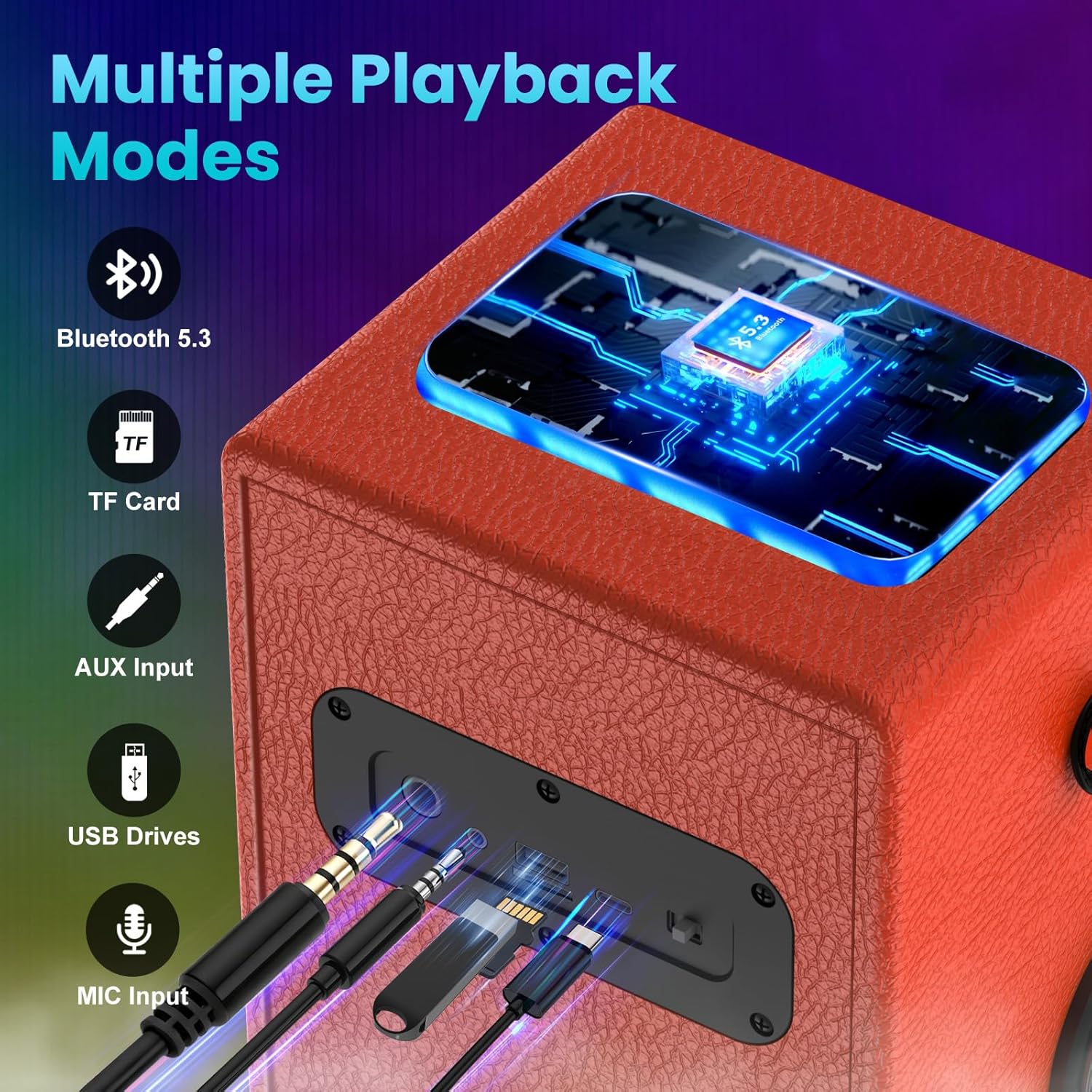
Image: Multiple connection ports on the speaker.
5.3 Pertunjukan Lampu LED
The speaker features dynamic LED lights that can enhance your listening experience.
- Short press the 'Light' button to cycle through 6 different colorful lighting effects.
- Long press the 'Light' button to turn the LED lights ON or OFF.

Image: Various dynamic LED light modes.
6. Penyelenggaraan
Proper care ensures the longevity of your TAMPROAD Q101 speaker:
- Pembersihan: Use a soft, dry cloth to wipe the exterior of the speaker. Do not use abrasive cleaners, alcohol, or chemical solvents.
- Storan: Apabila tidak digunakan untuk tempoh yang lama, simpan pembesar suara di tempat yang sejuk dan kering jauh dari cahaya matahari langsung dan suhu yang melampau.
- Penjagaan Bateri: Untuk mengekalkan kesihatan bateri, cas sepenuhnya pembesar suara sekurang-kurangnya sekali setiap tiga bulan, walaupun tidak digunakan secara tetap.
7. Penyelesaian masalah
Jika anda menghadapi masalah dengan pembesar suara anda, rujuk masalah dan penyelesaian biasa berikut:
| Masalah | Kemungkinan Punca | Penyelesaian |
|---|---|---|
| Speaker tidak dihidupkan. | Low battery; Power switch is OFF. | Charge the speaker fully; Slide the power switch to 'ON'. |
| Tidak boleh berpasangan melalui Bluetooth. | Speaker not in pairing mode; Device Bluetooth is off; Already paired with another device. | Ensure speaker is in Bluetooth mode; Enable Bluetooth on your device; Disconnect from other devices or long-press Play/Pause button to reset Bluetooth. |
| Tiada bunyi atau kelantangan rendah. | Kelantangan terlalu rendah; Mod input salah; Kelantangan peranti terlalu rendah. | Increase speaker volume; Press 'MODE' to select correct input; Increase volume on your connected device. |
| Gandingan TWS gagal. | Speakers too far apart; One speaker already paired with a device. | Ensure speakers are within close proximity; Disconnect both speakers from any devices before TWS pairing. |
| Lampu LED tidak berfungsi. | Lampu dimatikan. | Long press the 'Light' button to turn them on. |
8. Spesifikasi
| Ciri | Perincian |
|---|---|
| Jenama | TAMPJALAN RAYA |
| Nombor Model | Q101 |
| Kuasa Puncak | 120W |
| Diameter Woofer | 3.5 Inci (x2) |
| Diameter Tweeter | 2.0 Inci (x2) |
| Jenis Pemacu Audio | Pemandu Dinamik |
| Protokol Ketersambungan | Bluetooth, USB, AUX |
| Versi Bluetooth | 5.3 |
| Kapasiti Bateri | 10000 mAh |
| Kaedah Kawalan | Butang Tekan, Tombol Putar |
| warna | Jingga |
| Adakah Kalis Air | palsu |
9. Waranti dan Sokongan
All TAMPROAD products come with a Perkhidmatan waranti 12 bulan. For any product-related inquiries, technical assistance, or warranty claims, please contact TAMPROAD customer service. We offer Perkhidmatan pelanggan 24 jam untuk memastikan kepuasan anda.
Sila simpan bukti pembelian anda untuk pengesahan waranti.


