pengenalan
Thank you for choosing the FLEXISPOT ErgoX-PRO Ergonomic Office Chair. This manual provides essential information for the proper assembly, operation, maintenance, and troubleshooting of your new chair. Please read these instructions carefully before use and retain them for future reference.
Maklumat Keselamatan Penting
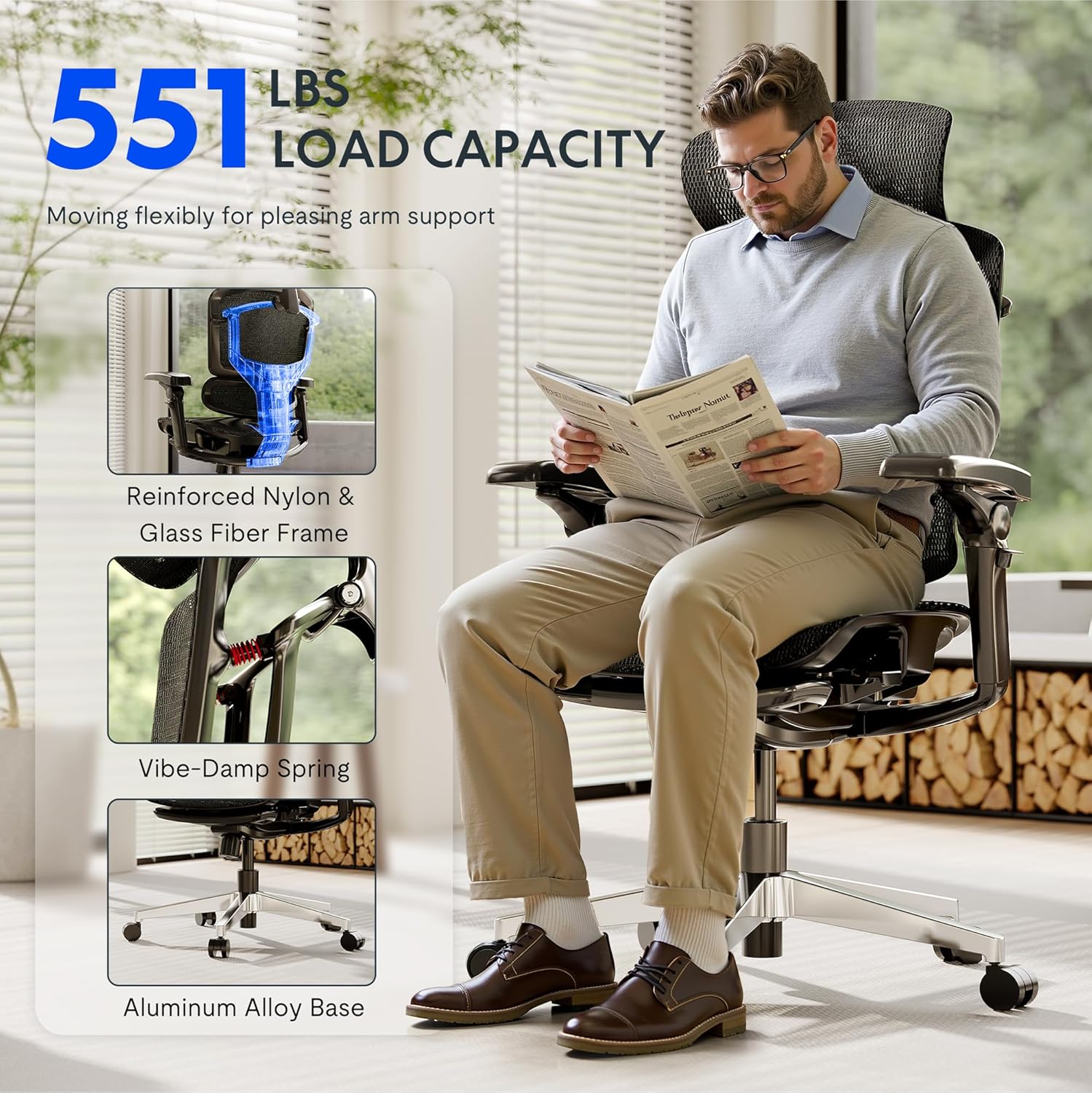
- Jangan melebihi kapasiti berat maksimum bagi 551 paun.
- Ensure proper assembly following the provided instructions. Incorrect assembly can lead to instability and injury.
- Use adjustable features carefully to avoid misuse and ensure stability during use.
- Pastikan tangan dan jari bebas daripada bahagian yang bergerak semasa pelarasan.
- Jangan berdiri di atas kerusi.
- Only use the chair on a stable, level surface.
Persediaan dan Perhimpunan
The FLEXISPOT ErgoX-PRO chair requires assembly. Please follow the steps below and refer to the assembly video for visual guidance. All necessary tools are included.
Langkah Perhimpunan:
- Buka Pembungkusan Komponen: Carefully remove all parts from the packaging and lay them out. Verify all components are present against the parts list in the included user manual.
- Pasang Kastor ke Pangkalan: Insert the five casters into the holes at the end of each leg of the aluminum alloy base. Press firmly until they click into place.
- Masukkan Pengangkat Gas: Letakkan silinder pengangkat gas ke dalam lubang tengah tapak kerusi yang telah dipasang.
- Lampirkan Mekanisme pada Tempat Duduk: Pasangkan mekanisme kawalan pada bahagian bawah kusyen tempat duduk menggunakan skru yang disediakan. Pastikan bahagian hadapan mekanisme sejajar dengan bahagian hadapan tempat duduk.
- Pasang tempat letak tangan: Fasten the 7D linkage armrests to the sides of the seat mechanism using the designated screws.
- Sambung Sandaran: Attach the backrest to the seat mechanism using the provided screws.
- Install Headrest: Secure the 4D adjustable headrest to the top of the backrest.
- Assemble Footrest (if applicable): Attach the footrest assembly to the designated points on the chair frame.
- Sambungkan Tempat Duduk ke Lif Gas: Letakkan tempat duduk dan penyandar yang telah dipasang dengan berhati-hati pada silinder pengangkat gas, pastikan ia berada di tengah dan stabil.
Video Perhimpunan:
Video: How to install FlexiSpot Ergox-Pro? This video demonstrates the step-by-step assembly process for the ErgoX-PRO chair, from unboxing to final setup.
Arahan Operasi
The FLEXISPOT ErgoX-PRO chair offers multiple adjustment options to customize your seating experience for optimal comfort and support.
Pelarasan Kerusi:
- Pelarasan Ketinggian Tempat Duduk: Locate the lever on the right side beneath the seat. Pull the lever up to raise the seat; release to lock. To lower, pull the lever up while seated.
- Pelarasan Kedalaman Tempat Duduk: Use the lever on the left side beneath the seat to slide the seat forward or backward by 2.8 inches (7cm), accommodating different thigh lengths.
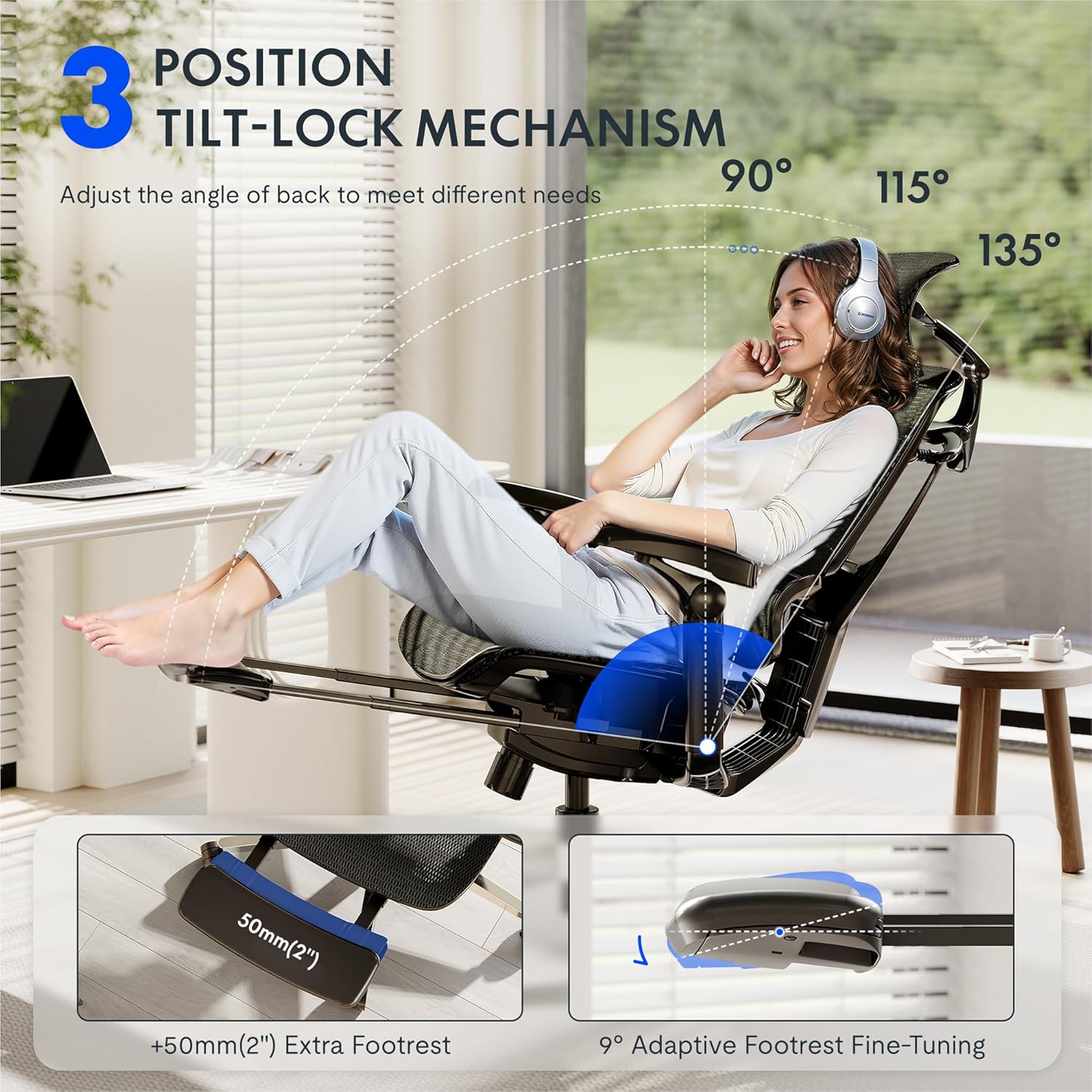
- Backrest Recline and Tilt Lock: The chair features a 3-position tilt base (90°/115°/135°). Use the recline lever to adjust the angle and lock it into your desired position. The 12-level fine-tuned backrest with spring cushioning ensures natural movement.
- 5D Dynamic Lumbar Support: The lumbar support is designed to adapt to your posture. It can be adjusted for height and depth to provide targeted support to your lower back.
- Penyandar Kepala Boleh Laras 4D: The headrest can be adjusted for height, angle (45°, 160°, 120° rotation), and front/back position (1.8 inches) to support your head and neck. It can also function as a back cushion.
- 7D Linkage Armrests: These full-motion armrests move with your body. Adjust them for height (3 inches up/down), rotation (40°), left/right movement (360°), and front/back (2.4 inches) to provide continuous support for various activities.
- Footrest (if applicable): Extend the footrest from beneath the seat for additional relaxation. It offers 9° adaptive fine-tuning.
Adjustment Demonstration Video:
Video: Set Up & Adjust the ErgoX Pro Chair for Maximum Comfort. This video illustrates how to effectively use the various adjustment features of your ErgoX-PRO chair.
Key Features Visuals:



Penyelenggaraan
To ensure the longevity and optimal performance of your FLEXISPOT ErgoX-PRO chair, regular maintenance is recommended.
- Pembersihan: Untuk pembersihan umum, gunakan pembersih lembutamp cloth. For the mesh components, cucian kering sahaja. Avoid harsh chemicals or abrasive cleaners.
- Pemeriksaan: Periksa semua skru dan bolt secara berkala untuk memastikan ia ketat. Ketatkan semula jika perlu.
- Penjagaan Kastor: Pastikan roda bebas daripada rambut dan serpihan untuk memastikan pergerakan yang lancar.
Menyelesaikan masalah
Jika anda menghadapi sebarang masalah dengan kerusi anda, sila rujuk penyelesaian biasa berikut:
- Kerusi Tidak Melaraskan Ketinggian: Ensure the gas lift lever is fully engaged or disengaged as required. Check if the gas lift cylinder is properly seated in the base and mechanism.
- Backrest Tilt Not Working: Verify that the tilt lock mechanism is disengaged. Some users report needing to apply more force or adjust the tension knob (if present) to achieve desired tilt.
- Tempat Letak Tangan Bergerak Terlalu Mudah: The 7D armrests are designed for dynamic movement. If they feel excessively loose, ensure all assembly screws are securely tightened.
- Bunyi Berdecit: Check all connection points and tighten any loose screws. Applying a small amount of silicone lubricant to moving parts (e.g., gas lift, tilt mechanism) can help.
- Kerusi Terasa Tidak Stabil: Re-check all assembly steps to ensure all components are correctly installed and tightened. Ensure the chair is on a flat, even surface.
Jika langkah-langkah ini tidak menyelesaikan masalah, sila hubungi khidmat pelanggan FLEXISPOT untuk bantuan lanjut.
Spesifikasi
| Jenama | FLEXISPOT |
| Nama Model | Ergonomic Task Chair (ErgoX PRO-Mesh+FT) |
| warna | Hitam Obsidian |
| Dimensi Produk | 28.3"D x 28.3"W x 55.9"H |
| Cadangan Berat Maksimum | 551 paun |
| Gaya Belakang | 12-L High-back, Mesh |
| Ciri Khas | Adjustable Headrest, Adjustable Height, Ergonomic, Adjustable Armrest, Dynamic Lumbar Support, Tilt, Back Support, Adjustable Recliner |
| bahan | AeroWeave 5.0 Mesh |
| Komponen yang Disertakan | Armrest, Headrest, Wheels, Backrest, Seat, User manual, Assembly tools |
| UPC | 840521507332 |
Dimensi Lebihview:

Waranti dan Sokongan
For warranty information, product support, or to purchase replacement parts, please refer to the official FLEXISPOT website or contact their customer service directly. Contact details are typically provided in the packaging or on the brand's official support pages.
Sokongan dalam talian: Lawati Kedai FLEXISPOT di Amazon untuk sumber tambahan dan pilihan hubungan.