1. Pengenalan
This manual provides essential information for the safe and efficient use of your Fossibot F107 Pro 5G Rugged Smartphone. Please read it thoroughly before operating your device.
Apa yang ada dalam Kotak
- Fossibot F107 Pro 5G Smartphone
- Kabel Jenis-C USB
- Penyesuai Kuasa (66W)
- Alat Ejector SIM
- Manual Pengguna
- Kad Waranti
2. Ciri-ciri Produk
The Fossibot F107 Pro is engineered for durability and high performance, offering a range of advanced features:
- Massive 28000mAh Battery with 66W Fast Charge: Experience extended usage with a large battery and rapid charging capabilities. The OTG function allows charging of other devices.
- Sistem Kamera Lanjutan: Features a 200MP AI main camera for detailed photos, a 2MP Night Vision Camera for clear low-light imaging, and a 50MP front camera for high-quality selfies. Supports 4K video recording and various modes including underwater, HDR, and 360° panorama.
- Robust Performance and Storage: Equipped with 12GB RAM (expandable up to 18GB virtual RAM for a total of 30GB) and 512GB internal storage, utilizing DDR5 technology for faster performance and lower power consumption.
- Immersive 6.95" FHD+ Display: A 2.4K display with 2400x1080 resolution and a 120Hz Smart Dynamic Refresh Rate provides smooth visuals and responsive interaction.
- Kesambungan Rangkaian 5G: Supports 5G networks (T-Mobile compatible; Verizon and AT&T are not supported). Please verify local frequency band compatibility before purchase.
- Reka bentuk lasak: Built to MIL-STD-810H standards, with IP68 and IP69K ratings for water, dust, and drop resistance.
- Lampu suluh bersepadu: A powerful flashlight with a 50-meter beam distance for outdoor activities and emergencies.
- Keselamatan dan Kemudahan: Includes NFC for contactless payments, Face ID, and Fingerprint unlock for secure and quick access.

Imej: Selesaiview of Fossibot F107 Pro's main features, highlighting its large battery, memory, camera, and rugged certifications.
3. Reka Letak Peranti
Familiarize yourself with the physical components of your Fossibot F107 Pro.

Imej: Depan dan belakang view of the Fossibot F107 Pro, showcasing its rugged design and camera module.

Imej: Side profile of the Fossibot F107 Pro, indicating the location of the power button, volume rocker, and SIM/TF card slot.
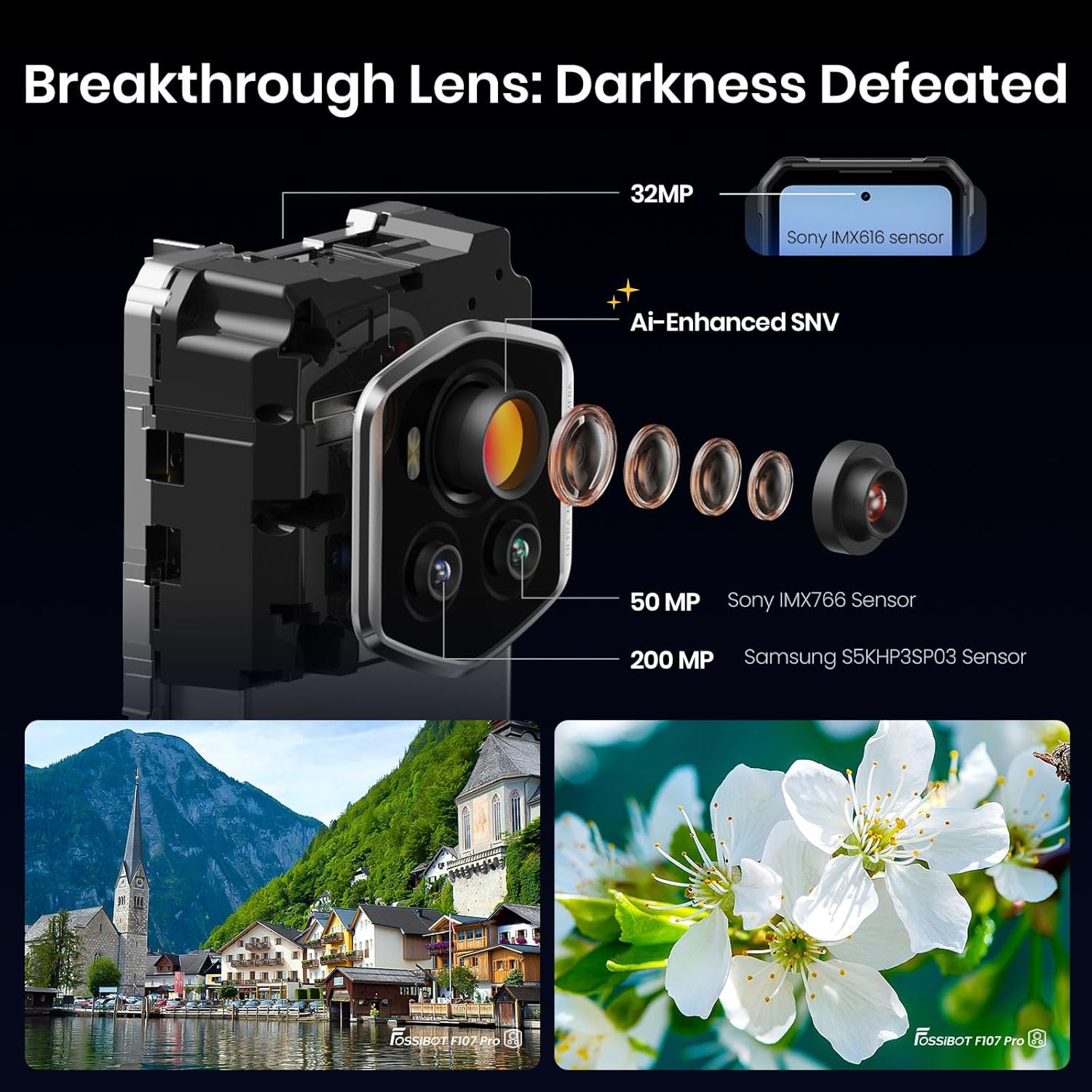
Imej: Terperinci view of the Fossibot F107 Pro's multi-lens camera system, including the 200MP main sensor and night vision lens.
4. Persediaan
4.1 Pemasangan Kad SIM dan Kad TF
- Cari dulang kad SIM/TF di sisi peranti.
- Masukkan alat ejektor SIM ke dalam lubang kecil di sebelah dulang dan tolak perlahan-lahan sehingga dulang terkeluar.
- Place your Nano-SIM card(s) and/or TF card (microSD) into the designated slots on the tray. Ensure the gold contacts face downwards.
- Masukkan semula dulang dengan berhati-hati ke dalam telefon sehingga ia berbunyi klik pada tempatnya.
4.2 Pengecasan Awal
Before first use, fully charge your device. Use the provided 66W power adapter and USB Type-C cable for optimal charging speed.
- Sambungkan kabel USB Jenis-C ke port pengecasan di bahagian bawah telefon.
- Sambungkan hujung kabel yang lain ke penyesuai kuasa.
- Palamkan penyesuai kuasa ke salur keluar dinding.
- Penunjuk pengecasan akan muncul pada skrin.
4.3 Menghidupkan/Mematikan
- Untuk Menghidupkan: Press and hold the Power button (located on the side) until the Fossibot logo appears.
- Untuk Mematikan: Tekan dan tahan butang Kuasa, kemudian pilih "Matikan" daripada pilihan pada skrin.
- Untuk Mulakan Semula: Tekan dan tahan butang Kuasa, kemudian pilih "Mulakan Semula" daripada pilihan pada skrin.
4.4 Persediaan Awal
Upon first power-on, follow the on-screen prompts to configure your device, including language, Wi-Fi connection, Google account, and security settings.
5. Arahan Operasi
5.1 Navigasi Asas (Android 15)
Your Fossibot F107 Pro runs on Android 15. Navigate using gestures or the traditional three-button navigation bar (configurable in Settings).
- Skrin Utama: Swipe left/right to access app pages.
- Laci Apl: Leret ke atas dari bawah skrin ke view semua aplikasi yang dipasang.
- Pemberitahuan & Tetapan Pantas: Leret ke bawah dari bahagian atas skrin untuk mengakses pemberitahuan dan togol tetapan pantas.
5.2 Penggunaan Kamera
The Fossibot F107 Pro features a versatile camera system.
- Buka apl Kamera.
- Select your desired mode (Photo, Video, Night Vision, Portrait, etc.).
- Ketik butang pengatup untuk menangkap foto atau mula/hentikan rakaman video.

Imej: Meletup view of the camera module, showing the 200MP Samsung S5KHP3SP03 sensor, 50MP Sony IMX766 sensor, and 32MP Sony IMX616 sensor.

Image: Demonstrates the difference between Starlight Night Vision (full-color) and traditional Infrared Night Vision (black and white).
5.3 Operasi Lampu Suluh
The powerful integrated flashlight can be accessed via Quick Settings or a dedicated button (if configured).

Image: The Fossibot F107 Pro's flashlight illuminating a path, highlighting its 50-meter beam distance.
5.4 Kefungsian OTG
The On-The-Go (OTG) feature allows your phone to act as a power bank to charge other devices or connect USB accessories.
- Connect an OTG adapter (not included) to your phone's USB-C port.
- Connect the device you wish to charge or the USB accessory to the OTG adapter.
- Ensure OTG is enabled in your phone's settings if it doesn't activate automatically.
5.5 Security Features (Face ID, Fingerprint)
Set up Face ID or Fingerprint unlock for convenient and secure access to your device.
- Pergi ke Settings > Security & privacy > Device unlock.
- Follow the on-screen instructions to register your face or fingerprint.
5.6 Tetapan Paparan
Customize your display experience, including the 120Hz refresh rate.

Image: Visual representation of the Fossibot F107 Pro's display specifications, including resolution, refresh rate, and brightness.
6. Penyelenggaraan
To ensure the longevity and optimal performance of your Fossibot F107 Pro, follow these maintenance guidelines:
- Tahan Air dan Debu: The device is IP68/IP69K rated. Ensure all port covers are securely closed before exposing the phone to water or dust. Do not intentionally submerge the phone in corrosive liquids or extreme temperatures.
- Pembersihan: Gunakan yang lembut, damp kain untuk membersihkan permukaan telefon. Elakkan bahan kimia yang keras atau bahan yang melelas.
- Penjagaan Bateri: Avoid extreme temperatures. Do not fully discharge the battery regularly. Use the original charger for optimal battery health.
- Perlindungan Skrin: While the screen is durable, consider using a screen protector for added scratch resistance.
- Suhu: Operate the device within recommended temperature ranges (typically 0°C to 35°C).
7. Penyelesaian masalah
If you encounter issues with your Fossibot F107 Pro, refer to the following common solutions:
7.1 Phone Not Powering On
- Pastikan bateri telah dicas. Sambungkan telefon ke pengecas selama sekurang-kurangnya 30 minit.
- Tekan dan tahan butang Kuasa selama 10-15 saat untuk memaksa mula semula.
7.2 Isu Pengecasan
- Verify that the charging cable and adapter are securely connected and undamaged.
- Try using a different compatible charger and cable.
- Clean the charging port gently with a dry, soft brush to remove any debris.
7.3 Masalah Ketersambungan Rangkaian
- Periksa sama ada kad SIM anda telah dimasukkan dengan betul.
- Ensure mobile data is enabled in Settings.
- Mulakan semula telefon.
- Verify that your carrier (T-Mobile) has coverage in your area. Remember, Verizon and AT&T are not supported.
7.4 Kamera Tidak Berfungsi
- Restart the Camera app or the phone.
- Check app permissions for the Camera app in Settings.
- Ensure there are no physical obstructions on the camera lenses.
7.5 Prestasi Perlahan
- Tutup aplikasi latar belakang yang tidak diperlukan.
- Clear cache data for frequently used apps.
- Pastikan ruang simpanan mencukupi tersedia.
- Consider a factory reset as a last resort (back up your data first).
8. Spesifikasi
| Ciri | Spesifikasi |
|---|---|
| Jenama | FOSSIBOT |
| Nama Model | fossibot f107 pro |
| Sistem Operasi | Android 15 |
| Saiz Skrin | 6.95 Inci |
| Resolusi | 2400 x 1080 |
| Kadar Segar Semula | 120 Hz |
| Saiz Terpasang Memori RAM | 12 GB (boleh dikembangkan kepada RAM maya 30GB) |
| Kapasiti Penyimpanan Memori | 512 GB |
| Kapasiti Bateri | 28000 Miliamp jam |
| Teknologi Ketersambungan | 5G, NFC, OTG, GPS |
| Sokongan Pembawa Tanpa Wayar | T-Mobile (Verizon and AT&T not supported) |
| Kekasaran | MIL-STD-810H, IP68, IP69K |
| Berat Barang | 3.04 paun |
| Dimensi Pakej | 9.25 x 8.19 x 2.4 inci |
| Tarikh Mula-mula Tersedia | 17 September 2025 |
9. Waranti dan Sokongan
Your Fossibot F107 Pro comes with a standard manufacturer's warranty. For detailed warranty information, please refer to the warranty card included in your product packaging or visit the official FOSSIBOT webtapak.
For technical support, troubleshooting assistance, or service inquiries, please contact FOSSIBOT customer support through their official channels. Keep your purchase receipt and product serial number handy when contacting support.
10. Video Produk Tamatview
Video: Tamatview of the Fossibot F107 Pro, showcasing its features, ruggedness, and battery life in various usage scenarios.


