pengenalan
This manual provides detailed instructions for the proper setup, operation, and maintenance of your Osight C 3 MOA Dot & 32 MOA Circle Reticle and Osight K 6 MOA Open Reflex Sight. Please read this manual thoroughly before use to ensure optimal performance and safety.
Osight C Overview
The Osight C is a ruggedized miniature reflex sight designed for precision targeting. It features a large field of view and multiple reticle options.
Key Features of Osight C:
- Medan Besar View with Multi-Coated Lens: Advanced anti-reflective lens coatings enhance light transmission for clarity and precise targeting. The large window offers a wider sight picture for quicker acquisition and follow-ups.
- Side-Loading Battery: Allows for effortless battery replacement without removing the optic, ensuring hassle-free re-zeroing.
- 3 MOA Dot + 32 MOA Circle Reticle: Offers switchable reticle options including dot-and-circle, dot-only, or circle-only, allowing adaptation to various shooting scenarios.
- Jejak: Compatible with 407c/507c footprints.
Visual Guide: Osight C

Figure 1: Osight C Reflex Sight, front view.
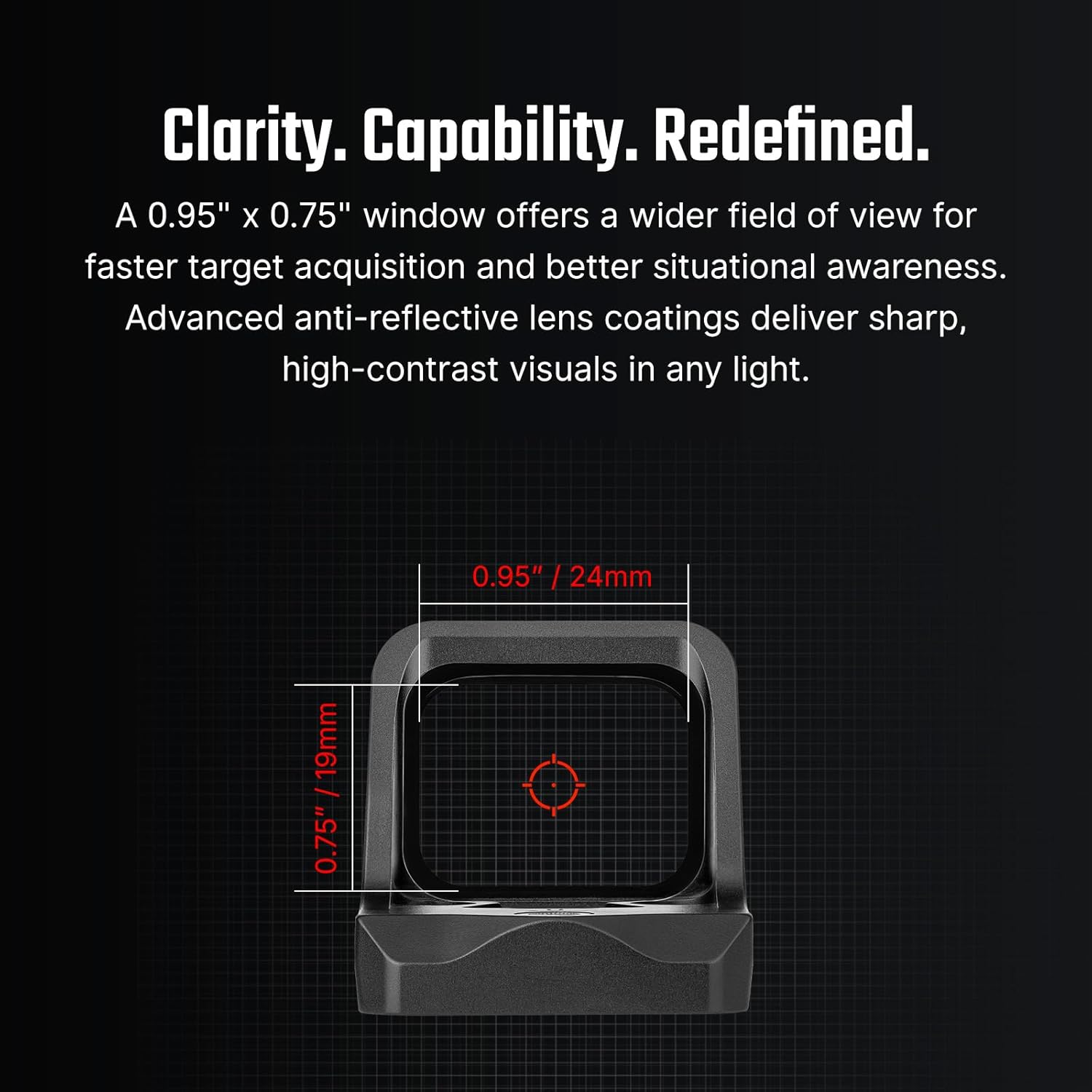
Figure 2: Illustrates the large field of view of the Osight C.

Figure 3: Side-loading battery compartment on the Osight C.
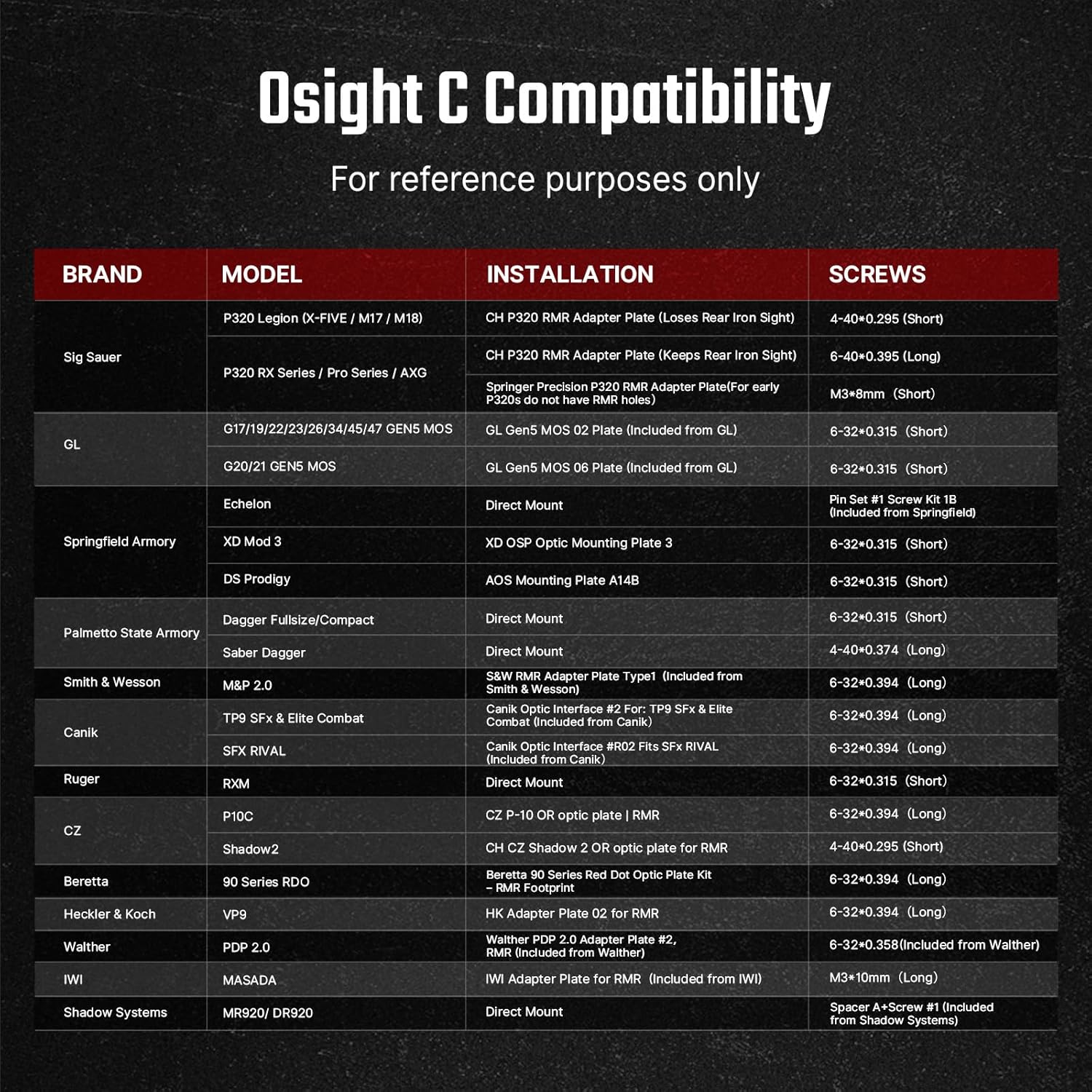
Figure 4: Depicts the 3 MOA Dot and 32 MOA Circle reticle options.

Figure 5: Compatibility table for Osight C with various firearm models and screw types.
Instructional Videos: Osight C
Video: Unboxing of the Osight C Micro Red Dot, showing included components and initial impressions.
Video: Selesaiview of the Osight C, detailing its design and primary functions.
Video: Feature overview of the Osight C Micro Red Dot, highlighting its capabilities.
Video: Demonstrates the features of the Osight C in a practical setting.
Video: Shows the different reticle options of the Osight C in use.
Osight K Overview
The Osight K is an open reflex sight featuring a 6 MOA dot, designed for quick target acquisition and enhanced visibility.
Key Features of Osight K:
- 6-MOA Dot: A larger dot for quicker target acquisition and improved visibility, suitable for high-stress situations and consistent target alignment.
- Side-Loading Battery: Enables easy battery replacement without removing the optic, preserving zero.
- Jejak: Features an RMSc/K footprint for broad compatibility and seamless integration.
Visual Guide: Osight K

Figure 6: Osight K Open Reflex Sight, front view.

Rajah 7: View through the Osight K, showing the 6 MOA dot reticle.

Figure 8: Underside of the Osight K, showing the RMSc footprint for mounting.
Figure 9: Compatibility table for Osight K with various firearm models and screw types.
Instructional Video: Osight K
Video: Unboxing of the Osight K Micro Red Dot, showcasing its contents and initial setup.
Persediaan
Pemasangan
Both Osight C and Osight K sights are designed for easy installation on compatible slide cuts or adapter plates. Refer to the specific compatibility tables (Figures 5 and 9) for your model and required screw types.
- Place the Osight sight on your compatible slide cut or adapter plate.
- Secure the sight properly by applying non-permanent (medium blue) threadlocker to the included screws.
- Torque each screw to the suggested value. If an adapter plate is required, follow the manufacturer's installation instructions.
- Verify proper clearance and slide function prior to use. Do not overtighten screws.
Pemasangan Bateri
Both Osight C and Osight K feature side-loading battery compartments, allowing battery replacement without removing the optic from the firearm.
- Locate the battery compartment on the side of the optic.
- Use the provided tool to open the battery compartment.
- Insert the CR1632 coin battery (for Osight C) or appropriate battery (for Osight K) with the positive (+) side facing up.
- Tutup petak bateri dengan selamat.
Operasi
Power On/Off & Motion Activation
- The sights feature motion activation. They will automatically turn on when motion is detected.
- If no motion is detected for approximately 3 minutes, the sight will enter sleep mode to conserve battery life.
- To manually turn off, press and hold both the '+' and '-' buttons simultaneously for 3 seconds.
- To manually turn on, press and hold the '+' button for 3 seconds.
Pelarasan Kecerahan
Both sights offer multiple brightness settings, including daylight and night vision compatible options.
- Press the '+' button to increase brightness.
- Tekan butang '-' untuk mengurangkan kecerahan.
- The sight has a memory function that will recall the last used brightness setting when powered on.
Reticle Adjustment (Osight C Only)
The Osight C allows switching between different reticle patterns.
- To cycle through the 3 MOA Dot, 32 MOA Circle, and Dot-and-Circle reticles, press and hold the '-' button for 3 seconds.
Zeroing (Windage & Elevation)
Use the provided adjustment tool for precise zeroing.
- Pelarasan Windage: Turn the windage adjustment screw (located on the side) clockwise to move the point of impact to the right, or counter-clockwise to move it to the left.
- Pelarasan Ketinggian: Turn the elevation adjustment screw (located on the top) clockwise to move the point of impact up, or counter-clockwise to move it down.
- Each adjustment click has a value of approximately 1 MOA (1 inch at 100 yards).
- Confirm zeroing by firing at least three shots at a zeroing target. Check points of impact to confirm accuracy and repeat the zeroing procedure if required.
Penyelenggaraan
Pembersihan
Use the provided Osight branded cleaning cloth to gently wipe the lenses and housing. Avoid abrasive materials or harsh chemicals that could damage the optic's coatings.
Penggantian Bateri
Replace the battery when the low battery indicator (if applicable) flashes or when the reticle dims significantly. Use the side-loading compartment for easy access without disturbing the sight's zero.
Spesifikasi
| Ciri | Spesifikasi |
|---|---|
| Jenama | Osight |
| warna | Hitam |
| Peranti Serasi | Rifle, Shotgun, Handgun |
| Penglihatan Malam | Tidak |
| Nama Model | OSIGHT C, OSIGHT K |
| Reticle Type (OSIGHT C) | 3 MOA Dot & 32 MOA Circle |
| Reticle Type (OSIGHT K) | 6 Titik MOA |
| Footprint (OSIGHT C) | 407c/507c |
| Footprint (OSIGHT K) | RMSc/K |
| bahan | 7075 Aircraft-Grade Aluminum (for OSIGHT C, implied for OSIGHT K) |
| Hayat Bateri | Sehingga 100,000 jam (pada tetapan terendah) |
| Penilaian Kalis Air | IPX6 |
Waranti dan Sokongan
For warranty information, technical support, or service inquiries, please refer to the official Osight webtapak atau hubungi perkhidmatan pelanggan mereka secara langsung. Simpan resit pembelian anda untuk sebarang tuntutan waranti.


