1. Pengenalan
Terima kasih kerana membeliasing the ZOLAMENTE 5K Digital Camera. This compact and versatile camera is designed to capture high-quality photos and videos, offering a range of features for both beginners and enthusiasts. Please read this manual carefully to ensure proper use and to maximize your camera's potential.

Image: ZOLAMENTE 5K Digital Camera highlighting its key features.
2. Kandungan Pakej
Pastikan semua item ada dalam pakej anda:
- 1 × ZOLAMENTE 5K Digital Camera
- 1 × 64GB MicroSD Card
- 1 × Kabel USB
- 1 × Rechargeable Battery (1200mAh)
- 1 × Camera Bag
- 1 × Tali
- 1 × Japanese Instruction Manual (English version provided here)

Image: All included accessories for the ZOLAMENTE 5K Digital Camera.
Video Nyah Tinju
Video: A short unboxing demonstration of a similar digital camera, showing the contents.
3. Produk Lebihview
The ZOLAMENTE 5K Digital Camera features a compact design with intuitive controls and dual screens for versatile shooting.
Ciri-ciri Fizikal
- Skrin hadapan: 1.5-inch high-vision display for selfies.
- Rear Screen: 2.8-inch IPS LCD monitor for clear viewing.
- Kanta: F/3.2, focal length 7.36mm.
- Penderia: 13 Megapixel CMOS sensor.
- Butang: Shutter, Power, Menu, OK, Navigation (Up/Down/Left/Right), Zoom (W/T), DISP.
- Pelabuhan: USB charging port, MicroSD card slot, tripod mount.
- Petunjuk: LED light, flash.
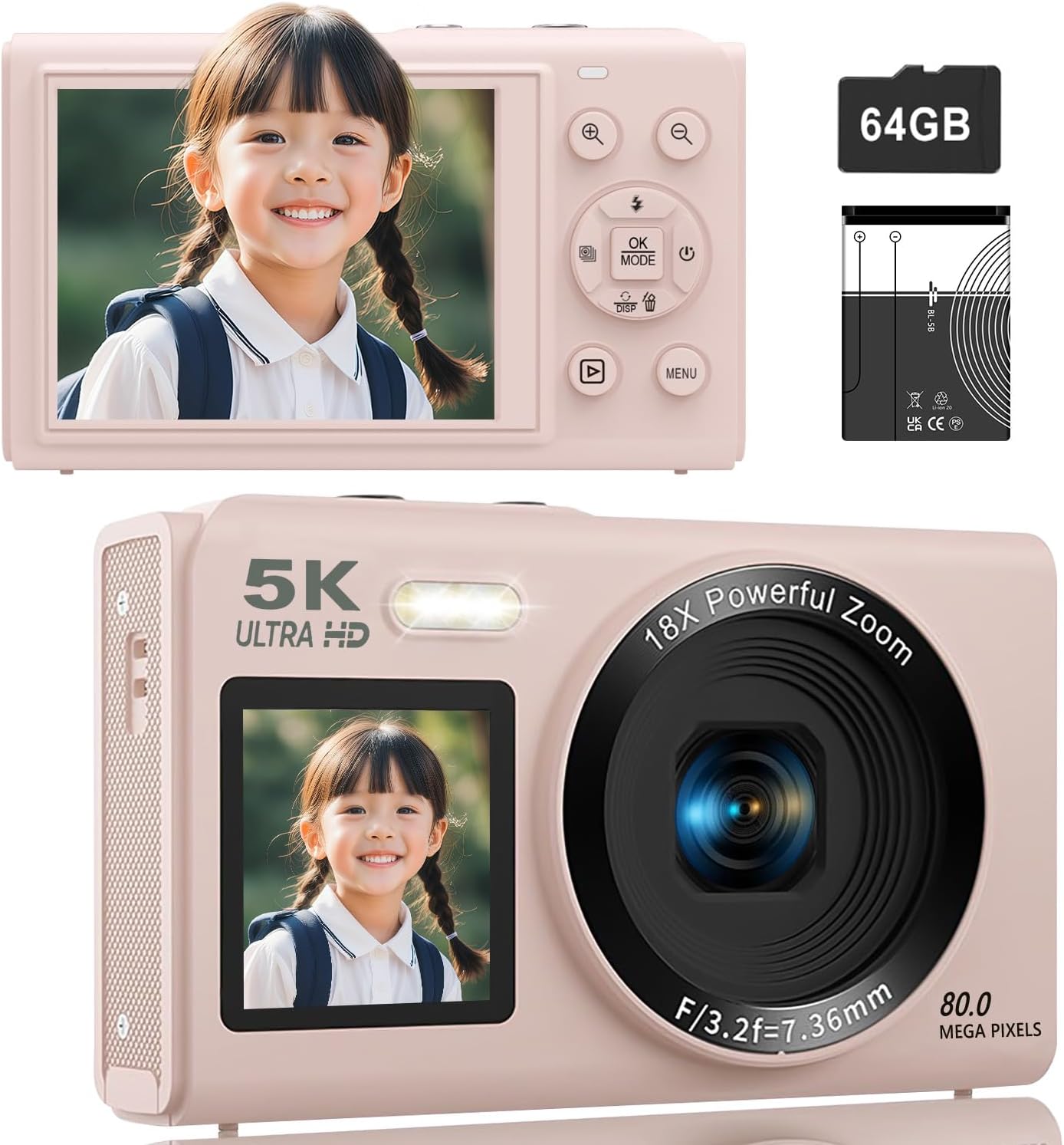
Imej: Depan dan belakang views of the ZOLAMENTE 5K Digital Camera, showing its compact design and dual screens.
Putaran Produk View
Video: 360 darjah view of the S95PRO digital camera, showcasinreka bentuk dan portnya.
4. Persediaan
4.1. Pemasangan Bateri
- Buka penutup petak bateri yang terletak di bahagian bawah kamera.
- Masukkan bateri boleh dicas semula 1200mAh yang disediakan, pastikan kekutuban yang betul.
- Tutup penutup petak bateri dengan selamat.
4.2. Pemasangan Kad MicroSD
The camera supports MicroSD cards up to 256GB. A 64GB MicroSD card is included.
- Cari slot kad MicroSD di sisi kamera.
- Masukkan kad MicroSD dengan sesentuh emas menghadap ke bawah sehingga ia klik pada tempatnya.
- To remove, gently push the card inward until it pops out.
4.3. Initial Settings (Language, Date/Time)
Upon first use or after a factory reset, you may need to set the language and date/time.
- Power on the camera by pressing the Power button.
- Tekan ke MENU button to access the settings.
- Navigate using the Up/Down buttons to find 'Language' or 'Date/Time' settings.
- Tekan OK to select, then use the navigation buttons to adjust the settings.
- Tekan MENU sekali lagi untuk menyimpan dan keluar.
Sediakan Video Demonstrasi
Video: A demonstration of inserting the MicroSD card, powering on, and navigating basic settings like language and date/time.
5. Arahan Operasi
5.1. Hidupkan/Mati Kuasa
Tekan ke kuasa butang untuk menghidupkan atau mematikan kamera.
5.2. Switching Between Photo and Video Modes
Tekan ke MENU button to access the mode selection screen. Use the navigation buttons to select between photo mode, video mode, or time-lapse mode, then press OK.
5.3. Mod Foto
The camera supports up to 80 Megapixel (MP) photo resolution. You can adjust the pixel settings in the menu.
- Pastikan kamera berada dalam mod foto.
- Bingkaikan tangkapan anda menggunakan skrin.
- Tekan ke Pengatup button halfway to focus, then fully press to take a photo.
Pixel Settings
You can select various pixel settings for your photos, up to 80MP, to suit your needs.
Tetapan Kilat
Tekan ke Up button to cycle through flash modes (Auto, On, Off).
Special Photo Features
- Beauty Filter: Enhance facial features.
- Pengesanan Muka: Automatically detects and focuses on faces.
- Pemasa Kendiri: Set a delay (e.g., 3s, 5s, 10s, 20s) before taking a photo.
- Penggambaran berterusan: Tangkap berbilang foto secara berturut-turut.

Image: Visual representation of various photo modes including beauty filter, face detection, self-timer, and continuous shooting.


Images: Detailed views of face detection, continuous shooting, and self-timer features.
5.4. Mod Video
Record stunning videos in 5K resolution. You can adjust video resolution settings in the menu.
- Ensure the camera is in video mode.
- Tekan ke Pengatup butang untuk mula merakam.
- Tekan ke Pengatup butang sekali lagi untuk menghentikan rakaman.
Tetapan Resolusi Video
The camera supports various video resolutions, including 5K. Select your preferred resolution from the menu.

Image: Demonstrating 5K video recording and various photo resolutions (80MP, 56MP, 30MP, 20MP).
Special Video Features
- Pergerakan Perlahan: Capture dynamic scenes in slow motion.
- Masa berlalu: Ringkaskan acara yang panjang menjadi video pendek yang menarik.
- Record While Charging: Allows for extended recording sessions.

Image: Illustrating autofocus, slow-motion, video loop, and time-lapse recording capabilities.
5.5. Zum Digital
The camera features an 18x digital zoom. Use the W (Lebar) dan T (Telephoto) buttons to zoom in and out, allowing you to capture distant subjects clearly without moving the lens.

Image: Demonstrating the 18x digital zoom capability and the front and rear screens.
5.6. Focus Modes
Choose from three focus modes to ensure sharp images:
- Autofokus (AF): Automatically adjusts focus for clear images.
- Fokus Manual (MF): Allows you to manually adjust focus by half-pressing the shutter button.
- Fokus Tetap: Maintains a fixed focus distance.

Image: Illustrating autofocus, image stabilization, pause function, and recording while charging.
5.7. Dual Screens
The camera features a 1.5-inch front screen and a 2.8-inch rear IPS screen. Long-press the Bawah button to switch between the front and rear screens, which is convenient for selfies and vlogging.
5.8. Penapis Warna
The camera offers 19 types of color filters to add creative effects to your photos and videos.

Image: The ZOLAMENTE 5K Digital Camera displaying different filter options.
5.9. WiFi Transfer Function
Easily transfer captured images and videos to your smartphone via WiFi. This eliminates the need for card readers or computers for quick sharing on social media.
- Enable WiFi on your camera through the settings menu.
- Download the dedicated app (e.g., 'HelloCam') on your smartphone (available on App Store and Google Play).
- Connect your smartphone to the camera's WiFi network (SSID and password displayed on the camera screen).
- Buka apl ke view dan pemindahan files.

Image: Demonstrating WiFi transfer of images from the camera to a laptop and the camera being used as a webcam.
WiFi Connection Video
Video: Instructions on how to connect the camera to a smartphone via WiFi using the dedicated app.
5.10. WebFungsi cam
Kamera boleh digunakan sebagai webcam for high-quality video calls and live streaming.
- Sambungkan kamera ke komputer anda menggunakan kabel USB yang disediakan.
- Pilih 'Webcam Mode' on the camera if prompted.
- Your computer should recognize the camera as a webcam.

Image: The camera connected to a laptop and functioning as a webcam.
6. Penyelenggaraan
- Pastikan kamera bersih dengan mengelapnya dengan kain lembut dan kering.
- Elakkan daripada mendedahkan kamera kepada suhu yang melampau, habuk atau lembapan.
- Simpan kamera di dalam beg pelindungnya apabila tidak digunakan.
- Regularly back up your photos and videos to prevent data loss.
7. Penyelesaian masalah
Isu dan Penyelesaian Biasa
| Isu | Kemungkinan Punca | Penyelesaian |
|---|---|---|
| Kamera tidak dihidupkan | Low battery; Battery incorrectly inserted | Charge the battery; Reinsert battery correctly |
| Cannot take photos/videos | MicroSD card full; MicroSD card not inserted; Incorrect mode selected | Padam files or replace card; Insert MicroSD card; Switch to photo/video mode |
| Imej kabur | Incorrect focus mode; Camera shake | Adjust focus mode; Use image stabilization or a tripod |
| Sambungan WiFi gagal | Incorrect password; App not installed | Verify WiFi password; Install the correct app |
8. Spesifikasi
| Ciri | Perincian |
|---|---|
| Jenama | ZOLAMENTE |
| Model | Kamera Digital 5K |
| warna | Pink (with 64GB SD Card) |
| Resolusi Video | Sehingga 5K |
| Resolusi Foto | Sehingga 80 Megapiksel |
| Zum Digital | 18X |
| Skrin Depan | 1.5 inci |
| Skrin Belakang | IPS 2.8 inci |
| Sensor | 13 Million CMOS Sensor |
| Lens Aperture | F/3.2 |
| Panjang Fokus | 7.36mm |
| Penyimpanan | Supports MicroSD up to 256GB (64GB included) |
| Bateri | Bateri Boleh Dicas Semula 1200mAh |
| Berat badan | Lebih kurang 114g (termasuk bateri) |
| Dimensi | 11.4 x 8.5 x 7.7 cm |
| ASIN | B0FQMLD2BV |
9. Waranti dan Sokongan
This product, when purchased as a domestic genuine product (new), comes with a 5-year manufacturer's warranty. Please note that parallel imported or overseas retail products do not come with a manufacturer's warranty. For support, please contact your seller.


