
pengenalan
This manual provides essential information for the setup, operation, and maintenance of your Hyperkin The Competitor Wired Controller. Designed for precision and performance, this controller is compatible with Xbox Series X|S, Xbox One, and Windows PC. Please read this manual thoroughly before use to ensure optimal performance and longevity of your device.
Kandungan Pakej
Sahkan bahawa semua item terdapat dalam pakej anda:
- Hyperkin The Competitor Wired Controller
- Kabel USB-C boleh tanggal
- Panduan Mula Pantas
- Swappable Stick Caps (Domed & Concave)

Image: Contents of the Hyperkin The Competitor package, including the controller, cable, and documentation.
Persediaan
The Hyperkin The Competitor Wired Controller offers plug-and-play functionality for supported platforms.
Menyambung ke Xbox Series X|S atau Xbox One:
- Pastikan konsol Xbox anda dihidupkan.
- Connect the detachable USB-C cable to the USB-C port on the top of the controller.
- Plug the USB-A end of the cable into an available USB port on your Xbox console.
- The controller will automatically connect and be ready for use.
Connecting to PC (Windows):
- Pastikan PC anda dihidupkan.
- Connect the detachable USB-C cable to the USB-C port on the top of the controller.
- Plug the USB-A end of the cable into an available USB port on your PC.
- Windows will automatically detect and install the necessary drivers. The controller will be ready for use once the installation is complete.
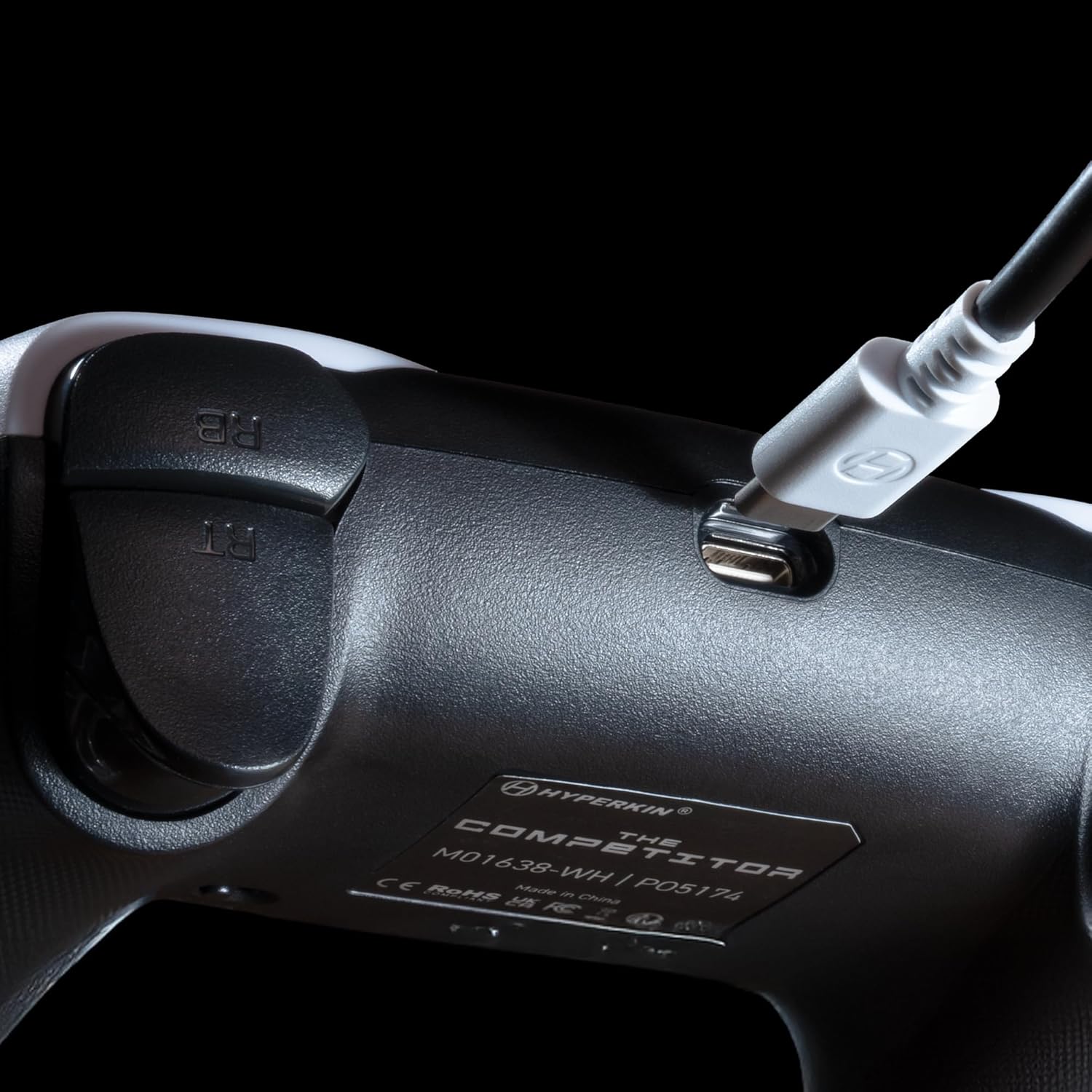
Imej: Jarak dekat view of the USB-C port on the Hyperkin The Competitor controller, illustrating the connection point for the detachable cable.
Mengendalikan Pengawal
Familiarize yourself with the key features and controls of your Hyperkin The Competitor controller.
Ciri-ciri Utama:
- Kayu Joy Kesan Dewan: Experience drift-free accuracy and magnetic precision for ultra-smooth movement and long-lasting durability.
- Pencetus Impuls: Provides immersive and reliable haptic feedback for enhanced gameplay.
- Symmetrical Analog Stick Layout: Offers a balanced and comfortable design, supporting precision play.
- Segmented Traditional D-pad: Delivers ultra-responsive control and satisfying feedback for pinpoint accuracy.
- Butang Kembali Boleh Diprogram: Two customizable rear buttons for on-the-fly remapping to suit your playstyle.
- Dedicated Mute Button: Quickly mute your microphone during gameplay.
- Swappable Stick Caps: Customize your feel with included Domed and Concave stick caps.
- Anti-Friction Gates & Metal Glide Rings: Engineered for ultra-smooth control and reduced wear.

Image: Diagram highlighting the Hall Effect Sticks and the Symmetrical Twin Stick Layout of the controller.

Image: Diagram illustrating the Hall Effect Impulse Triggers and the location of the programmable Back Buttons.

Imej: Terperinci views of the Traditional Segmented D-Pad, the interchangeable Dome and Concave stick caps, and the Metal Glide Rings.
Programming Back Buttons:
Specific instructions for programming the back buttons are typically found in the Quick Start Guide included with your product or on the Hyperkin official support website. Generally, this involves a combination of holding a program button and pressing the desired back button and the button you wish to map.
Penyelenggaraan
Untuk memastikan jangka hayat dan prestasi optimum pengawal anda, ikuti garis panduan penyelenggaraan ini:
- Pembersihan: Gunakan kain lembut dan kering untuk mengelap pengawal. Untuk kotoran degil, sedikit dampen kain dengan air. Elakkan menggunakan bahan kimia yang keras atau pembersih yang kasar.
- Storan: Simpan pengawal di tempat yang sejuk dan kering jauh dari cahaya matahari langsung dan suhu yang melampau.
- Penjagaan Kabel: Avoid sharply bending or twisting the USB-C cable. Always grasp the connector, not the cable, when plugging or unplugging.
- Elakkan Titisan: Lindungi pengawal daripada titisan dan hentaman, yang boleh merosakkan komponen dalaman.
Menyelesaikan masalah
If you encounter issues with your Hyperkin The Competitor controller, try the following steps:
- Pengawal Tidak Menjawab:
- Pastikan kabel USB-C disambungkan dengan selamat pada kedua-dua pengawal dan konsol/PC.
- Cuba pasangkan pengawal ke port USB yang berbeza.
- Mulakan semula konsol atau PC anda.
- Test the controller on another compatible device if possible.
- Buttons/Joysticks Not Working Correctly:
- Ensure no debris is lodged around the buttons or joysticks.
- Perform a system update on your console or PC to ensure the latest drivers are installed.
- If using on PC, check controller calibration settings in your operating system.
- Audio Issues (Mic Mute Button):
- Ensure the dedicated mute button is not activated.
- Check your in-game or system audio settings.
If problems persist after attempting these steps, please contact Hyperkin customer support for further assistance.
Spesifikasi
| Nombor Model | M01638-WH |
| Keserasian | Xbox Series X|S, Xbox One, PC (Windows) |
| Ketersambungan | Wired (Detachable USB-C to USB-A cable) |
| Kayu bedik | Kesan Dewan |
| Pencetus | Pencetus Impuls |
| Susun atur | Symmetrical Analog Sticks |
| D-Pad | Segmented Traditional D-pad |
| Butang | ABXY, Menu, View, Share, Xbox Guide, 2 Programmable Back Buttons, Dedicated Mic Mute Button |
| Penyesuaian | Swappable Stick Caps (Domed & Concave) |
| Dimensi | 6.25 x 2.5 x 5 inci |
| Berat badan | 15.6 auns |
Waranti dan Sokongan
Maklumat Waranti:
Warranty details for the Hyperkin The Competitor Wired Controller are typically provided with your product packaging or can be found on the official Hyperkin webtapak. Sila simpan bukti pembelian anda untuk sebarang tuntutan waranti.
Sokongan Pelanggan:
For technical assistance, troubleshooting, or further inquiries, please visit the official Hyperkin support page or contact their customer service directly. Refer to the contact information provided in your product's Quick Start Guide or on the Hyperkin webtapak.


