1. Pengenalan
The Mecpow P50 Fume Extractor is designed to provide a cleaner and safer working environment by effectively removing smoke, dust, and harmful particles generated during various processes, such as laser engraving and soldering. This manual provides essential information for the proper setup, operation, and maintenance of your P50 Fume Extractor.
2. Arahan Keselamatan
Please read all safety instructions carefully before operating the device. Failure to follow these instructions may result in injury or damage to the product.
- Ensure the power supply matches the specifications listed on the device.
- Jangan kendalikan pengekstrak wasap dalam keadaan basah atau berhampiran cecair atau gas mudah terbakar.
- Keep the air inlet and outlet clear of obstructions to ensure proper airflow.
- Regularly inspect the power cord for damage. Do not use if the cord is damaged.
- Jangan cuba membuka atau membaiki unit sendiri. Hubungi kakitangan perkhidmatan yang berkelayakan untuk mendapatkan bantuan.
- Replace filters as recommended to maintain optimal performance and air quality.
- Jauhkan daripada kanak-kanak.
3. Produk Lebihview
3.1 Ciri-ciri Utama
- Sedutan Kuat: Equipped with a 50W brushless motor, providing 128m³/h airflow for instant smoke and particle capture.
- Sistem Penapisan 3 Lapisan: Includes a pre-filter, medium HEPA filter, and activated carbon filter for 99.97% purification efficiency.
- Reka bentuk tertutup: Integrated sealed design with precision-fit air inlet and protective foam to prevent smoke leakage.
- 3 Mod Kelajuan: Adjustable low, medium, and high-speed settings for various tasks.
- Operasi senyap: Operates at a noise level under 55 dB.
- Keserasian Luas: Compatible with Mecpow M1, Atomstack P1, and other laser engravers with a Φ50 mm flange.
3.2 Komponen
The Mecpow P50 Fume Extractor consists of the main unit, a flexible exhaust hose, and a power cable. The internal filtration system comprises three distinct layers.
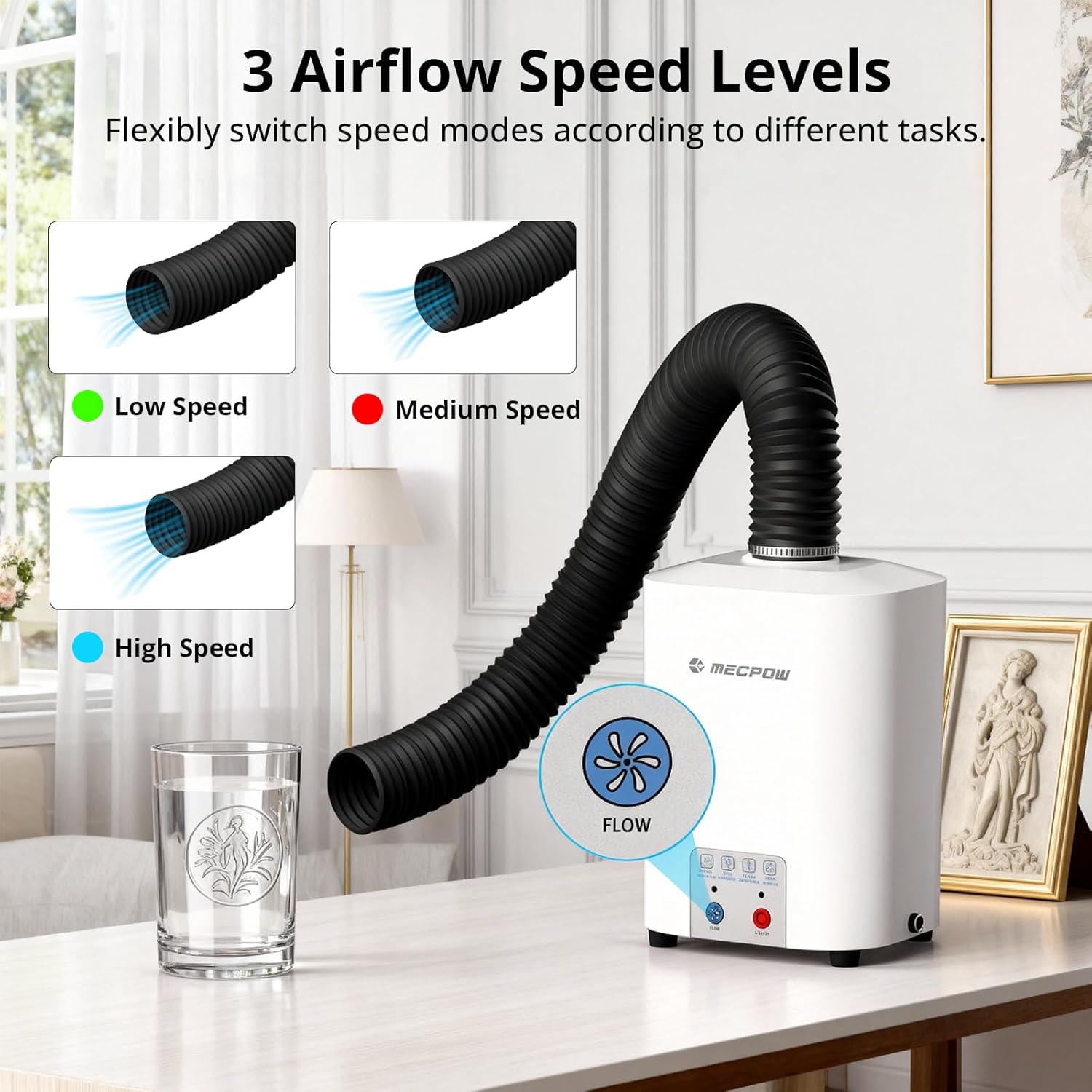
Figure 3.2.1: Mecpow P50 Fume Extractor with exhaust hose. This image shows the complete fume extractor unit, including the main body and the flexible exhaust hose connected to the top.
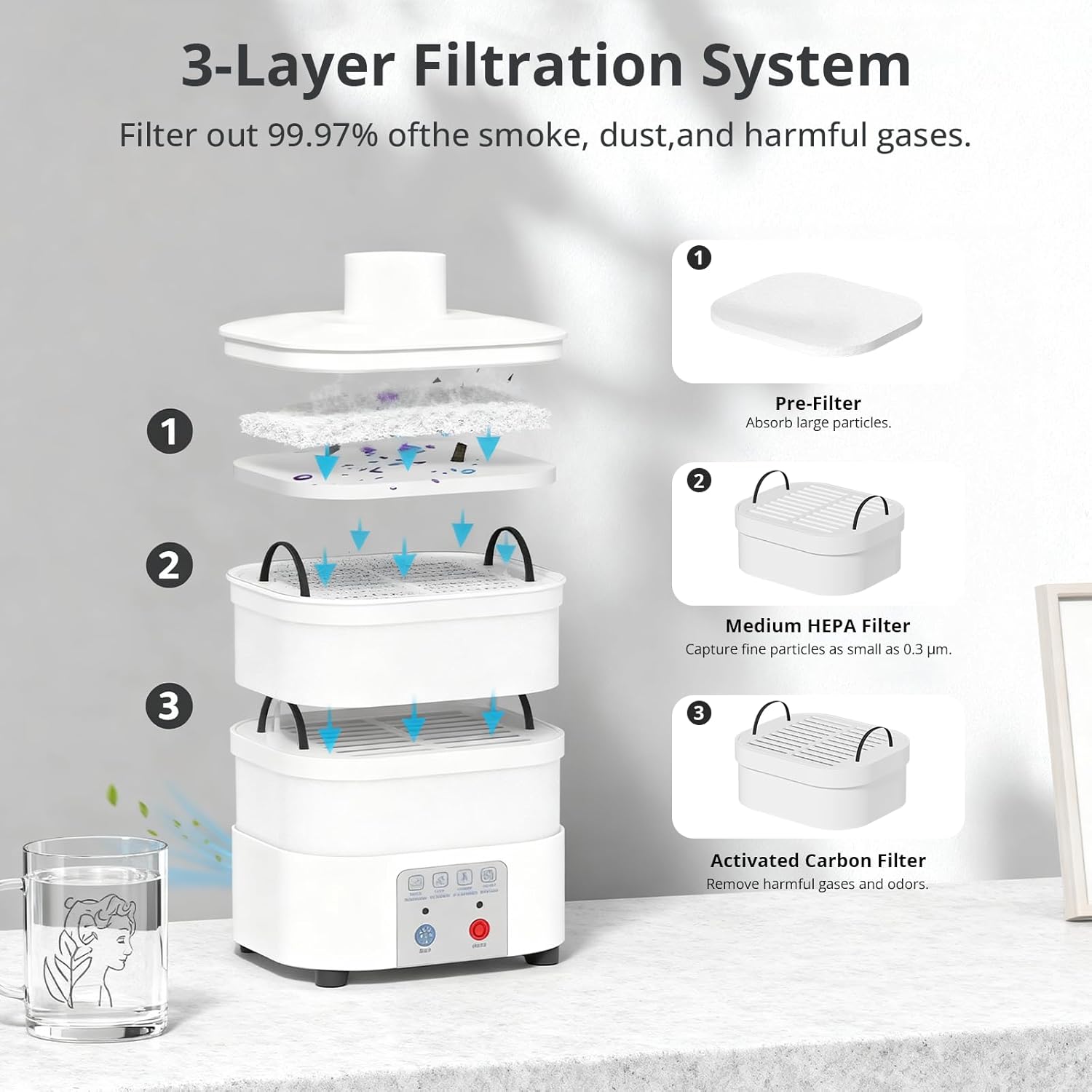
Rajah 3.2.2: Terperinci view of the 3-Layer Filtration System. This diagram illustrates the three filter layers: (1) Pre-Filter for large particles, (2) Medium HEPA Filter for fine particles, and (3) Activated Carbon Filter for harmful gases and odors.

Figure 3.2.3: Product Dimensions of the Mecpow P50. This image displays the height (240 mm / 9.45 inch) and width (148 mm / 5.83 inch front, 128 mm / 5.04 inch side) of the fume extractor unit.
4. Persediaan
- Membongkar: Keluarkan semua komponen dari pembungkusan dengan berhati-hati. Sahkan bahawa semua bahagian yang disenaraikan dalam senarai pembungkusan ada.
- Pemasangan Penapis:
- Open the top cover of the fume extractor.
- Insert the activated carbon filter at the bottom, followed by the medium HEPA filter, and finally the pre-filter on top. Ensure they are seated correctly.
- Tutup penutup atas dengan selamat.
- Sambungan Hos: Attach one end of the flexible exhaust hose to the outlet on top of the fume extractor. Secure it firmly.
- penempatan: Position the fume extractor on a stable, flat surface near your laser engraver or soldering station. Connect the other end of the exhaust hose to the fume outlet of your laser engraver (if applicable) or position it to capture fumes effectively.
- Sambungan Kuasa: Connect the power cable to the fume extractor and then plug it into a suitable power outlet.

Figure 4.1: Mecpow P50 Fume Extractor set up with a laser engraver. This image demonstrates the fume extractor connected via its hose to a laser engraver, showing a typical setup for fume extraction during operation.
5. Arahan Operasi
- Hidupkan kuasa: Tekan ke HIDUP/MATI button located on the front panel to turn on the fume extractor. The indicator light will illuminate.
- Melaraskan Kelajuan Aliran Udara:
- Tekan ke ALIRAN button to cycle through the three airflow speed levels: Low, Medium, and High.
- Select the appropriate speed based on the intensity of fumes and your working environment.
- Operasi: Begin your laser engraving or soldering task. The fume extractor will continuously draw in smoke and particles, purifying the air.
- Matikan: After completing your task, press the HIDUP/MATI button again to turn off the fume extractor.

Figure 5.1: Control panel and airflow speed levels. This image highlights the control buttons for power and airflow, showing indicators for Low, Medium, and High speed settings.

Figure 5.2: Sealed design for effective fume containment. This image illustrates the fume extractor's sealed design, demonstrating how it prevents smoke leakage and maintains a clean workspace.

Figure 5.3: Quiet operation of the Mecpow P50. This image shows the fume extractor in a home environment, emphasizing its low noise level (under 55 dB) compared to typical traffic noise or normal conversation.
6. Penyelenggaraan
Regular maintenance ensures the longevity and optimal performance of your Mecpow P50 Fume Extractor.
6.1 Penggantian Penapis
The 3-layer filtration system requires periodic replacement to maintain 99.97% purification efficiency. The frequency of replacement depends on usage and the type of materials processed.
- Matikan: Ensure the fume extractor is turned off and unplugged before performing any maintenance.
- Open Unit: Carefully open the top cover of the fume extractor.
- Alih Keluar Penapis Lama: Remove the pre-filter, medium HEPA filter, and activated carbon filter. Dispose of used filters responsibly according to local regulations.
- Pasang Penapis Baharu: Place new filters in the correct order: activated carbon filter at the bottom, then the medium HEPA filter, and finally the pre-filter on top. Ensure a snug fit.
- Tutup Unit: Tutup penutup atas dengan kemas.
Replacement filters can be purchased from authorized Mecpow retailers or the official Mecpow webtapak.
6.2 Membersihkan Unit
- Wipe the exterior of the fume extractor with a soft, damp kain. Jangan gunakan pembersih atau pelarut yang melelas.
- Pastikan tiada cecair memasuki komponen dalaman.
- Periodically check the exhaust hose for any blockages or damage. Clean if necessary.
7. Penyelesaian masalah
| Masalah | Kemungkinan Punca | Penyelesaian |
|---|---|---|
| Unit tidak dihidupkan. |
|
|
| Kuasa sedutan rendah. |
|
|
| Bunyi luar biasa semasa operasi. |
|
|
8. Spesifikasi
- model: P50
- Kuasa Motor: 50W (Tanpa Berus)
- Kadar Aliran Udara: 128 m³/j
- Sistem Penapisan: 3-Layer (Pre-filter, Medium HEPA filter, Activated Carbon filter)
- Purification Rate: 99.97%
- Tahap Bunyi: < 55 dB
- Keserasian: Mecpow M1, Atomstack P1, and other laser engravers with Φ50 mm flange.
- Berat Barang: 10.01 paun (lebih kurang 4.54 kg)
- Dimensi (lebih kurang): 148 mm (W) x 128 mm (D) x 240 mm (H)
9. Waranti dan Sokongan
9.1 Maklumat Waranti
Mecpow provides a 1-year warranty for the P50 Fume Extractor from the date of purchase. This warranty covers manufacturing defects and workmanship under normal use. It does not cover damage caused by misuse, accidents, unauthorized modifications, or improper maintenance.
Sila simpan bukti pembelian anda untuk tuntutan waranti.
9.2 Sokongan Pelanggan
For technical assistance, troubleshooting, or warranty inquiries, please contact Mecpow customer support through the official website or your retailer. Our support team is available to help you with any questions or issues you may encounter.
Visit the official Mecpow webtapak untuk maklumat sokongan terkini dan butiran hubungan: www.mecpow.com


