pengenalan
This manual provides detailed instructions for the Lenovo IdeaPad Slim 3 15IRH10 Laptop. It covers initial setup, operational guidance, maintenance procedures, troubleshooting common issues, and a comprehensive list of technical specifications. Please read this manual thoroughly to ensure optimal use and longevity of your device.
Produk Selesaiview
The Lenovo IdeaPad Slim 3 15IRH10 is a high-performance laptop designed for productivity and everyday computing. Familiarize yourself with its components and layout.
Depan View
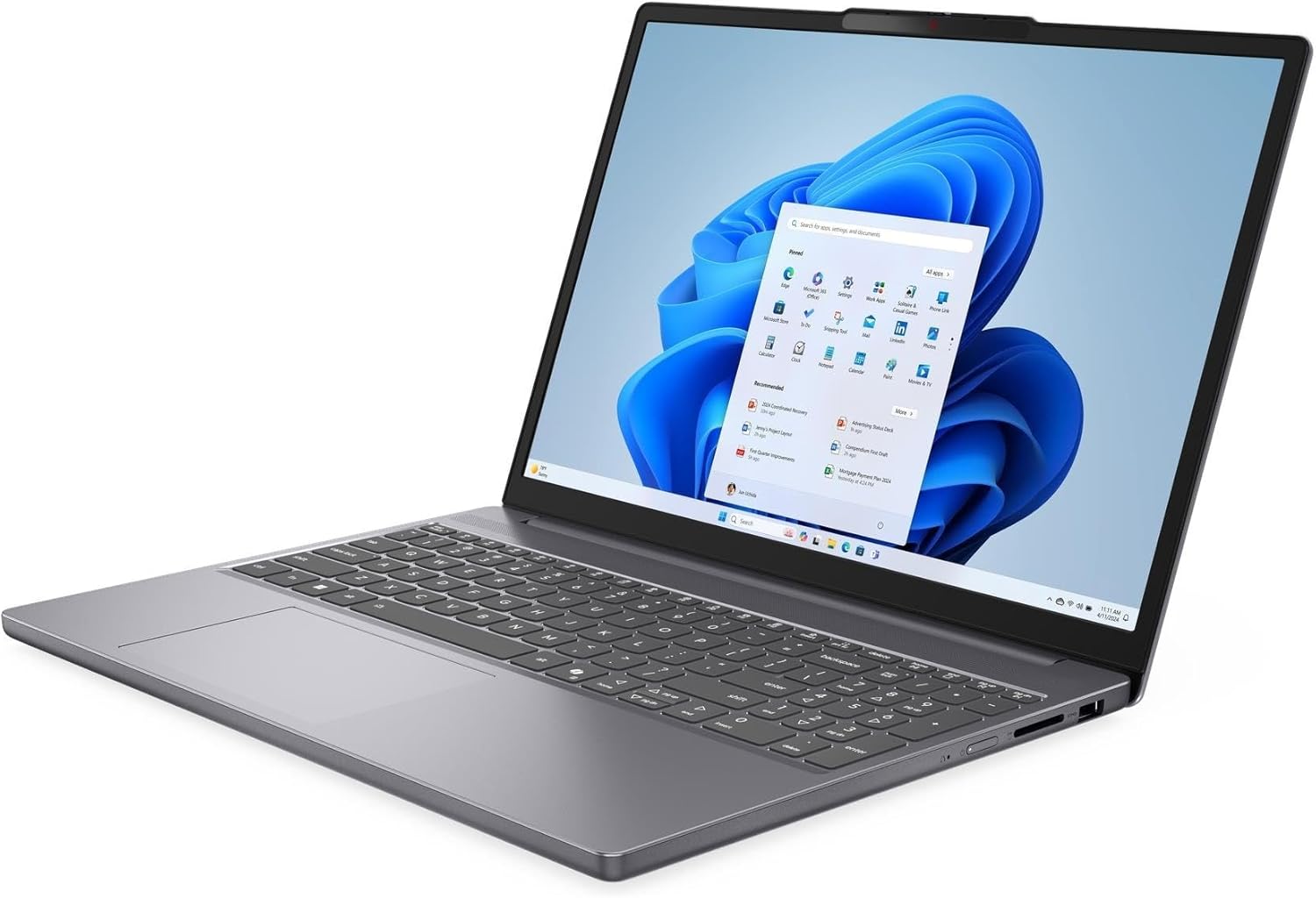
This image displays the laptop from the front, showcasing the 15.3-inch WUXGA display, keyboard with Numpad, and touchpad. The integrated 720p HD camera with a privacy shutter is visible at the top bezel of the screen.
sebelah Views (Port dan Penyambung)

The sides of the laptop house various ports for connectivity. These include one USB-C 3.2 Gen 1 port (supporting Power Delivery and DisplayPort 1.4), two USB 3.2 Gen 1 ports, one HDMI v1.4 port, and a headphone/microphone combo jack. The power input port is also located on one of the sides.
tertutup View

This image shows the laptop in its closed state, highlighting its slim profile and the Lenovo branding on the lid.
Persediaan
Membongkar
Carefully remove the laptop and all accessories from the packaging. Ensure all components listed in the packing slip are present, including the laptop, power adapter, and any documentation.
Kuasa Awal Hidup
- Sambungkan penyesuai kuasa ke port input kuasa komputer riba dan kemudian ke salur keluar elektrik.
- Open the laptop lid and press the power button, typically located on the top-right side of the keyboard or on the side chassis.
- Follow the on-screen instructions to complete the initial setup of Windows 10 Pro, including language selection, network connection, and user account creation.
Menyambung Peranti
- Peranti USB: Connect external mice, keyboards, or storage devices to the available USB 3.2 Gen 1 ports or the USB-C 3.2 Gen 1 port.
- Paparan luaran: Use an HDMI cable to connect an external monitor or projector to the HDMI v1.4 port. The USB-C port also supports DisplayPort 1.4 for compatible displays.
- Peranti Audio: Plug headphones or external speakers into the headphone/microphone combo jack.
Arahan Operasi
Pengurusan Kuasa
- Menghidupkan/Mematikan: Press the power button to turn on. To shut down, click the Start button in Windows, then select Power > Shut down.
- Mod tidur: Close the lid or select Power > Sleep from the Start menu to put the laptop into sleep mode.
- Mulakan semula: Select Power > Restart from the Start menu to restart the system.
Papan Kekunci dan Pad Sentuh

The laptop features a full-size keyboard with a Numpad for efficient data entry. The touchpad supports multi-touch gestures for navigation. Refer to Windows settings for customizing touchpad sensitivity and gestures.
- Kekunci Fungsi (Fn): Use the Fn key in combination with the F1-F12 keys to access special functions like adjusting brightness, volume, or enabling/disabling Wi-Fi.
- Nombor pad: The dedicated Numpad on the right side of the keyboard allows for quick numerical input.
Tetapan Paparan
Adjust display settings to suit your preferences:
- Kecerahan: Use the dedicated function keys (e.g., Fn + F5/F6) or Windows display settings to adjust screen brightness.
- Resolusi: The native resolution is 1920 x 1200 (WUXGA). You can change display scaling and resolution through Windows Display Settings.
Menyambung ke Wi-Fi dan Bluetooth
- Wi-Fi: Click the Wi-Fi icon in the taskbar, select your desired network, enter the password if prompted, and click Connect. The laptop supports Intel Wi-Fi 6 AX203 (2x2).
- Bluetooth: Go to Windows Settings > Devices > Bluetooth & other devices to pair with Bluetooth 5.2 compatible devices like headphones or speakers.
Menggunakan Kamera
The laptop is equipped with a 720p HD camera. To use it, open the Camera app in Windows or any video conferencing application. The camera features a physical privacy shutter; slide it to cover the lens when not in use to ensure privacy.
Penyelenggaraan
Membersihkan Laptop
- Skrin: Gunakan kain lembut dan tidak berbulu sedikit dampdisapu dengan air atau larutan pembersih skrin. Jangan sembur cecair terus ke skrin.
- Papan Kekunci dan Casis: Gunakan kain lembut dan kering. Untuk kotoran degil, sedikit damp kain boleh digunakan. Elakkan bahan kimia yang keras atau bahan yang melelas.
- Pengudaraan: Periodically clean the ventilation openings with compressed air to prevent dust buildup, which can affect cooling performance.
Penjagaan Bateri
- Untuk jangka hayat bateri yang optimum, elakkan daripada kerap mencas bateri sepenuhnya.
- Store the laptop in a cool, dry place and avoid exposing it to extreme temperatures.
- Jika menyimpan komputer riba untuk tempoh yang lama, pastikan bateri dicas pada kira-kira 50-60%.
Kemas Kini Perisian
Regularly update your operating system and drivers to ensure optimal performance, security, and compatibility.
- Kemas Kini Windows: Go to Windows Settings > Update & Security > Windows Update and check for available updates.
- Kemas Kini Pemandu: Lawati sokongan rasmi Lenovo website for your specific model to download and install the latest drivers for components like graphics, Wi-Fi, and chipset.
Menyelesaikan masalah
Bahagian ini menangani isu biasa yang mungkin anda hadapi dengan komputer riba anda.
Isu dan Penyelesaian Biasa
- Tiada Kuasa:
- Pastikan penyesuai kuasa disambungkan dengan selamat pada kedua-dua komputer riba dan salur keluar elektrik yang berfungsi.
- Periksa sama ada bateri mempunyai cas yang mencukupi.
- Cuba salur keluar kuasa yang berbeza.
- Display Problems (No image, flickering):
- Laraskan kecerahan skrin menggunakan kekunci fungsi.
- If using an external monitor, ensure the cable is properly connected and the correct display output is selected (Fn + F7 or Windows Display Settings).
- Mulakan semula komputer riba.
- Isu Kesambungan Wi-Fi:
- Ensure Wi-Fi is enabled (check function keys or Windows settings).
- Mulakan semula penghala dan modem anda.
- Lupakan rangkaian dan sambung semula.
- Kemas kini pemacu Wi-Fi daripada sokongan Lenovo webtapak.
- Prestasi Perlahan:
- Tutup aplikasi yang tidak perlu berjalan di latar belakang.
- Semak dan pasang sebarang kemas kini Windows yang belum selesai.
- Run a disk cleanup and defragmentation (for HDDs, not necessary for SSDs).
- Imbas untuk perisian hasad atau virus.
Spesifikasi
| Ciri | Spesifikasi |
|---|---|
| Nama Model | IdeaPad Slim 3 15IRH10 |
| Pemproses | 13th Gen Intel Core i7-13620H (10-Core, up to 4.9 GHz) |
| Grafik | Grafik Intel Iris Xe (Bersepadu) |
| Paparan | 15.3-inch WUXGA (1920 x 1200) LED-backlit Anti-glare 300 nits 45% NTSC, 60Hz |
| RAM | 24GB DDR5 SDRAM 4800 MHz |
| Penyimpanan | 2TB NVMe M.2 SSD |
| Sistem Operasi | Windows 10 Pro |
| papan kekunci | Saiz penuh dengan Numpad |
| Webcam | Kamera HD 720p dengan Pengatup Privasi |
| Kesambungan Wayarles | Intel Wi-Fi 6 AX203 (2x2), Bluetooth 5.2 |
| Pelabuhan | 1x USB-C 3.2 Gen 1 (PD, DP 1.4, 5Gbps), 2x USB 3.2 Gen 1 (5Gbps), 1x HDMI v1.4, 1x Headphone/Microphone Combo Jack |
| Bateri | Litium-Ion 50Wh (sehingga 6 jam) |
| Dimensi (LxWxH) | 13.54 x 9.54 x 0.71 inci |
| Berat badan | 6.97 pounds (Note: Product description states 3.51 lbs, using specification data for consistency) |
| warna | Luna Grey |
Waranti dan Sokongan
The Lenovo IdeaPad Slim 3 15IRH10 Laptop comes with a 12-month warranty, as specified by the manufacturer. For technical support, warranty claims, or service inquiries, please visit the official Lenovo support website or contact their customer service. It is recommended to keep your purchase receipt and the laptop's model number (83K100R3IN) readily available when contacting support.
Anda boleh mendapatkan sumber sokongan tambahan dan maklumat hubungan di Sokongan Lenovo Webtapak.