1. Produk Lebihview
The LEKATO 2-in-1 Drum Looper Pedal is a versatile guitar effect pedal combining a high-sampling-rate looper with a built-in drum machine. It operates at 44.1 kHz, 24-bit, offering both looping and drum functions independently or simultaneously.

Rajah 1: Depan view of the LEKATO LP-02 2-in-1 Drum Looper Pedal, highlighting its dual functionality as a looper and drum machine.
2. Arahan Persediaan
2.1 Bekalan Kuasa
This pedal requires a 9V DC negative-center power adapter (not included). Ensure the power supply provides less than 80 mA. Do not use a power supply with different specifications to avoid damage to the unit.
2.2 Sambungan
- Sambungkan gitar atau alat muzik lain anda ke V INPUT bicu di sebelah kanan pedal.
- Sambungkan V OUTPUT bicu di sebelah kiri pedal ke amplifier or next effect pedal.
- Connect the 9V DC power adapter to the power input jack.
2.3 Buffer Bypass
The pedal features Buffer Bypass, which helps maintain signal strength over long cable runs or when using multiple pedals. This prevents tone loss that can occur due to cable capacitance in True Bypass systems.

Figure 2: Detail of the footswitch, indicating the Buffer Bypass functionality for signal integrity.
3. Operasi
3.1 Kawalan Ke Atasview
- LOOP Knob: Adjusts the playback volume of the recorded loop.
- DRUM Knob: Adjusts the playback volume of the drum machine.
- DRUM SELECT Knob: Selects one of the 8 available drum styles. This knob is analog and not notched, requiring careful adjustment to select the desired style.
- Suis kaki: A multi-function switch used for recording, playback, overdubbing, undo/redo, and tap tempo.
- Penunjuk LED: A single multi-colored LED indicates the pedal's status (e.g., recording, playing, overdubbing, drum tempo). Refer to the quick start guide for specific LED patterns and colors.

Figure 3: The three control knobs for adjusting loop volume, drum volume, and selecting drum styles.
3.2 Looper Module
The looper module offers up to 6 minutes of recording time and supports unlimited overdubs. Recorded tracks are automatically saved.
- Rakaman: Press the footswitch once to start recording. The LED will indicate recording status.
- Main balik: Press the footswitch again to stop recording and start playback.
- Overdub: During playback, press the footswitch once to start overdubbing. Press again to stop overdubbing.
- Buat asal/Buat Semula: Hold the footswitch for approximately 5 seconds to undo the last recorded layer. Repeat to redo.
- Berhenti: Tekan dua kali suis kaki untuk menghentikan main balik.
- Kosongkan: While stopped, hold the footswitch for an extended period (e.g., 15 seconds as per some documentation, but often shorter in practice) to clear the entire loop.
Files can be exported or imported using dedicated software (refer to manufacturer's website for software details).

Figure 4: The looper module's key features, including its 6-minute loop capacity and data management options.
3.3 Drum Machine Module
The built-in drum machine features 8 musical styles, each with real drum samples. It includes a tap tempo function.
- Selecting Drum Style: Gunakan DRUM SELECT knob to choose one of the 8 available drum styles (e.g., Blues, Rock, Pop, Country, Metal, Ballad, R&B, Dance).
- Ketik Tempo: While the drum machine is playing, tap the footswitch at your desired tempo to adjust the drum speed. The drum speed can also automatically match the tempo of a 4/4 time phrase when used with the looper.

Figure 5: The drum machine functionality, detailing the variety of grooves and real drum sampkurang tersedia.
4. Penyelenggaraan
- Pastikan pedal bersih dengan mengelapnya dengan kain lembut dan kering. Elakkan menggunakan pembersih atau pelarut yang kasar.
- Simpan pedal di persekitaran yang kering, jauh daripada suhu dan kelembapan yang melampau.
- Ensure all cable connections are secure before and after use.
- Sentiasa putuskan bekalan kuasa apabila pedal tidak digunakan untuk tempoh yang lama.
5. Penyelesaian masalah
5.1 Tiada Kuasa
- Ensure the 9V DC negative-center power adapter is correctly connected and functioning.
- Sahkan alur keluar kuasa aktif.
5.2 Tiada Keluaran Bunyi
- Check all input and output cable connections.
- Ensure the LOOP and DRUM volume knobs are not set to minimum.
- Test with different cables and an amppengimbang untuk menolak isu peralatan luaran.
5.3 Difficulty with Footswitch Functions
- The single footswitch performs multiple functions based on the number, duration, and order of presses. Refer to the 'Operation' section and practice the specific press sequences for recording, playback, overdub, undo/redo, and tap tempo.
- Consistent timing is crucial for accurate loop recording and drum tempo setting.
5.4 Unclear LED Indications
- The single multi-colored LED indicates various statuses. Consult the quick start guide or manufacturer's documentation for a detailed explanation of LED color and flash patterns.
6. Spesifikasi
| Ciri | Spesifikasi |
|---|---|
| Nombor Model | BCUSM03626 |
| Dimensi Produk | 5.08 x 5.08 x 9.65 cm (2 x 2 x 3.8 inci) |
| Berat Barang | 176 g |
| Masa Gelung | Sehingga 6 minit |
| Overdubs | Tidak terhad |
| Drum Grooves | 8 musical styles with real drum samples |
| SampKadar ling | 44.1 kHz, 24-bit |
| Sumber Kuasa | Corded Electric (9V DC, negative-center) |
| Arus Operasi | Kurang daripada 80 mA |
| Antara Muka Perkakasan | USB Type C (for import/export) |
| Format Isyarat | digital |
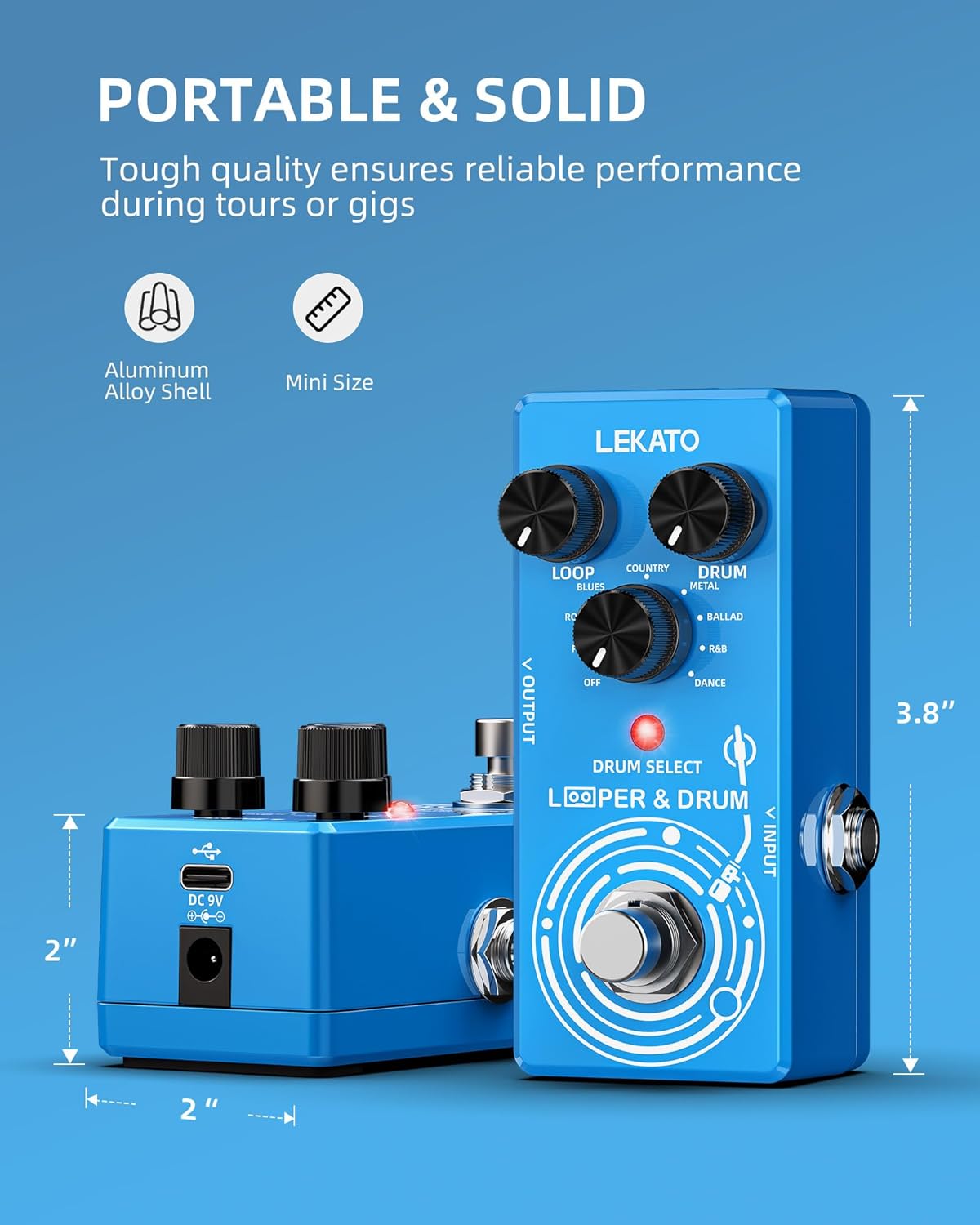
Figure 6: Physical dimensions of the LEKATO 2-in-1 Drum Looper Pedal.
7. Waranti dan Sokongan
For warranty information and technical support, please refer to the documentation provided with your purchase or visit the official LEKATO webtapak. Syarat jaminan tertentu mungkin berbeza mengikut wilayah dan peruncit.


