1. Pengenalan
This manual provides essential information for the safe and efficient operation of your SANSUI 65-inch 4K QLED Google TV, model JSW65UG23Q. Please read this manual thoroughly before using the television and retain it for future reference.
2. Maklumat Keselamatan
Sentiasa ikuti langkah berjaga-jaga keselamatan asas apabila menggunakan televisyen ini untuk mengurangkan risiko kebakaran, renjatan elektrik dan kecederaan.
- Jangan dedahkan TV kepada hujan atau lembapan.
- Jangan buka TV casing; merujuk semua perkhidmatan kepada kakitangan yang berkelayakan.
- Pastikan pengudaraan yang betul di sekeliling TV.
- Gunakan hanya kord kuasa yang dibekalkan dengan TV.
- Jauhkan TV daripada sumber haba dan cahaya matahari langsung.
- Bersihkan TV hanya dengan kain lembut dan kering.
3. Apa yang ada di dalam Kotak
Sahkan bahawa semua komponen hadir semasa membongkar:
- 1 Piece TV
- 1 Piece User Manual (this document)
- 1 Piece Remote Control
- 1 Set Base Stand
- 1 Pair Batteries
- 1 Piece Wall Mounting Set
4. Persediaan
4.1 Pemasangan Fizikal
Your SANSUI TV can be installed using the included base stand for table mounting or with the provided wall mounting set.
Table Mount Installation:
- Letakkan skrin TV dengan berhati-hati pada permukaan yang lembut dan rata untuk mengelakkan kerosakan.
- Attach the base stands to the designated slots on the bottom of the TV using the provided screws. Ensure they are securely fastened.
- Place the TV on a stable, level surface, ensuring adequate ventilation.
Pemasangan Dinding:
- Consult the separate wall mount installation guide included with the wall mounting set for detailed instructions.
- Ensure the wall can support the weight of the TV (approximately 15.1 kg) and the wall mount. Professional installation is recommended.
4.2 Menyambung Peranti
Sambungkan peranti luaran anda ke TV menggunakan port yang sesuai.
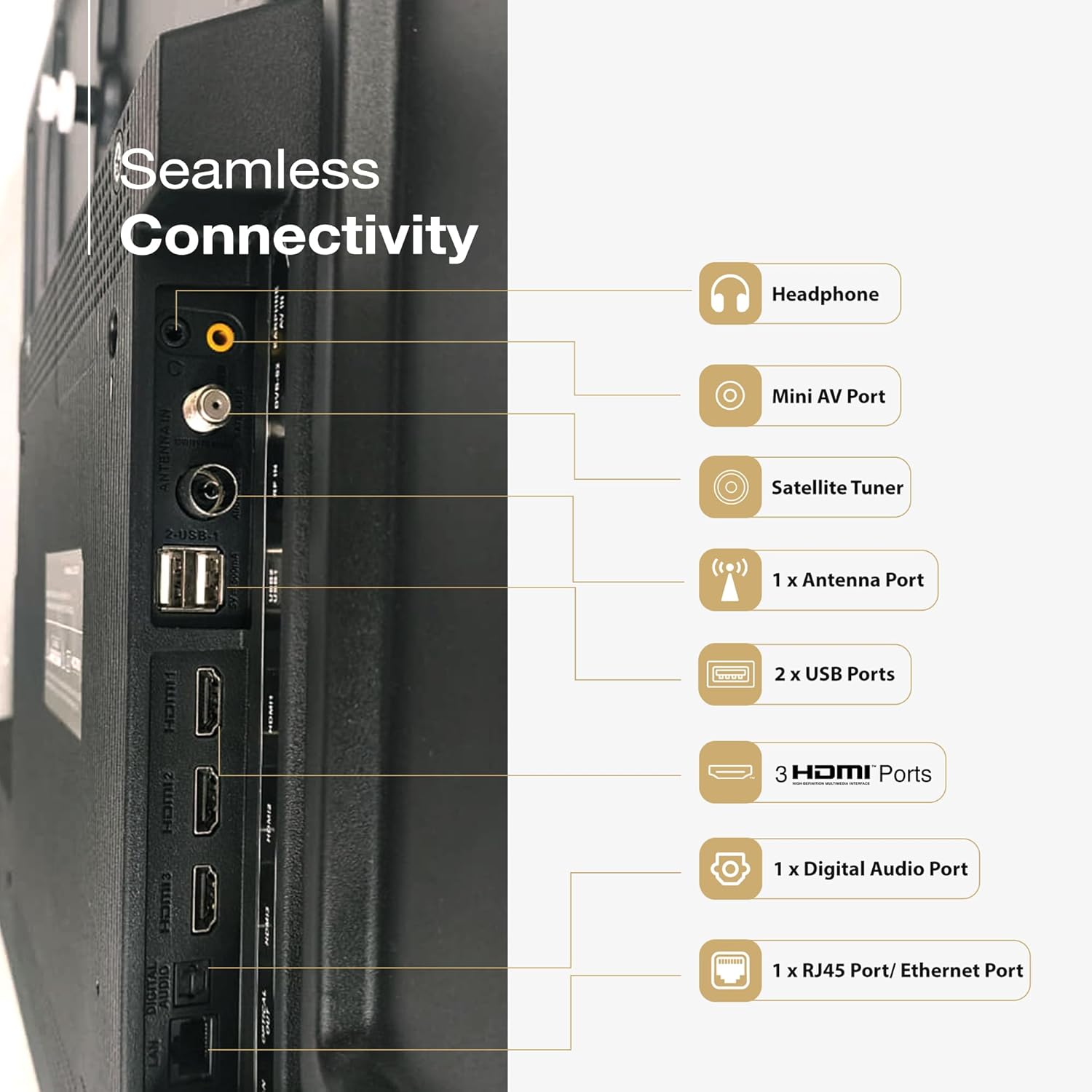
Imej: Belakang view of the SANSUI TV displaying its various input and output ports, including HDMI, USB, and audio connections.
- Port HDMI (3): Connect Blu-ray players, gaming consoles, set-top boxes, etc.
- Port USB (2): Sambungkan peranti storan USB untuk main balik media.
- Pelabuhan Ethernet (RJ45): Untuk sambungan internet berwayar.
- Mini AV Port: Untuk peranti analog yang lebih lama.
- Port Antena: For connecting a terrestrial antenna.
- Digital Audio Port: Untuk menyambung ke sistem audio luaran.
- Jack fon kepala: Untuk mendengar secara peribadi.
4.3 Sambungan Kuasa
After all connections are made, plug the power cord into the TV and then into a wall outlet. The TV will enter standby mode.
5. Mengendalikan TV Anda
5.1 Persediaan Kali Pertama
Upon first power-on, the TV will guide you through the initial setup process, including language selection, network connection (Wi-Fi or Ethernet), Google account sign-in, and channel scanning.
5.2 Alat Kawalan Jauh
The included remote control features Bluetooth and IR technology, along with dedicated hotkeys for popular streaming services and Google Assistant.

Image: The SANSUI Smart Remote control, highlighting the Google Assistant button and quick access hotkeys for Netflix, Prime Video, and YouTube.
- Butang Kuasa: Menghidupkan/mematikan TV atau bersedia.
- Butang Pembantu Google: Mengaktifkan kawalan suara.
- Pad Navigasi: Untuk navigasi menu.
- Jilid +/-: Melaraskan kelantangan.
- Saluran +/-: Menukar saluran.
- Kekunci pintas: Direct access to Netflix, Prime Video, and YouTube.
5.3 Antara Muka Google TV
Your SANSUI TV runs on Google TV, providing a personalized home screen with content recommendations from your subscriptions and apps. You can browse movies, shows, and apps, and manage your library.

Image: A living room scene with the SANSUI TV displaying the Google TV interface, featuring various streaming app icons and content suggestions.
5.4 Kawalan Suara dengan Google Assistant
Press the Google Assistant button on your remote and speak commands to search for content, control smart home devices, get answers, and more.
6. Ciri-ciri Utama
The SANSUI JSW65UG23Q TV incorporates advanced technologies for an enhanced viewpengalaman dan audio.
6.1 4K QLED Display with Dolby Vision, HDR10+, HLG

Image: A close-up of a reptile eye displayed on the SANSUI 4K QLED TV, illustrating the clarity and color depth of 4K, QLED, and HDR10+ technologies.
- Resolusi 4K: Provides four times the detail of Full HD for crisp, clear images.
- Teknologi QLED: Quantum Dot technology delivers vibrant and accurate colors with improved brightness.
- Dolby Vision, HDR10+, HLG: Support for multiple High Dynamic Range formats ensures superior contrast, brightness, and color reproduction in compatible content.
6.2 FloLED Panel

Imej: Meletup view diagram showing the layers of the FloLED panel, including the enriched color display with prism layer, advanced light diffusion, and high-intensity glowing LED structure.
The FloLED Panel technology enhances brightness and color uniformity across the screen, utilizing an advanced light diffusion and dispersal system with a high-intensity glowing LED structure.
6.3 Dolby Atmos Sound with Tweeters

Image: A SANSUI TV displaying a lighthouse during a storm, with text indicating "Explosive Sonic with Dolby Atmos" and details about 30W box speakers with tweeters.
Experience immersive audio with Dolby Atmos, delivering multi-dimensional sound that moves around you. The TV features 30W surround sound output with integrated tweeters for clear highs and rich audio.
6.4 HSR 120Hz and MEMC

Image: A person playing a racing game on the SANSUI TV, illustrating the smooth motion provided by HSR 120Hz refresh rate and MEMC technology for lag-free gaming.
The 120Hz High Speed Refresh (HSR) rate combined with Motion Estimation, Motion Compensation (MEMC) technology ensures smooth, blur-free motion, especially beneficial for fast-paced content and gaming.
6.5 Quadcore Processor

Imej: A terperinci view of a MediaTek Quadcore Processor chip on a circuit board, representing the TV's processing power.
Powered by a Quadcore Processor, the TV delivers responsive performance for smooth navigation, quick app loading, and efficient multitasking.
6.6 Bezel-Less Design

Image: A SANSUI TV displaying a large elephant, emphasizing the immersive viewing experience provided by its sleek, bezel-less design.
The TV features a bezel-less design, maximizing screen space and providing a more immersive viewpengalaman dalam.
7. Ketersambungan
Your SANSUI TV offers various connectivity options:
- Antara muka perkakasan: Bluetooth, Ethernet, HDMI, USB
- Jumlah Port USB: 2
- Audio Input Compatible: HDMI, USB, mini AV
- Teknologi Bluetooth: ya
- Wi-Fi: Supports 2.4GHz and 5GHz bands for wireless internet connection.
- Chromecast built-in / Google Cast: Allows casting content from compatible mobile devices to the TV.
8. Penyelenggaraan
Penyelenggaraan yang betul memastikan jangka hayat dan prestasi optimum TV anda.
- Membersihkan Skrin: Lap skrin perlahan-lahan dengan kain lembut yang tidak berbulu. Untuk tanda degil, sedikit dampen kain dengan air atau pembersih skrin khusus (jangan sembur terus ke skrin).
- Membersihkan Casing: Gunakan kain lembut dan kering untuk mengelap TV casing. Elakkan pembersih atau pelarut yang melelas.
- Pengudaraan: Pastikan bukaan pengudaraan di bahagian belakang TV tidak tersumbat.
- Kord Kuasa: Periksa kord kuasa secara kerap untuk sebarang kerosakan.
9. Penyelesaian masalah
If you encounter issues, refer to the following common solutions before contacting customer support.
| Masalah | Penyelesaian yang Mungkin |
|---|---|
| Tiada kuasa | Check if the power cord is securely plugged into the TV and the wall outlet. Press the power button on the remote or TV. |
| Tiada gambar, tetapi bunyi hadir | Pastikan sumber input yang betul dipilih. Semak sambungan kabel ke peranti luaran. |
| Tiada bunyi, tetapi ada gambar | Check volume level and mute status. Verify audio cable connections. If using external audio, ensure TV speakers are not disabled. |
| Alat kawalan jauh tidak berfungsi | Replace batteries. Ensure no obstructions between the remote and the TV's IR sensor. Re-pair Bluetooth remote if necessary. |
| Kualiti gambar yang buruk | Check antenna or cable connections. Adjust picture settings (brightness, contrast, sharpness). Try a different input source. |
| Tidak dapat menyambung ke Wi-Fi | Ensure Wi-Fi is enabled on the TV. Restart your router. Check Wi-Fi password. Try moving the TV closer to the router or using a wired Ethernet connection. |
10. Spesifikasi
Detailed technical specifications for the SANSUI JSW65UG23Q TV:
| Ciri | Spesifikasi |
|---|---|
| Jenama | SANSUI |
| Nama Model | JSW65UG23Q |
| Saiz Skrin | 65 Inci (165cm) |
| Teknologi Paparan | QLED |
| Resolusi | 4K (3840 x 2160 Piksel) |
| Kadar Segar Semula | 120 Hz (HSR) |
| Sistem Operasi | Google TV |
| Ciri Khas | Bezel Less Design, Wide Viewing Angle, Chromecast built-in, Google Cast, Dolby Vision, HDR10+, HLG, MEMC |
| Pengekodan Audio | Dolby Atmos |
| Pembesar Suara Kuasa Output Maksimum | 30 Watt |
| Konfigurasi Saluran Bunyi Surround Speaker | 2.0 |
| Antara Muka Perkakasan | Bluetooth, Ethernet, HDMI (3), USB (2) |
| Kapasiti Penyimpanan Memori | 32 GB |
| Masa Tindak Balas | 8 milisaat |
| Dimensi Produk (LxWxH) | 144.5 x 90.8 x 7.8 cm |
| Berat Barang | 15.1 kg |
| Voltage | 240 Volt |
| Wattage | 200 Watt |
| Tahun Model | 2025 |
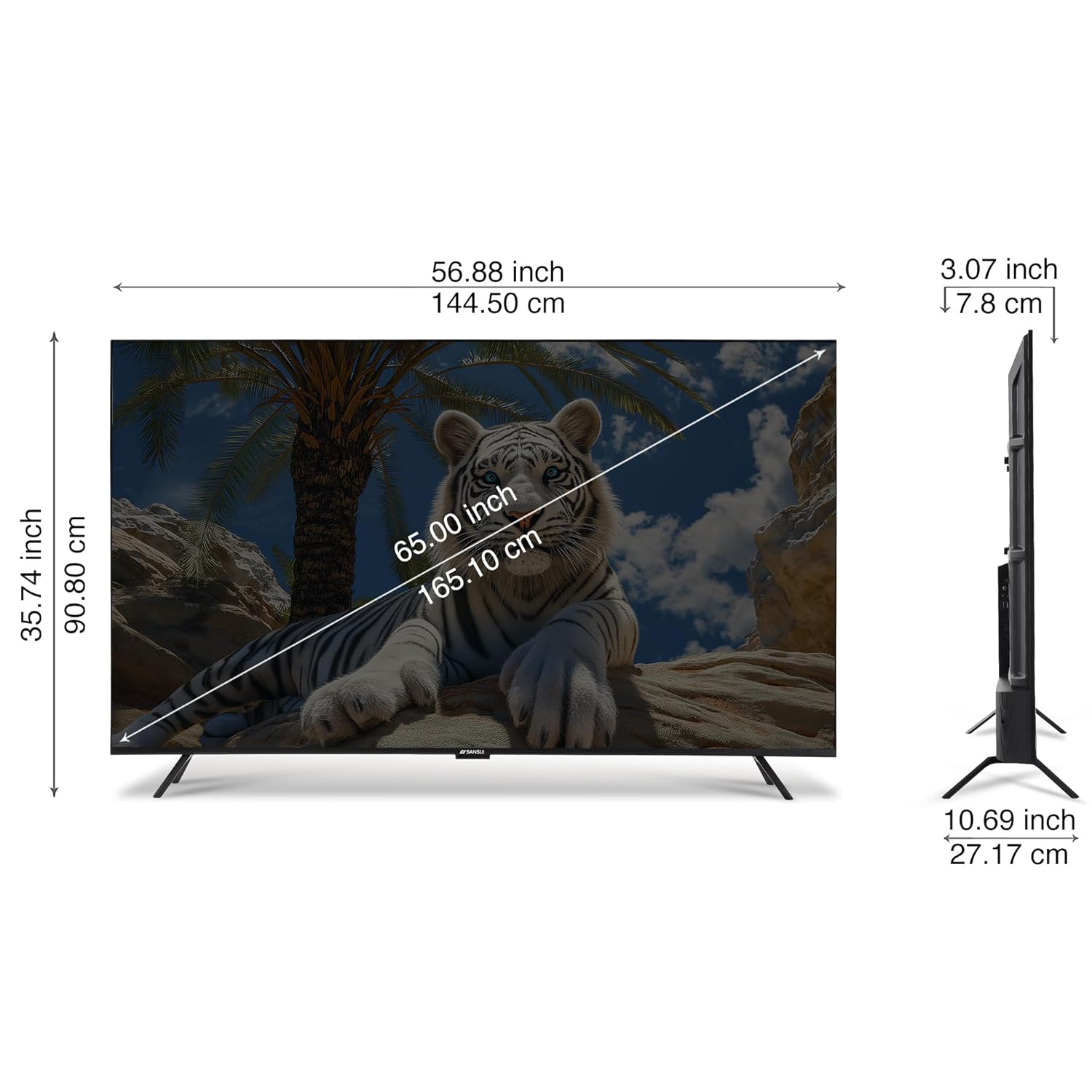
Image: A diagram illustrating the physical dimensions of the SANSUI 65-inch TV, showing measurements in both inches and centimeters for screen size, width, height, and depth.
11. Waranti dan Sokongan
Your SANSUI 65-inch 4K QLED Google TV comes with a Waranti 1 Tahun. For warranty claims, technical support, or service requests, please contact SANSUI customer care.
For further assistance, visit the official SANSUI website or refer to the contact information provided in your warranty card.
12. Produk Lebihview Video
Tonton video ini untuk visual seterusnyaview of the SANSUI Smart TV features.
Video: Pratonton ringkasview tayangan videocasing various features and design aspects of the SANSUI Smart TV line, including display quality, sound, and smart functionalities.