1. Pengenalan
The Trevi RDA 70 BR is a compact and versatile portable radio designed to provide a comprehensive listening experience. It combines traditional radio functionality with modern digital features, making it suitable for listening to music or news anywhere. This manual provides instructions for the proper setup, operation, and maintenance of your device.
2. Maklumat Keselamatan
- Baca semua arahan dengan teliti sebelum menggunakan peranti.
- Jangan dedahkan radio kepada hujan, kelembapan atau suhu yang melampau.
- Elakkan meletakkan peranti berhampiran sumber haba atau di bawah cahaya matahari langsung.
- Jangan buka atau cuba membaiki unit sendiri. Rujuk semua servis kepada kakitangan yang berkelayakan.
- Jauhkan peranti daripada medan magnet yang kuat.
- Use only the specified charging cable (USB Type-C) for recharging the battery.
3. Kandungan Pakej
Pastikan semua item ada dalam pakej:
- Trevi RDA 70 BR Portable Radio
- Kabel Pengecasan USB Jenis-C
- Manual Pengguna (dokumen ini)
4. Produk Lebihview
Familiarize yourself with the various parts and controls of your Trevi RDA 70 BR radio.

Rajah 1: Depan bersudut view of the Trevi RDA 70 BR Portable Radio, showing the speaker grille, display, and main controls.
Kawalan Panel Hadapan
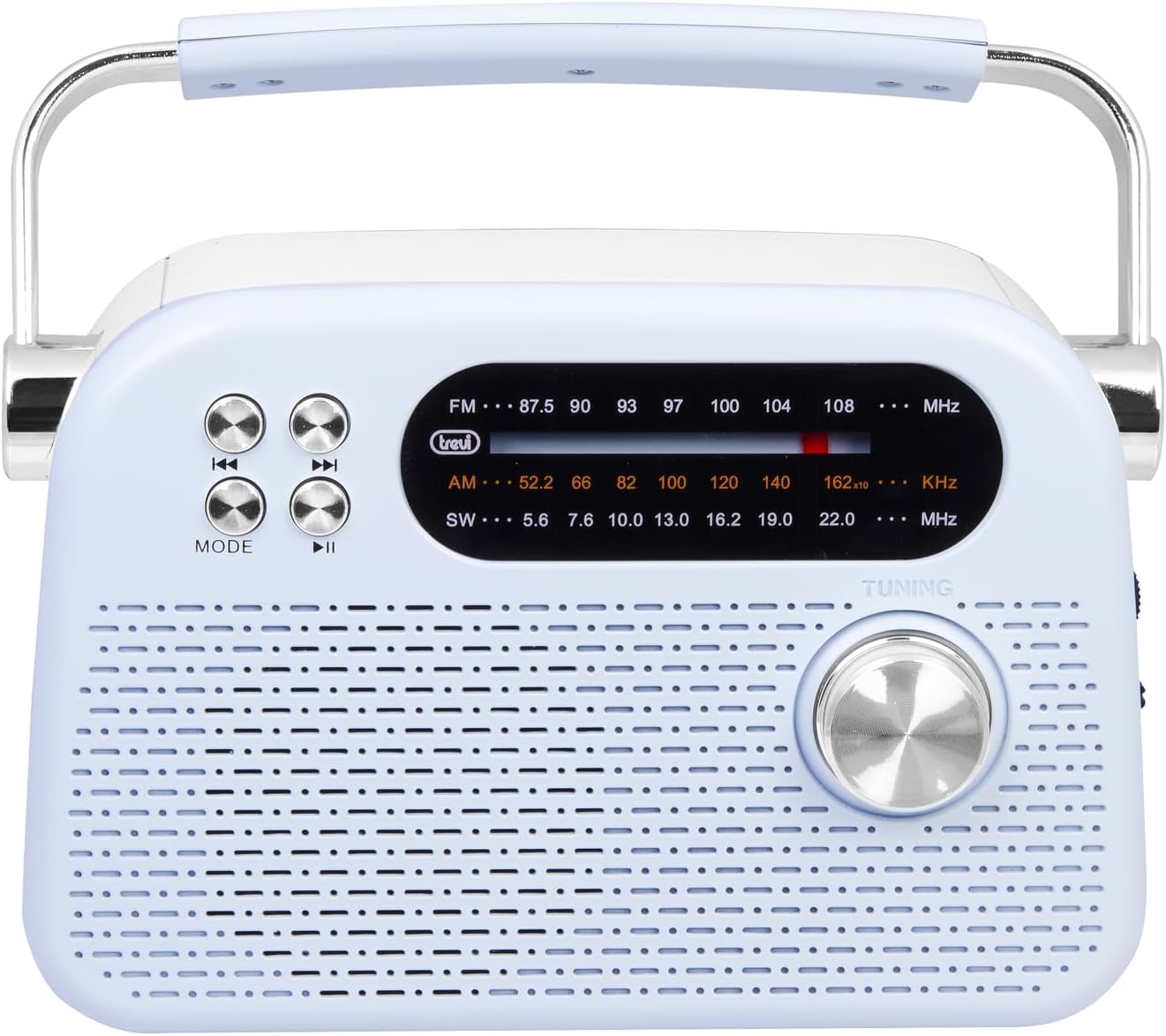
Rajah 2: Bahagian hadapan terperinci view highlighting the display, mode button, playback controls, and tuning knob.
- paparan: Shows frequency, mode, and other information.
- Butang MOD: Switches between radio bands (FM/AM/SW) and media playback modes (USB/Micro SD/Wireless).
- Playback Controls (◀◀ / ▶▶ / ▶▶): Used for skipping tracks in media mode or fine-tuning in radio mode.
- Tombol Penalaan: For manual station tuning.
Side Panel Controls and Ports

Rajah 3: Sisi view showing the power switch, volume control, USB port, Micro SD slot, and USB Type-C charging port.
- OFF/ON/Volume Knob: Turns the radio on/off and adjusts the volume level.
- DC 5V IN (USB Type-C): Charging port for the internal battery.
- Port USB: Untuk menyambungkan pemacu kilat USB untuk main balik MP3.
- Micro SD Slot (TF): For inserting Micro SD cards for MP3 playback.
- Band Selector Switch: Selects between FM, AM, and SW radio bands, and MEDIA mode for USB/Micro SD/Wireless.
Panel Belakang

Rajah 4: Belakang view showing the telescopic antenna and battery compartment.
- Antena Teleskopik: Extend for improved radio reception, especially for FM and SW bands.
- Petak Bateri: Houses the rechargeable lithium battery.
5. Persediaan
5.1 Mengecas Bateri
- Locate the USB Type-C charging port on the side of the radio.
- Connect the provided USB Type-C cable to the radio's charging port.
- Sambungkan hujung kabel USB yang satu lagi ke penyesuai kuasa USB standard (tidak disertakan) atau port USB komputer.
- The charging indicator light will illuminate (if present) to show charging status.
- Once fully charged, disconnect the cable. A full charge ensures maximum portability and uninterrupted use.
5.2 Pelarasan Antena
For optimal radio reception, extend the telescopic antenna fully. Adjust its direction and angle to achieve the clearest signal, especially for FM and Shortwave (SW) broadcasts.
6. Arahan Operasi
6.1 Kuasa Hidup/Mati dan Kawalan Kelantangan
- Untuk menghidupkan radio ON, rotate the OFF/ON/Volume knob clockwise.
- Continue rotating the knob clockwise to meningkatkan kelantangan.
- Rotate the knob counter-clockwise to mengurangkan kelantangan.
- Untuk menghidupkan radio DIMATIKAN, rotate the knob counter-clockwise until it clicks into the OFF position.
6.2 Pemilihan Mod
Gunakan Suis Pemilih Jalur on the side panel to choose your desired mode:
- FM: For Frequency Modulation radio stations.
- AM: Untuk Amplitude Modulation radio stations.
- SW: For Shortwave radio stations.
- PURATA: For playing audio from USB, Micro SD, or Wireless (Bluetooth) sources.
6.3 Penalaan Radio
- Select the desired radio band (FM, AM, or SW) using the Band Selector Switch.
- Panjangkan antena teleskopik untuk penerimaan yang lebih baik.
- Putar perlahan-lahan Tombol Penalaan on the front panel to scan for stations.
- The frequency will be displayed on the screen. Stop tuning when you find a clear station.
6.4 USB/Micro SD Playback (MP3)
- Insert a USB flash drive or a Micro SD card (with MP3 files) into the corresponding port/slot on the side panel.
- Switch the Band Selector Switch to MEDIA mode. The radio should automatically detect and begin playing MP3 files.
- Gunakan Kawalan Main Semula (◀◀ / ▶▶) to skip to the previous or next track.
- Gunakan Play/Pause (▶▶) butang untuk menjeda atau menyambung semula main semula.
6.5 Sambungan Tanpa Wayar (Bluetooth)
The radio supports wireless audio streaming from compatible devices.
- Switch the Band Selector Switch to MEDIA mode. The radio will enter Bluetooth pairing mode (indicated by an audible prompt or flashing indicator).
- Pada telefon pintar, tablet atau peranti lain yang didayakan Bluetooth anda, dayakan Bluetooth dan cari peranti yang tersedia.
- Pilih "Trevi RDA 70 BR" (or similar name) from the list of devices to pair.
- Setelah dipasangkan, anda boleh menstrim audio daripada peranti anda ke radio.
- Use the playback controls on your connected device or the radio's playback controls to manage audio.
7. Penyelenggaraan
- Pembersihan: Gunakan kain lembut dan kering untuk membersihkan bahagian luar radio. Jangan gunakan pembersih atau pelarut yang melelas.
- Storan: Apabila tidak digunakan untuk tempoh yang lama, simpan radio di tempat yang sejuk dan kering, jauh dari cahaya matahari langsung dan suhu yang melampau.
- Penjagaan Bateri: To prolong battery life, avoid fully discharging the battery frequently. Recharge it regularly, even if not in constant use.
8. Penyelesaian masalah
| Masalah | Kemungkinan Punca | Penyelesaian |
|---|---|---|
| Tiada kuasa | Battery is discharged; Power knob is OFF. | Charge the battery; Rotate the power knob to ON. |
| Penerimaan radio yang lemah | Antena tidak dilanjutkan; Isyarat lemah; Gangguan. | Extend and adjust the telescopic antenna; Move the radio to a different location; Tune carefully. |
| USB/Micro SD not playing | Incorrect mode; Unsupported file format; rosak files. | Ensure Band Selector Switch is on MEDIA; Check if files are MP3 format; Try a different USB/Micro SD card. |
| Cannot connect via Wireless (Bluetooth) | Radio not in pairing mode; Bluetooth off on device; Device already connected to another unit. | Ensure radio is in MEDIA mode; Enable Bluetooth on your device; Disconnect from other devices and try again. |
9. Spesifikasi
| Ciri | Perincian |
|---|---|
| Jenama | Trevi |
| Model | RDA 70 BR |
| Dimensi (L x W x H) | 18.5 x 7 x 12.5 cm |
| Berat badan | 600 gram |
| Sumber Kuasa | Bateri Litium Boleh Dicas semula |
| Port Pengecasan | USB Jenis-C (DC 5V) |
| Kumpulan Radio yang Disokong | FM, AM, SW |
| Main Balik Media | USB, Micro SD (MP3 format) |
| Kesambungan Wayarles | Yes (Bluetooth compatible) |
| Ciri Khas | Mudah alih, Boleh dicas semula |
10. Waranti dan Sokongan
For warranty information and customer support, please refer to the documentation provided at the time of purchase or visit the official Trevi website. Standard return policies apply for products purchased through retailers. For specific details regarding returns or defective products, consult your purchase platform's help pages.