1. Pengenalan
This manual provides essential information for the safe operation, assembly, maintenance, and troubleshooting of your Varstrom VS10 Electric Scooter. Please read this manual thoroughly before first use to ensure proper function and to prevent injury or damage.
2. Garis Panduan Keselamatan
Operating an electric scooter carries inherent risks. Adhere to the following safety guidelines:
- Sentiasa pakai topi keledar dan peralatan pelindung yang sesuai (pelindung lutut, pelindung siku).
- Patuhi semua undang-undang dan peraturan lalu lintas tempatan.
- Jangan menunggang dalam keadaan basah, hujan lebat, atau di atas permukaan licin.
- Avoid riding at night or in low visibility conditions. If unavoidable, ensure all lights are functional and wear reflective clothing.
- Kekalkan kelajuan dan jarak yang selamat daripada kenderaan lain dan pejalan kaki.
- Jangan lakukan aksi atau gerakan mengejut.
- Pastikan skuter dicas sepenuhnya dan semua komponen dicas dengan kukuh sebelum setiap tunggangan.
- Kapasiti beban maksimum ialah 120 kg. Jangan melebihi had ini.
- This scooter is intended for adult use only.
3. Kandungan Pakej
Sahkan bahawa semua item terdapat dalam pakej:
- Varstrom VS10 Electric Scooter
- Pengecas
- Manual Pengguna (dokumen ini)
4. Produk Lebihview
Familiarize yourself with the main components of your Varstrom VS10 Electric Scooter.

Imej: Sisi view of the Varstrom VS10 Electric Scooter, showcasing reka bentuk dan komponen keseluruhannya.
Ciri-ciri Utama:
- Motor: 500W Brushless DC Motor for efficient power delivery.
- Bateri: 48V 15.6Ah Lithium-ion battery for extended range.
- Tayar: 10-inch puncture-proof solid tires.
- Penggantungan: Front dual suspension and rear dual suspension for ride comfort.
- Pencahayaan: Integrated headlight, bright rear brake light, and dual handlebar turn signals.
- paparan: Intelligent LED screen showing speed, battery level, and riding mode.
- Kawalan: App control via smartphone for various settings.
- mudah alih: Quick folding mechanism for easy storage and transport.
5. Pemasangan dan Persediaan
5.1 Membuka Lipatan Skuter
The scooter is shipped in a folded state. Follow these steps to unfold it:
- Letakkan skuter di atas permukaan rata.
- Locate the folding mechanism latch near the base of the steering column.
- Release the latch and carefully lift the steering column until it locks into the upright position. Ensure the locking mechanism is fully engaged.
- Raise the handlebars and secure them if they are folded down.

Image: Illustration showing the folded and unfolded dimensions of the Varstrom VS10 Electric Scooter, demonstrating its compact storage capability.
5.2 Pengecasan Awal
Sebelum perjalanan pertama anda, cas sepenuhnya bateri skuter.
- Pastikan skuter dimatikan.
- Cari port pengecasan, biasanya di sisi dek.
- Sambungkan pengecas ke port pengecasan, kemudian palamkan pengecas ke soket dinding standard.
- Penunjuk pengecasan pada pengecas biasanya akan menunjukkan warna merah semasa pengecasan dan bertukar menjadi hijau apabila dicas sepenuhnya.
- Charging time is approximately 6-7 hours. Do not overcharge.

Imej: Terperinci view of the scooter's battery compartment and charging specifications, highlighting the 48V 15.6Ah battery and 6-7 hour charging time.
6. Operasi
6.1 Hidupkan/Mati Kuasa
- Untuk menghidupkan: Tekan dan tahan butang kuasa pada paparan LED sehingga skrin menyala.
- To power off: Press and hold the power button until the screen turns off.
6.2 Paparan dan Kawalan LED
The integrated LED display provides real-time information and control options.

Image: Close-up of the scooter's intelligent LED screen, displaying current speed, selected gear (riding mode), and battery level.
- Paparan Kelajuan: Menunjukkan kelajuan tunggangan semasa.
- Paparan Bateri: Menunjukkan baki cas bateri.
- Gear Shift (Riding Modes): Press the 'Set/Switch' button to cycle through Eco, Drive, and Sport modes.
6.3 Mod Menunggang
- Mod Eko: Lowest speed, maximum range, suitable for beginners or crowded areas.
- Mod Pandu: Medium speed, balanced performance for daily commuting.
- Mod Sukan: Highest speed, maximum power, for experienced riders on open roads.
6.4 Kawalan Pelayaran
To activate cruise control, maintain a consistent speed for a few seconds. The scooter will beep, and cruise control will engage. To disengage, press the brake lever or accelerate.
6.5 Sistem Pencahayaan
The scooter is equipped with a comprehensive lighting system for visibility and safety.
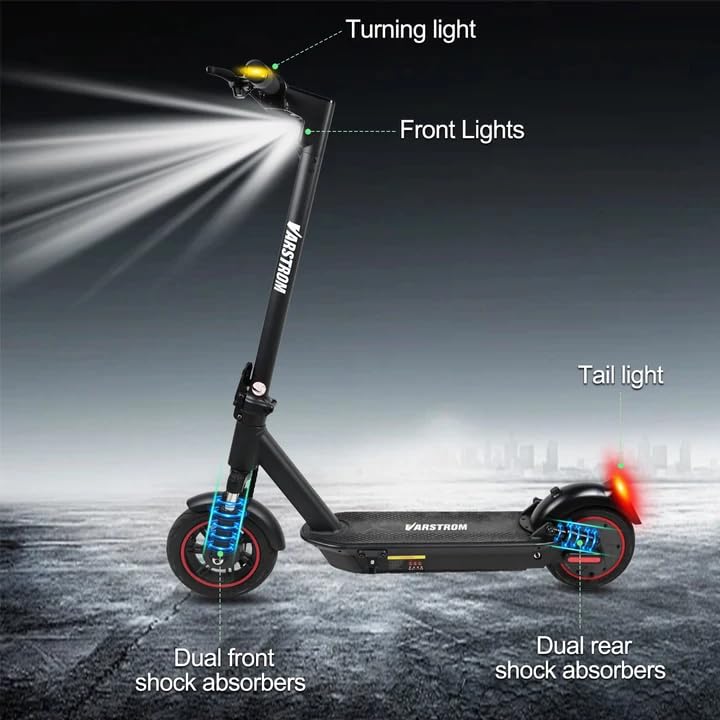
Image: Diagram illustrating the scooter's front lights, turning lights on the handlebars, tail light, and the dual front and rear shock absorbers.
- Lampu depan: Turn on/off via the app or dedicated button (if available).
- Tail Light/Brake Light: The rear light illuminates when the scooter is powered on and brightens when the brake is applied.
- Isyarat Belok: Activate turn signals using the controls on the handlebars to indicate your turning direction.
6.6 Brek
The scooter features front braking. Apply the brake lever gently to slow down. For emergency stops, apply firm and even pressure to the brake lever. Avoid sudden braking at high speeds.
6.7 Kawalan Aplikasi Pintar Tuya
Enhance your riding experience by connecting your scooter to the Tuya Smart app.

Image: Screenshot of the Tuya Smart App interface, showing options to unlock the scooter, control cruise, turn on/off headlights, switch riding modes, and set speed limits.
- Download the 'Tuya Smart' app from your smartphone's app store.
- Ensure your scooter is powered on and Bluetooth is enabled on your phone.
- Open the app and follow the instructions to add a new device. You may need to hold the brake and power button simultaneously to activate Bluetooth pairing mode.
- Melalui aplikasi, anda boleh:
- Unlock/Lock the scooter remotely.
- Adjust lights.
- Switch riding modes.
- Set cruise control.
- Toggle units (km/mph).
- View real-time ride data.
- Enable/disable zero start (safety feature).
7. Penyelenggaraan
7.1 Penjagaan Bateri
- Cas bateri secara berkala, walaupun tidak digunakan, untuk mengekalkan kesihatannya.
- Elakkan bateri habis sepenuhnya.
- Simpan skuter di tempat yang sejuk dan kering jauh dari cahaya matahari langsung dan suhu yang melampau.
- Gunakan hanya pengecas yang disediakan.
7.2 Pembersihan
Lap skuter dengan iklanamp cloth. Do not use high-pressure water jets or immerse the scooter in water, as this can damage electrical components.
7.3 Tire Inspection
Although the tires are puncture-proof solid tires, regularly inspect them for any signs of damage, cracks, or embedded debris.
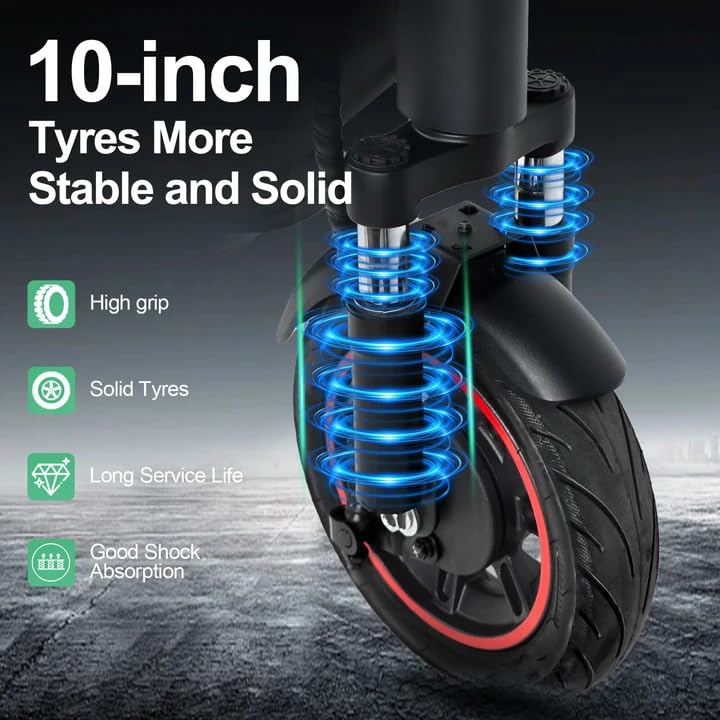
Image: Close-up of the scooter's 10-inch solid tires and dual suspension system, emphasizing stability and shock absorption.
8. Penyelesaian masalah
| Masalah | Kemungkinan Punca | Penyelesaian |
|---|---|---|
| Skuter tidak dihidupkan | Bateri lemah; Sambungan longgar; Butang kuasa rosak | Charge the battery; Check all visible connections; Contact support if issue persists. |
| Julat atau kuasa yang dikurangkan | Low battery; Overload; Cold weather; Tire damage | Fully charge battery; Ensure load is within limits; Battery performance decreases in cold; Inspect tires. |
| Apl tidak bersambung | Bluetooth off; Scooter not in pairing mode; App issue | Ensure phone Bluetooth is on; Activate scooter's Bluetooth pairing mode (brake + power button); Restart app/phone. |
| Brakes not responsive | Brake cable loose or damaged | Inspect brake cable and lever; Seek professional service if necessary. |
9. Spesifikasi
| Parameter | Nilai |
|---|---|
| Motor | 500W Brushless (50N·m torque) |
| Bateri | Litium 48V 15.6Ah |
| Julat Maks | Up to 60 km per charge |
| Kelajuan Maks | 25 km/j |
| Masa Mengecas | 6-7 jam |
| tayar | 10-inch Puncture-Proof Solid Tires |
| Penggantungan | Front Dual Suspension + Rear Dual Suspension |
| Beban Maks | 120 kg |
| Sudut Mendaki | 15° |
| Unfolding Size (LWH) | 117 x 53 x 120 cm |
| Folding Size (LWH) | 117 x 53 x 56 cm |
| Berat badan | 19.6 kg |
| Ciri Khas | Digital Display, Foldable, Rechargeable, App Control, Cruise Control, Turning Indicator Light |

Imej: Keratan view illustrating the 500W brushless DC motor, highlighting its power and efficiency, alongside key performance metrics.
10. Waranti dan Sokongan
For warranty information, technical support, or service inquiries, please refer to the purchase documentation or contact your retailer. Keep your proof of purchase for warranty claims.


