1. Pengenalan
This manual provides detailed instructions for the proper use and maintenance of your LIGE Smart Watch FV6-B2. Please read this manual thoroughly before using the device to ensure optimal performance and longevity.
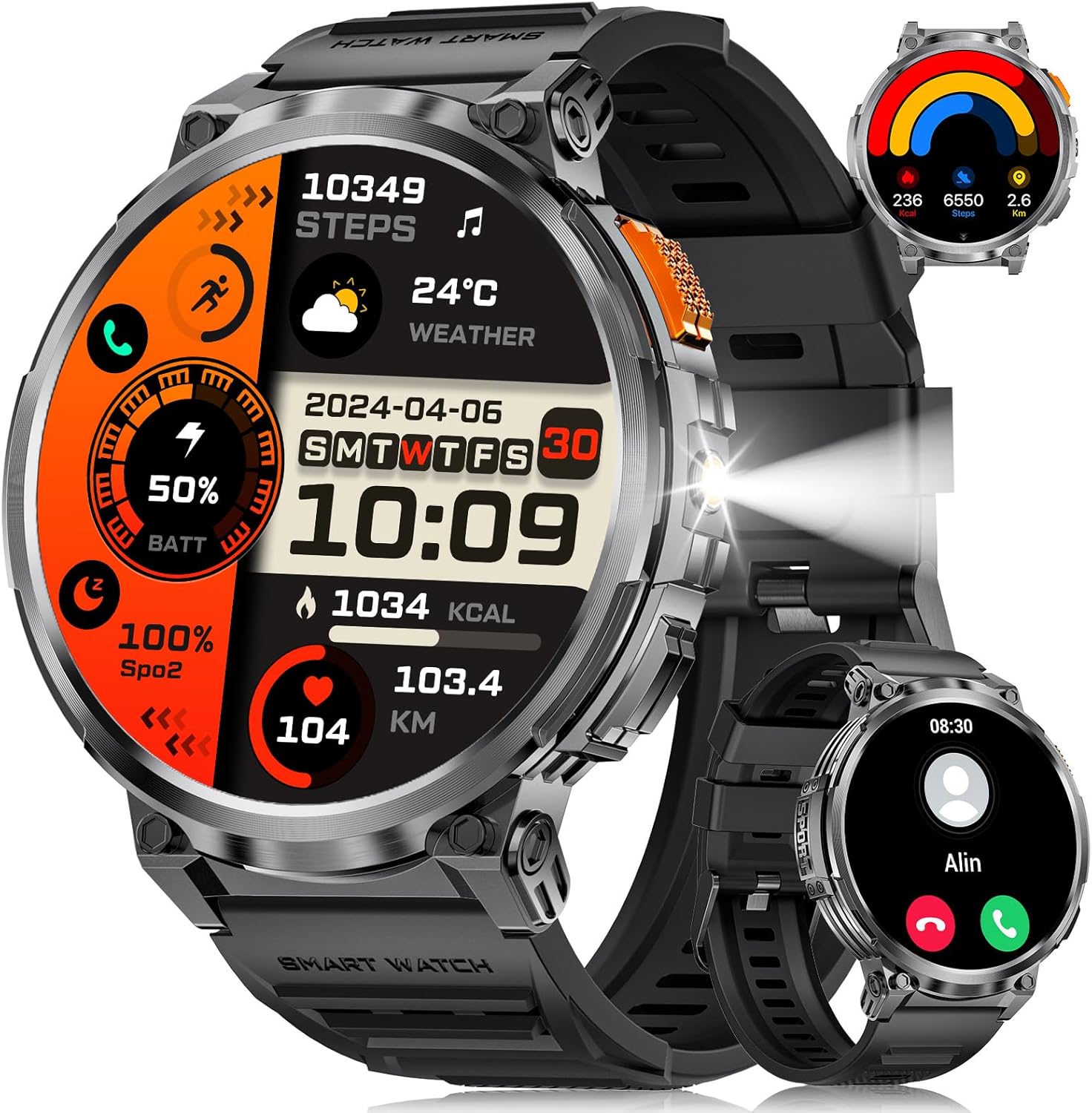
Imej 1.1: LIGE Smart Watch FV6-B2 displaying various health and activity metrics.
2. Kandungan Pakej
Sahkan bahawa semua item terdapat dalam pakej:
- 1 x LIGE Smart Watch FV6-B2
- 1 x Watch Strap (pre-installed or separate)
- 1 x Kabel Pengecasan
- Accessories and Extension Tools (for strap adjustment, if applicable)
- 1 x Manual Pengguna (dokumen ini)
3. Panduan Persediaan
3.1 Pengecasan Awal
Before first use, fully charge your smartwatch. Connect the provided charging cable to the watch and a compatible USB power source. A full charge typically takes approximately 2.5 hours. The watch features a 730mAh battery, providing extended usage time.

Imej 3.1: Smartwatch connected to its charging cable, highlighting the 730mAh battery.
3.2 Pemasangan Apl dan Berpasangan
To unlock the full functionality of your LIGE Smart Watch FV6-B2, download and install the companion application on your smartphone. The watch is compatible with Android 4.4 and iOS 8.0 or above. Refer to the quick start guide or packaging for the specific app name and QR code.
- Scan the QR code provided in the watch packaging or search for the app in your smartphone's app store.
- Pasang aplikasi pada telefon pintar anda.
- Buka apl dan ikut arahan pada skrin untuk membuat akaun atau log masuk.
- Dayakan Bluetooth pada telefon pintar anda.
- Within the app, search for your LIGE Smart Watch FV6-B2 and initiate the pairing process.
- Sahkan permintaan berpasangan pada telefon pintar anda dan jam tangan pintar.
For visual guidance, a connection video may be available. Check the product page or manufacturer's weblaman web untuk maklumat lebih lanjut.
4. Arahan Operasi
4.1 Menavigasi Antara Muka
The LIGE Smart Watch FV6-B2 features a 1.85-inch HD display with a 360x360 resolution and a highly responsive touch interface. Navigate through menus and functions with simple swipes and taps.
- Leret ke atas/bawah: Scroll through notifications or menu options.
- Leret Kiri/Kanan: Akses widget pantas atau muka jam tangan yang berbeza.
- Ketik: Pilih item atau buka aplikasi.
- Butang Sisi: Typically used to return to the home screen, power on/off, or access the app list.

Imej 4.1: Terperinci view of the 1.85-inch HD display.
4.2 Panggilan dan Pemberitahuan Bluetooth
Once paired with your smartphone, the watch supports Bluetooth calling and displays notifications.
- Buat/Jawab Panggilan: Use the built-in microphone and speaker to handle calls directly from your wrist. Access the dial keypad or call records on the watch.
- Pemberitahuan Mesej: Receive alerts for incoming messages from various applications (e.g., SMS, social media).

Imej 4.2: Bluetooth calling and notification features on the smartwatch.
4.3 Pemantauan Kesihatan
The watch utilizes advanced biosensor technology for continuous health tracking.
- Pemantauan Denyut Jantung: Mengukur kadar denyutan jantung anda sepanjang hari.
- Pemantauan Tekanan Darah: Memberi bacaan tekanan darah.
- Pemantauan Tidur: Tracks your sleep patterns, including deep and light sleep stages. View detailed sleep reports in the companion app.

Imej 4.3: Sleep monitoring interface on the smartwatch.
4.4 Mod Sukan dan Penjejakan Aktiviti
The watch supports over 120 sports modes to track your physical activities.
- Mod Terbina Dalam: Access over 20 pre-installed exercise modes.
- Mod Tersuai: Add over 100 additional sports modes via the app (e.g., running, badminton, baseball).
- Metrik Penjejakan: Records training history, speed, rhythm, heart rate, and steps to help plan and improve exercise efficiency.

Imej 4.4: Berakhirview of multiple sports tracking modes.
4.5 Fungsi Tambahan
The LIGE Smart Watch FV6-B2 includes several utility features:
- Ramalan Cuaca
- Pembantu Suara
- Jam Penggera
- Jam randik
- Pedometer
- Music Control Playback
- Kawalan Foto
- Peringatan Air Minum
- Multi-language Switching
- Penjejakan Kesihatan Wanita
- Pelarasan Kecerahan
- Mod Jangan Ganggu
- Tetapkan Kata Laluan
- Raise Hand to Turn On Screen
- Built-in Flashlight (range up to 20m)

Imej 4.5: Multifunctional interface showing various features.
Over 200 watch desktop faces can be downloaded and switched. You can also customize the watch face with your favorite pictures.
5. Penyelenggaraan
5.1 Tahan Air
The LIGE Smart Watch FV6-B2 has an IP68 waterproof rating. This means it is protected against dust ingress and can withstand immersion in water up to 1.5 meters for up to 30 minutes. It is suitable for use in rainy conditions, during sweating, or while showering. However, it is not recommended for diving or high-pressure water activities.

Imej 5.1: Smartwatch demonstrating its IP68 waterproof capability.
5.2 Pembersihan dan Penjagaan
- Bersihkan jam tangan dan tali secara berkala dengan kain lembutamp kain.
- Elakkan menggunakan bahan kimia yang keras, pembersih yang kasar atau pelarut, kerana ini boleh merosakkan kemasan dan pengedap jam tangan.
- Pastikan sentuhan pengecas bersih dan kering sebelum mengecas untuk mengelakkan kakisan.
- Simpan jam tangan di tempat yang sejuk dan kering apabila tidak digunakan.
6. Penyelesaian masalah
6.1 Watch Will Not Turn On
- Cas jam tangan menggunakan kabel yang disediakan selama sekurang-kurangnya 10 minit.
- If it still does not turn on, press and hold the side button for 10 seconds to force a restart.
- If the issue persists, charge the watch fully for 2.5 hours.
- If the watch still does not power on after these steps, contact customer support.
6.2 Watch Stopped Working Suddenly
- Restart the watch by pressing and holding the side button for 10 seconds.
- Ensure the watch is sufficiently charged.
- If the problem continues, consider resetting the watch via the settings menu: Tetapan > Sistem > Tetapkan Semula. Note that a reset will erase all data on the watch.
- Jika masalah berterusan, hubungi sokongan pelanggan.
6.3 Isu Ketersambungan (Bluetooth)
- Ensure Bluetooth is enabled on both your smartphone and the smartwatch.
- Make sure the watch is within the Bluetooth range of your smartphone (typically 10 meters or 33 feet).
- Mulakan semula telefon pintar dan jam tangan pintar anda.
- Unpair and re-pair the watch through the companion app.
- Check if the companion app is running in the background and has necessary permissions.
7. Spesifikasi
| Ciri | Perincian |
|---|---|
| Nombor Model | FV6-B2 |
| Saiz Paparan | 1.85 Inci |
| Resolusi Paparan | 360x360 piksel |
| Kapasiti Bateri | 730 mAh (Lithium Polimer) |
| Masa Mengecas | lebih kurang 2.5 jam |
| Penggunaan Biasa Hayat Bateri | 15+ hari |
| Hayat Bateri Siap Sedia | 50+ hari |
| Penilaian Ketahanan Air | IP68 |
| Ketersambungan | Bluetooth |
| OS yang serasi | Android 4.4 dan ke atas, iOS 8.0 dan ke atas |
| Sistem Operasi | AsteroidOS |
| Kapasiti Penyimpanan Memori | 128 MB |
| Berat Barang | 8.8 auns |
| Dimensi Pakej | 8.07 x 3.78 x 0.87 inci |
8. Waranti dan Sokongan
8.1 Maklumat Waranti
Specific warranty details are not provided in the available product information. Please refer to the warranty card included in your product packaging or contact the manufacturer directly for comprehensive warranty terms and conditions.
8.2 Sokongan Pelanggan
Should you encounter any issues or have questions regarding your LIGE Smart Watch FV6-B2, please contact our customer support team. We aim to respond to all inquiries within 24 hours.
For support, please visit the official LIGE webtapak atau rujuk maklumat hubungan yang diberikan dalam pembungkusan produk anda.
9. Video Produk Rasmi
No official product videos from the seller were found in the provided data for this model. Please check the product's online listing or the manufacturer's weblaman web untuk sebarang sumber video yang tersedia.


