1. Pengenalan
Terima kasih kerana membeliasing the Monster S350 Bluetooth Speaker. This portable wireless speaker features a touch screen, Bluetooth 6.0 connectivity, and support for TF cards, offering a versatile audio experience. This manual provides detailed instructions for setup, operation, maintenance, and troubleshooting to ensure optimal performance and longevity of your device.
2. Maklumat Keselamatan
- Jangan dedahkan pembesar suara kepada suhu yang melampau, cahaya matahari langsung atau kelembapan yang tinggi.
- Elakkan daripada menjatuhkan atau menundukkan pembesar suara kepada impak yang kuat.
- Jauhkan pembesar suara daripada air dan cecair lain.
- Do not attempt to disassemble, repair, or modify the speaker yourself. Contact qualified service personnel if needed.
- Gunakan hanya kabel pengecasan yang disediakan atau setara yang diperakui.
- Lupuskan bateri mengikut peraturan tempatan. Jangan bakar.
3. Kandungan Pakej
Sila semak pakej untuk item berikut:
- Monster S350 Bluetooth Speaker
- Kabel Pengecas USB
- Manual Pengguna
4. Produk Lebihview
Familiarize yourself with the components of your Monster S350 speaker.

Rajah 4.1: Depan view of the Monster S350 Bluetooth Speaker, showcasing its retro design and touch screen.

Rajah 4.2: Close-up of the speaker's top controls, illustrating the long press function for power and swipe gestures for volume adjustment.
Kawalan dan Pelabuhan:
- Tombol Kuasa/Kelantangan: Long press to turn on/off. Swipe up to increase volume, swipe down to decrease volume.
- Paparan Skrin Sentuh: For navigation, settings, and displaying information.
- Slot Kad TF: Insert a TF (microSD) card for local music playback.
- Port Pengecasan USB-C: Untuk mengecas pembesar suara.
5. Persediaan
5.1 Mengecas Speaker
- Sambungkan kabel pengecas USB ke port USB-C pembesar suara.
- Sambungkan hujung kabel yang satu lagi ke penyesuai kuasa USB (tidak disertakan) atau port USB komputer.
- Penunjuk pengecasan pada skrin akan menunjukkan status pengecasan. Pengecasan penuh biasanya mengambil masa kira-kira 2-3 jam.
5.2 Menghidupkan/Mematikan
- Untuk Menghidupkan: Long press the Power/Volume knob until the screen lights up.
- Untuk Mematikan: Long press the Power/Volume knob until the screen turns off.
5.3 Berpasangan Bluetooth
Pair your Monster S350 with a Bluetooth-enabled device.
- Ensure the speaker is powered on and within range of your Bluetooth device (e.g., smartphone, tablet).
- Pada peranti Bluetooth anda, dayakan Bluetooth dan cari peranti yang tersedia.
- Select "Monster S350" from the list of found devices.
- Setelah dipasangkan, pembesar suara akan menunjukkan sambungan yang berjaya dan anda boleh mula memainkan audio.

Rajah 5.1: The speaker displaying its Bluetooth connection status alongside a smartphone's Bluetooth settings.
5.4 Main Semula Kad TF
Play music directly from a TF (microSD) card.
- Pastikan pembesar suara dimatikan.
- Insert a TF card (up to 32GB, formatted to FAT32) into the TF card slot until it clicks into place.
- Power on the speaker. The speaker will automatically detect the TF card and switch to local music playback mode, or you can select it from the touch screen menu.

Rajah 5.2: Demonstrating the insertion of a TF card into the speaker's dedicated slot for local music playback.
6. Arahan Operasi
6.1 Main Balik Audio Asas
- Main/Jeda: Tap the play/pause icon on the touch screen.
- Lagu Seterusnya: Swipe right on the touch screen or tap the next track icon.
- Trek Sebelumnya: Swipe left on the touch screen or tap the previous track icon.
- Kawalan Kelantangan: Swipe up on the Power/Volume knob to increase volume, swipe down to decrease volume. Alternatively, adjust volume via the connected Bluetooth device.
6.2 Menggunakan Skrin Sentuh
The full-color touchscreen display allows for intuitive navigation and access to various features.
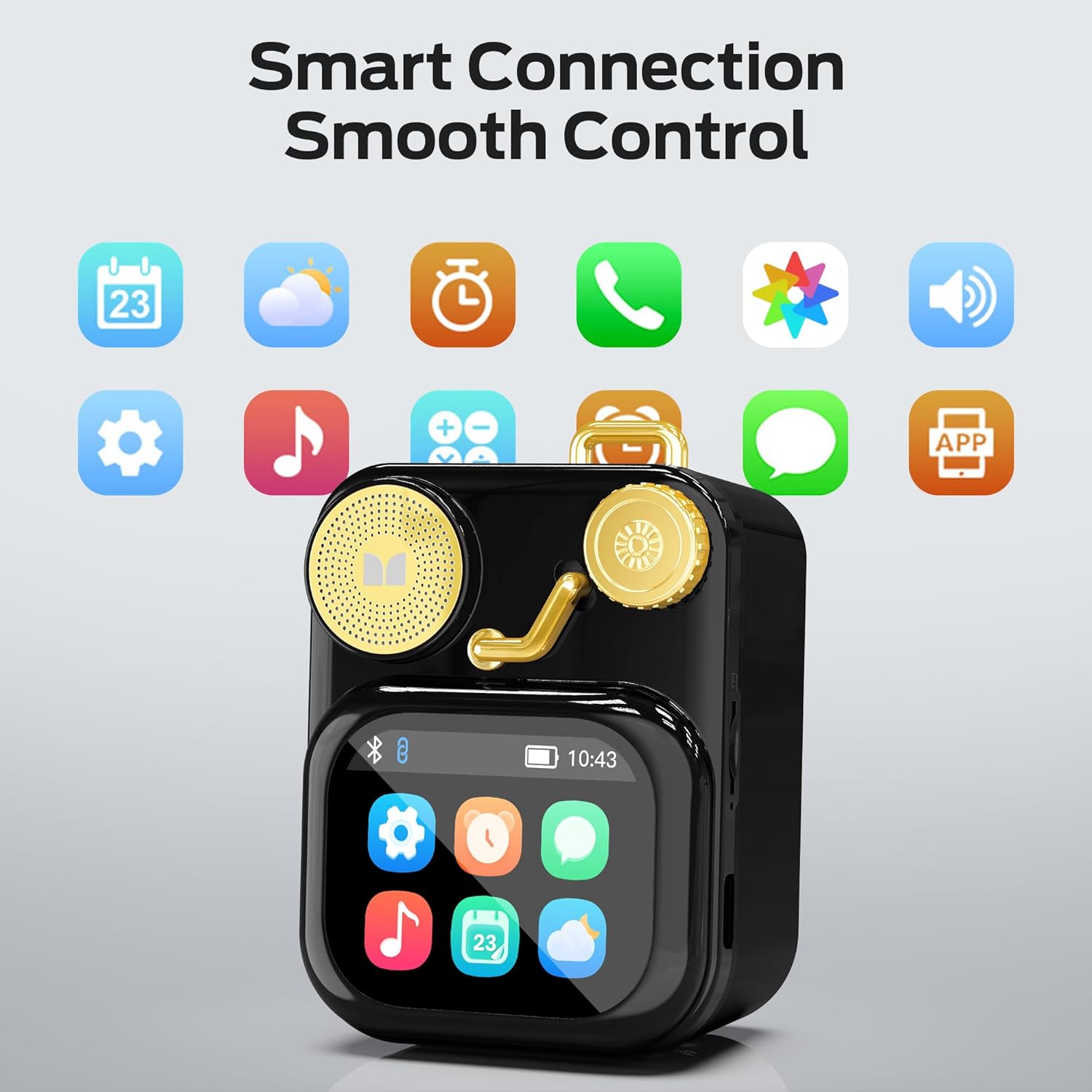
Rajah 6.1: The speaker's touch screen displaying various application icons for smart features.
- Navigasi: Swipe left/right or up/down to browse through menus and options.
- Pilihan: Ketik ikon atau pilihan untuk memilihnya.
- tetapan: Access system settings, Bluetooth options, display preferences, and more through the settings icon.
6.3 Ciri Pintar
When connected to a compatible smartphone via Bluetooth and the companion app (if available), the speaker can display various smart features:

Rajah 6.2: Examples of smart features displayed on the speaker's screen, including notifications, weather, lyrics, and Bluetooth call information.
- Pemberitahuan Mudah Alih: Receive alerts for messages and other app notifications.
- Maklumat Lagu: Display song titles and artist information during playback.
- Alarms: Set and manage alarms directly from the speaker.
- Kemas Kini Cuaca: View maklumat cuaca masa nyata.
- Bunyi Putih: Access soothing white noise sounds for relaxation.
7. Penyelenggaraan
7.1 Pembersihan
- Wipe the speaker's surface with a soft, dry, lint-free cloth.
- Jangan gunakan pembersih yang melelas, alkohol atau pelarut kimia, kerana ini boleh merosakkan kemasan.
- Pastikan port bebas daripada habuk dan serpihan.
7.2 Penyimpanan
- Simpan pembesar suara di tempat yang sejuk dan kering jauh dari cahaya matahari langsung dan suhu yang melampau.
- If storing for an extended period, charge the battery to approximately 50% every three months to preserve battery life.
8. Penyelesaian masalah
If you encounter issues with your Monster S350 speaker, refer to the following solutions:
| Masalah | Kemungkinan Punca | Penyelesaian |
|---|---|---|
| Speaker tidak dihidupkan. | Bateri habis. | Cas pembesar suara menggunakan kabel USB yang disediakan. |
| Tiada suara dari pembesar suara. | Volume is too low or muted. Device not paired. | Increase speaker volume. Ensure Bluetooth device is paired and playing audio. |
| Tidak dapat berpasangan melalui Bluetooth. | Speaker is not in pairing mode. Device is out of range. Interference. | Ensure speaker is on and Bluetooth is enabled. Move devices closer. Turn off other Bluetooth devices. |
| TF card music not playing. | Kad tidak dimasukkan dengan betul. Tidak disokong file format. Kad rosak. | Masukkan semula kad TF. Pastikan muzik files are in a supported format (e.g., MP3). Try a different TF card. |
| Smart features not working. | Not connected to companion app. App issues. | Ensure the speaker is connected to the companion app on your smartphone. Check app permissions and updates. |
9. Spesifikasi
Technical details of the Monster S350 Bluetooth Speaker:
- Nama Model: S350
- Jenama: raksasa
- Bahan: logam
- warna: Hitam
- Dimensi Produk: 12.5D x 10.5W x 5.4H Centimetres (approx. 4.9 x 4.1 x 2.1 inches)
- Berat Barang: 160 Gram (lebih kurang 0.35 paun)
- Teknologi Ketersambungan: Bluetooth 6.0
- Kuasa Output Maksimum Pembesar Suara: 10 Watt
- Mod Output Audio: Stereo
- Jenis Pemasangan: Atas meja
- Bateri: 1 bateri Lithium Ion (termasuk)
- Sokongan Kad TF: Yes (up to 32GB, FAT32 format recommended)

Rajah 9.1: Diagram illustrating the internal woofer for deep bass and tweeter for crisp highs, contributing to the speaker's audio quality.
10. Waranti dan Sokongan
For warranty information or technical support, please refer to the documentation included with your purchase or contact Monster customer service. Keep your proof of purchase for warranty claims.
Hubungan Perkhidmatan Pelanggan: Please visit the official Monster website or refer to your product packaging for the most current support contact information.


