1. Pengenalan
The Metapen Pencil Air8 Pro X is a digital stylus designed for a seamless and quiet writing experience on compatible iPad models. Inspired by classic pencil design, it combines a lightweight form factor with advanced technology, including a unique Air-Flex tip and fast charging capabilities. This manual provides detailed instructions for setup, operation, maintenance, and troubleshooting to ensure optimal use of your device.

Image 1.1: Metapen Pencil Air8 Pro X with two spare tips.
2. Keserasian
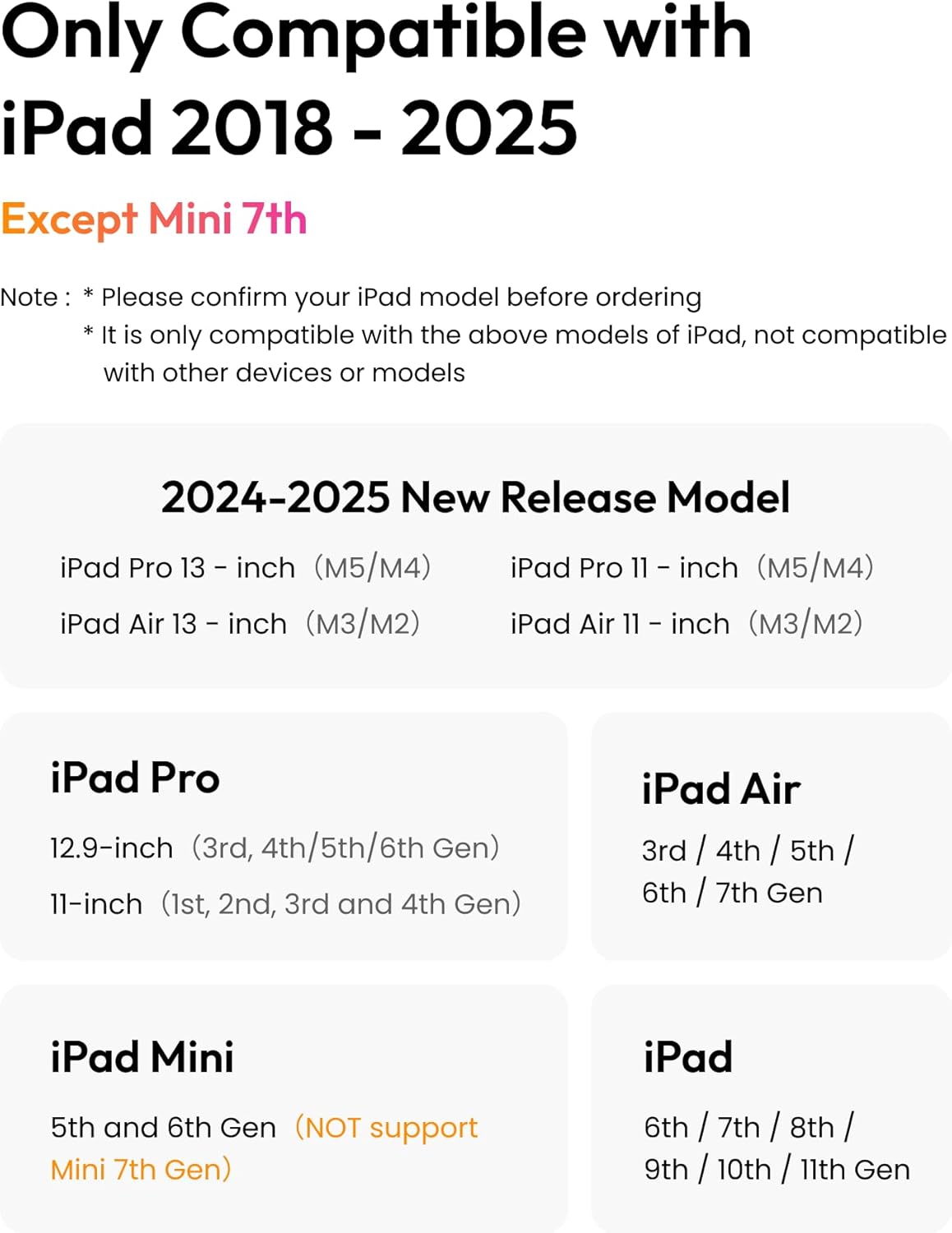
The Metapen Pencil Air8 Pro X is compatible with specific iPad models released between 2018 and 2025. Please verify your iPad model before use. It is not compatible with other devices or models, including the iPad Mini 7th Gen.
Supported iPad Models:
- iPad Pro: 12.9-inch (3rd, 4th, 5th, 6th Gen), 11-inch (1st, 2nd, 3rd, 4th Gen), 13-inch (M5/M4), 11-inch (M5/M4)
- iPad Air: 3rd, 4th, 5th, 6th, 7th Gen, 13-inch (M3/M2), 11-inch (M3/M2)
- iPad: 6th, 7th, 8th, 9th, 10th, 11th Gen
- iPad Mini: 5th, 6th Gen
Nota: The Air8 Pro X does not support magnetic attachment.

Image 2.1: Detailed compatibility chart for iPad models.

Image 2.2: Instructions on how to locate your iPad's model name in settings.
3. Kandungan Pakej
Upon opening your Metapen Pencil Air8 Pro X package, you should find the following items:
- Metapen Pencil Air8 Pro X Stylus
- 3 x Air-Flex Replacement Tips (one pre-installed, two spares)
- Kabel Pengecas USB-C ke C
- Adhesive Pen Holder
Imej 3.1: Meletup view of the Metapen Pencil Air8 Pro X showing its components and included accessories.
4. Persediaan
4.1 Menghidupkan/Mematikan
To power on the Metapen Pencil Air8 Pro X, simply click the top button once. To power off, long press the top button for 3 seconds. The pen will automatically shut off after 5 minutes of inactivity to conserve battery life.
4.2 Sambungan Awal
No Bluetooth connection is required for the Metapen Pencil Air8 Pro X. Simply turn it on, and it is ready for immediate use with your compatible iPad.
Video 4.1: Demonstrates the instant-on feature and smooth writing capabilities of the Metapen Air8 Pro X.
5. Arahan Operasi
5.1 Writing Experience
The Metapen Pencil Air8 Pro X features an Air-Flex soft tip designed to provide a paper-like feel with gentle resistance on the iPad screen. This allows for smooth, precise, and natural strokes without lag or skipping. The tip is also ultra-quiet, operating at approximately 25 dB, ensuring minimal disturbance to others.
The stylus supports palm rejection, allowing you to rest your hand comfortably on the iPad screen while writing or drawing without interfering with the input. This feature enhances the natural writing experience.
Nota: The Metapen Pencil Air8 Pro X does not support tilt or pressure sensitivity.
Video 5.1: Highlights the quiet writing experience and the internal structure of the Air-Flex tip, demonstrating smooth and precise input.

Image 5.1: Visual representation of the pen's smooth, precise, and natural writing capabilities, highlighting no lag, continuous lines, and no slip.

Image 5.2: Depicts the Metapen Pencil Air8 Pro X being used in a quiet environment, emphasizing its low noise output.
Paparan Kuasa LED 5.2
The stylus features a three-color LED indicator to show the power status:
- hijau: Bateri 60-100%.
- Biru: Bateri 20-60%.
- merah: Kurang daripada 20% bateri
6. Mengecas dan Bateri
The Metapen Pencil Air8 Pro X offers extended battery life and fast charging capabilities.
- Masa Pengecasan Penuh: Lebih kurang 45 minit
- Full Charge Usage: Sehingga 26 jam
- Caj Cepat: Cas selama 5 minit memberikan masa penggunaan selama lebih kurang 4 jam.
The stylus charges via a USB-C to C cable. Connect the provided cable to the USB-C port on the pen and a compatible power source.

Image 6.1: Illustration of the Metapen Pencil Air8 Pro X's 26-hour battery life and USB-C charging interface.

Image 6.2: Visual guide to charging the Metapen Pencil Air8 Pro X, emphasizing ease and reliability.
7. Air-Flex Tip Technology
The Metapen Pencil Air8 Pro X features the world's first Air-Flex soft tip with micro air chambers. This innovative design provides a unique writing experience:
- Paper-like Feel: Offers gentle resistance on the iPad screen, mimicking the sensation of writing on paper.
- Sangat Senyap: Stays as quiet as 25 dB, significantly quieter than traditional hard tips (55 dB), preventing distractions.
- Smooth & Scratch-Free: Glides smoothly across the screen without causing scratches.

Imej 7.1: Jarak dekat view of the Air-Flex tip, highlighting its micro-shock absorption for a true pencil feel.
Image 7.2: Internal diagram illustrating the micro-porous elastic core of the Air-Flex tip, responsible for its unique writing properties.
8. Penyelenggaraan
8.1 Replacing the Air-Flex Tip
The Metapen Pencil Air8 Pro X comes with three Air-Flex tips (one pre-installed and two spares) for long-lasting use. If the tip shows signs of wear or damage, it can be easily replaced.
- Pusing perlahan hujung lama mengikut arah jam untuk mengeluarkannya.
- Align a new tip with the pen's barrel and twist clockwise until securely fastened.

Image 8.1: Visual guide for swapping the Air-Flex tips, showing the twist-off and twist-on process.
8.2 Pembersihan
To clean your stylus, gently wipe the body with a soft, dry, lint-free cloth. Avoid using harsh chemicals or abrasive materials, as these may damage the finish or internal components.
9. Penyelesaian masalah
If you encounter issues with your Metapen Pencil Air8 Pro X, please refer to the following common solutions:
| Masalah | Penyelesaian |
|---|---|
| Pen tidak menyala. | Ensure the pen is charged. Connect it to a USB-C power source using the provided cable. Click the top button once to power on. |
| Pen is not writing on iPad. | Verify your iPad model is compatible (refer to Section 2). Ensure the pen is powered on. Check if the tip is securely attached and not worn out. Restart your iPad. |
| Pen turns off unexpectedly. | The pen has an auto shut-off feature after 5 minutes of inactivity. If it turns off during use, check the battery level using the LED indicator and recharge if necessary. |
| Writing feels rough or inconsistent. | Inspect the Air-Flex tip for wear or damage. Replace the tip if necessary (refer to Section 8.1). Ensure your iPad screen is clean. |
| Palm rejection is not working. | Ensure your iPad's software is up to date. Some applications may have specific settings for stylus input; check the app's preferences. |
If the issue persists after trying these solutions, please contact Metapen customer support for further assistance.
10. Spesifikasi
| Ciri | Perincian |
|---|---|
| Nombor Model | ME-APP172 |
| Dimensi Produk | 6.54 x 0.39 x 0.39 inci |
| Berat Barang | 2.11 auns |
| Jenis Bateri | 1 bateri CR5 (termasuk) |
| Purata Hayat Bateri (Bersedia) | 26 Jam |
| Port Pengecasan | USB-C |
| bahan | plastik |
| warna | Jingga |
| Sistem Pengoperasian Minimum yang Diperlukan | iPadOS 13 |
| Ciri Khas | Ultra-Quiet Air-Flex Tip, 2X Fast Charging, Palm Rejection, LED Power Display, Auto Shut-off |
| Keserasian | iPad models 2018-2025 (excluding Mini 7th Gen) |
11. Waranti dan Sokongan
Metapen is committed to providing high-quality products and excellent customer service. Your Metapen Pencil Air8 Pro X comes with a 12-month troubleshooting period.
Sokongan Pelanggan:
For any questions, technical assistance, or warranty claims, please contact Metapen Official customer support. We offer 24-hour support to address your needs promptly.
- Sokongan dalam talian: Visit the official Metapen website or contact through your purchase platform.
- Sokongan E-mel: Refer to your product packaging or the Metapen webtapak untuk e-mel hubungan.

Imej 11.1: Selesaiview of Metapen's customer support, including 12 months troubleshooting and 24-hour support.


