pengenalan
This manual provides detailed instructions for the safe and efficient operation, installation, and maintenance of your Jebao DLW-20 Bluetooth Submersible Vario Wave Maker. Please read this manual thoroughly before use and retain it for future reference. The DLW-20 is designed for creating variable water flow in both saltwater and freshwater aquarium environments, featuring Bluetooth control for easy programming.
Maklumat Keselamatan
Always observe the following safety precautions to reduce the risk of electric shock, personal injury, or damage to the product or aquarium.
- Keselamatan Elektrik: Ensure your hands are dry before handling the power adapter or plugging/unplugging the unit. Always disconnect power to all aquarium equipment before performing any maintenance.
- Sentuhan Air: This device is submersible. However, the controller and power adapter are not waterproof and must be kept dry.
- Pemasangan: Do not operate the wave maker if it appears damaged or is not fully submerged in water. Ensure the power cord is routed to prevent tripping hazards and is not pinched or cut.
- Kanak-kanak dan Haiwan Kesayangan: Jauhkan peranti ini daripada kanak-kanak dan haiwan peliharaan.
- Penggunaan yang Dimaksudkan: Use this product only for its intended purpose in aquariums. Do not use with flammable liquids or in environments other than those specified.
- Matikan Automatik: The unit features automatic power-off protection upon no water. Do not rely solely on this feature; always ensure the pump is adequately submerged.
Komponen yang Disertakan
Sahkan bahawa semua komponen ada dan dalam keadaan baik semasa membongkar.
- Jebao DLW-20 Wave Maker Pump Unit
- Controller with LCD Display
- Penyesuai Kuasa AC
- Manual Pengguna (dokumen ini)

Persediaan dan Pemasangan
- Positioning the Wave Maker:
Mount the wave maker pump unit inside your aquarium using the magnetic mount. Position it to achieve optimal water flow patterns, avoiding direct flow onto sand beds or delicate corals. The 3D rotation angle allows for precise adjustment of water output direction.
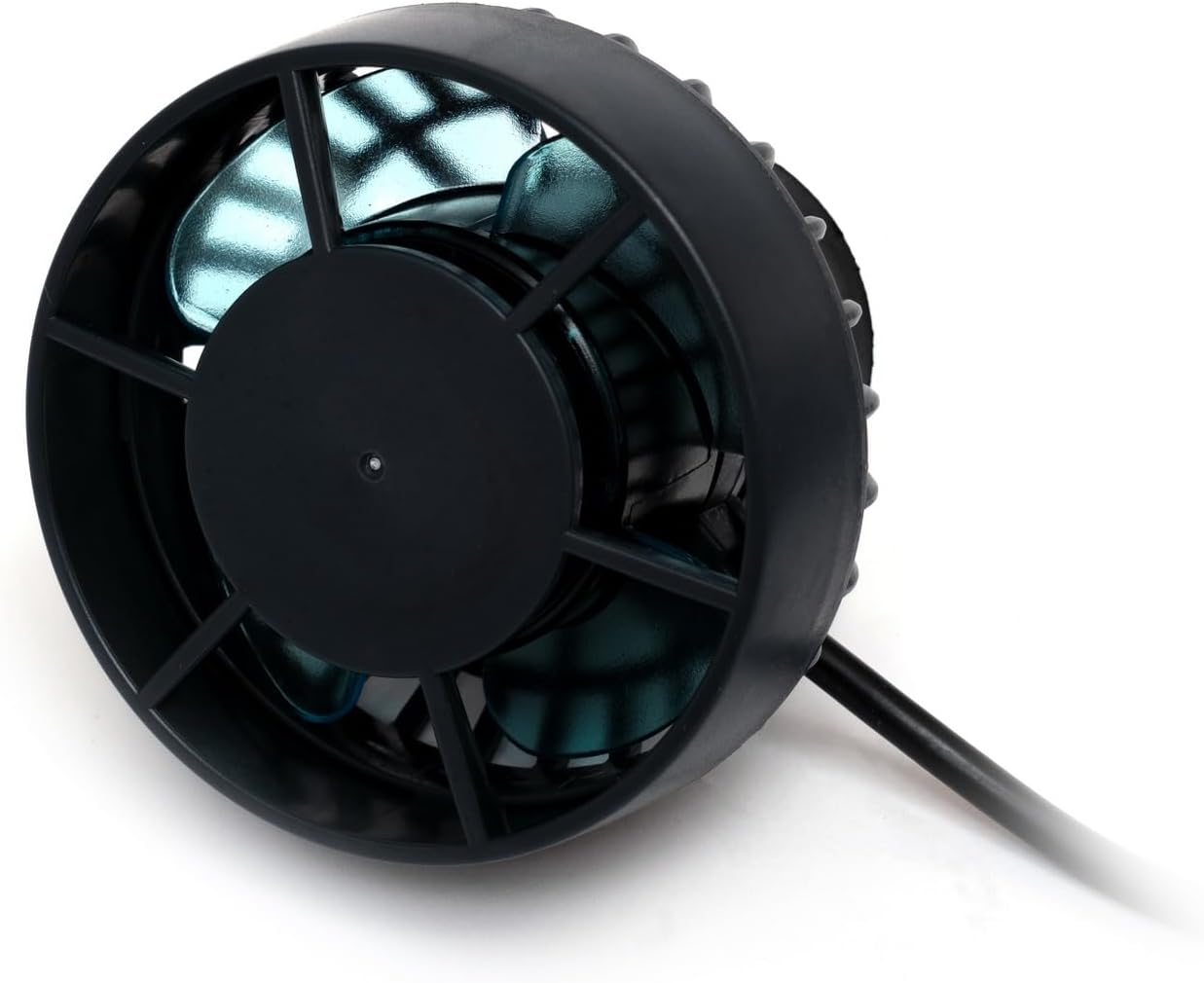
Imej: Depan view of the DLW-20 pump unit, showing the impeller and protective grate. 
Imej: Sisi view of the DLW-20 pump unit, illustrating the compact design and magnetic mounting base. - Menyambungkan Pengawal:
Connect the wave maker pump unit cable to the designated port on the controller. Ensure the connection is secure.
- Sambungan Kuasa:
Connect the AC power adapter to the controller, then plug the adapter into a suitable electrical outlet. Ensure a drip loop is formed with the power cord to prevent water from traveling along the cord to the outlet.
- Penenggelaman:
Ensure the wave maker pump unit is fully submerged in water before powering on. Operating the pump dry can cause damage.
Arahan Operasi
Kawalan Manual
The DLW-20 can be operated directly via its integrated controller with a visual LCD display.
- Hidupkan/Mati Kuasa: Press the power button on the controller to turn the unit on or off.
- Pemilihan Mod: Use the mode button to cycle through various wave patterns and flow modes (e.g., constant flow, wave mode, feed mode). Refer to the controller's LCD display for current mode indication.
- Pelarasan Aliran: Use the up/down arrows to adjust the flow intensity within the selected mode.
- Mod Suapan: Activate feed mode to temporarily pause the pump for feeding, typically for 10 minutes, to prevent food from being drawn into filtration.
Kawalan APP Bluetooth
For advanced control and programming, use the dedicated mobile application available for iOS and Android devices.
- Muat turun APP: Cari untuk the "Jebao" or "Jecod" app in your device's app store and install it.
- Dayakan Bluetooth: Pastikan Bluetooth didayakan pada peranti mudah alih anda.
- Berpasangan: Open the app and follow the on-screen instructions to discover and pair with your DLW-20 wave maker. The app allows for control of single or multiple DLW wave makers.
- Pengaturcaraan: Utilize the app's interface to set custom schedules, wave patterns, flow intensities, and master/slave modes for synchronized operation of multiple units.
Penyelenggaraan
Regular maintenance ensures optimal performance and extends the lifespan of your wave maker.
- Pembersihan Bulanan:
Disconnect power before removing the wave maker from the aquarium. Disassemble the pump unit carefully by twisting the front cage. Clean the impeller and housing with a soft brush to remove algae, detritus, and calcium buildup. Rinse thoroughly with clean water.
- Pemeriksaan Pendesak:
Inspect the impeller for any signs of wear or damage. Replace if necessary. Ensure the impeller spins freely after cleaning.
- Cable and Controller:
Periodically check the power cord and controller for any signs of damage, fraying, or water ingress. Keep the controller dry and clean.
- Pemasangan semula:
Reassemble the pump unit, ensuring all parts are correctly aligned and secured. Return the unit to the aquarium and restore power.
Menyelesaikan masalah
| Masalah | Kemungkinan Punca | Penyelesaian |
|---|---|---|
| Pam tidak beroperasi | No power; impeller jammed; controller malfunction. | Check power connection. Disconnect power, clean impeller. Contact support if controller is faulty. |
| Pengurangan aliran | Impeller dirty or obstructed; calcium buildup. | Disconnect power, remove pump, clean impeller and housing thoroughly. |
| Kebisingan yang berlebihan | Impeller obstructed or worn; air in pump; improper mounting. | Clean impeller. Ensure pump is fully submerged. Adjust mounting position. |
| Isu sambungan Bluetooth | Bluetooth off; app not updated; interference. | Ensure Bluetooth is enabled on device. Update app. Move closer to controller. Restart controller and device. |
Spesifikasi
- model: DLW-20
- Jenama: Jebao
- Aliran Maks: 2641 GPH (10000 L/J)
- Kuasa: 24V, 20 Watt
- Dimensions (Pump Only): 1.75" x 3" Diameter
- Berat Barang: 1.48 paun
- Bahan: Stainless Steel (internal components, likely shaft)
- Sumber Kuasa: Elektrik Bertali
- Kawalan: Manual and Bluetooth APP
- Permohonan: Saltwater and Freshwater Aquariums
Waranti dan Sokongan
Untuk maklumat waranti dan sokongan teknikal, sila rujuk dokumentasi yang diberikan bersama pembelian anda atau hubungi terus pengilang. Simpan bukti pembelian anda untuk tuntutan waranti.


