1. Apa yang ada di dalam Kotak
Your Google TV Streamer 4K package includes the following items:
- Google TV Streamer (4K)
- Voice Remote (with 2 included AAA batteries)
- Penyesuai Kuasa
- Kabel Kuasa (1.8m)
- Panduan Mula Pantas (tidak ditunjukkan)
- Safety & Warranty Document (not shown)
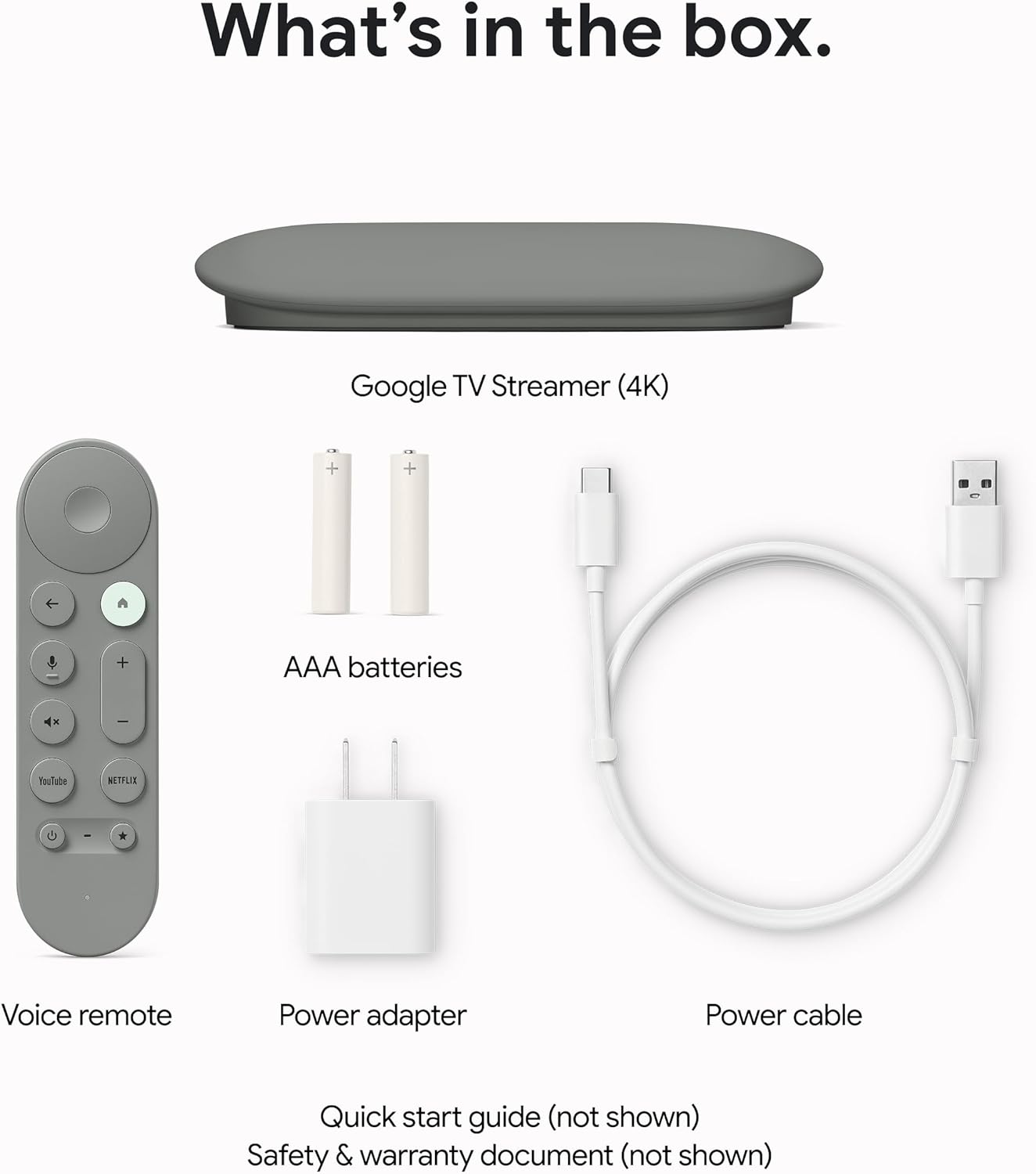
Imej 1.1: All components included in the Google TV Streamer 4K package.
2. Persediaan
2.1 Menyambung Peranti
- Connect the Google TV Streamer to an available HDMI port on your television. An HDMI 2.1 cable is recommended for optimal performance (sold separately).
- Connect the power cable to the Google TV Streamer and then plug the power adapter into a wall outlet.

Imej 2.1: The Google TV Streamer 4K connected and ready for use.
2.2 Persediaan Kawalan Jauh
Insert the two included AAA batteries into the Voice Remote. The remote is designed for easy setup and can control your TV's power and volume.

Imej 2.2: The Google TV Streamer 4K Voice Remote.
2.3 Initial On-Screen Configuration
Follow the on-screen prompts to complete the initial setup. This typically includes:
- Memilih bahasa dan wilayah anda.
- Menyambung ke rangkaian Wi-Fi anda.
- Signing in with your Google Account for personalized recommendations and app access.
- Pairing the Voice Remote.
3. Operating the Google TV Streamer 4K
3.1 Menavigasi Google TV
The Google TV interface organizes all your content in one place, providing fast performance and responsive navigation. You'll find tailored recommendations based on your interests and viewtabiat.

Imej 3.1: The Google TV home screen with app icons and content suggestions.
3.2 Voice Remote Features
Use the redesigned Voice Remote to find shows, get answers, and control smart home devices. The customizable button allows you to quickly open your favorite app or the home panel. If you misplace your remote, you can easily find it by making it ring through your Google Home device.
3.3 Kawalan Rumah Pintar
Control your smart home devices directly from your TV using the new home panel. Dim lights or view live camera feeds without interrupting your shows.
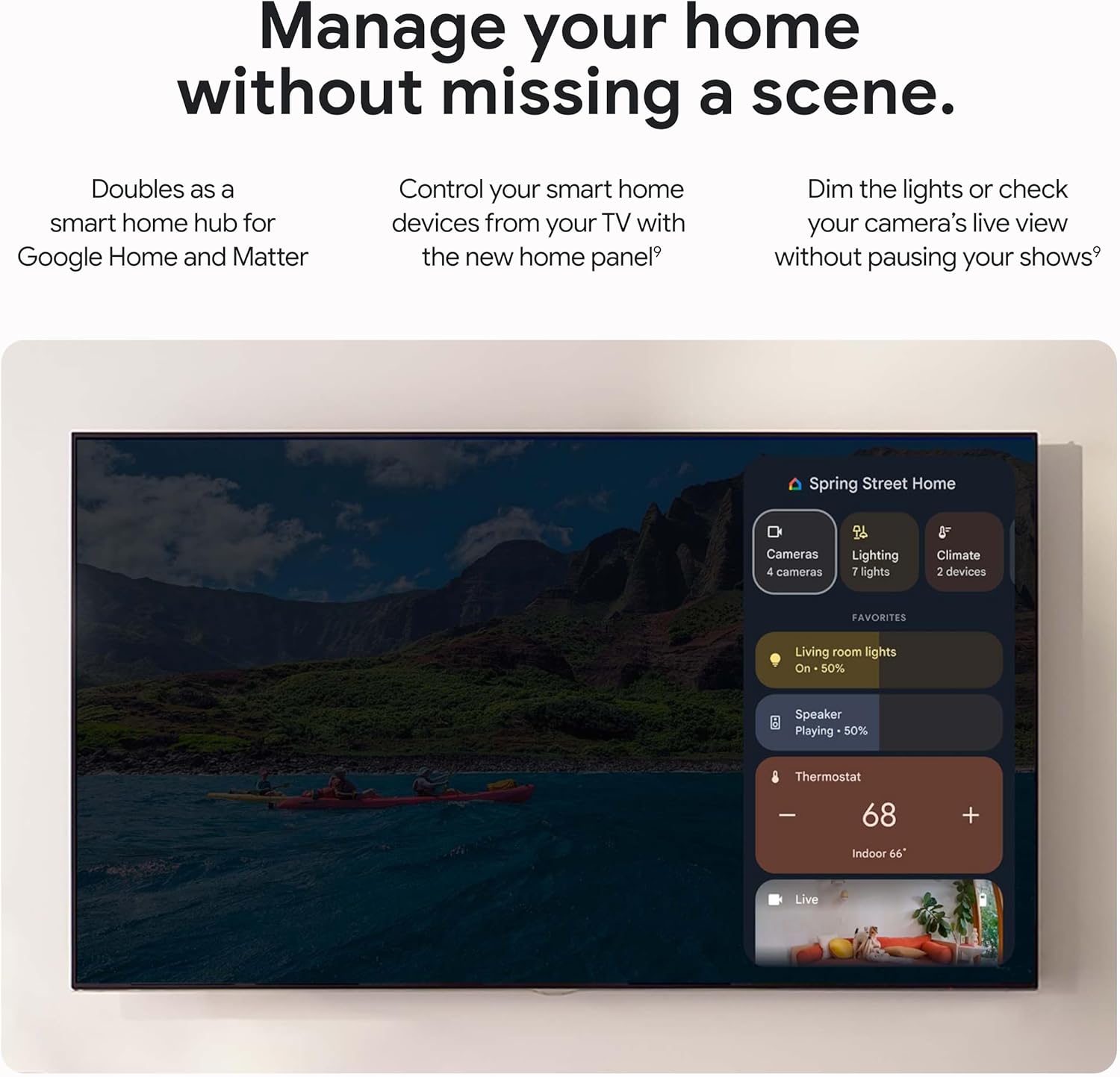
Imej 3.2: Smart Home Control panel on Google TV.
3.4 Casting Content
Effortlessly cast content from compatible Android and iOS apps on your phone, tablet, or laptop directly to your Google TV Streamer 4K.
4. Penyelenggaraan
4.1 Penjagaan Am
To ensure the longevity of your Google TV Streamer 4K, keep the device clean and free from dust. Avoid exposing it to extreme temperatures or moisture. Use a soft, dry cloth for cleaning.
4.2 Kemas Kini Perisian
The device will periodically receive software updates to improve performance, add new features, and enhance security. Ensure your device is connected to the internet to receive these updates automatically. Updates may require a restart of the device.
5. Penyelesaian masalah
5.1 Performance Issues (Lagging/Slow)
The Google TV Streamer 4K features a 22% faster processor and twice the memory compared to the previous generation, designed for smooth navigation and quick app switching. If you experience lagging, try the following:
- Restart the device by unplugging it from the power source for 30 seconds and then plugging it back in.
- Ensure your internet connection is stable and strong.
- Tutup sebarang aplikasi yang tidak digunakan yang berjalan di latar belakang.
5.2 Lost Remote
If you cannot find your Voice Remote, you can make it ring by pressing a button on your streamer device or by asking your Google Assistant-enabled device (e.g., Google Home speaker) to find your remote.
5.3 Volume Control Not Working
If the volume control on your remote occasionally stops working, power your TV off and then back on. This often resolves the issue.
5.4 Masalah Kesambungan
Ensure your Wi-Fi connection is active. For a more stable connection, consider using the built-in Ethernet port (Ethernet cable sold separately).
6. Spesifikasi
| Ciri | Perincian |
|---|---|
| Resolusi | Up to 4K HDR with Dolby Vision |
| Audio | Sokongan Dolby Atmos |
| RAM | 4 GB |
| Penyimpanan | 32 GB |
| Teknologi Ketersambungan | Ethernet, Wi-Fi |
| Jenis Penyambung | HDMI |
| Ciri Khas | Miracast, Voice Search |
| Jenis Pengawal | Kawalan Jauh, Kawalan Suara |
| Dimensi Produk | 6.4 x 3 x 1 inci |
| Berat Barang | 5.7 auns |
| Bateri | 2 bateri AAA diperlukan (termasuk) |

Imej 6.1: Detailed specifications and comparison with other models.
7. Waranti dan Sokongan
7.1 Pelan Perlindungan
Optional protection plans are available for purchase to extend coverage beyond the standard warranty:
- Pelan Perlindungan 2 Tahun: $9.99 (one-time)
- Pelan Perlindungan 3 Tahun: $13.49 (one-time)
- Perlindungan Lengkap: $16.99 (monthly) - Covers all eligible past and future purchases.
7.2 Sokongan Pelanggan
For further assistance, troubleshooting, or warranty claims, please refer to the official Google support website or the contact information provided in your product's Safety & Warranty Document.