1. Pengenalan
The ATOMSTACK R8 Pro Rotary Laser Roller & Chuck is an advanced accessory designed to expand the engraving capabilities of your ATOMSTACK laser engraver. It features adjustable jaws to securely hold objects of various shapes and sizes, enabling precise engraving on irregular items such as cups, balls, and rings. This versatile tool ensures stable material support during the engraving process, enhancing efficiency and protecting delicate materials.
2. Kandungan Pakej
Sila sahkan bahawa semua item yang disenaraikan di bawah disertakan dalam pakej anda:
- 1 x Chuck Main Unit
- 1 x Motor Connection Cable
- 1 x White Connection Cable
- 1 x Black Connection Cable
- 3 x L-shaped Jaws
- 3 x Scale Jaws
- 3 x Hexagonal Jaws
- 3 x Threaded Cylindrical Pins
- 1 x Tailstock Support
- 1 x Mini Leveler
- 1 x Soft Measuring Tape
- 1 x Vernier Caliper
- 1 x Set Skru
- 1 x Sepana Hex
- 1 x Manual Arahan

Figure 2.1: All components included in the ATOMSTACK R8 Pro package.
3. Persediaan
3.1 Membongkar dan Pemeriksaan
Carefully remove all components from the packaging. Inspect each item for any signs of damage. If any components are missing or damaged, please contact customer support immediately.
3.2 Connecting the Rotary Module
The R8 Pro is compatible with various ATOMSTACK laser engraver models. For older frame models that lack automatic detection, use the provided old motor cable for compatibility.
- Place the R8 Pro Rotary Module on a stable surface within your laser engraver's working area.
- Connect the motor connection cable from the R8 Pro to the designated rotary axis port on your ATOMSTACK engraver.
- Ensure all jaws are securely attached and adjusted according to the object you intend to engrave.

Figure 3.1: The R8 Pro Rotary Module integrated with an ATOMSTACK laser engraver.
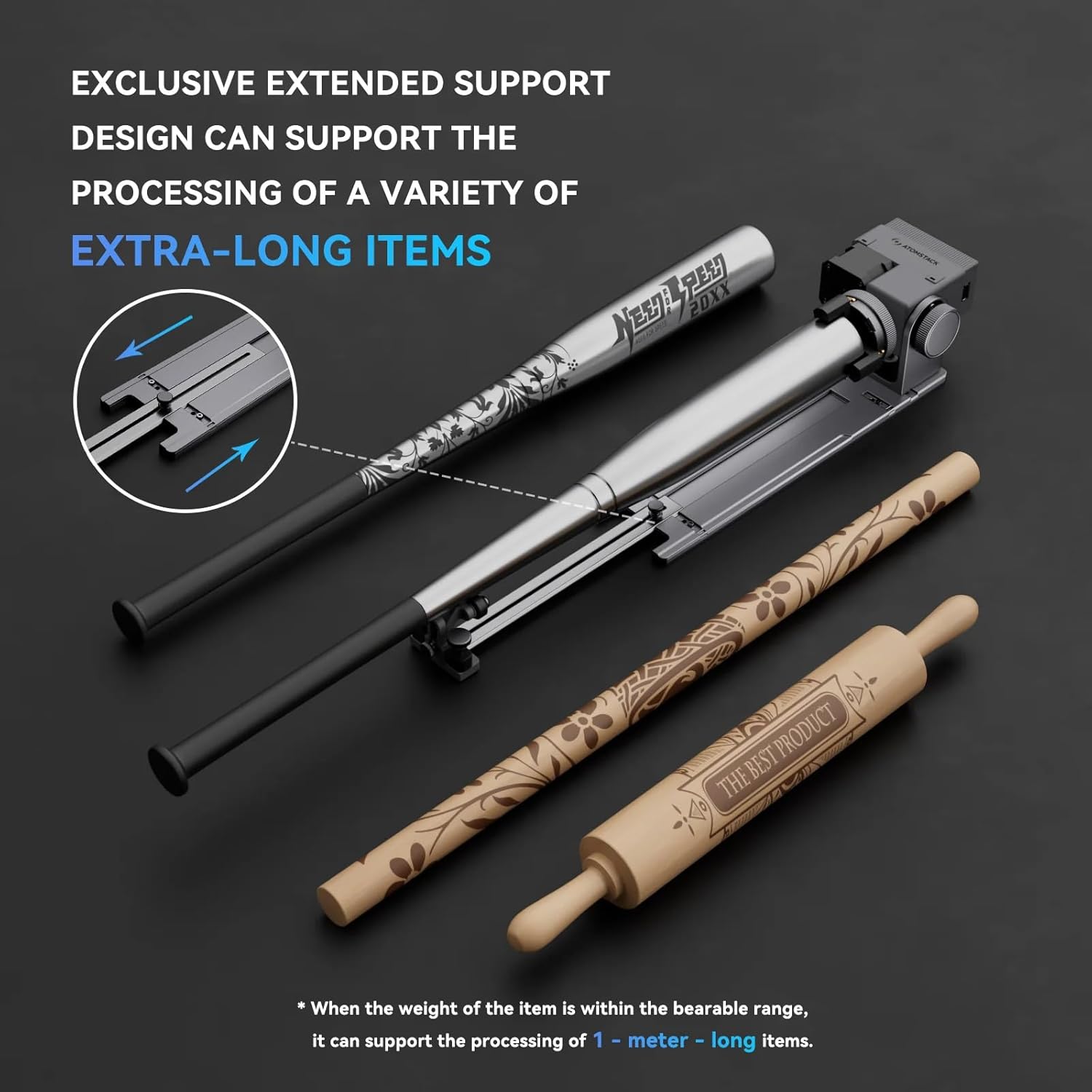
Figure 3.2: Adjustable spacing between rotating axes for different object sizes.

Figure 3.3: Extended support design for processing extra-long items.
4. Arahan Operasi
4.1 Preparing the Object for Engraving
The R8 Pro is designed for versatile engraving on various cylindrical and irregular objects. Its adjustable jaws ensure a secure grip.
- Cylindrical Objects: Place the object between the rollers or chuck jaws, ensuring it is centered and level. Adjust the jaws to firmly hold the object without overtightening.
- Irregular Objects: Utilize the L-shaped, scale, or hexagonal jaws to conform to the unique shape of the object (e.g., mugs, baseballs, rings). The flexible design adapts to different forms for stable engraving.

Figure 4.1: Engraving on regular cylindrical objects like tumblers and cans.

Figure 4.2: Engraving on irregular cylindrical objects such as wine bottles and glasses.
4.2 Konfigurasi Perisian
Refer to your ATOMSTACK laser engraver's software manual for specific settings related to rotary engraving. Typically, you will need to:
- Select the rotary engraving mode in your software (e.g., AtomStack Studio).
- Input the object's diameter and perimeter for accurate rotation calculations.
- Adjust engraving parameters (speed, power, passes) based on the material and desired effect.
Video 4.1: Demonstration of the AtomStack Rotary add-ons in use, showing various engraving applications.
5. Penyelenggaraan
Regular maintenance ensures the longevity and optimal performance of your R8 Pro Rotary Module:
- Pembersihan: After each use, clean the jaws and rollers to remove any dust, debris, or material residue. Use a soft cloth and mild cleaning solution if necessary.
- Pelinciran: Periodically apply a small amount of lubricant to the moving parts of the chuck and rollers to ensure smooth operation.
- Storan: Store the R8 Pro in a clean, dry environment when not in use to prevent corrosion and damage.
6. Penyelesaian masalah
| Masalah | Kemungkinan Punca | Penyelesaian |
|---|---|---|
| Object not rotating smoothly | Jaws too tight or too loose; debris on rollers; insufficient lubrication. | Adjust jaw tension; clean rollers; apply lubricant. |
| Engraving is distorted or misaligned | Object not properly centered; incorrect software settings (diameter/perimeter); loose connections. | Re-center object; verify software settings; check all cable connections. |
| Module not recognized by engraver | Incorrect cable used (for older models); loose USB connection; software driver issue. | Ensure correct motor cable is used; check USB connection; update software drivers. |
7. Spesifikasi
| Ciri | Perincian |
|---|---|
| Model | T-R8Pro-3 |
| Berat Keseluruhan | 1.5 kg |
| Sudut Putaran | 25° |
| Engraving Diameter (Cylindrical Objects) | 0-80 mm |
| Engraving Diameter (Circular Objects) | 10-70 mm |
| Engraving Diameter (Spherical Objects) | 25-80 mm |
| Kapasiti Muatan | 1.5 kg |
| bahan | Logam, Plastik |
| Keserasian | ATOMSTACK Hurricane I, P1, A5, A10, A20, A6, A12, A24 PRO, A48 ULTRA (Older frame models may require specific cable, included). |
8. Waranti dan Sokongan
For warranty information and technical support, please refer to the official ATOMSTACK webtapak atau hubungi peruncit anda. Simpan resit pembelian anda untuk tuntutan waranti.
First available on Amazon.it: August 15, 2025.


