pengenalan
This manual provides detailed instructions for the EasySMX S10 Wireless Controller. It covers setup, operation, maintenance, and troubleshooting to ensure optimal performance and user experience across various platforms including Nintendo Switch, PC, iOS, and Android devices.
Ciri-ciri Produk
- One-Tap Wake Up: Seamlessly wake up your Nintendo Switch console with a single button press.
- TMR Anti-Drift Joysticks: Combines Hall Effect durability with carbon-film precision for zero-drift and ultra-smooth analog input.
- Full Mechanical Buttons: Micro-switch buttons with 0.3mm actuation and a lifespan of over 5 million clicks, providing tactile feedback.
- HD Vibration: Equipped with ALPS Linear HD Rumble motors for multi-layered haptic feedback.
- Bateri tahan lama: Built-in 1200mAh battery offers up to 17 hours of playtime with lights and vibration, or up to 26 hours without.
- Interchangeable D-pad & Custom Faceplate: Allows swapping between disc and cross-style D-pads and magnetic removable faceplates for personalization.
- Ciri-ciri tambahan: Customizable RGB lighting, 2 programmable back buttons, 6-axis gyroscope for motion sensing, and NFC function.
Persediaan
Kandungan Pakej
- EasySMX S10 Wireless Controller
- Kabel Pengecas USB-C
- Interchangeable D-pads (if included)
- Customizable Faceplates (if included)
- Manual Pengguna
Susun atur Pengawal
The EasySMX S10 controller features standard gaming buttons, including A/B/X/Y buttons, directional pad, left and right analog sticks, shoulder buttons (L/R), and triggers (ZL/ZR). Additionally, it includes a HOME button, a Capture button, and two programmable back buttons (GR/GL).
Mengecas Pengawal
Connect the provided USB-C cable to the controller's charging port and the other end to a USB power source (e.g., a computer, wall adapter). The LED indicators on the controller will show charging status and turn off when fully charged. A full charge typically takes approximately 3 hours.
Arahan Operasi
Connecting to Nintendo Switch / Switch 2
- Set the mode toggle switch on the back of the controller to the "S" mode.
- Press and hold the HOME button on the controller for 3 seconds until the LED indicators flash rapidly.
- On your Nintendo Switch console, navigate to Pengawal > Tukar Pegangan/Pesanan.
- When the LED on the controller becomes solid and you feel a short vibration, pairing is complete.
- (First-time connection only) Within 20 seconds after pairing, remove and reattach the Joy-Con controllers from the console. This action activates the wireless wake-up function for future use.
- For future reconnections, simply short-press the HOME button to automatically reconnect and wake the console.
Video: Instructions on how to connect the EasySMX S10 controller to a Nintendo Switch or Switch 2 console for the first time and for subsequent reconnections.
Menyambung ke PC
- Set the mode toggle switch on the back of the controller to the "X" mode.
- Connect the controller to your PC via the provided Type-C cable. The controller will be recognized as an Xbox Wireless Controller.
- For wireless connection, ensure Bluetooth is enabled on your PC. Cari untuk "Xbox Wireless Controller" in your Bluetooth settings and select it to pair.
Video: Tutorial on connecting the EasySMX S10 controller to a PC, including both wired and wireless (Bluetooth) methods.
Connecting to Mobile (iOS & Android)
- Set the mode toggle switch on the back of the controller to the "X" mode.
- Dayakan Bluetooth pada telefon bimbit anda.
- Cari untuk "Xbox Wireless Controller" in your phone's Bluetooth settings and select it to pair.
- When the LED on the controller becomes steady with a short vibration, pairing is confirmed.
Video: Guide on how to connect the EasySMX S10 controller to both iOS and Android mobile devices via Bluetooth.
Menyesuaikan Pencahayaan RGB
The controller features customizable RGB lighting. Refer to the quick start guide included in the packaging for specific button combinations to change lighting modes, colors, or to turn the lighting off.
Programming Back Buttons
The two back buttons (GR and GL) can be programmed to perform specific actions or combos. Consult the quick start guide for detailed instructions on how to map functions to these buttons.
Swapping D-Pads and Faceplates
The S10 controller allows for easy customization. The D-pad can be swapped between a classic cross-style and a smooth circular control. The magnetic faceplates can also be removed and replaced to personalize the controller's appearance.

Image: The EasySMX S10 controller highlighting the swappable D-pads, allowing users to choose between a classic cross-style or a smooth circular control.
Penyelenggaraan
- Pastikan pengawal bersih dengan mengelapnya dengan kain lembut dan kering.
- Elakkan mendedahkan pengawal kepada suhu, kelembapan atau cahaya matahari langsung yang melampau.
- Jangan cuba membuka alat kawalan, kerana ini boleh membatalkan jaminan.
- Simpan alat kawalan jauh di tempat yang selamat apabila tidak digunakan untuk mengelakkan kerosakan.
Menyelesaikan masalah
Controller Not Connecting/Pairing
- Pastikan pengawal dicas secukupnya.
- Verify the mode toggle switch on the back is set to the correct platform (S for Switch, X for PC/Mobile).
- Restart the console/device and the controller, then attempt the pairing process again.
- If connecting to Switch for the first time and wake-up function doesn't activate, repeat the pairing process and ensure Joy-Cons are removed and reattached within 20 seconds after initial pairing.
Video: A guide explaining why the S10 controller might not wake up the Switch 2 and how to fix it.
NFC Function Not Working
- Ensure the NFC function is enabled on your console/device settings.
- Place the Amiibo or NFC tag directly over the NFC sensor area on the controller.
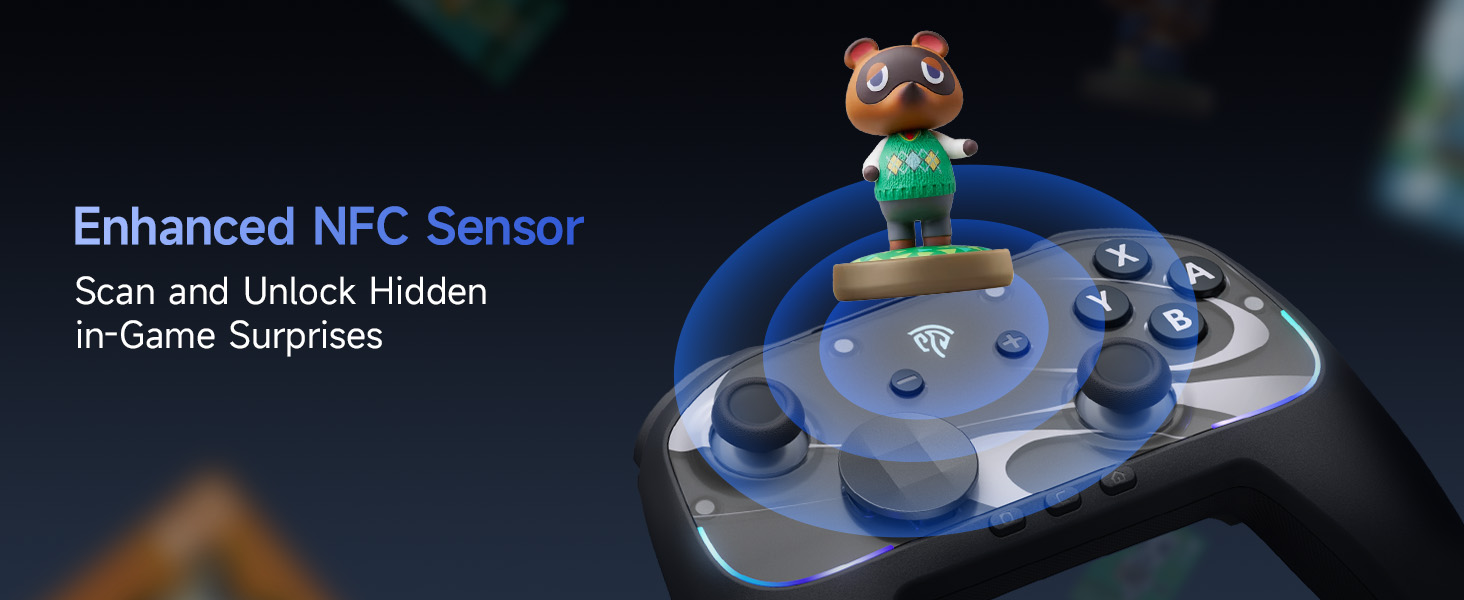
Image: The EasySMX S10 controller demonstrating its NFC function, allowing for scanning and unlocking in-game surprises.
Spesifikasi
| Model | EasySMX S10 |
| Ketersambungan | Bluetooth, USB-C (Wired) |
| Keserasian | Nintendo Switch / Switch 2, PC (Windows), iOS (13.0 and above), Android (8.0 and above) |
| Jenis Kayu Ria | TMR Anti-Drift Joysticks |
| Jenis Butang | Full Mechanical Micro-Switch Buttons |
| Getaran | HD Rumble (ALPS Linear HD Rumble Motors) |
| Penderiaan Pergerakan | Giroskop 6-Paksi |
| Kapasiti Bateri | 1200mAh |
| Masa bermain | Up to 17 hours (with lights/vibration), up to 26 hours (without) |
| Masa Mengecas | lebih kurang 3 jam |
| Berat badan | 1.17 paun |
| Dimensi | 7.32 x 5.79 x 2.91 inci |
Waranti dan Sokongan
EasySMX products typically come with a manufacturer's warranty. Please refer to the warranty card included in your product packaging or visit the official EasySMX webtapak untuk maklumat dan syarat jaminan terperinci.
For technical support, troubleshooting assistance, or any product-related inquiries, please contact EasySMX customer service through their official weblaman web atau maklumat hubungan yang diberikan dalam dokumentasi produk anda. Anda juga boleh melayari EasySMX Store on Amazon untuk mendapatkan maklumat lanjut dan sumber sokongan.


