1. Pengenalan
This manual provides detailed instructions for the proper setup, operation, and maintenance of your Facmogu AK-50 Bluetooth Stereo Audio Amplifier. Please read this manual thoroughly before using the device to ensure optimal performance and safety. The AK-50 is designed to deliver clear, powerful stereo sound with versatile connectivity options for various audio sources.
2. Arahan Keselamatan
- Pastikan bekalan kuasa voltage sepadan dengan keperluan yang dinyatakan pada unit.
- Jangan dedahkan unit kepada hujan, kelembapan atau suhu yang melampau.
- Elakkan meletakkan unit berhampiran sumber haba atau di bawah cahaya matahari langsung.
- Jangan buka casing; merujuk semua perkhidmatan kepada kakitangan yang berkelayakan.
- Jauhkan unit daripada kanak-kanak.
- Putuskan sambungan kuasa semasa ribut petir atau apabila tidak digunakan untuk tempoh yang lama.
3. Kandungan Pakej
Sahkan bahawa semua item terdapat dalam pakej:
- AK50 Audio Amppenguat x1
- Alat kawalan jauh x1
- Antena FM x1
- Manual Pengguna x1
- Power Cord (1 Meter) x1
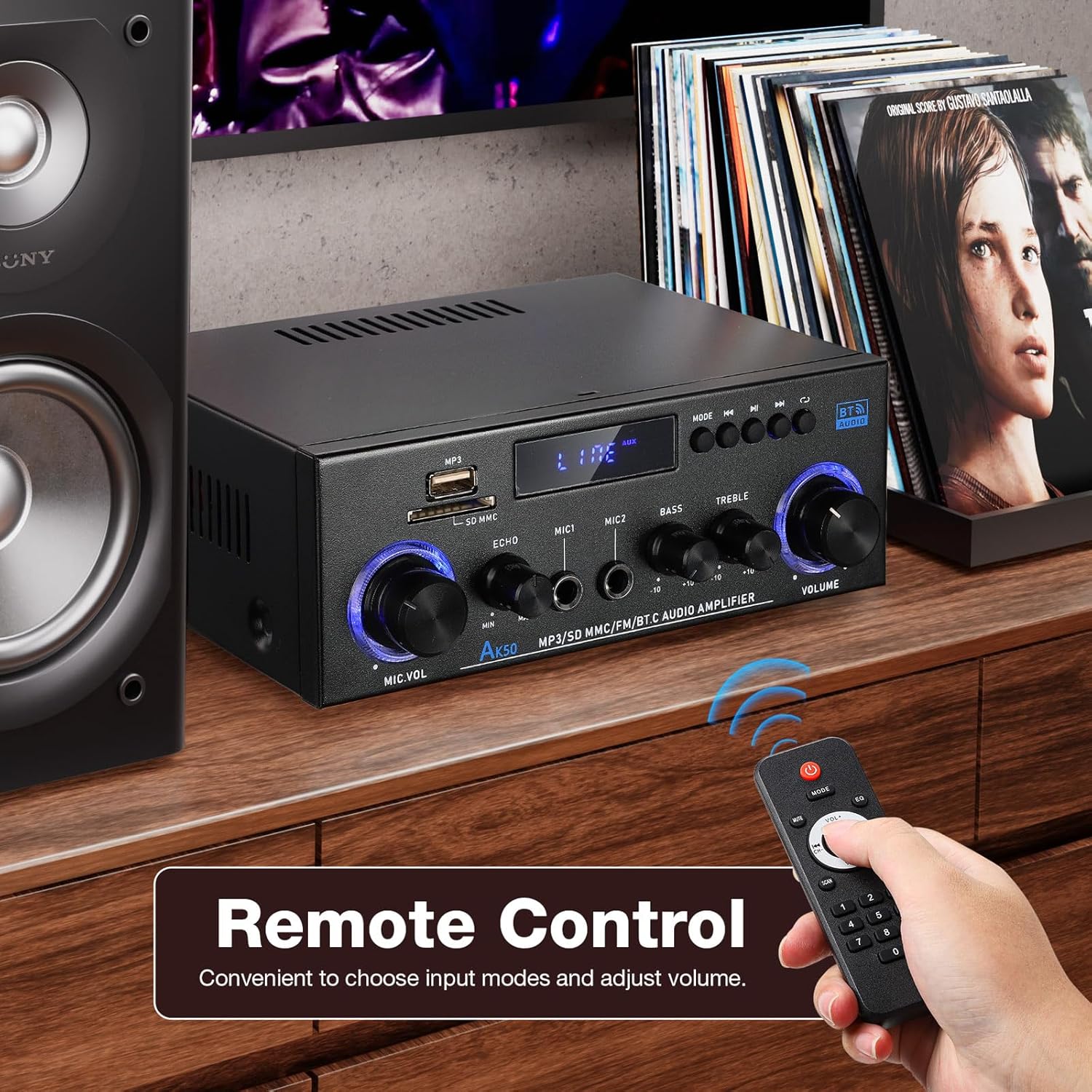
Figure 3.1: Package contents of the AK-50 amplebih hidup.
4. Produk Lebihview
4.1 Panel Depan

Figure 4.1: Front Panel Controls and Inputs.
- Port USB: Untuk main balik pemacu USB.
- Slot Kad SD/MMC: For SD/MMC card playback.
- Function Display Window: Shows current mode and settings.
- MP3/FM Control Buttons: Main/Jeda, Trek Seterusnya/Sebelumnya, Pemilihan mod.
- MIC VOL (Microphone Volume): Melaraskan kelantangan mikrofon yang disambungkan.
- ECHO: Adjusts the echo effect for microphones.
- MIC1/MIC2 Input: Input bicu 6.35mm untuk mikrofon.
- ASAS: Melaraskan output audio frekuensi rendah.
- Treble: Melaraskan output audio frekuensi tinggi.
- JILID: Kawalan kelantangan utama untuk semua output audio.
4.2 Panel Belakang

Rajah 4.2: Sambungan Panel Belakang.
- AUX Audio Input (RCA L/R): Connect external audio devices via RCA cables.
- Line Audio Signal Output (RCA L/R): Output audio signal to another ampalat penghidup atau rakaman.
- SEMUT FM: Sambungan untuk antena FM.
- Speaker System 4Ω-16Ω (Left/Right Channel Output): Connect passive speakers using speaker wire. Observe polarity.
- DC Input 12V/5A: Power input for 12V DC power supply.
- Input Kuasa AC: Connect the AC power cord (90-240V, 50-60Hz).
- Suis kuasa: Berpusing ampLifier HIDUP/MATI.
5. Persediaan
5.1 Sambungan Pembesar suara
- Memastikan amppenyambung dimatikan.
- Connect your passive speakers to the "Speaker System 4Ω-16Ω" terminals on the rear panel.
- Match the positive (+) terminal of the amplifier to the positive (+) terminal of the speaker, and the negative (-) to the negative (-). Use appropriate speaker wire.
5.2 Sambungan Kuasa
- Connect the supplied AC power cord to the "AC Power Input" on the rear panel.
- Pasangkan hujung kord kuasa yang satu lagi ke soket dinding yang sesuai.
Sambungan Antena FM 5.3
- Connect the FM antenna to the "FM ANT" port on the rear panel.
- Panjangkan antena untuk penerimaan yang lebih baik.
5.4 Audio Source Connection (AUX)
- To connect an external audio device (e.g., CD player, TV, computer) via RCA, use an RCA cable.
- Connect one end of the RCA cable to the audio output of your device and the other end to the "AUX Audio Input" (L/R) on the amppanel belakang liifier.
6. Arahan Operasi
6.1 Menghidupkan/Mematikan
Flip the "POWER ON/I" switch on the rear panel to turn the amplifier on or off. The front display will illuminate when powered on.
6.2 Volume, Bass, and Treble Control
- JILID: Rotate the large knob on the right of the front panel to adjust the master volume.
- ASAS: Rotate the "BASS" knob to increase or decrease low-frequency sounds.
- Treble: Rotate the "TREBLE" knob to increase or decrease high-frequency sounds.
6.3 Pemilihan Input
Press the "MODE" button on the front panel or the remote control to cycle through available input sources: Bluetooth (BT), USB, SD, FM, and AUX.
7. Ketersambungan
7.1 Sambungan Bluetooth
- Tukar amplifier to Bluetooth mode using the "MODE" button. The display will show "BT".
- Pada peranti mudah alih anda, dayakan Bluetooth dan cari peranti yang tersedia.
- Select "AK-50" from the list of devices to pair.
- Setelah dipasangkan, anda boleh menstrim audio daripada peranti anda ke amplebih hidup.

Figure 7.1: Bluetooth connectivity with a smartphone. Maintain a distance of 16.4ft/5m without obstructions for optimal connection.
Video 7.1: A demonstration of the Facmogu AK-50 Bluetooth Stereo Audio Amppenguat, pertunjukancasing reka bentuk dan ciri-cirinya.
7.2 Main Semula USB/Kad SD
- Insert a USB drive or SD/MMC card into the respective slot on the front panel.
- Tukar amplifier to USB or SD mode using the "MODE" button. The amplifier akan mengesan dan memainkan audio secara automatik files.
- Use the MP3/FM control buttons to navigate tracks (Next/Previous) and Play/Pause.
7.3 Input AUX
After connecting an external audio source to the rear AUX input (as described in Section 5.4), switch the amplifier to AUX mode using the "MODE" button. Play audio from your connected device.
7.4 Radio FM
- Ensure the FM antenna is properly connected.
- Tukar amplifier to FM mode using the "MODE" button.
- Use the MP3/FM control buttons to scan for and select radio stations.
8. Fungsi Karaoke
The AK-50 amplifier features two microphone inputs for karaoke use.
- Connect up to two microphones to the MIC1 and MIC2 inputs on the front panel.
- Adjust the microphone volume using the "MIC VOL" knob.
- Use the "ECHO" knob to add a reverberation effect to the microphone audio.

Rajah 8.1: Menggunakan amplifier for karaoke with dual microphone inputs.
9. Alat Kawalan Jauh
Alat kawalan jauh yang disertakan membolehkan pengendalian yang mudah amppenguat dari jauh.
- Kuasa: Berpusing amppengikat hidup/mati.
- Mod: Cycles through input sources (BT, USB, SD, FM, AUX).
- Jilid +/-: Melaraskan kelantangan induk.
- Play/Pause, Next/Previous: Controls media playback in USB/SD/Bluetooth modes.
- EQ: Selects equalizer presets (if available).
- Pad Nombor: Direct track selection for USB/SD.

Figure 9.1: Remote control for the AK-50 amplebih hidup.
10. Penyelesaian masalah
| Masalah | Kemungkinan Punca | Penyelesaian |
|---|---|---|
| Tiada kuasa | Kord kuasa tidak disambungkan; Suis kuasa dimatikan; Kerosakan soket. | Check power cord connection; Turn power switch ON; Test outlet with another device. |
| Tiada keluaran bunyi | Incorrect input selected; Volume too low; Speaker wires loose/incorrectly connected; Faulty audio source. | Select correct input mode; Increase volume; Check speaker wire connections and polarity; Test with a different audio source. |
| Bluetooth tidak bersambung | Amplifier not in BT mode; Device Bluetooth off; Device too far; Interference. | Tukar amplifier to BT mode; Enable Bluetooth on your device; Move device closer to amplifier (within 5m); Reduce interference. |
| Kad USB/SD tidak dimainkan | Incorrect mode; Unsupported file format; Corrupted media; Card/drive not inserted correctly. | Switch to USB/SD mode; Ensure files are MP3 or supported format; Try a different USB/SD card; Reinsert media. |
| Penerimaan FM yang lemah | Antena tidak disambungkan atau dipanjangkan; Isyarat lemah. | Connect and extend FM antenna; Reposition antenna for better signal. |
11. Spesifikasi
| Ciri | Spesifikasi |
|---|---|
| Nombor Model | A50803-MG-US |
| Jenama | Facmogu |
| Teknologi Ketersambungan | Bluetooth |
| Komunikasi Tanpa Wayar | Bluetooth |
| Mod Keluaran Audio | Stereo |
| Impedans Pembesar Suara | 4-16Ω |
| Input Kuasa | AC 90-240V, 50-60Hz / DC 12V/5A |
| bahan | logam |
| Berat Barang | 1.98 paun (0.9 kg) |
| Dimensi Pakej | 8.5 x 8.11 x 3.82 inci (21.6 x 20.6 x 9.7 cm) |
| Komponen yang Disertakan | AK50 Audio Amplebih hidup |
| Jenis Pemasangan | Pemasangan Atas Meja |
12. Penyelenggaraan
- Pembersihan: Gunakan kain lembut dan kering untuk membersihkan bahagian luar amppengikat. Jangan gunakan pembersih cecair atau aerosol.
- Storan: Apabila tidak digunakan untuk tempoh yang lama, simpan amplifier in a cool, dry place, away from direct sunlight and moisture.
- Pengudaraan: Pastikan pengudaraan yang betul di sekitar unit untuk mengelakkan terlalu panas. Jangan halang bukaan pengudaraan.
13. Waranti dan Sokongan
For warranty information or technical support, please refer to the contact details provided with your purchase or visit the official Facmogu webtapak. Simpan resit pembelian anda sebagai bukti pembelian untuk sebarang tuntutan waranti.


