pengenalan
This manual provides essential information for setting up, operating, maintaining, and troubleshooting your Lenovo IdeaCentre 24 All-in-One desktop computer. Please read this manual thoroughly before using your device to ensure proper functionality and safety.
Apa yang ada dalam Kotak
Sahkan bahawa semua item terdapat dalam pembungkusan:
- Lenovo IdeaCentre 24 All-in-One Desktop Computer (Monitor with integrated components)
- USB Calliope Wired Keyboard
- USB Calliope Wired Mouse
- Penyesuai Kuasa dan Kord Kuasa
- Dokumentasi (Panduan Mula Pantas, Maklumat Waranti)
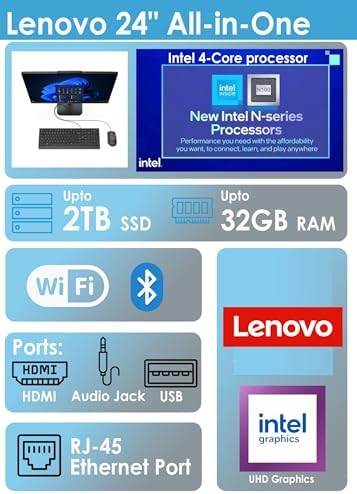
Image: The image displays the Lenovo IdeaCentre 24 All-in-One computer, including the monitor, wired keyboard, wired mouse, and power adapter, as typically found in the product packaging.
Arahan Persediaan
- Buka bungkusan Peranti: Carefully remove all components from the packaging. Place the All-in-One computer on a stable, flat surface.
- Sambungkan Papan Kekunci dan Tetikus: Plug the USB cables of the wired keyboard and mouse into the available USB ports on the rear of the computer.
- Sambungkan Kuasa: Connect the power cord to the power adapter, then plug the adapter into the power input port on the rear of the computer. Plug the other end of the power cord into a wall outlet.
- Hidupkan kuasa: Press the power button, usually located on the side or bottom edge of the monitor. The Lenovo logo will appear on the screen.
- Persediaan Windows Awal: Follow the on-screen instructions to complete the Windows 11 setup process. This includes selecting your region, language, connecting to a Wi-Fi network, and creating a user account.

Imej: Imej ini memberikan gambaran terperinci view of the rear panel of the Lenovo IdeaCentre 24 All-in-One, highlighting the various ports including USB-A, HDMI-out, Ethernet (RJ-45), headphone/microphone combo jack, and the Kensington Security Slot.
Arahan Operasi
Hidupkan/Mati Kuasa
- Untuk Menghidupkan: Tekan butang kuasa.
- Untuk Mematikan: Klik butang Mula dalam Windows, kemudian pilih Kuasa > Matikan.
- Untuk Mulakan Semula: Klik butang Mula, kemudian pilih Kuasa > Mulakan Semula.
- Untuk Tidur: Klik butang Mula, kemudian pilih Kuasa > Tidur.
Menyambung ke Rangkaian
Your IdeaCentre 24 supports both Wi-Fi 6 and wired Ethernet connections.
- Wi-Fi: During initial setup, you will be prompted to connect to a wireless network. To connect later, click the Wi-Fi icon in the taskbar, select your network, and enter the password.
- Ethernet: Plug an Ethernet cable from your router or modem into the RJ-45 port on the rear of the computer.
Menggunakan Peranti
Connect external devices such as USB drives, external monitors, or headphones to the appropriate ports. The system features multiple USB-A ports (Hi-Speed USB / USB 2.0 and USB 10Gbps / USB 3.2 Gen 2) and an HDMI-out 1.4b port for external displays.
Ciri-ciri Utama
The Lenovo IdeaCentre 24 All-in-One is designed for efficient daily computing with a focus on performance and space-saving design.
- Pemproses: Powered by the Intel N100 Processor (4C / 4T, Max Turbo up to 3.4GHz, 6MB Cache) for reliable performance and energy efficiency.
- Memori & Storan: Equipped with 16GB DDR4 RAM and a 1TB PCIe NVMe M.2 SSD for seamless multitasking and ampkapasiti penyimpanan.
- paparan: Features a 23.8" FHD (1920x1080) IPS Anti-glare display with 250 nits brightness and 99% sRGB color accuracy, designed to minimize eye fatigue.
- Ketersambungan: Includes Intel Wi-Fi 6 AX203 (802.11ax 2x2) and Bluetooth 5.2 for stable wireless connections.
- Pelabuhan: Rear ports include 2x USB-A (Hi-Speed USB / USB 2.0), 2x USB-A (USB 10Gbps / USB 3.2 Gen 2), 1x HDMI-out 1.4b, 1x Ethernet (RJ-45), and 1x headphone/microphone combo jack (3.5mm).
- Bersepadu Webcam: Built-in HD camera for video conferencing and online communication.
- Sistem pengendalian: Dipasang terlebih dahulu dengan Windows 11 Home.
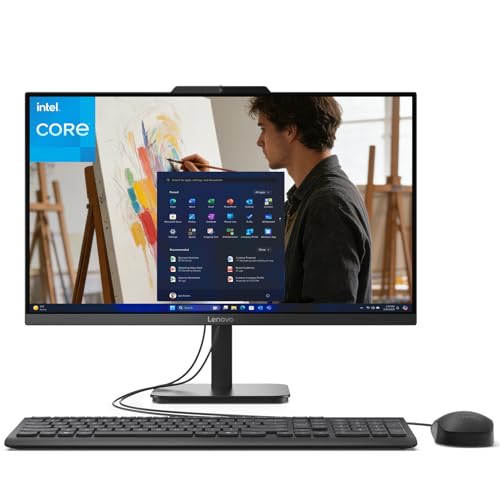
Image: This graphic illustrates the main technical specifications and connectivity options of the Lenovo IdeaCentre 24 All-in-One, including processor type, storage, RAM, wireless capabilities, and available ports.
Spesifikasi
| Komponen | Spesifikasi |
|---|---|
| Pemproses | Intel N100 (4C / 4T, Max Turbo up to 3.4GHz, 6MB Cache) |
| Grafik | Grafik Intel UHD Bersepadu |
| Memori (RAM) | 16GB DDR4 |
| Penyimpanan | 1TB PCIe NVMe M.2 SSD |
| Paparan | 23.8" FHD (1920x1080) IPS Anti-glare 250nits, 99% sRGB |
| Sistem Operasi | Windows 11 Home |
| WLAN + Bluetooth | Intel Wi-Fi 6 AX203, 802.11ax 2x2 + BT5.2 |
| Pelabuhan Belakang | 2x USB-A (USB 2.0), 2x USB-A (USB 3.2 Gen 2), 1x HDMI-out 1.4b, 1x Ethernet (RJ-45), 1x headphone/microphone combo jack (3.5mm) |
| Kamera | HD Webcam |
| Dimensi (WxDxH) | 539.3 x 185 x 422.78 mm (21.23 x 7.3 x 16.65 inci) |
| Berat badan | lebih kurang 4.3 kg (9.47 paun) |
Penyelenggaraan
Penyelenggaraan yang kerap membantu memastikan jangka hayat dan prestasi komputer anda yang optimum.
- Pembersihan: Gunakan kain lembut dan tidak berbulu untuk membersihkan skrin dan permukaan luar. Untuk kesan degil,ampen kain sedikit dengan air atau pembersih selamat skrin. Elakkan bahan kimia yang keras.
- Kemas Kini Perisian: Regularly check for and install Windows updates and driver updates from the Lenovo support website to ensure system stability and security.
- Pengudaraan: Ensure that the ventilation openings on the computer are not blocked to prevent overheating.
- Sandaran Data: Sandarkan data penting secara berkala ke pemacu luaran atau storan awan untuk mengelakkan kehilangan data.
Menyelesaikan masalah
Jika anda menghadapi masalah, cuba langkah penyelesaian masalah asas ini:
- Tiada Kuasa: Ensure the power cord is securely connected to both the computer and the wall outlet. Try a different outlet.
- Tiada Paparan: Check if the computer is powered on. If connected to an external monitor, ensure the correct input source is selected on the external monitor.
- Papan Kekunci/Tetikus Tidak Membalas: Verify that the USB cables are securely plugged into the correct ports. Try plugging them into different USB ports.
- Tiada sambungan internet: For Wi-Fi, check if Wi-Fi is enabled and you are connected to the correct network. For Ethernet, ensure the cable is properly connected to both the computer and the router/modem. Restart your router/modem.
- Prestasi Perlahan: Close unnecessary applications. Check for available Windows updates. Ensure sufficient free space on your SSD.
For more advanced troubleshooting or persistent issues, refer to the Lenovo support webtapak atau hubungi perkhidmatan pelanggan.
Waranti dan Sokongan
Your Lenovo IdeaCentre 24 All-in-One computer comes with a standard manufacturer's warranty. Please refer to the warranty documentation included in your product packaging for specific terms and conditions.
For technical support, driver downloads, and additional resources, visit the official Lenovo support website. You will need your product's serial number, typically found on a label on the back or bottom of the device.


