pengenalan
Thank you for choosing the Bigben Karaoke Microphone. This all-in-one portable karaoke system combines a stereo microphone with a powerful 15W Bluetooth speaker and dynamic light effects, designed to enhance your singing and music listening experience. This manual provides essential information for safe and optimal use of your device.
Maklumat Keselamatan
- Baca semua arahan sebelum menggunakan peranti.
- Jauhkan peranti daripada air dan kelembapan.
- Jangan dedahkan kepada suhu yang melampau atau cahaya matahari langsung.
- Jangan cuba membuka atau membaiki peranti sendiri. Rujuk kepada kakitangan perkhidmatan yang berkelayakan.
- Gunakan hanya aksesori pengecasan yang dinyatakan.
- Jauhkan daripada kanak-kanak.
Kandungan Pakej
Sila pastikan semua item ada dalam pakej:
- Bigben Karaoke Microphone (Model PARTYBTMIC2WH)
- Kabel Pengecasan (USB)
- Manual Pengguna (dokumen ini)
- Front Glass (as an included component, likely pre-installed or a protective cover)

Imej 1: The Bigben Karaoke Microphone shown in its retail packaging. The packaging highlights features such as Bluetooth connectivity, 4 vocal effects, and wireless speaker functionality.
Produk Selesaiview
The Bigben Karaoke Microphone features an integrated speaker and various controls for an interactive experience.
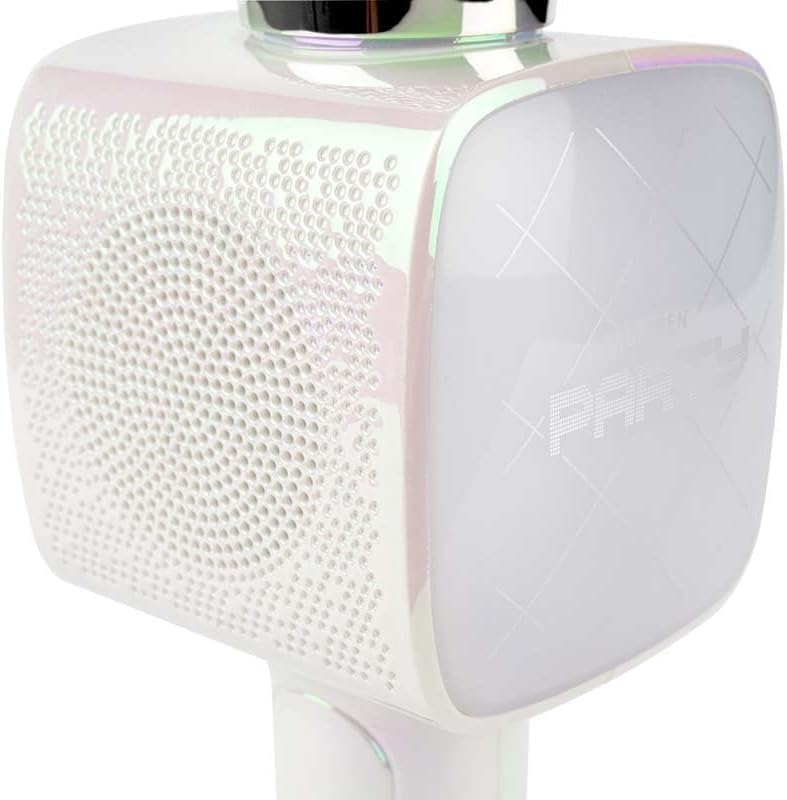
Imej 2: Satu jarak dekat view of the Bigben Karaoke Microphone, focusing on the speaker grille and the light-up panel. The panel displays "PARTY" and shows dynamic light effects.
Ciri-ciri Utama:
- Bluetooth 5.0: For stable wireless connection to your devices.
- Penceramah Bersepadu: 15W output for clear and powerful sound.
- Kesan Cahaya: Dynamic lighting to enhance the karaoke experience.
- Kesan Bunyi: 4 different vocal effects and an echo effect.
- Berbilang Input: USB, Micro SD, and 3.5mm headphone jack.
Persediaan
1. Mengecas Mikrofon
- Sambungkan kabel pengecas USB yang disediakan ke port pengecasan mikrofon.
- Sambungkan hujung kabel USB yang satu lagi ke penyesuai kuasa USB yang serasi (tidak disertakan) atau port USB komputer.
- Lampu penunjuk pengecasan akan menyala. Setelah dicas sepenuhnya, lampu mungkin bertukar warna atau mati.
2. Menghidupkan/Mematikan
- To power on, press and hold the Power button for a few seconds until the indicator light illuminates and you hear an audible prompt.
- To power off, press and hold the Power button again until the indicator light turns off.
3. Berpasangan Bluetooth
- Ensure the microphone is powered on and in Bluetooth pairing mode (usually indicated by a flashing light).
- Pada telefon pintar, tablet anda atau peranti berdaya Bluetooth lain, pergi ke tetapan Bluetooth.
- Cari untuk available devices and select "Bigben Karaoke Mic" (or similar name) from the list.
- Sebaik sahaja dipasangkan, anda akan mendengar bunyi pengesahan dan lampu penunjuk akan berhenti berkelip.
Arahan Operasi
1. Memainkan Muzik
- Melalui Bluetooth: After successful pairing, play music from your connected device. The sound will output through the microphone's speaker.
- Via USB/Micro SD: Insert a USB drive or Micro SD card (with music files) into the respective port. The microphone will automatically detect and play music.
- Via 3.5mm Audio Cable: Connect an external audio source using a 3.5mm audio cable (not included) to the headphone input.
2. Menggunakan Mikrofon
- Speak or sing directly into the microphone grille.
- Adjust the microphone volume using the dedicated controls on the device.
3. Kesan Bunyi
- Kesan Vokal: The microphone offers 4 different vocal effects. Press the "Effect" button (or similar labeled button) to cycle through these effects.
- Kesan Gema: Activate or adjust the echo effect using its dedicated control.
4. Kesan Cahaya
The microphone features dynamic light effects. These lights typically activate automatically when the device is on and can often be toggled or changed using a dedicated light button, if available.
Penyelenggaraan
- Pembersihan: Lap mikrofon dengan kain lembut dan kering. Jangan gunakan pembersih atau pelarut yang kasar.
- Storan: Simpan peranti di tempat yang sejuk dan kering jauh dari cahaya matahari langsung apabila tidak digunakan.
- Penjagaan Bateri: For optimal battery life, charge the device regularly, even if not used frequently.
Menyelesaikan masalah
| Masalah | Kemungkinan Punca | Penyelesaian |
|---|---|---|
| Tiada kuasa | Bateri habis. | Cas mikrofon sepenuhnya. |
| Tiada bunyi dari pembesar suara | Volume is too low; device not connected; incorrect input mode. | Increase volume; ensure Bluetooth is paired or cable is connected; check USB/Micro SD insertion. |
| Mikrofon tidak berfungsi | Microphone volume is too low; microphone function is off. | Increase microphone volume; ensure microphone is active. |
| Sambungan Bluetooth tidak stabil | Device is too far from the microphone; interference. | Move devices closer; avoid obstacles; disconnect and re-pair. |
Spesifikasi
| Ciri | Perincian |
|---|---|
| Jenama | Bigben |
| Nombor Model | PARTYBTMIC2WH |
| Ketersambungan | Bluetooth 5.0, USB, Micro SD, 3.5mm Headphone Jack |
| Output Speaker | 15W |
| Kesan Bunyi | 4 Vocal Effects, Echo Effect |
| Dimensi Produk (LxWxH) | 20 x 15 x 10 cm |
| Berat Barang | 300 gram |
| warna | putih |
| Bilangan Saluran | 2 |
| Bateri Diperlukan | Yes (type unknown, likely integrated rechargeable) |
Waranti dan Sokongan
For warranty information and customer support, please refer to the documentation provided with your purchase or visit the official Bigben webtapak. Simpan bukti pembelian anda untuk tuntutan waranti.
For technical assistance or further inquiries, please contact Bigben customer service through their official channels.


