pengenalan
This manual provides essential information for setting up, operating, maintaining, and troubleshooting your NIMO 17.3 Gaming Laptop. Designed for high performance with an AMD Ryzen 9 8945HS processor and Radeon 780M graphics, this laptop offers a powerful computing experience for gaming, creative work, and everyday tasks. Please read this manual thoroughly to ensure optimal use and longevity of your device.
1. Persediaan Awal
1.1 Membongkar dan Hidupkan Pertama
Carefully remove your NIMO laptop and all accessories from the packaging. Place the laptop on a stable, flat surface. Before first use, it is recommended to fully charge the battery.

The NIMO 17.3 Gaming Laptop, ready for initial setup.
1.2 Mengecas Bateri
Connect the provided 100W PD Type-C fast charger to the USB-C port on your laptop and then to a power outlet. The charging indicator light will illuminate. Allow the laptop to charge fully before its first use for optimal battery calibration.

The 100W GaN Type-C charger connected to the laptop, illustrating fast charging capability.
1.3 Konfigurasi Sistem Pengendalian
Upon first power-on, you will be guided through the Windows 11 setup process. Follow the on-screen instructions to configure language, region, network settings, and user accounts.
1.4 Persediaan Pembaca Cap Jari
For enhanced security and quick login, set up the integrated fingerprint reader during the Windows 11 setup or later via Windows Settings > Accounts > Sign-in options. Follow the prompts to register your fingerprints.

Close-up of the backlit keyboard and integrated fingerprint reader for secure access.
1.5 Menyambung Peranti
Your NIMO laptop features a comprehensive multi-port design for various peripherals:
- USB-C 4.0: For ultra-fast data transfer, external displays, and eGPU support.
- USB 3.2: High-speed data transfer for compatible devices.
- USB 2.0: Untuk peranti USB standard.
- HDMI: Sambungkan ke monitor luaran atau TV.
- Slot Kad SD: Untuk kad memori.
- Headphone Combo Jack: Untuk output audio dan input mikrofon.
- Slot Kunci Kensington: Untuk keselamatan fizikal.
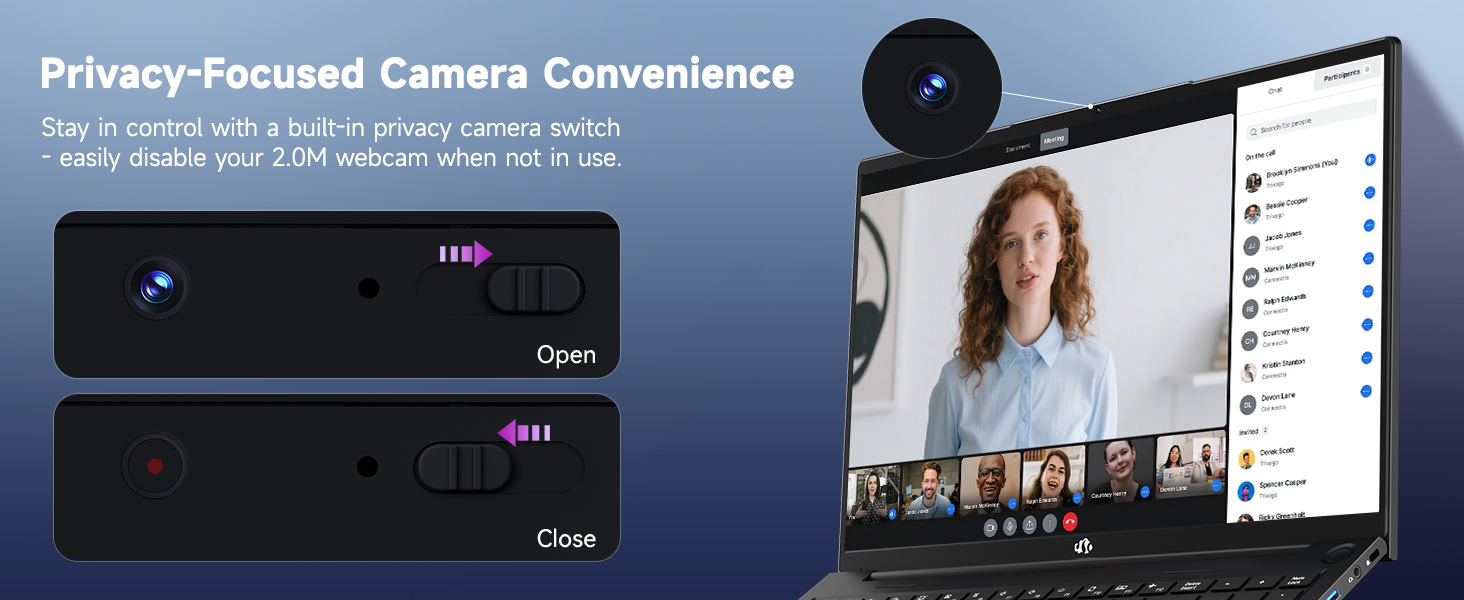
Diagram illustrating the comprehensive multi-port design of the NIMO laptop, including USB-C 4.0, HDMI, USB 3.2, USB 2.0, SD Card slot, Headphone Combo, and Kensington Lock.
2. Arahan Operasi
2.1 Power On/Off and Sleep Modes
- Hidupkan kuasa: Tekan butang kuasa yang terletak pada papan kekunci.
- Matikan: Klik butang Mula, kemudian Kuasa > Tutup.
- Mod tidur: Click the Start button, then Power > Sleep, or close the laptop lid.
2.2 Menggunakan Papan Kekunci dan Pad Sentuh
The NIMO laptop features a full-size keyboard with a numeric keypad and adjustable backlighting. Press Fn + F10 (or similar function key depending on model) to cycle through backlight brightness levels. The large touchpad supports multi-touch gestures for navigation.
2.3 Ciri Paparan
Experience clear visuals on the 17.3-inch Full HD (1920x1080) IPS display. This screen provides vibrant colors and wide viewing angles, suitable for various applications from productivity to entertainment.

The NIMO laptop displaying a vibrant image, highlighting its 17.3-inch Full HD IPS screen.
2.4 Webcam Privacy Switch
For privacy, your laptop includes a physical webcam privacy switch. Slide the switch to the left to cover the camera lens and disable the webcam, or to the right to uncover and enable it.
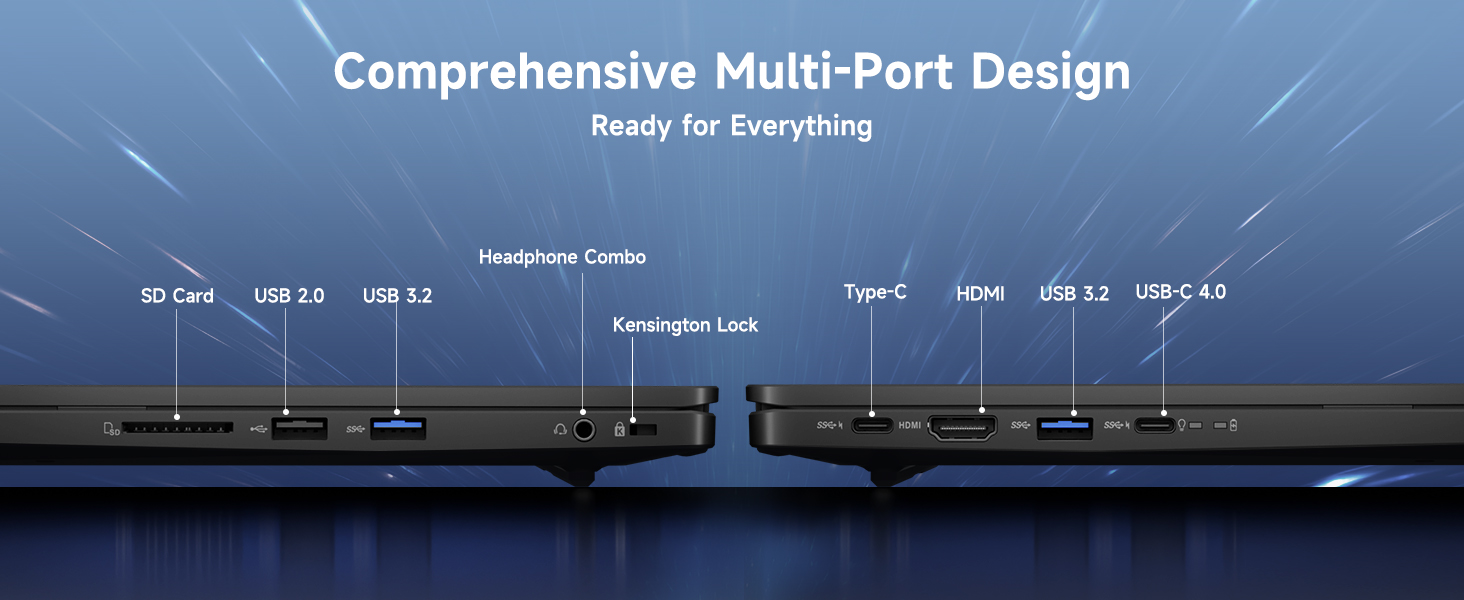
Ilustrasi bagi webcam privacy switch in both open and closed positions, demonstrating how to control camera access.
2.5 Berakhir Prestasiview
The NIMO laptop is powered by an AMD Ryzen 9 8945HS processor, offering 8 cores and 16 threads with a max boost clock of 5.2GHz. Integrated AMD Radeon 780M graphics provide capable performance for gaming and demanding creative applications.

Rajah menunjukkanasing the AMD Ryzen 9 8945HS processor with its 8 cores/16 threads and integrated Ryzen AI NPU.

Visual representation of the AMD Radeon 780M graphics, emphasizing its capabilities for gaming and creative work.
3. Penjagaan dan Penyelenggaraan
3.1 Membersihkan Komputer Riba
- Skrin: Gunakan kain lembut yang tidak berbulu dampdiisi dengan air atau pembersih skrin. Jangan sembur cecair terus ke skrin.
- Papan Kekunci dan Casis: Gunakan kain lembut dan kering. Untuk kotoran degil, sedikit damp kain boleh digunakan. Elakkan bahan kimia yang keras.
- Pelabuhan: Gunakan udara termampat untuk membersihkan habuk dari port secara perlahan.
3.2 Pengurusan Bateri
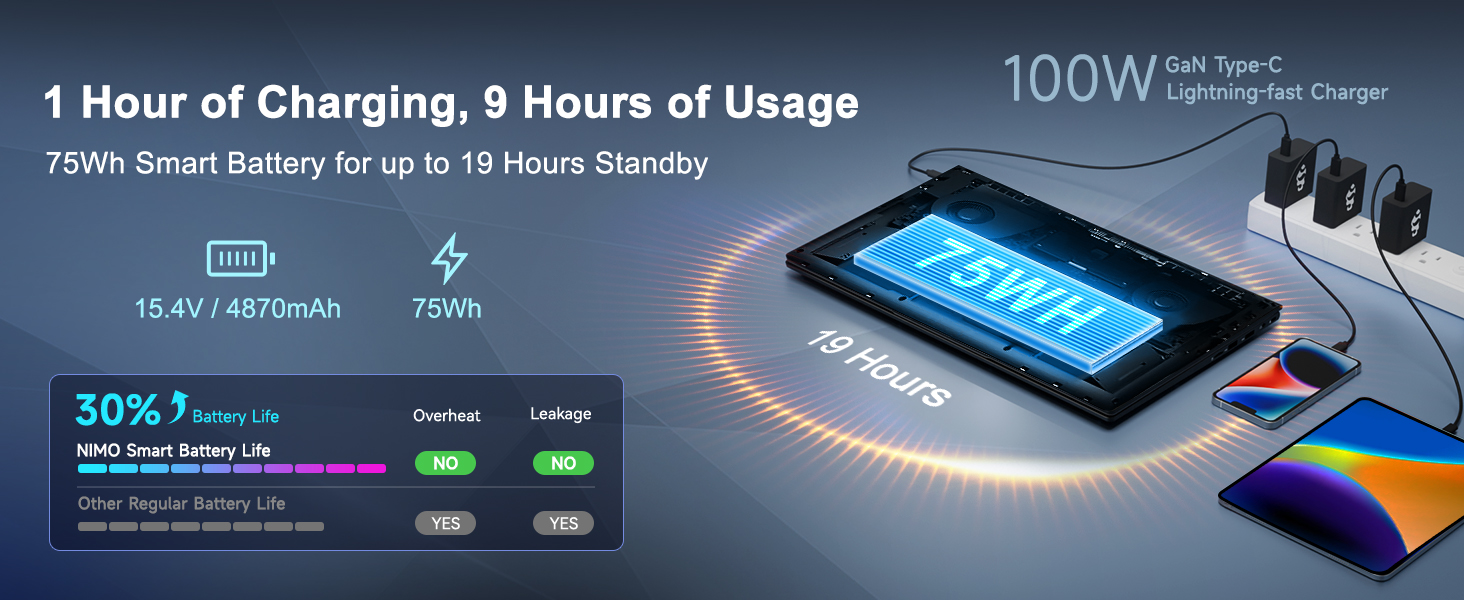
The laptop is equipped with a 75Wh battery. To prolong battery life:
- Elakkan menyahcas sepenuhnya bateri dengan kerap.
- Simpan komputer riba di tempat yang sejuk dan kering jika tidak digunakan untuk tempoh yang lama.
- Utilize power-saving settings in Windows 11.

Graphic illustrating smart battery optimization features, including extended battery life, smart power control, safe fast charging, and battery health protection.
3.3 Pelesapan Haba
The NIMO laptop features an efficient cooling system with dual fans and double copper pipes to manage heat. Ensure that the ventilation openings are not blocked during use to maintain optimal performance and prevent overheating.
Dalaman view of the laptop's efficient heat dissipation system, featuring dual fans and double copper pipes.
3.4 Kemas Kini Perisian
Regularly update your Windows 11 operating system and device drivers to ensure system stability, security, and optimal performance. You can check for updates via Windows Settings > Windows Update.
4. Penyelesaian masalah
This section addresses common issues you might encounter with your NIMO laptop.
4.1 Isu Kuasa
- Komputer riba tidak dihidupkan: Ensure the charger is securely connected and the power outlet is functional. Try holding the power button for 15-20 seconds to perform a hard reset.
- Bateri tidak dicas: Verify the charger is correctly plugged into both the laptop and the wall. Check for any damage to the charger cable or port.
4.2 Masalah Paparan
- Tiada paparan pada skrin: Sambungkan monitor luaran melalui HDMI untuk memeriksa sama ada masalahnya adalah pada paparan dalaman komputer riba. Jika monitor luaran berfungsi, paparan dalaman atau sambungannya mungkin rosak.
- Skrin berkelip: Update your graphics drivers. Adjust display refresh rate in Windows settings.
4.3 Masalah Kesambungan
- Wi-Fi tidak bersambung: Ensure Wi-Fi is enabled in Windows settings. Restart your router and laptop. Update wireless drivers.
- Peranti Bluetooth tidak berpasangan: Ensure Bluetooth is enabled on both devices. Remove and re-add the device in Windows Bluetooth settings.
4.4 Performance Degradation
- Prestasi perlahan: Tutup aplikasi yang tidak diperlukan. Semak Pengurus Tugas untuk penggunaan CPU/RAM yang tinggi. Pastikan ruang kosong yang mencukupi pada SSD. Jalankan imbasan virus.
- Terlalu panas: Ensure ventilation vents are clear. Use the laptop on a hard, flat surface. Consider reducing demanding workloads.
5. Spesifikasi Teknikal
| Ciri | Spesifikasi |
|---|---|
| Jenama | NIMO |
| Nama Model | NIMO N175L |
| Saiz Skrin | 17.3 Inci |
| Resolusi Skrin | 1920 x 1080 piksel (HD Penuh) |
| Pemproses | AMD Ryzen 9 8945HS (Up to 5.2 GHz) |
| RAM | 32 GB DDR5 |
| Pemacu Keras | SSD 1024 GB (Keadaan Pepejal) |
| Pemproses bersama Grafik | AMD Radeon 780M (Bersepadu) |
| Sistem Operasi | Windows 11 |
| Jenis Wayarles | 802.11a/b/g/n/ac |
| Port USB | 1x USB 2.0, 3x USB 3.0, 1x USB-C 4.0 |
| Purata Hayat Bateri | 12.8 Jam |
| Berat Barang | 3.84 paun |
| Dimensi Produk | 15.66 x 9.99 x 0.74 inci |
| warna | Hitam |
| Ciri Khas | Backlit Keyboard, Fingerprint Reader, HD Audio, Numeric Keypad |
6. Waranti dan Sokongan Pelanggan
6.1 Maklumat Waranti
Your NIMO laptop comes with a Waranti 2 tahun for support and service. Additionally, NIMO offers a Polisi pemulangan 90 hari from the date of purchase for any reason.
Image depicting a technician working on a laptop, symbolizing the 2-year support provided for NIMO products.
Image of a customer receiving a package, representing the 90-day return policy for NIMO products.
6.2 Menghubungi Sokongan
For any product-related questions, technical assistance, or warranty claims, please contact NIMO customer support:
- e-mel: service@nimopc.com
- Professional customer assistance is available to help resolve your issues.
Image of customer service representatives, indicating professional customer assistance is available.


