1. Pengenalan
This manual provides essential information for the safe and efficient operation of your WYBOT S2 Pro Cordless Robotic Pool Cleaner. The S2 Pro is designed for inground pools, offering advanced features such as underwater wireless charging, remote app control, and dual cleaning filtration. Please read this manual thoroughly before using the device to ensure proper setup and maintenance.
2. Maklumat Keselamatan
- Always ensure the power adapter is disconnected from the outlet before performing any maintenance or cleaning.
- Do not operate the cleaner if the power cord or docking station is damaged.
- Jauhkan kanak-kanak dan haiwan peliharaan dari kawasan kolam renang semasa pembersih beroperasi.
- The cleaner is designed for underwater use only. Do not operate it out of water for extended periods.
- Ensure the pool water temperature is within the recommended operating range (typically 10°C to 35°C / 50°F to 95°F).
3. Kandungan Pakej
Sahkan bahawa semua komponen terdapat dalam pakej:
- WYBOT S2 Pro Robotic Pool Cleaner
- Underwater Wireless Charging Dock
- Penyesuai Kuasa untuk Dok Pengecasan
- Manual Pengguna (dokumen ini)
- Filter Basket (pre-installed)
- Ultra-fine Sponge Filters (pre-installed)
4. Persediaan
4.1. Charging Dock Installation
The WYBOT S2 Pro features an underwater wireless charging dock. Proper installation of the dock is crucial for automatic charging and retrieval.
- Prepare the Pool Wall: Ensure the pool wall where the dock will be installed is clean and dry. The distance between the top of the pool coping and the waterline should be at least 4 inches (100mm or 10cm). The bottom of the dock's wall attachment piece should be approximately 0.8 to 1 inch from the waterline.
- Attach Wall Mount: Use the provided 3M adhesive tape to attach the backing piece of the charging dock to the pool wall. Press firmly to ensure a secure bond.
- Masa Pengawetan: Allow 48 hours for the adhesive to cure completely before attaching the main charging dock unit.
- Attach Charging Dock: After 48 hours, carefully lower the main charging dock unit into the water and latch it onto the installed wall mount. Ensure it is securely fastened.
- Sambungkan Kuasa: Plug the power adapter into a suitable DC outlet to provide power to the docking station.

Figure 1: WYBOT S2 Pro on its underwater wireless charging dock, illustrating the wireless charging feature.

Rajah 2: Terperinci view of the docking station's wall mount installation, highlighting the adhesive points.
5. Arahan Operasi
5.1. Menghidupkan dan Pemilihan Mod
The S2 Pro can be controlled via the WYBOT mobile application. Ensure your device is paired with the cleaner for full functionality.
- Mod Lantai: In this mode, the cleaner focuses solely on the pool floor. It will not climb walls. This mode is recommended when using the ultra-fine sponge filter for collecting very small debris.
- Mod Dinding: In this mode, the cleaner will ascend pool walls and scrub the waterline. It can navigate various wall types and transitions, including steep tanning ledges. The cleaner will move along the waterline, scrub, then descend and repeat the pattern.
- Kawalan Apl: Use the WYBOT app to start/stop cleaning, direct the cleaner to specific areas, or set daily cleaning schedules. The app allows for precise control and customization of cleaning patterns.

Figure 3: Remote control of the WYBOT S2 Pro via the mobile application.

Figure 4: Setting a precise cleaning schedule using the WYBOT app.
5.2. Smart Navigation and Sensors
The S2 Pro utilizes advanced sensors for efficient navigation and cleaning.
- Penderia Inframerah: Determines the distance between objects and the robot, aiding in obstacle avoidance.
- Penderia Kedalaman: Used to determine the underwater depth position of the machine.
- Giroskop: Stabilizes the machine's posture for smoother operation and consistent cleaning paths.
- Sonar Sensor: Establishes communication channels to receive mobile commands and enhances navigation.

Gambar 5: Lebihview of the S2 Pro's integrated sensors for intelligent navigation.
6. Penyelenggaraan
6.1. Cleaning the Filter Basket
Regular cleaning of the filter basket is essential to maintain optimal cleaning performance. The S2 Pro features a top-loading cartridge and sponge filters.
- Retrieve the Cleaner: Once the cleaning cycle is complete, or when maintenance is required, retrieve the cleaner from the pool.
- Buka Tudung: Locate the lid on top of the cleaner and open it to access the filter basket.
- Keluarkan Bakul Penapis: Angkat keluar bakul penapis dengan berhati-hati.
- Serpihan Kosong: Open the filter basket to empty collected debris, including leaves, sand, and other particles.
- Bilas Penapis: Rinse the filter cartridge and sponge filters thoroughly with a hose to remove any remaining fine debris.
- Pasang semula: Place the clean filters back into the basket, close the basket, and reinsert it into the cleaner. Close the cleaner's lid securely.
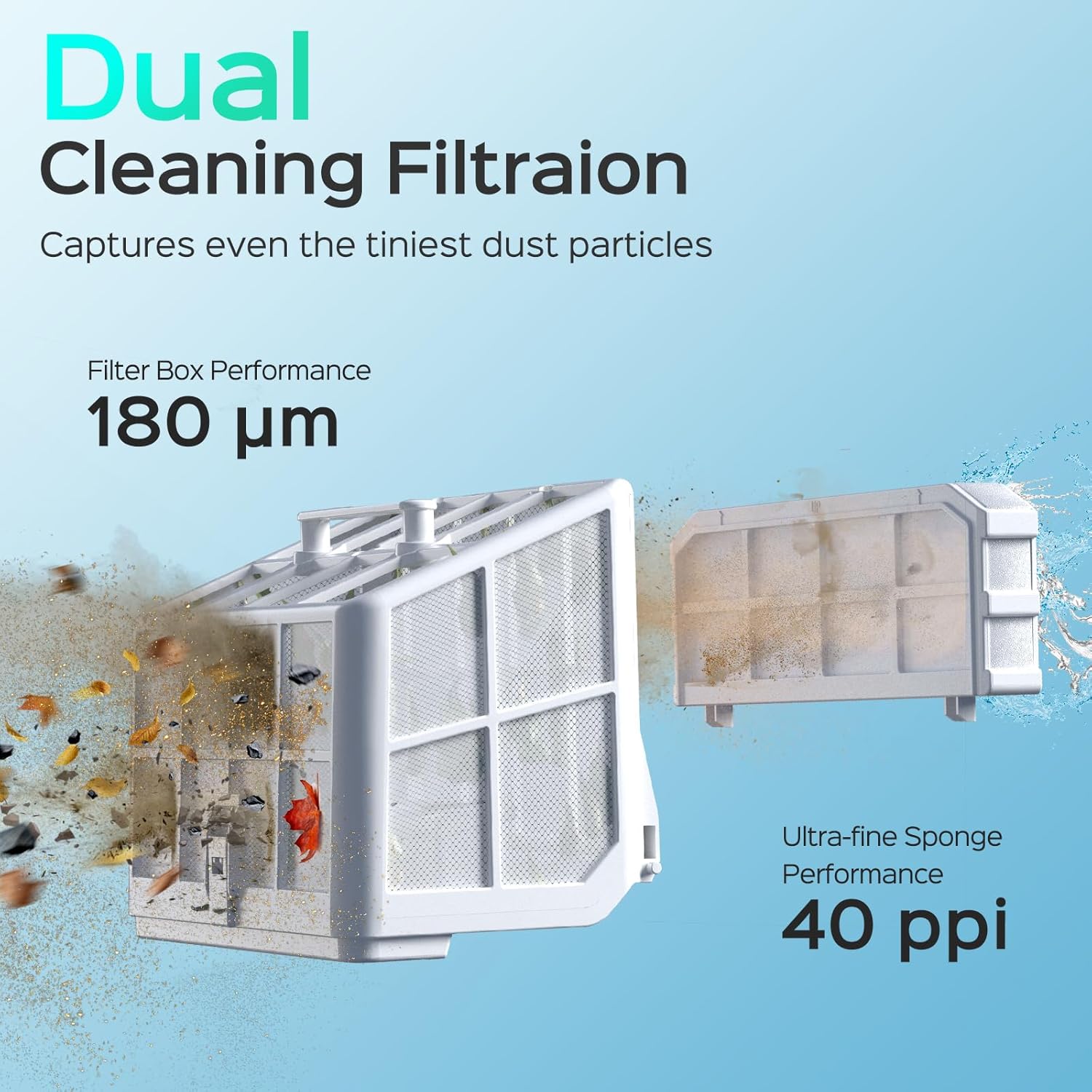
Figure 6: The dual cleaning filtration system, featuring a 180 µm filter box and 40 ppi ultra-fine sponge.

Gambar 7: Cthample of debris collected in the filter basket after a cleaning cycle.
7. Spesifikasi
| Ciri | Perincian |
|---|---|
| Jenama | WYBOT |
| Nama Model | S2PRO-WY210-81 |
| Nombor Model Item | S2 Pro-0912-WY210 |
| Sumber Kuasa | Dikuasakan Bateri |
| Jenis Bateri | Litium-Ion |
| Masa Mengecas | 3 Jam |
| Ciri Khas | Boleh dicas semula |
| Kaedah Kawalan | Apl, Jauh, Sentuh |
| Kuasa Motor | Motor Tanpa Berus 90W |
| Kadar Sedutan | 3592 GPH |
| Kecekapan | High efficiency, Cleans pools in approximately 3 hours, Energy Efficient |
| Dimensi Produk | 16"L x 15"W x 10"H |
| Berat Barang | 25.5 paun |
| bahan | plastik |
| warna | black&green |
8. Waranti dan Sokongan
The WYBOT S2 Pro comes with a Waranti 2 tahun. For warranty claims, technical support, or any inquiries regarding your product, please contact WYBOT customer service through their official webtapak atau maklumat hubungan yang diberikan dalam dokumentasi pembelian anda.
Untuk sumber tambahan dan maklumat produk, lawati laman web Kedai WYBOT di Amazon.


