1. Pengenalan
Terima kasih kerana membeliasing the Fenix HP12R-T USB-C Rechargeable LED Trail Running Headlamp. This manual provides detailed instructions for the proper use, maintenance, and troubleshooting of your device. Please read this manual thoroughly before operating the headlamp untuk memastikan prestasi dan keselamatan yang optimum.
The Fenix HP12R-T is a high-performance headlamp designed for trail running and other outdoor activities, offering a maximum output of 1300 lumens, multiple light sources (white, neutral white, and red), and a balanced weight distribution for comfort during extended use. It features USB-C recharging, dual switch operation, and an IP66 water resistance rating.
2. Kandungan Pakej
Sahkan bahawa semua item terdapat dalam pakej anda:
- Fenix HP12R-T Headlamp
- Fenix ARB-L18-4000 Rechargeable 4000mAh Battery
- Kabel Pengecasan USB Jenis-C
- Spare O-Ring
- Cable Clips (Qty 2)
- HP12R-T User Manual (this document)

Image: The Fenix HP12R-T headlamp, its packaging, and included accessories such as the USB-C charging cable and battery.
3. Produk Lebihview
The Fenix HP12R-T headlamp features a split design for balanced weight distribution, with the light unit at the front and the battery case at the rear. It incorporates dual switches for intuitive control of its multiple light sources.

Image: The Fenix HP12R-T headlamp shown on a natural surface, illustrating its design and key features like three light sources, 1300 lumens, separate battery case, dual switches, and red light for alerts.
4. Persediaan
4.1 Pemasangan Bateri
- Unscrew the battery case cover located at the rear of the headlamp.
- Insert the Fenix ARB-L18-4000 rechargeable 4000mAh battery with the positive (+) terminal facing inwards.
- Screw the battery case cover back on securely. Ensure the O-ring is properly seated to maintain water resistance.
4.2 Mengecas
The HP12R-T features a USB-C charging port for convenient recharging.
- Locate the USB-C charging port on the battery case.
- Plug the provided USB Type-C charging cable into the port.
- Connect the other end of the cable to a USB power source (e.g., computer, wall adapter, power bank).
- The battery level indicator lights will show charging status. A full charge is indicated when all lights are solid.
Nota: kepalaamp can be operated while charging, but charging time may be extended.
5. Arahan Operasi
5.1 Hidupkan/Mati Kuasa
- Untuk Menghidupkan: Long press either the white light switch or the neutral white light switch for 0.5 seconds.
- Untuk Mematikan: Long press either switch for 0.5 seconds when the light is on.
5.2 Mode Switching (White, Neutral White, Red)
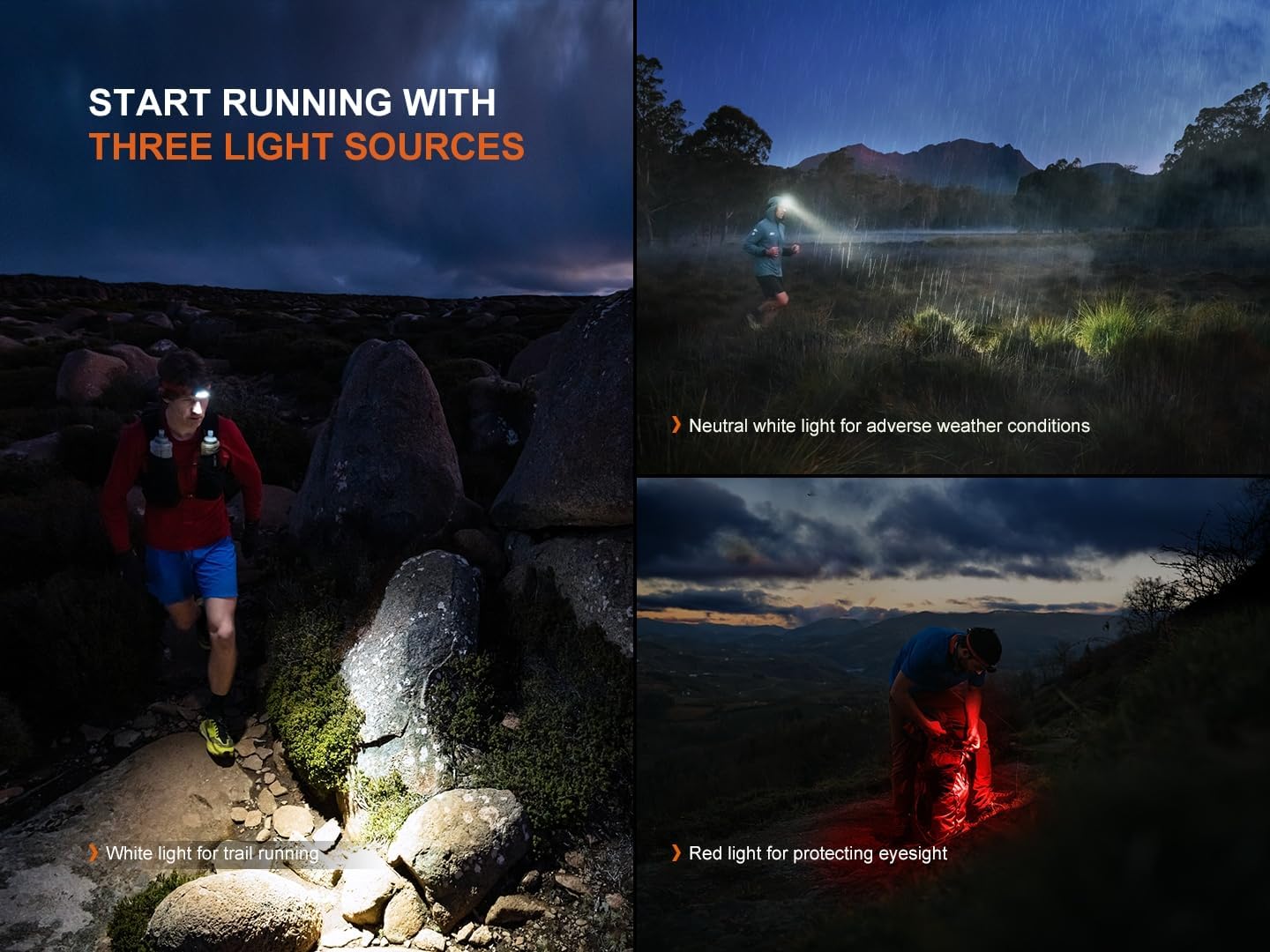
Image: A collage showing the Fenix HP12R-T headlamp in use with its three light sources: white light for trail running, neutral white light for adverse weather conditions, and red light for protecting eyesight.
- White Light & Neutral White Light: These are controlled separately by their respective switches.
- Mod Lampu Merah: Double click either switch to activate the red light mode.
5.3 Output Selection (Brightness Levels)

Imej: A terperinci view of the Fenix HP12R-T headlamp's dual control switches, illustrating the functions for power on/off, mode switching, and output selection for white, neutral white, and red light modes.
- White Light Switch: Single click to cycle through Low → Med → High → Turbo.
- Neutral White Light Switch: Single click to cycle through Low → Med → High.
- Mod Lampu Merah: Single click either switch to cycle through Constant-On → SOS.
5.4 Rear Red Light Operation
The battery case features a rear red light for enhanced visibility and safety.
- Malar-Hidup: The rear red light automatically turns on when the headlamp diaktifkan.
- kilat: To switch to flash mode, press the small button on the battery case. Press again to return to constant-on.
5.5 Fungsi Lockout
The HP12R-T includes both electronic and physical lockout features to prevent accidental activation.
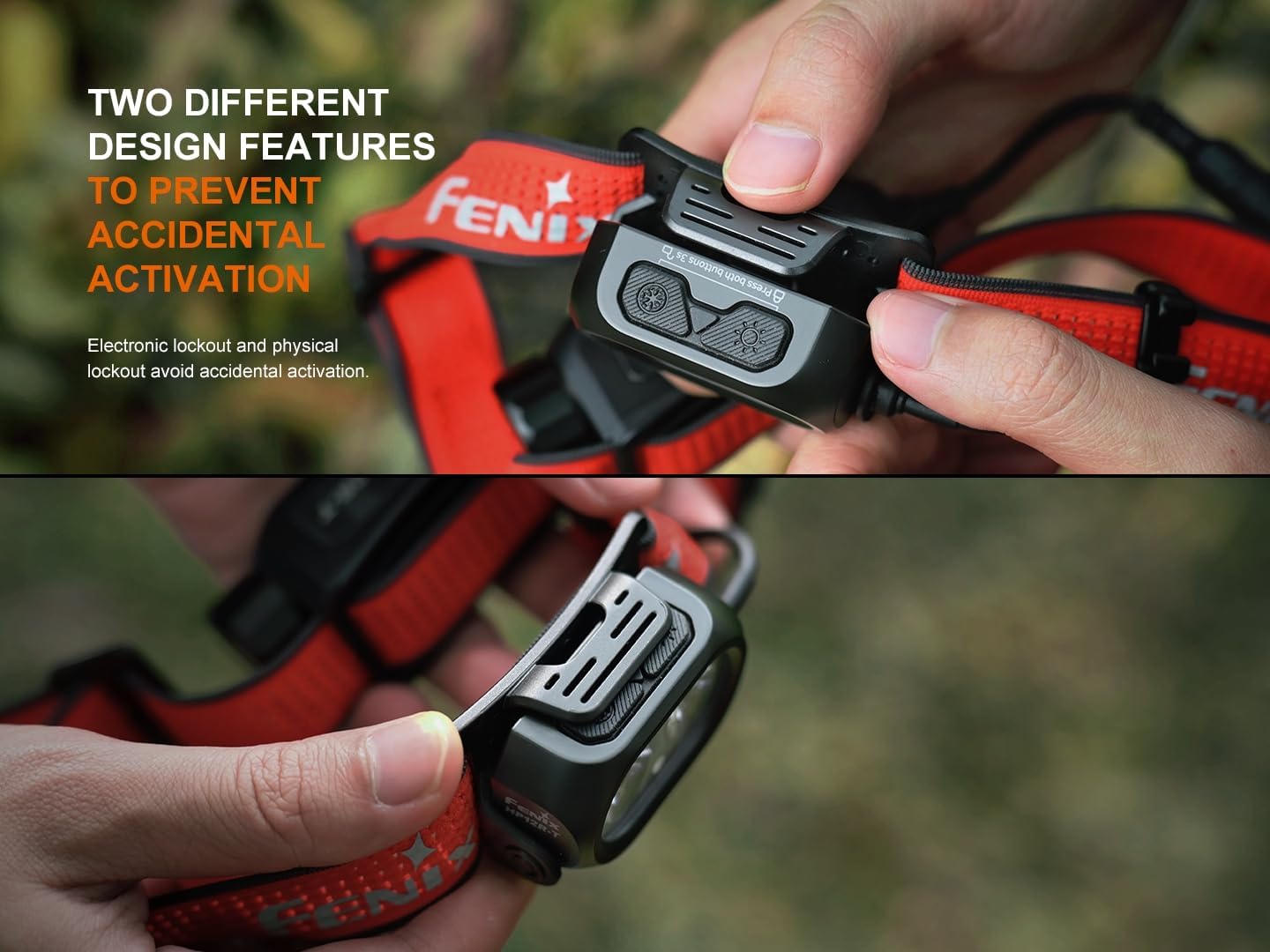
Imej: Dua views of the Fenix HP12R-T headlamp demonstrating its dual lockout mechanisms: electronic lockout via button sequence and physical lockout by sliding a cover over the switches.
- Kunci Keluar Elektronik: With the light off, press and hold both switches simultaneously for 3 seconds. The light will flash twice to indicate lockout. To unlock, press and hold both switches again for 3 seconds.
- Physical Lockout: Slide the protective cover over the switches to physically prevent them from being pressed.
6. Penyelenggaraan
- Pembersihan: Bersihkan kepala dengan kerapamp body with a soft cloth. For stubborn dirt, use a mild detergent. Avoid abrasive materials.
- O-Ring Maintenance: Inspect the O-ring periodically for wear and tear. Replace it if damaged to maintain the IP66 water resistance rating. Lubricate the O-ring with silicone grease as needed.
- Penjagaan Bateri: Store the battery in a cool, dry place. Recharge the battery every four months if not in regular use to prolong its lifespan.
- Port Pengecasan: Pastikan port pengecas USB-C bersih dan bebas daripada serpihan.
7. Penyelesaian masalah
If your Fenix HP12R-T headlamp tidak berfungsi dengan betul, sila rujuk isu dan penyelesaian biasa berikut:
| Masalah | Kemungkinan Punca | Penyelesaian |
|---|---|---|
| Ketuaamp tidak menyala. | Bateri habis atau tidak dipasang dengan betul. Ketuaamp is in lockout mode. | Recharge or reinstall the battery correctly. Buka kunci kepalaamp (lihat Bahagian 5.5). |
| Keluaran cahaya malap atau berkelip. | Tahap bateri rendah. Poor contact between battery and contacts. | Cas semula bateri. Bersihkan kenalan bateri dengan kapas. |
| Ketuaamp menjadi panas semasa digunakan. | High output levels generate heat. | This is normal for high-lumen devices. The headlamp has intelligent overheat protection to reduce output if necessary. |
| Kemasukan air. | Damaged or improperly seated O-ring. | Inspect and replace the O-ring if damaged. Ensure battery case cover is tightly secured. |
If the problem persists, please contact Fenix customer support for assistance.
8. Spesifikasi

Image: A detailed table outlining the ANSI/PLATO FL1 standards for the Fenix HP12R-T, including various light modes (White+Neutral, White, Neutral White, Red), their respective outputs, runtimes, beam distances, intensities, impact resistance, and IP66 waterproof rating.
| Ciri | Perincian |
|---|---|
| Output Maksimum | 1300 Lumen |
| Sumber Cahaya | White, Neutral White, Red LED |
| Jarak Pancaran | Sehingga 200 meter (656 kaki) |
| Bateri | 1 x Fenix ARB-L18-4000 4000mAh Li-ion (included) |
| Mengecas | USB Type-C Boleh dicas semula |
| Masa Jalanan Maksimum | 310 hours (on Low White Light mode) |
| Tahan Air | IP66 rated (Dustproof and protected against powerful water jets) |
| Rintangan Kesan | 2 meter |
| Ketuaamp Dimensi | 2.4" (W) x 1.46" (H) x 1.10" (D) |
| Dimensi Sarung Bateri | 3.62" (W) x 1.42" (H) x 1.38" (D) |
| Berat badan | 7.02 auns (termasuk bateri) |
| bahan | Aluminium Anodized |
Note: The above specifications are from the results produced by Fenix through its laboratory testing using one ARB-L18-4000 battery under the temperature of 21±3°C and humidity of 50% - 80%. The true performance of this product may vary according to different working environments and the actual battery used.
9. Waranti dan Sokongan
Fenix provides a limited warranty for its products. For detailed warranty information and to register your product, please visit the official Fenix webtapak atau hubungi perkhidmatan pelanggan mereka.
For technical support, troubleshooting assistance beyond this manual, or warranty claims, please contact Fenix customer service directly. Refer to the warranty card included in your package for specific contact details or visit www.fenixlight.com.
E-mel Perkhidmatan Pelanggan: service@fenixlight.com


